Cloth Config API (Fabric/Forge/NeoForge) Needed by Chat Impressive Animation ChatImpressiveAnimation-neoforge-1.6.0+mc1.21.10.jar
requiredMatching file found Matched file: [NeoForge 1.21.9] v20.0.149

CurseForge · Minecraft mod
Makes chat messages appear with a smooth animation.
Quick answer
Chat Impressive Animation ChatImpressiveAnimation-neoforge-1.6.0+mc1.21.10.jar targets 1.21.9, 1.21.10 with NeoForge. The project page does not say whether this file belongs on the client, dedicated server, or both. All 2 required mods have matching files.
Where it goes
The project page does not say whether this file belongs on the client, dedicated server, or both.
The source does not explicitly classify this release as client-only or server-only.
ChatImpressiveAnimation-neoforge-1.6.0+mc1.21.10.jar. Change the file and its required mods may change too.
Install Cloth Config API (Fabric/Forge/NeoForge), Cloth Config API first. We found matching files for this game-version and loader setup.
We only count dependency files that match this setup. A file for another loader does not fill the gap.
Before you install it
Built for Chat Impressive Animation ChatImpressiveAnimation-neoforge-1.6.0+mc1.21.10.jar. Pick another file and the loader, install side or required mods may change.
Use ChatImpressiveAnimation-neoforge-1.6.0+mc1.21.10.jar. It targets 1.21.9, 1.21.10 with NeoForge; another release may have different loader, side or dependency requirements.
Install Cloth Config API (Fabric/Forge/NeoForge), Cloth Config API first. We found matching files for this game-version and loader setup.
The project page does not say whether this file belongs on the client, dedicated server, or both.
Use the “Get this file” button beside ChatImpressiveAnimation-neoforge-1.6.0+mc1.21.10.jar. It opens that exact file at the source.
About this project



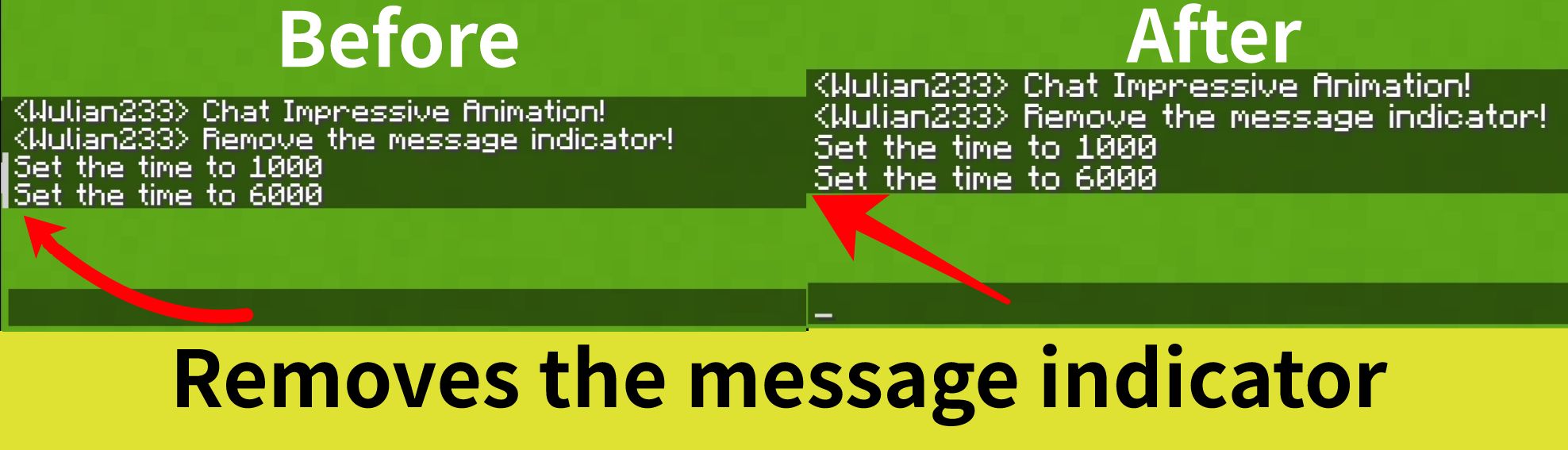
Makes the chat look better by adding animations, such as opening/closing the chat bar, sending messages, etc. It also removes the message indicator



Chat Impressive Animation (CIA) is developed based on Chat Animation. Compared to the original mod, this mod adds more animation effects and detailed designs, and includes a configuration file to freely customize each feature. Most importantly, this mod supports Fabric, Forge, and Neoforge, all of which are required.
For mc versions 1.20.4 and below, Forge support is also provided, but message sending animations are not supported.
Note: This mod is not related to the real-life CIA, only the abbreviated name is the same.
All features can be individually configured in the configuration file!
This mod includes specialized compatibility code for the following mods:
Project description from CurseForge.
Pick your setup
Choose the version and loader you play, then open the matching release.
Showing the newest 12 of 22 game versions. Older files are in the list below.
Check the dependencies, then try the file in a copied instance before changing a world you care about.
Recent files
19 Apr 2026
19 Apr 2026
19 Apr 2026
19 Apr 2026
19 Apr 2026
19 Apr 2026
19 Apr 2026
19 Apr 2026
19 Apr 2026
19 Apr 2026
19 Apr 2026
19 Apr 2026
Looking for an older file? The official CurseForge project page is in Resources.
 mod
modA Cobblemon addon that adds modular instanced type Gyms.
 mod
modAll Nations' Armies, whether if it is superpowers or major powers
 mod
modA client-side mod using Carpet Mod operation logic, providing some very very very useful features.
