Minecraft version
Back to mods 
CurseForge · Minecraft mod
Easy Navigator
Navigate coordinates efficiently by having a compass that shows you the way!
Choose a version Pick your version below, then grab the matching file.
Quick answer
Which Easy Navigator release should I use?
Latest stable file EasyNavigator+1.21.3-1.3.0.jar
Game version 1.21.3, 1.21.2
Loader Fabric
Easy Navigator EasyNavigator+1.21.3-1.3.0.jar targets 1.21.3, 1.21.2 with Fabric. The project page does not say whether this file belongs on the client, dedicated server, or both. No extra mods listed for this file.
Where it goes
Is Easy Navigator required on the client, server, or both?
The project page does not say whether this file belongs on the client, dedicated server, or both.
Client Source doesn’t say
Dedicated server Source doesn’t say
Loader for this release Fabric
Required install it here Optional supported, not mandatory Not supported do not install here Source doesn’t say do not assume
The source does not explicitly classify this release as client-only or server-only.
What else does Easy Navigator EasyNavigator+1.21.3-1.3.0.jar need?
EasyNavigator+1.21.3-1.3.0.jar. Change the file and its required mods may change too.
This file does not list any required mods. Do not add a library just because a different file uses it.
This file does not list any required or optional mods.
Before you install it
Add Easy Navigator without breaking your instance.
Built for Easy Navigator EasyNavigator+1.21.3-1.3.0.jar. Pick another file and the loader, install side or required mods may change.
- 01
Stick to this file
Use EasyNavigator+1.21.3-1.3.0.jar. It targets 1.21.3, 1.21.2 with Fabric; another release may have different loader, side or dependency requirements.
- 02
Bring the mods it needs
This file does not list any required mods. Do not add a library just because a different file uses it.
- 03
Put it on the correct side
The project page does not say whether this file belongs on the client, dedicated server, or both.
- 04
Pick the file you checked
Use the “Get this file” button beside EasyNavigator+1.21.3-1.3.0.jar. It opens that exact file at the source.
About this project
What does Easy Navigator add?
Easy Navigator
Allows you to easily travel to coordinates by providing a compass that leads the way.
This mod is fully clientside!
If there is a bug or an incompatibility with another mod please let me know on github issues
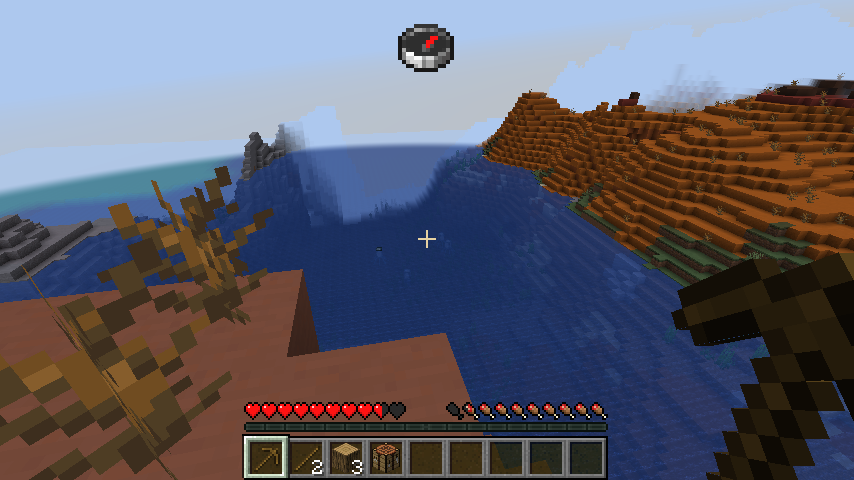
How to use
There are two different ways you can start the navigation mode. The easiest is by receiving a message with coordinates. You can simply click the highlighted coordinates to start your journey.

Ingame this would look something like this
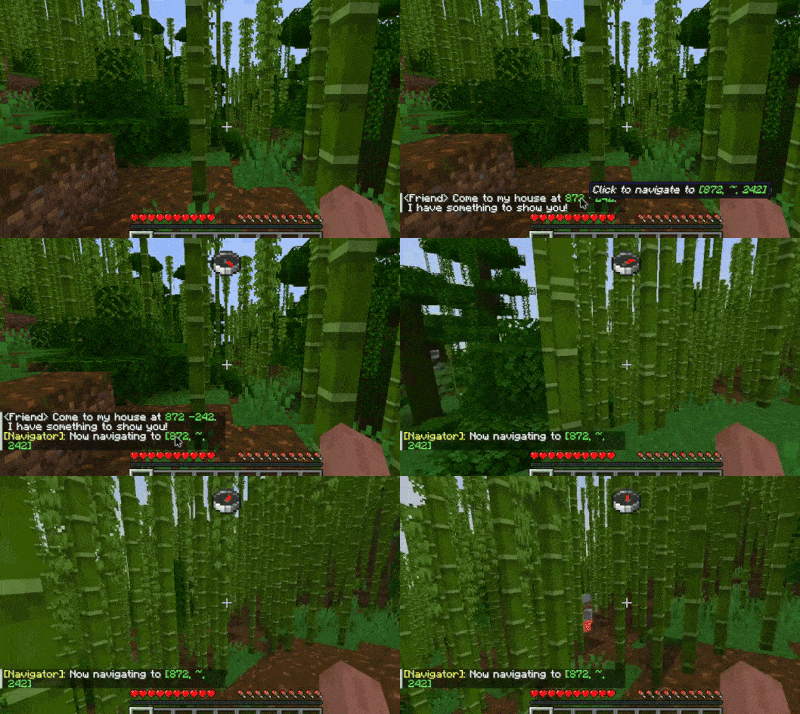
You can also use commands to start and stop your travels. The following two commands are available
/navigate <x> <z>or/navigate <x> <y> <z>to dial in the compass/navigation stopto stop navigating
Dependencies
- Yet Another Config Lib 3.2.0 or higher is required
- Fabric API is required
- Modmenu is suggested
Settings
When modmenu is installed you can change a number of settings
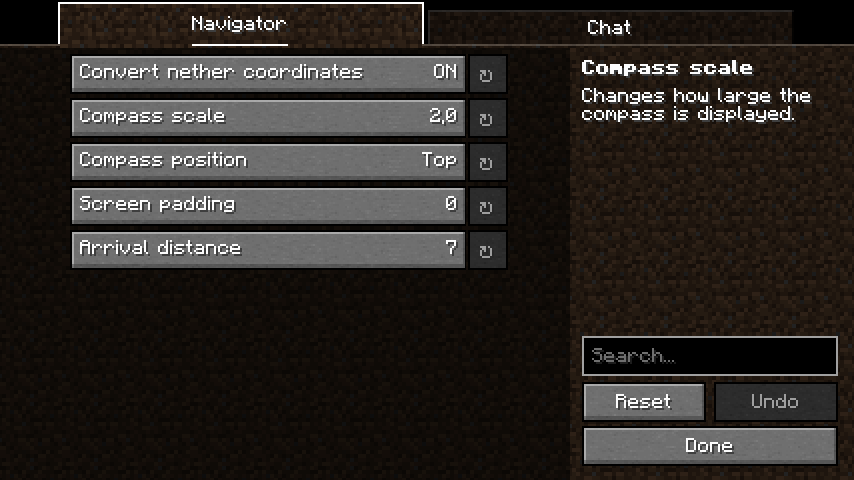
Project description from CurseForge.
Pick your setup
Easy Navigator by Minecraft version and loader
Choose the version and loader you play, then open the matching release.
Minecraft version
1.21.2
1 loader buildMinecraft version
1.21.1
1 loader buildMinecraft version
1.21
1 loader buildMinecraft version
1.20.4
1 loader buildMinecraft version
1.20.3
1 loader buildMinecraft version
1.20.2
1 loader buildMinecraft version
1.20.1
1 loader buildMinecraft version
1.20
1 loader buildCheck the dependencies, then try the file in a copied instance before changing a world you care about.
Recent files
Easy Navigator versions and loaders
EasyNavigator+1.21.3-1.3.0.jar
27 Oct 2024
Client Source doesn’t say Server Source doesn’t say Dependencies No extras listed Listed on Release listing
Check the 1.21.3 · Fabric setup Fabric1.21.31.21.2 release
EasyNavigator+1.20.4-1.2.2.jar
21 Jul 2024
Client Source doesn’t say Server Source doesn’t say Dependencies No extras listed Listed on Release listing
Check the 1.20.4 · Fabric setup 1.20.2Fabric1.20.31.20.1 release
EasyNavigator+1.21-1.2.2.jar
14 Jun 2024
Client Source doesn’t say Server Source doesn’t say Dependencies No extras listed Listed on Release listing
Check the 1.21.1 · Fabric setup 1.21Fabric1.21.1 release
EasyNavigator-1.2.1.jar
29 Mar 2024
Client Source doesn’t say Server Source doesn’t say Dependencies No extras listed Listed on Release listing
Check the 1.20.4 · Fabric setup 1.20.2Fabric1.20.31.20.1 release
Looking for an older file? The official CurseForge project page is in Resources.
 mod
CurseForge · Minecraft
Some-Useless-Things
A mod that provides universal tools, super alloy furnaces, and various QOL modifications.
 mod
CurseForge · Minecraft
Profet's Veinminer
Sneak, mine one ore, and the whole vein comes out in a chain reaction. Respects Fortune, Silk Touch, tool tier and durability. Only needed on the server.
 mod
CurseForge + Modrinth · Minecraft
CreativeCore
a core mod