Minecraft version
Back to mods 
Modrinth · Minecraft mod
Uncraft Everything
Crafted wrong item? Uncraft everything with this mod!
Choose a version Pick your version below, then grab the matching file.
Quick answer
Which Uncraft Everything release should I use?
Latest stable file 26.2.0.1
Game version 26.2
Loader Fabric
Uncraft Everything 26.2.0.1 targets 26.2 with Fabric. Installation on the client is optional. Installation on the dedicated server is optional. No extra mods listed for this file.
Where it goes
Is Uncraft Everything required on the client, server, or both?
Installation on the client is optional. Installation on the dedicated server is optional.
Client Optional
Dedicated server Optional
Loader for this release Fabric
Required install it here Optional supported, not mandatory Not supported do not install here Source doesn’t say do not assume
The source marks this as usable on both the client and server.
What else does Uncraft Everything 26.2.0.1 need?
26.2.0.1. Change the file and its required mods may change too.
This file does not list any required mods. Do not add a library just because a different file uses it.
This file does not list any required or optional mods.
Before you install it
Add Uncraft Everything without breaking your instance.
Built for Uncraft Everything 26.2.0.1. Pick another file and the loader, install side or required mods may change.
- 01
Stick to this file
Use 26.2.0.1. It targets 26.2 with Fabric; another release may have different loader, side or dependency requirements.
- 02
Bring the mods it needs
This file does not list any required mods. Do not add a library just because a different file uses it.
- 03
Put it on the correct side
Installation on the client is optional. Installation on the dedicated server is optional.
- 04
Pick the file you checked
Use the “Get this file” button beside 26.2.0.1. It opens that exact file at the source.
About this project
What does Uncraft Everything add?
♻️ Uncraft Everything
A powerful utility mod that lets players reverse the crafting process — and reclaim their resources.
🧱 What This Mod Does
Uncraft Everything adds a uncrafting mechanic to Minecraft, allowing players to take crafted items and break them back down into their original components.
Whether you accidentally crafted the wrong item, need to recycle old tools (With full durability), or want to get value out of loot, this mod gives you an intuitive way to recover materials — all while maintaining balance.
Features:
- ✅ Supports vanilla and modded items
Configs:
- Experience Point for Uncrafting
- Prevent certain items from Uncrafting
Modify in /config/uncrafteverything_common.toml
💡 Why Download This?
In survival gameplay, every resource matters. With Uncraft Everything, you can:
- 🪓 Recover materials from unused or extra tools, armor, and blocks
- 🏹 Undo accidental crafts and wasted resources
- ♻️ Improve inventory management and reduce item clutter
- 🧩 Build modpacks with more player agency and creativity
This mod is perfect for tech-based, RPG, skyblock, hardcore, or builder-focused packs — or just everyday Minecraft survival.
📥 Installation & Setup
Mod Loaders: Fabric and NeoForge are supported.
- Download and install your preferred mod loader.
- Place
Uncraft Everythingin your/modsfolder. - Launch the game — you're ready to go!
⚙️ How It Works
Base Functionality:
- Place a crafted item into the Uncrafting Table.
🖥 Compatibility
- ✅ 100% vanilla compatible
- ✅ Works with most modded items (standard crafting recipes)
- ✅ Multiplayer and server-compatible
🐛 Bug Reports & Contributions
Have a bug to report, feature request, or translation to contribute?
Please open an issue or submit a PR on the Github issue tracker
🚧 Important Notes
- ❌ Enchanted items will not return enchanted book.
- 🪓 Damaged tools unable to uncraft.
- 🔒 Balance-focused: The goal is utility, not duplication exploits.
- 🧩 Designed for survival, challenge, and tech gameplay — not cheat mode.
Project description from Modrinth.
Pick your setup
Uncraft Everything by Minecraft version and loader
Choose the version and loader you play, then open the matching release.
Minecraft version
26.2-snapshot-6
1 loader buildMinecraft version
26.2-snapshot-5
1 loader buildMinecraft version
26.2-snapshot-3
1 loader buildMinecraft version
26.2-snapshot-2
1 loader buildMinecraft version
26.2-snapshot-1
1 loader buildMinecraft version
26.2
2 loader buildsMinecraft version
26.1.2
2 loader buildsMinecraft version
26.1.1
2 loader buildsMinecraft version
26.1-snapshot-7
1 loader buildMinecraft version
26.1-snapshot-6
1 loader buildMinecraft version
26.1-snapshot-4
2 loader buildsShowing the newest 12 of 27 game versions. Older files are in the list below.
Check the dependencies, then try the file in a copied instance before changing a world you care about.
Recent files
Uncraft Everything versions and loaders
26.2.0.1
uncrafteverything-fabric-26.2-26.2.0.1.jar
23 Jun 2026
Client Optional Server Optional Dependencies No extras listed Listed on Release listing
Check the 26.2 · Fabric setup 26.2Fabric release
26.2.0.1
uncrafteverything-neoforge-26.2-26.2.0.1.jar
23 Jun 2026
Client Optional Server Optional Dependencies No extras listed Listed on Release listing
Check the 26.2 · NeoForge setup 26.2NeoForge release
26.1.2.10
uncrafteverything-fabric-26.1.2-26.1.2.10.jar
23 Jun 2026
Client Optional Server Optional Dependencies No extras listed Listed on Release listing
Check the 26.1.2 · Fabric setup 26.1.2Fabric release
26.1.2.10
uncrafteverything-neoforge-26.1.2-26.1.2.10.jar
23 Jun 2026
Client Optional Server Optional Dependencies No extras listed Listed on Release listing
Check the 26.1.2 · NeoForge setup 26.1.2NeoForge release
26.1.2.9
uncrafteverything-fabric-26.1.2-26.1.2.9.jar
23 Jun 2026
Client Optional Server Optional Dependencies No extras listed Listed on Release listing
Check the 26.1.2 · Fabric setup 26.1.2Fabric release
26.1.2.9
uncrafteverything-neoforge-26.1.2-26.1.2.9.jar
23 Jun 2026
Client Optional Server Optional Dependencies No extras listed Listed on Release listing
Check the 26.1.2 · NeoForge setup 26.1.2NeoForge release
26.2.0
uncrafteverything-fabric-26.2-26.2.0.jar
17 Jun 2026
Client Optional Server Optional Dependencies No extras listed Listed on Release listing
Check the 26.2 · Fabric setup 26.2Fabric release
26.2.0
uncrafteverything-neoforge-26.2-26.2.0.jar
17 Jun 2026
Client Optional Server Optional Dependencies No extras listed Listed on Release listing
Check the 26.2 · NeoForge setup 26.2NeoForge release
26.1.2.8
uncrafteverything-fabric-26.1.2-26.1.2.8.jar
8 Jun 2026
Client Optional Server Optional Dependencies No extras listed Listed on Release listing
Check the 26.1.2 · Fabric setup 26.1.2Fabric release
26.1.2.8
uncrafteverything-neoforge-26.1.2-26.1.2.8.jar
8 Jun 2026
Client Optional Server Optional Dependencies No extras listed Listed on Release listing
Check the 26.1.2 · NeoForge setup 26.1.2NeoForge release
26.1.2.7
uncrafteverything-fabric-26.1.2-26.1.2.7.jar
2 Jun 2026
Client Optional Server Optional Dependencies No extras listed Listed on Release listing
Check the 26.1.2 · Fabric setup 26.1.2Fabric release
26.1.2.7
uncrafteverything-neoforge-26.1.2-26.1.2.7.jar
2 Jun 2026
Client Optional Server Optional Dependencies No extras listed Listed on Release listing
Check the 26.1.2 · NeoForge setup 26.1.2NeoForge release
Looking for an older file? The official Modrinth project page is in Resources.
 mod
mod CurseForge + Modrinth · Minecraft
ClipChat
A clipboard manager that lives inside the Minecraft chat screen. Open chat, click an entry, and it is inserted at your cursor : no alt-tabbing to find that message, coordinate or command again.
 mod
mod CurseForge + Modrinth · Minecraft
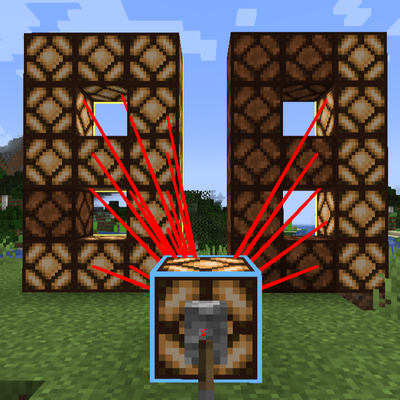
Virtual Redstone Wire (虚拟红石线缆)
A Minecraft mod for long-distance redstone signal transmission that does not rely on physical redstone blocks, supporting one-to-one, one-to-many, and many-to-one connections.
 mod
mod CurseForge + Modrinth · Minecraft
Aroma Affect
There is something missing in Minecraft. You can see the world, you can hear it, but you've never truly sensed it.