Minecraft version
Back to mods 
Modrinth · Minecraft mod
Simply No Shading
Removes darkening on sides of geometry, inspired by the old lighting from OptiFine's internal shaders, for in-game blocks, clouds, and (block) entities.
Choose a version Pick your version below, then grab the matching file.
Quick answer
Which Simply No Shading release should I use?
Latest stable file 7.6.6+mc25w42a
Game version 25w42a
Loader Fabric
Simply No Shading 7.6.6+mc25w42a targets 25w42a with Fabric. It must be installed on the client. Do not install it on the dedicated server. No extra mods listed for this file.
Where it goes
Is Simply No Shading required on the client, server, or both?
It must be installed on the client. Do not install it on the dedicated server.
Client Required
Dedicated server Not supported
Loader for this release Fabric
Required install it here Optional supported, not mandatory Not supported do not install here Source doesn’t say do not assume
This file is marked client-only.
What else does Simply No Shading 7.6.6+mc25w42a need?
7.6.6+mc25w42a. Change the file and its required mods may change too.
This file does not list any required mods. Do not add a library just because a different file uses it.
This file does not list any required or optional mods.
Before you install it
Add Simply No Shading without breaking your instance.
Built for Simply No Shading 7.6.6+mc25w42a. Pick another file and the loader, install side or required mods may change.
- 01
Stick to this file
Use 7.6.6+mc25w42a. It targets 25w42a with Fabric; another release may have different loader, side or dependency requirements.
- 02
Bring the mods it needs
This file does not list any required mods. Do not add a library just because a different file uses it.
- 03
Put it on the correct side
It must be installed on the client. Do not install it on the dedicated server.
- 04
Pick the file you checked
Use the “Get this file” button beside 7.6.6+mc25w42a. It opens that exact file at the source.
About this project
What does Simply No Shading add?
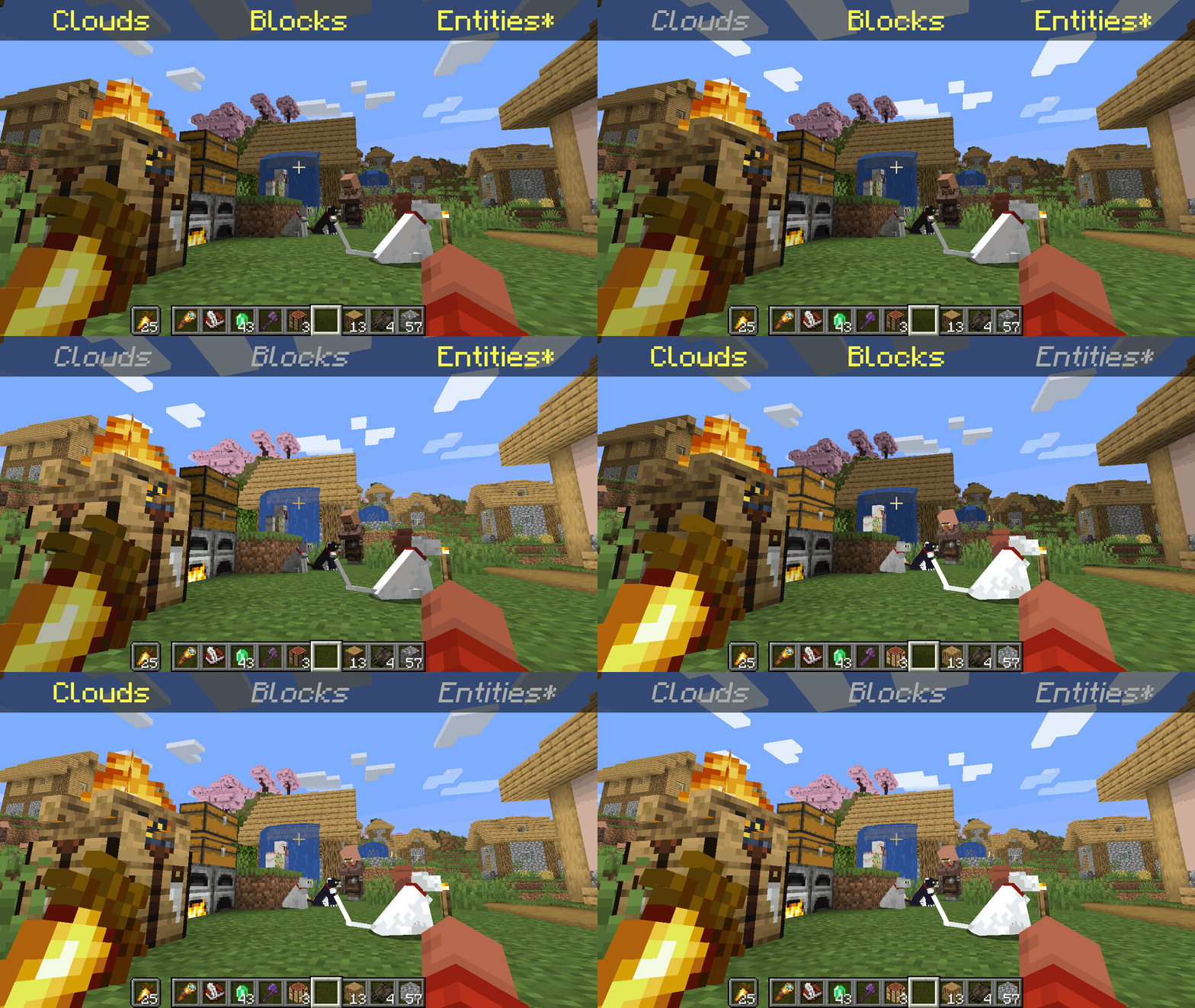
*Clarification that Entity shading is now stable and DOES NOT affect the inventory and in-game screens.
Simply No Shading is a Fabric-based modification (mod) for the Minecraft client. This mod removes the darkening on sides or faces (also known as shading) to in-game objects such as blocks, clouds, and entities as illustrated above.
Compatibility
Simply No Shading provides active compatibility for BedrockIfy and Sodium. Some mods that provide or replace stuff may work such as Enhanced Block Entities (EBE), where block entities act like blocks and are affected as such when toggling shading. Some mods that replace rendering are most likely incompatible; exceptions have active support such as Sodium, for example. One example of incompatibility is shaders, usually applied using Iris, as they may not crash the game but would just render this mod ineffective when they are applied.
Similar Solutions
Simply No Shading is not the only effort to removing shading, there are other solutions such as:
- Flat Lighting is a simple Fabric mod that achieves the same results for blocks and supports Sodium.
- internal-shaders, though unlisted, is a simple Iris shader that removes shading on blocks and entities.
- Lightingless is a simple shader that removes shading on blocks and entities.
- OptiFine's old lighting through the internal shader. Achieved by turning
Options > Video Settings > Shaders... > (internal) > Old LightingtoON. - New Lighting 1.18+ (Internal Shaders without Optifine). This resource pack achieves the similar results by setting the
shadeflag on block models tofalse(OFF).
Features
Simply No Shading supports the following categories for toggling shading:
- Blocks — this includes blocks, liquids, and EBE's block entities
- Clouds — this includes clouds
- Entities (
≥7.4.0) — this includes normal entities and block entities in the world - Deprecated Experimental Entities Built-in Resource Pack — this includes block entities, entities, and blocks, block entities, entities, and items in toasts (pop-ups, e.g. completing an advancement) and inventories and or Graphical User Interfaces (GUIs)
Configuration
Simply No Shading has a configuration screen and it's accessible through:
- a key mapping. It's unbound by default and can be bound at
Options > Controls > Keys > Simply No Shading > Open Config Screen - Mod Menu.
Mods > Simply No Shading > Configure...
Simply No Shading stores its configuration as a formatted JSON file at <your minecraft folder>/config/simply-no-shading.json.
Versions
Simply No Shading follows semantic versioning. This mod aims to maintain the same feature across supported Minecraft versions. Given the version X.Y.Z where:
Xchanges when breaking changes occur, such as with breaking config format changes.Ychanges when features are added or changed (non-breaking).Zchanges for bug and compatibility fixes and may not stay consistent across supported Minecraft versions.
Target versions is currently being reconsidered. Mod version 8.x will likely only be maintained for the newest versions of the game. 7.x will still remain maintained for bug-fixing and translations.
Simply No Shading aims to provide support for the latest minor updates to major releases along with some April Fool's snapshots. All minor releases for the latest major version are supported. The latest snapshot versions also get temporary support before the next major release. Following are all those versions:
| # | Mod Version | Minecraft Version |
|---|---|---|
| 1 | 7.6.4 |
1.14.4 |
| 2 | 7.6.4 |
1.15.2 |
| 3 | 7.6.4 |
20w14infinite |
| 4 | 7.6.4 |
1.16.5 |
| 5 | 7.6.4 |
1.17.1 |
| 6 | 7.6.4 |
1.18.2 |
| 7 | 7.6.4 |
22w13oneblockatatime |
| 8 | 7.6.4 |
1.19.4 |
| 9 | 7.6.4 |
23w13a_or_b |
| 10 | 7.6.4 |
1.20.1 |
| 11 | 7.6.4 |
24w14potato |
| 12 | 7.6.4 |
1.20.6 |
| 13 | 7.6.4 |
1.21 |
| 14 | 7.6.4 |
1.21.1 |
| 15 | 7.6.4 |
25w14craftmine |
| 16 | 7.6.6 |
1.21.10 |
| 17 | 8.0.0-alpha.5 |
1.21.11 |
| 18 | 8.0.0-alpha.6 |
26.1.2 |
| 19 | 8.0.0-alpha.5 |
26.2 |
Project description from Modrinth.
Pick your setup
Simply No Shading by Minecraft version and loader
Choose the version and loader you play, then open the matching release.
Minecraft version
26.2-snapshot-8
1 loader buildMinecraft version
26.2-snapshot-7
1 loader buildMinecraft version
26.2-snapshot-6
1 loader buildMinecraft version
26.2-snapshot-5
1 loader buildMinecraft version
26.2-snapshot-4
1 loader buildMinecraft version
26.2-snapshot-3
1 loader buildMinecraft version
26.2-snapshot-2
1 loader buildMinecraft version
26.2-snapshot-1
1 loader buildMinecraft version
26.2-rc-2
1 loader buildMinecraft version
26.2-rc-1
1 loader buildMinecraft version
26.2-pre-6
1 loader buildShowing the newest 12 of 92 game versions. Older files are in the list below.
Check the dependencies, then try the file in a copied instance before changing a world you care about.
Recent files
Simply No Shading versions and loaders
8.0.0-alpha.6+mc26.3-rc-2
simply-no-shading-8.0.0-alpha.6+mc26.3-rc-2.jar
12 Sept 2026
Client Required Server Not supported Dependencies No extras listed Listed on Release listing
Check the 26.3-rc-2 · Fabric setup 26.3-rc-2Fabric alpha
8.0.0-alpha.5+mc26.2
simply-no-shading-8.0.0-alpha.5+mc26.2.jar
17 Jun 2026
Client Required Server Not supported Dependencies No extras listed Listed on Release listing
Check the 26.2 · Fabric setup 26.2Fabric alpha
8.0.0-alpha.5+mc26.2-rc-2
simply-no-shading-8.0.0-alpha.5+mc26.2-rc-2.jar
16 Jun 2026
Client Required Server Not supported Dependencies No extras listed Listed on Release listing
Check the 26.2-rc-2 · Fabric setup 26.2-rc-2Fabric alpha
8.0.0-alpha.5+mc26.2-rc-1
simply-no-shading-8.0.0-alpha.5+mc26.2-rc-1.jar
16 Jun 2026
Client Required Server Not supported Dependencies No extras listed Listed on Release listing
Check the 26.2-rc-1 · Fabric setup 26.2-rc-1Fabric alpha
8.0.0-alpha.5+mc26.2-pre-6
simply-no-shading-8.0.0-alpha.5+mc26.2-pre-6.jar
16 Jun 2026
Client Required Server Not supported Dependencies No extras listed Listed on Release listing
Check the 26.2-pre-6 · Fabric setup 26.2-pre-6Fabric alpha
8.0.0-alpha.5+mc26.2-pre-5
simply-no-shading-8.0.0-alpha.5+mc26.2-pre-5.jar
16 Jun 2026
Client Required Server Not supported Dependencies No extras listed Listed on Release listing
Check the 26.2-pre-5 · Fabric setup 26.2-pre-5Fabric alpha
8.0.0-alpha.5+mc26.2-pre-4
simply-no-shading-8.0.0-alpha.5+mc26.2-pre-4.jar
16 Jun 2026
Client Required Server Not supported Dependencies No extras listed Listed on Release listing
Check the 26.2-pre-4 · Fabric setup 26.2-pre-4Fabric alpha
8.0.0-alpha.5+mc26.2-pre-3
simply-no-shading-8.0.0-alpha.5+mc26.2-pre-3.jar
3 Jun 2026
Client Required Server Not supported Dependencies No extras listed Listed on Release listing
Check the 26.2-pre-3 · Fabric setup 26.2-pre-3Fabric alpha
8.0.0-alpha.5+mc1.21.11
simply-no-shading-8.0.0-alpha.5+mc1.21.11.jar
30 May 2026
Client Required Server Not supported Dependencies No extras listed Listed on Release listing
Check the 1.21.11 · Fabric setup 1.21.11Fabric alpha
8.0.0-alpha.6+mc26.1.2
simply-no-shading-8.0.0-alpha.6+mc26.1.2.jar
30 May 2026
Client Required Server Not supported Dependencies No extras listed Listed on Release listing
Check the 26.1.2 · Fabric setup 26.1.2Fabric alpha
8.0.0-alpha.5+mc26.1.2
simply-no-shading-8.0.0-alpha.5+mc26.1.2.jar
30 May 2026
Client Required Server Not supported Dependencies No extras listed Listed on Release listing
Check the 26.1.2 · Fabric setup 26.1.2Fabric alpha
8.0.0-alpha.5+mc26.2-pre-2
simply-no-shading-8.0.0-alpha.5+mc26.2-pre-2.jar
29 May 2026
Client Required Server Not supported Dependencies No extras listed Listed on Release listing
Check the 26.2-pre-2 · Fabric setup 26.2-pre-2Fabric alpha
Looking for an older file? The official Modrinth project page is in Resources.
 mod
CurseForge + Modrinth · Minecraft
Inventory Overlay (HUD)
This mod displays your inventory directly on the HUD without needing to open it.
 mod
CurseForge + Modrinth · Minecraft
Runeborn | Soulslike RPG progression
A soulslike RPG overhaul: earn runes, level eight attributes at Ember Shrines, wield 74 scaling armaments and hunt seven Sovereigns.
 mod
CurseForge + Modrinth · Minecraft
Core RPG - Quests Engine
A complete RPG quest system: a quest book with branching chapters, an in-game editor, parties with shared progress, team stages, smart item filters and vein mining.