Mod Menu Optional for WindRose 1.3.0
optionalMatching file found Matched file: 21.0.0

Modrinth · Minecraft mod
A clean, customizable HUD with your day, coordinates, direction, totems used and FPS
Quick answer
WindRose 1.3.0 targets 26.3 with Fabric. It must be installed on the client. Do not install it on the dedicated server. All 1 required mods have matching files.
Where it goes
It must be installed on the client. Do not install it on the dedicated server.
This file is marked client-only.
1.3.0. Change the file and its required mods may change too.
Install Fabric API first. We found matching files for this game-version and loader setup. 1 comes through another mod in the chain.
1 extra mod was pulled in by another dependency. Indented rows show who needs each one. We only count dependency files that match this setup. A file for another loader does not fill the gap.
Before you install it
Built for WindRose 1.3.0. Pick another file and the loader, install side or required mods may change.
Use 1.3.0. It targets 26.3 with Fabric; another release may have different loader, side or dependency requirements.
Install Fabric API first. We found matching files for this game-version and loader setup. 1 comes through another mod in the chain.
It must be installed on the client. Do not install it on the dedicated server.
Use the “Get this file” button beside 1.3.0. It opens that exact file at the source.
About this project
WindRose adds a clean, fully customizable HUD with the stats you check all the time: the day, your coordinates, the direction you are facing, the totems you have used and your FPS. It keeps the vanilla look, so it fits right in.
It is a lightweight, client-side mod: it works in singleplayer and on any server, with nothing to install on the server.
Pick the modules you want, in the order you want, in the top-left corner of the screen.
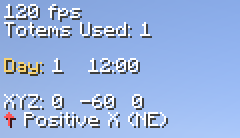
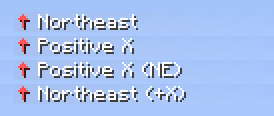
Use the 8-point compass, the axis you are moving along, or both together.
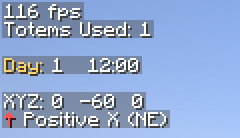
Every module has its own label and colours. Add an optional background with your own colour and opacity, and adjust the margin and line spacing.
Open the settings from Mod Menu. Add, remove, edit and reorder modules, with a live preview of each one.
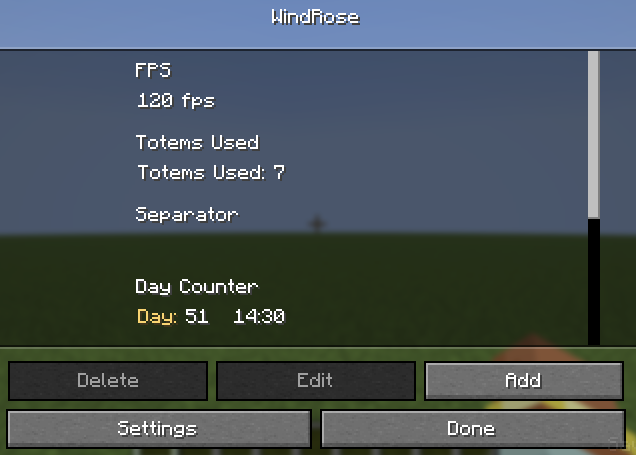
Each module has its own options: label, colours, and extras such as the direction mode or whether the day counter starts at day 1.
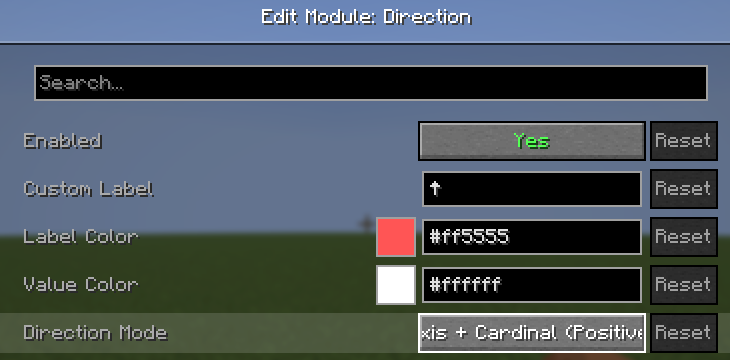
In Settings:
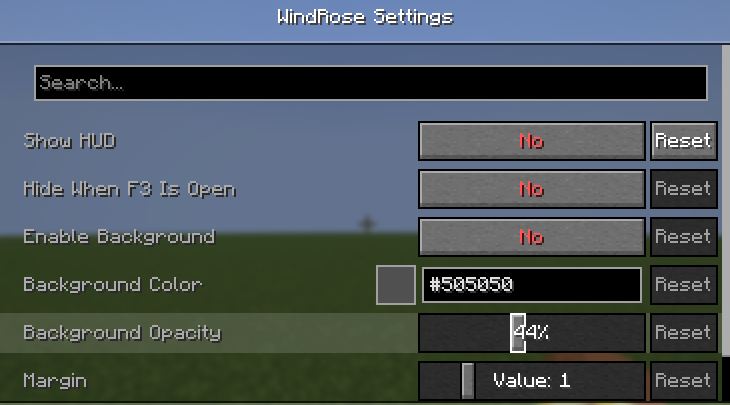
Cloth Config is already included.
Project description from Modrinth.
Pick your setup
Choose the version and loader you play, then open the matching release.
Check the dependencies, then try the file in a copied instance before changing a world you care about.
Recent files
windrose-1.3.0+mc26.3.jar
10 Nov 2026
windrose-1.2.0+mc26.3.jar
27 Sept 2026
windrose-1.1.0.jar
6 Jan 2026
windrose-1.0.0.jar
6 Jan 2026
Looking for an older file? The official Modrinth project page is in Resources.
 mod
Create custom world portal to travel between dimensions.
 mod
Rethought and tweaked Anvil usage to have more fair prices
 mod
Spill blood for power. Altars that consume life, sigils that bend the world, custom demons in an endless dungeon, sentient armor that drinks souls, a shield that pays your damage in essentia. Datapack-driven from the ground up.