Fabric API Needed by WhenChat 1.0.4+fabric-mc1.19
requiredMatching file found Matched file: [1.19] Fabric API 0.58.0+1.19
Modrinth · Minecraft mod
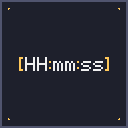
Prepends a [HH:mm:ss] timestamp to every received chat message — never lose track of when something was sent.
Quick answer
WhenChat 1.0.4+fabric-mc1.19 targets 1.19 with Fabric. It must be installed on the client. Do not install it on the dedicated server. All 1 required mods have matching files.
Where it goes
It must be installed on the client. Do not install it on the dedicated server.
This file is marked client-only.
1.0.4+fabric-mc1.19 on 1.19. Every mod below is checked against that same setup.
Install Fabric API first. We found matching files for this game-version and loader setup.
We only count dependency files that match this setup. A file for another loader does not fill the gap.
Before you install it
Built for WhenChat 1.0.4+fabric-mc1.19 on 1.19. Pick another file and the loader, install side or required mods may change.
Use 1.0.4+fabric-mc1.19. It targets 1.19 with Fabric; another release may have different loader, side or dependency requirements.
Install Fabric API first. We found matching files for this game-version and loader setup.
It must be installed on the client. Do not install it on the dedicated server.
Use the “Get this file” button beside 1.0.4+fabric-mc1.19. It opens that exact file at the source.
About this project
WhenChat is a lightweight, client-side mod that automatically prepends a [HH:mm:ss] timestamp in front of every chat message you receive in Minecraft. Available for Fabric, NeoForge, and Forge.
Ever wondered exactly when that message in chat was sent? Whether you're on a busy multiplayer server, taking screenshots for proof, or just want a quiet reference for the time of day without opening the F3 debug menu — WhenChat has you covered.
[HH:mm:ss] formatBefore:
<Steve> hey, are you online?
<Alex> sup
After:
[18:42:07] <Steve> hey, are you online?
[18:43:21] <Alex> sup
| Loader | Minecraft versions |
|---|---|
| Fabric | 1.19, 1.19.1 – 1.19.4, 1.20 – 1.20.6, 1.21 – 1.21.11 (24 versions) |
| NeoForge | 1.20.6, 1.21, 1.21.1, 1.21.3, 1.21.4, 1.21.5, 1.21.8 |
| Forge | 1.20.6, 1.21, 1.21.1, 1.21.3, 1.21.4, 1.21.5 |
More MC versions and loaders coming soon!
WhenChat only modifies how incoming chat messages are displayed on your client. It does not send or intercept any data to or from the server, and is compatible with any server type (vanilla, Paper, Fabric, NeoForge, Forge, modded, etc.). No server-side install required.
Open source under the MIT license. Source code, issue tracker, and contributions welcome:
👉 github.com/ErikEdits/WhenChat
If you enjoy the mod, consider leaving a thumbs up on Modrinth — it really helps!
Project description from Modrinth.
Pick your setup
Choose the version and loader you play, then open the matching release.
Showing the newest 12 of 24 game versions. Older files are in the list below.
Check the dependencies, then try the file in a copied instance before changing a world you care about.
Recent files
whenchat-fabric-mc1.19.jar
7 Jun 2026
Looking for an older file? The official Modrinth project page is in Resources.
 mod
Vanilla+ additions: Jars, signposts, faucets, weather vanes spring launchers, sconces, planters, lights, decoration and automation
 mod
Break down your trees by only cutting one piece of it
 mod
Improves your keys & controls setup by providing modifier keys and making multi-functional keys a thing.