Epic Fight Needed by Epic Fight - Impactful impactful-20.14.2.jar
requiredMatching file found Matched file: 20.14.17-mc1.20.1-forge
CurseForge · Minecraft mod
An Epic Fight addon. Adding hit stop and screen shake for more impactful combat experience.
Quick answer
Epic Fight - Impactful impactful-20.14.2.jar targets 1.20.1 with Forge. The project page does not say whether this file belongs on the client, dedicated server, or both. All 1 required mods have matching files.
Where it goes
The project page does not say whether this file belongs on the client, dedicated server, or both.
The source does not explicitly classify this release as client-only or server-only.
impactful-20.14.2.jar. Change the file and its required mods may change too.
Install Epic Fight first. We found matching files for this game-version and loader setup.
We only count dependency files that match this setup. A file for another loader does not fill the gap.
Before you install it
Built for Epic Fight - Impactful impactful-20.14.2.jar. Pick another file and the loader, install side or required mods may change.
Use impactful-20.14.2.jar. It targets 1.20.1 with Forge; another release may have different loader, side or dependency requirements.
Install Epic Fight first. We found matching files for this game-version and loader setup.
The project page does not say whether this file belongs on the client, dedicated server, or both.
Use the “Get this file” button beside impactful-20.14.2.jar. It opens that exact file at the source.
About this project
*** If you have installed 18.5.3/19.5.3/20.6.2 and the game crashes when you load it, please delete your /config/impactful-common.toml as well as the original mod, and install the latest hotfix version, or manually replace uchigatana with tachi and replace katana with uchigatana in the "weapon_categories_setting" option in impactful-common.toml ***
Modern action games have made many attempts to make player feel the force in every punches. Impactful is one of these attempts brings hit stop and screen shake to Epic Fight.

Version after 20.11, need to setup resoucepack and datapack. example for 20.11.1
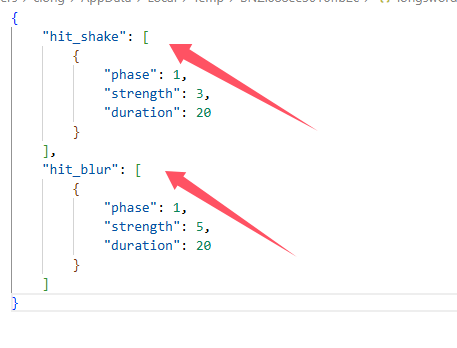
For visual effects of screen shake and radial blur just need to setup resoucepack in client side.
you can custom the visual effect deponds on items in resoucepack. "modid/item_skin/item_registryname.json". just like how to custom trails
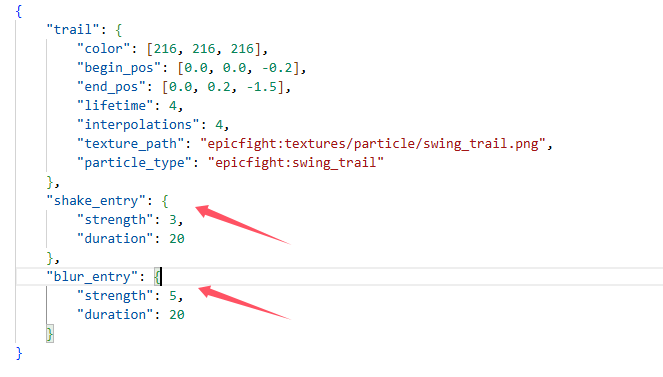 or you can custom the visual effect deponds on animation in resoucepack. "modid/animmodels/animations/biped/combat/visual_effct/animation_registryname.json"
For hit stop need to setup resoucepack and datapack in both side.
custom hit stop setting deponds on item capabilities in datapack "modid/capabilities/weapons/item_registryname.json". just like how to custom weapon capability
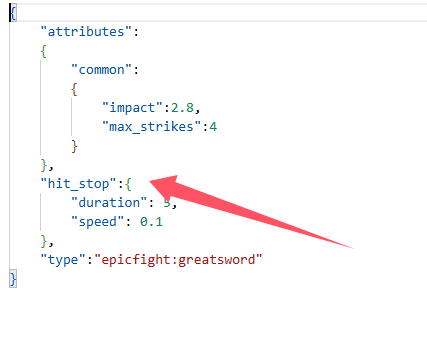
custom hit stop setting deponds on animation
"modid/animmodels/animations/biped/combat/hit_stop/animation_registryname.json"
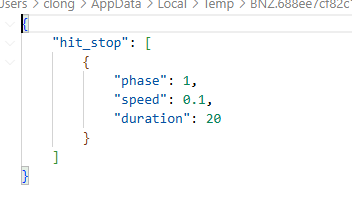
When playing on the server, animation setting of hit stop must setup in server side as a datapack, and setup in client side as a resoucepack.
When singleplayer, just need to setup as a resourcepack
Version before 20.11, only need to set the configuration file impactful-common.toml and impactful-client.toml
Project description from CurseForge.
Pick your setup
Choose the version and loader you play, then open the matching release.
Check the dependencies, then try the file in a copied instance before changing a world you care about.
Recent files
15 Mar 2026
8 Dec 2025
7 Dec 2025
impactful-20.13.1.jar
6 Aug 2025
2 Aug 2025
7 Jan 2025
10 Sept 2024
10 Sept 2024
10 Sept 2024
17 Aug 2024
15 Aug 2024
14 Jul 2024
Looking for an older file? The official CurseForge project page is in Resources.
 mod
modAdd functionality to TaCZ guns to trigger Iron's Spells 'n Spellbooks spells
 mod
modA core mod for the modpack Gregtech: Voyager. Adds new multiblocks, and new mechanics
 mod
modAdds Swayle's Polar Bear to your world, is it friendly?