Fabric Language Kotlin Needed by Advancements Search 1.3.1
requiredNo matching file Version asked for: 1.13.12+kotlin.2.4.0

Modrinth · Minecraft mod
A client-side mod that adds a search feature to the advancements window.
Quick answer
Advancements Search 1.3.1 targets 26.3 with Fabric. It must be installed on the client. Do not install it on the dedicated server. 1 required mod needs a matching file.
Where it goes
It must be installed on the client. Do not install it on the dedicated server.
This file is marked client-only.
1.3.1. Change the file and its required mods may change too.
Install Fabric Language Kotlin first, but 1 required mod has no matching file for this setup. Do not mix loader builds to force a match.
We only count dependency files that match this setup. A file for another loader does not fill the gap.
Before you install it
Built for Advancements Search 1.3.1. Pick another file and the loader, install side or required mods may change.
Use 1.3.1. It targets 26.3 with Fabric; another release may have different loader, side or dependency requirements.
Install Fabric Language Kotlin first, but 1 required mod has no matching file for this setup. Do not mix loader builds to force a match.
It must be installed on the client. Do not install it on the dedicated server.
Use the “Get this file” button beside 1.3.1. It opens that exact file at the source.
About this project
A client-side mod that adds a search feature to the advancements window.
The text you enter is searched in titles, descriptions, and icon item display names for all available advancements. Search results are displayed in a grid that fits the window and sorted by relevance - advancements closest to completion appear at the top, while finished ones move to the bottom. Clicking on a search result opens the tab containing the advancement and smoothly highlights it in the advancements tree.
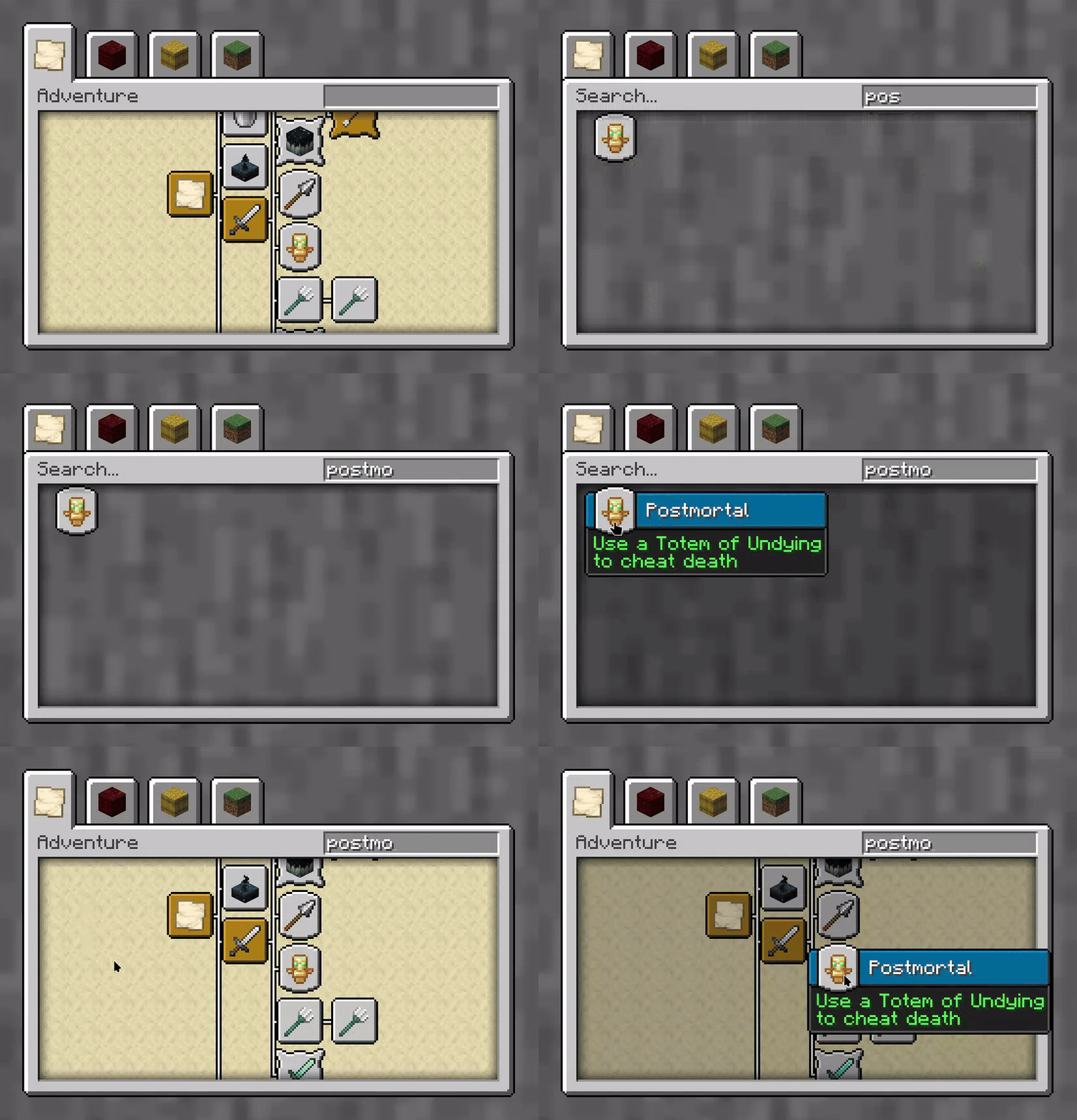
Project description from Modrinth.
Pick your setup
Choose the version and loader you play, then open the matching release.
Showing the newest 12 of 43 game versions. Older files are in the list below.
Check the dependencies, then try the file in a copied instance before changing a world you care about.
Recent files
advancements_search-1.3.1+fabric-mc26.3.jar
18 Sept 2026
advancements_search-mc26.2+1.3.jar
17 Jun 2026
advancementssearch-mc26.1+1.3.jar
25 Mar 2026
advancementssearch-mc1.21.11+1.3.jar
25 Jan 2026
advancementssearch-mc1.21.9+1.3.jar
25 Jan 2026
advancementssearch-mc1.21.8+1.3.jar
10 Aug 2025
advancementssearch-mc1.21.6+1.2.jar
29 Jun 2025
advancementssearch-mc1.21.5+1.2.jar
27 Mar 2025
advancementssearch-mc1.21.2+1.2.jar
18 Jan 2025
advancementssearch-mc1.21.2+1.1.jar
25 Dec 2024
advancementssearch-mc1.21.2+1.0.jar
27 Oct 2024
advancementssearch-mc1.21+1.0.jar
13 Jun 2024
Looking for an older file? The official Modrinth project page is in Resources.
 mod
Lock your items up! Safe from griefers! Also adds new chest, new keys/locks for dungeon chest and loot!
 mod
Open guidebooks, backpacks, handhelds and more with a single click in inventory
 mod
This project takes the Vanilla Enhancements mod's tooltips, originally only for version 1.8.9 on forge, and puts it in the latest version for fabric.