CraftTweaker Optional for Open In Inventory 2.1.1 for 26.1.2 neoforge
optionalNo matching file
CurseForge · Minecraft mod
Open guidebooks, backpacks, handhelds and more with a single click in inventory
Quick answer
Open In Inventory 2.1.1 for 26.1.2 neoforge targets 26.1, 26.1.1, 26.1.2 with NeoForge. The project page does not say whether this file belongs on the client, dedicated server, or both. All 1 required mods have matching files.
Where it goes
The project page does not say whether this file belongs on the client, dedicated server, or both.
The source does not explicitly classify this release as client-only or server-only.
2.1.1 for 26.1.2 neoforge. Change the file and its required mods may change too.
Install Architectury API first. We found matching files for this game-version and loader setup. 9 come through another mod in the chain.
9 extra mods were pulled in by other dependencies. Indented rows show who needs each one. We only count dependency files that match this setup. A file for another loader does not fill the gap.
Before you install it
Built for Open In Inventory 2.1.1 for 26.1.2 neoforge. Pick another file and the loader, install side or required mods may change.
Use 2.1.1 for 26.1.2 neoforge. It targets 26.1, 26.1.1, 26.1.2 with NeoForge; another release may have different loader, side or dependency requirements.
Install Architectury API first. We found matching files for this game-version and loader setup. 9 come through another mod in the chain.
The project page does not say whether this file belongs on the client, dedicated server, or both.
Use the “Get this file” button beside 2.1.1 for 26.1.2 neoforge. It opens that exact file at the source.
About this project
Open guidebooks, backpacks, terminals and handheld tools with a single click in your inventory.
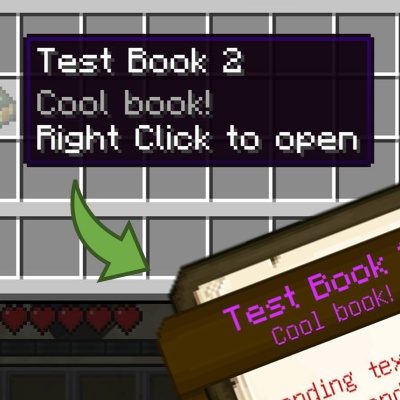
No more hunting for a free hotbar slot or manually swapping items when your hotbar is full, hover over a supported item in any inventory screen and right-click it: Open In Inventory briefly swaps it into your hand, uses it, and automatically puts it back when you close the screen.
Right Click to open line while the inventory screen is open, so you can tell at a glance what can be used this way.example:{color}_backpack in config.The mod is client-side: it adds no blocks, items or network packets, so you can join any server without it being installed there. Servers may install it too; it will simply stay inactive.
While an inventory screen is open and you right-clicked, Open In Inventory checks what you are hovering over. If there's builtin or configured support for it:
These are supported without any additional configuration:
| Source | Items |
|---|---|
| Vanilla | Written Book, Book and Quill |
| Patchouli | Every guide book |
| Refined Storage | Portable and wireless grids (item, fluid, crafting, autocrafting), including creative variants |
| Applied Energistics 2 | Wireless terminal, wireless crafting terminal, portable item/fluid cells, cutting knives (used while sneaking) |
| Scannable | Scanner (used while sneaking) |
| Extended Crafting | Handheld Table |
| Crafting on a Stick | Crafting Table, Loom, Grindstone, Cartography Table, Stonecutter, Smithing Table, Anvil (all damage states) |
The easiest way is the in-game command. Hold the item you want to support and run:
/open-in-inventory add
This appends your main-hand item to enabled_items. Useful variants:
| Command | What it does |
|---|---|
/open-in-inventory add --hotbar |
Add every valid stack in your hotbar at once. |
/open-in-inventory add --wildcard |
Match by item only, ignoring NBT/components (e.g. any written book). |
/open-in-inventory add --sneak |
Use the item while sneaking. |
/open-in-inventory add --show |
Print the generated JSON instead of saving it. |
/open-in-inventory hand |
Preview the main-hand entry without saving it. |
/open-in-inventory hotbar |
Preview hotbar entries without saving them. |
/open-in-inventory refresh |
Reload the config and rebuild the item list. |
--wildcard and --sneak also have the short forms -w and -s.
NOTE: You can add arbitrarily many args when using add command, for example:
/open-in-inventory add --hotbar --wildcard
Project description from CurseForge.
Pick your setup
Choose the version and loader you play, then open the matching release.
Check the dependencies, then try the file in a copied instance before changing a world you care about.
Recent files
open_in_inventory-neoforge-2.1.1-26.1.2.jar
24 Nov 2026
open_in_inventory-fabric-2.1.1-26.1.2.jar
24 Nov 2026
open_in_inventory-neoforge-2.1.1-1.21.1.jar
24 Nov 2026
open_in_inventory-forge-2.1.1-1.20.1.jar
24 Nov 2026
open_in_inventory-fabric-2.1.1-1.20.1.jar
24 Nov 2026
open_in_inventory-fabric-2.1.1-1.21.1.jar
24 Nov 2026
open_in_inventory-neoforge-2.1.0-26.1.2.jar
23 Nov 2026
open_in_inventory-fabric-2.1.0-26.1.2.jar
23 Nov 2026
open_in_inventory-neoforge-2.1.0-1.21.1.jar
23 Nov 2026
open_in_inventory-fabric-2.1.0-1.21.1.jar
23 Nov 2026
open_in_inventory-forge-2.1.0-1.20.1.jar
23 Nov 2026
open_in_inventory-fabric-2.1.0-1.20.1.jar
23 Nov 2026
Looking for an older file? The official CurseForge project page is in Resources.
 mod
Lock your items up! Safe from griefers! Also adds new chest, new keys/locks for dungeon chest and loot!
 mod
A mod that adds fictional mobs to the game, with cool and unique functions
 mod
An easy to use and lightweight questing mod focused on dev facing and user facing experience with a custom external tasks and rewards system.