Minecraft version
Back to mods 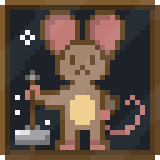
Modrinth · Minecraft mod
Mousie Builder Toolkit
Mousie Builder Toolkit adds a set of powerful yet easy-to-use tools that make building easier and give you the freedom to create without the usual limitations.
Choose a version Pick your version below, then grab the matching file.
Quick answer
Which Mousie Builder Toolkit release should I use?
beta file 0.1.3
Game version 1.21.11
Loader Fabric
Mousie Builder Toolkit 0.1.3 targets 1.21.11 with Fabric. Installation on the client is optional. Installation on the dedicated server is optional. No extra mods listed for this file.
Where it goes
Is Mousie Builder Toolkit required on the client, server, or both?
Installation on the client is optional. Installation on the dedicated server is optional.
Client Optional
Dedicated server Optional
Loader for this release Fabric
Required install it here Optional supported, not mandatory Not supported do not install here Source doesn’t say do not assume
The source marks this as usable on both the client and server.
What else does Mousie Builder Toolkit 0.1.3 need?
0.1.3. Change the file and its required mods may change too.
This file does not list any required mods. Do not add a library just because a different file uses it.
This file does not list any required or optional mods.
Before you install it
Add Mousie Builder Toolkit without breaking your instance.
Built for Mousie Builder Toolkit 0.1.3. Pick another file and the loader, install side or required mods may change.
- 01
Stick to this file
Use 0.1.3. It targets 1.21.11 with Fabric; another release may have different loader, side or dependency requirements.
- 02
Bring the mods it needs
This file does not list any required mods. Do not add a library just because a different file uses it.
- 03
Put it on the correct side
Installation on the client is optional. Installation on the dedicated server is optional.
- 04
Pick the file you checked
Use the “Get this file” button beside 0.1.3. It opens that exact file at the source.
About this project
What does Mousie Builder Toolkit add?
Mousie Builder Toolkit is a Fabric mod designed for builders who enjoy precise, flexible, and slightly impossible construction.
Hold Left Alt (default keybind: Open Toolkit) to open Mousie’s menu, then hover over each button for a short description. The mod introduces tools that extend vanilla Minecraft building rules, allowing block placement and editing beyond normal limitations.
The mod works in both single-player and multiplayer. On servers, it must be installed on both client and server, and players require operator permissions to access the full toolkit. Without OP, the menu can still be opened, but tools remain locked.
Current Tools 
- Still Paws – Prevents block updates, physics, fluid ticks, growth ticks, and scheduled block reactions.
- Cheese Logic – Allows block placement without normal support or placement restrictions.
- Extend Tail – Extends block interaction range with selectable distances.
- Ruffled Fur – Adjusts flight speed in Creative and Spectator modes.
- Moon Sight – Toggles Night Vision and detects existing effects from potions or commands.
- Sharp Teeth & Double Paws – Adjusts block breaking and placement speed using the mouse scroll wheel.
- Burrow Mode – Enables free movement through walls and other solid blocks while flying.
- Gamemode Buttons – Quickly switch between Survival, Creative, Spectator, and Adventure.
- Cheese Guard, Glowbug & Tweak Stick – Instantly equips or selects Barrier, Light, and Debug Stick items.
Spoiler
More tools and buttons will be added in future updates. Mousie is still conducting experiments that may or may not be safe for block physics.
⚙ Controls:
The menu key can be changed in Minecraft controls:
Options → Controls → Key Binds → Mousie Builder Toolkit → Open Toolkit.
If Mod Menu is installed, keybinds can also be configured through the mod’s settings screen.
License 
This mod is provided for free. It may be used in single-player and multiplayer servers, including modpacks, as long as it is not sold or redistributed as a standalone file.
📬 Feedback
Found a bug or have an idea for a new tool? I'd love to hear your feedback! Please send bug reports and feature suggestions to mousie.academy@gmail.com
Project description from Modrinth.
Pick your setup
Mousie Builder Toolkit by Minecraft version and loader
Choose the version and loader you play, then open the matching release.
Check the dependencies, then try the file in a copied instance before changing a world you care about.
Recent files
Mousie Builder Toolkit versions and loaders
0.1.3
mousie-builder-toolkit-0.1.3-mc1.21.11.jar
24 Nov 2026
Client Optional Server Optional Dependencies No extras listed Listed on Release listing
Check the 1.21.11 · Fabric setup 1.21.11Fabric beta
0.1.2
mousie-builder-toolkit-0.1.2.jar
14 Jul 2026
Client Optional Server Optional Dependencies No extras listed Listed on Release listing
Check the 1.21.11 · Fabric setup 1.21.11Fabric beta
0.1.1
mousie-builder-toolkit-0.1.1.jar
1 Jul 2026
Client Optional Server Optional Dependencies No extras listed Listed on Release listing
Check the 1.21.11 · Fabric setup 1.21.11Fabric beta
Looking for an older file? The official Modrinth project page is in Resources.
 mod
Modrinth · Minecraft
Wizards of Lua
Unlock the Magic of Lua Scripting in Minecraft 🌟 WoL adds the /lua command, allowing you to cast spells and interact with the game using the Lua programming language.
 mod
Modrinth · Minecraft
RGB blocks
Massive RGB building block palette for Minecraft
 mod
Modrinth · Minecraft
True Villagers
Villagers get their own names, genders, skin tones and homes. They fall in love, raise families, pass traits to their kids, and remember all of it.