Minecraft version
Back to mods 
Modrinth · Minecraft mod
KoHs Inventory Tweaks
Fast, precise, and fully customizable client-side inventory controls
Choose a version Pick your version below, then grab the matching file.
This page is having a moment, so a few details may be a little behind.
Quick answer
Which KoHs Inventory Tweaks release should I use?
Latest stable file 1.0.4+mc26.2
Game version 26.2
Loader Fabric
KoHs Inventory Tweaks 1.0.4+mc26.2 targets 26.2 with Fabric. It must be installed on the client. Do not install it on the dedicated server. No extra mods listed for this file.
Where it goes
Is KoHs Inventory Tweaks required on the client, server, or both?
It must be installed on the client. Do not install it on the dedicated server.
Client Required
Dedicated server Not supported
Loader for this release Fabric
Required install it here Optional supported, not mandatory Not supported do not install here Source doesn’t say do not assume
This file is marked client-only.
What else does KoHs Inventory Tweaks 1.0.4+mc26.2 need?
1.0.4+mc26.2. Change the file and its required mods may change too.
This file does not list any required mods. Do not add a library just because a different file uses it.
This file does not list any required or optional mods.
Before you install it
Add KoHs Inventory Tweaks without breaking your instance.
Built for KoHs Inventory Tweaks 1.0.4+mc26.2. Pick another file and the loader, install side or required mods may change.
- 01
Stick to this file
Use 1.0.4+mc26.2. It targets 26.2 with Fabric; another release may have different loader, side or dependency requirements.
- 02
Bring the mods it needs
This file does not list any required mods. Do not add a library just because a different file uses it.
- 03
Put it on the correct side
It must be installed on the client. Do not install it on the dedicated server.
- 04
Pick the file you checked
Use the “Get this file” button beside 1.0.4+mc26.2. It opens that exact file at the source.
About this project
What does KoHs Inventory Tweaks add?




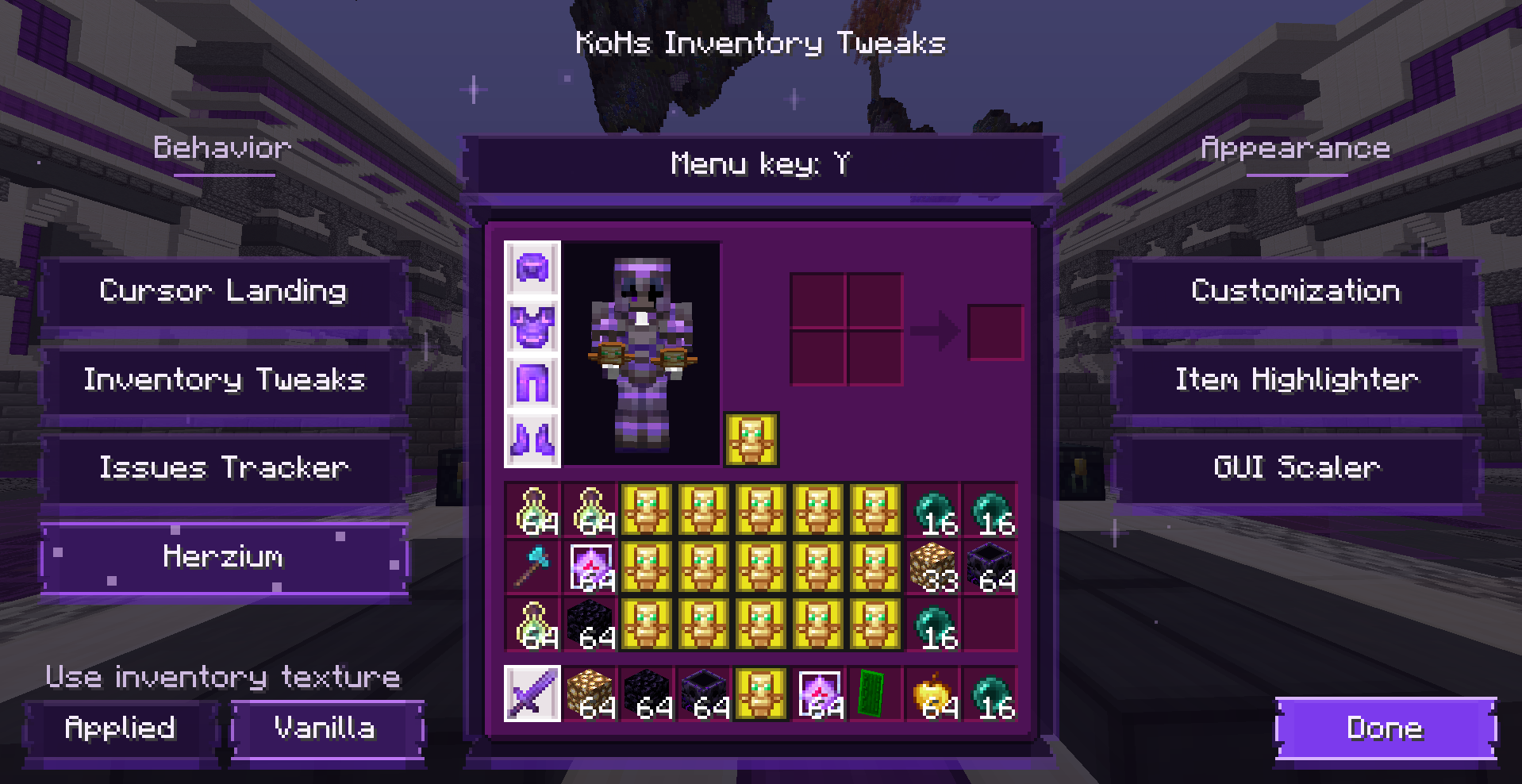
Your inventory, your rules
KoHs Inventory Tweaks is the client-side successor to KoHs Inv Cursor, rebuilt for Minecraft 26.1.2 and 1.21.11. It gives you precise cursor placement, faster and more reliable inventory input, visual customization, item highlighting, and an inventory-only GUI scaler—all through a responsive purple configuration menu.
The mod keeps normal Minecraft inventory rules. It does not require installation on the server and does not add automated item transfers or custom inventory packets.
Features
- Cursor Landing — choose where the cursor appears in your inventory, single or double chests, Ender Chests, and barrels. Every container can be individually disabled to keep its Vanilla behavior.
- Center Mouse Fix — verifies the cursor position once when the player inventory opens, without dragging the mouse or affecting other containers.
- SuperFastInventory — opens the local inventory immediately and safely handles very fast inventory/offhand key combinations.
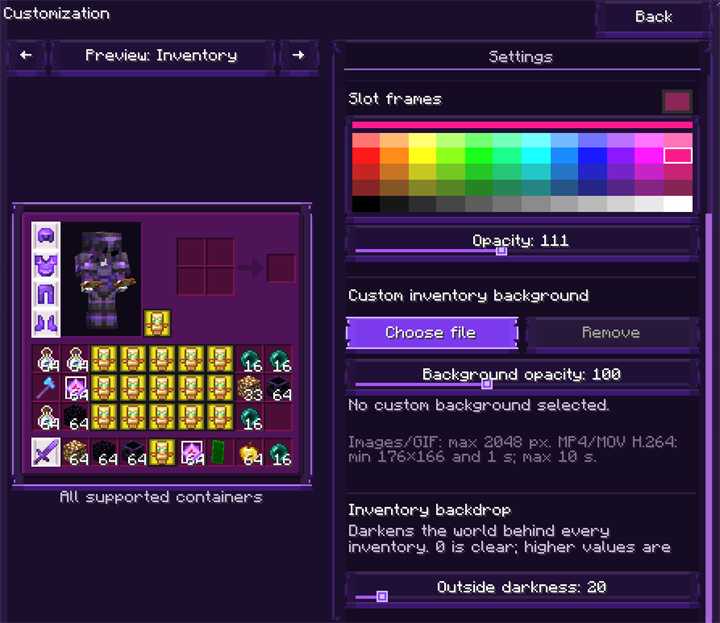
- Customization — recolor inventory and slot frames, control opacity and world backdrop darkness, or use a cropped image, GIF, or short video background.
- Resource-pack aware — choose the active resource-pack inventory texture or the Vanilla base, then apply KoHs customization above it.
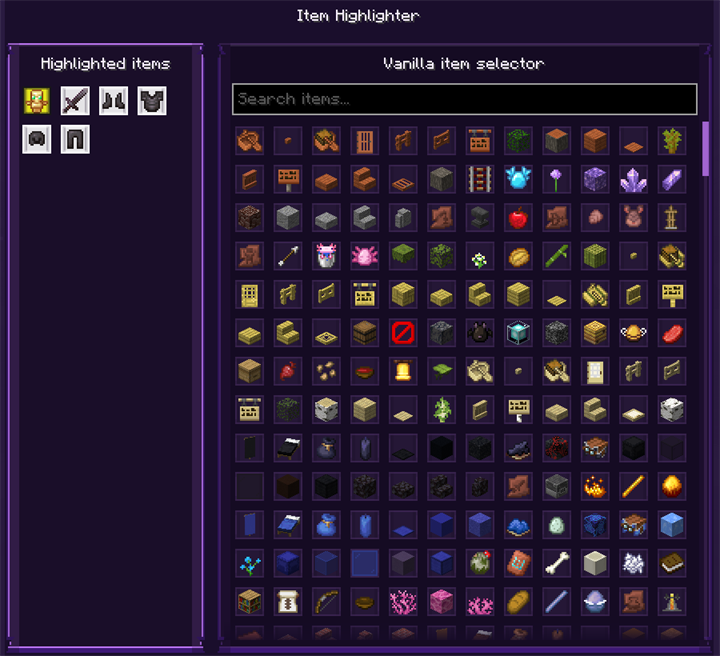
- Item Highlighter — search Vanilla items and configure slot colors, borders, hotbar highlighting, and dynamic hover highlighting.
- GUI Scaler — resize only the player inventory, including its slots, text, items, and character model.
- Smooth responsive UI — animated particles, soft transitions, clipped scrolling panels, hover explanations, and support for compact GUI scales.
- English and Spanish — every supported Spanish locale uses the Spanish interface; other languages fall back to English.
A closer look
Cursor Landing
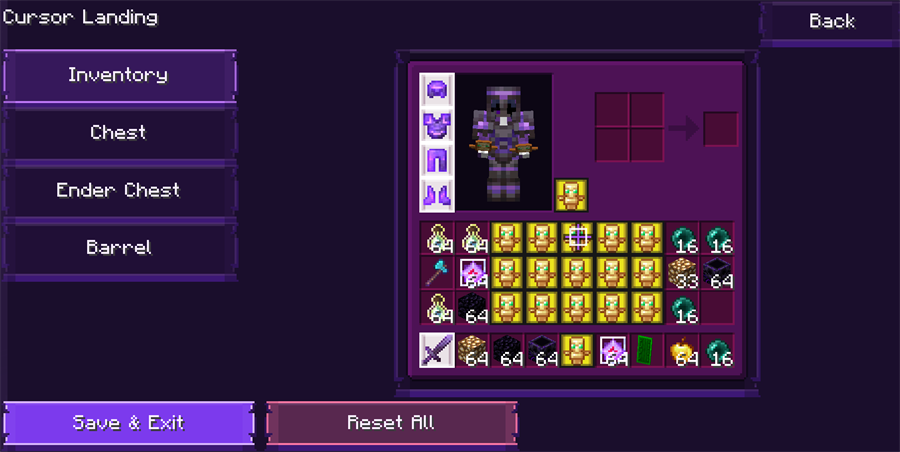
Inventory appearance
Item Highlighter
Inventory-only GUI Scaler
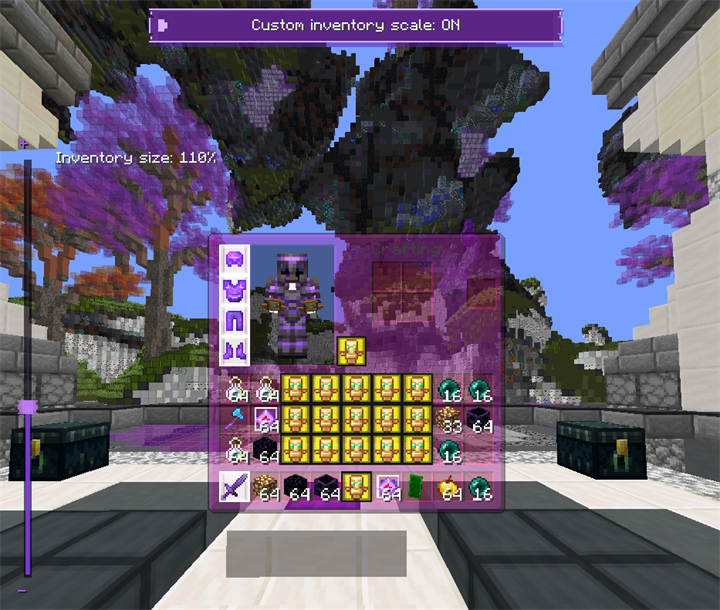
Install the mod only on the client. Enter a world or server before opening its configuration so Minecraft can provide the active player, item models, and resource packs. The configuration menu opens with Y by default and the key can be changed from the menu or Minecraft Controls.
For complete instructions, media limits, troubleshooting, and configuration backups, read the KoHs Inventory Tweaks Wiki.
Your inventory, your rules
KoHs Inventory Tweaks is the client-side successor to KoHs Inv Cursor, rebuilt for Minecraft 26.1.2. It gives you precise cursor placement, faster and more reliable inventory input, visual customization, item highlighting, and an inventory-only GUI scaler—all through a responsive purple configuration menu.
The mod keeps normal Minecraft inventory rules. It does not require installation on the server and does not add automated item transfers or custom inventory packets.
Features
- Cursor Landing — choose where the cursor appears in your inventory, single or double chests, Ender Chests, and barrels. Every container can be individually disabled to keep its Vanilla behavior.
- Center Mouse Fix — verifies the cursor position once when the player inventory opens, without dragging the mouse or affecting other containers.
- SuperFastInventory — opens the local inventory immediately and safely handles very fast inventory/offhand key combinations.
- Customization — recolor inventory and slot frames, control opacity and world backdrop darkness, or use a cropped image, GIF, or short video background.
- Resource-pack aware — choose the active resource-pack inventory texture or the Vanilla base, then apply KoHs customization above it.
- Item Highlighter — search Vanilla items and configure slot colors, borders, hotbar highlighting, and dynamic hover highlighting.
- GUI Scaler — resize only the player inventory, including its slots, text, items, and character model.
- Smooth responsive UI — animated particles, soft transitions, clipped scrolling panels, hover explanations, and support for compact GUI scales.
- English and Spanish — every supported Spanish locale uses the Spanish interface; other languages fall back to English.
A closer look
Cursor Landing
Inventory appearance
Item Highlighter
Inventory-only GUI Scaler
Install the mod only on the client. Enter a world or server before opening its configuration so Minecraft can provide the active player, item models, and resource packs. The configuration menu opens with Y by default and the key can be changed from the menu or Minecraft Controls.
For complete instructions, media limits, troubleshooting, and configuration backups, read the KoHs Inventory Tweaks Wiki.
Project description from Modrinth.
Pick your setup
KoHs Inventory Tweaks by Minecraft version and loader
Choose the version and loader you play, then open the matching release.
Minecraft version
26.1.2
1 loader buildMinecraft version
26.1.1
1 loader buildMinecraft version
26.1
1 loader buildMinecraft version
1.21.11
1 loader buildMinecraft version
1.21.10
1 loader buildCheck the dependencies, then try the file in a copied instance before changing a world you care about.
Recent files
KoHs Inventory Tweaks versions and loaders
1.0.4+mc26.2
kohs-inventory-tweaks-1.0.4+mc26.2.jar
12 Aug 2026
Client Required Server Not supported Dependencies No extras listed Listed on Release listing
Check the 26.2 · Fabric setup 26.2Fabric release
1.0.4+mc26.1.2
kohs-inventory-tweaks-1.0.4+mc26.1.2.jar
12 Aug 2026
Client Required Server Not supported Dependencies No extras listed Listed on Release listing
Check the 26.1.2 · Fabric setup 26.1.2Fabric release
1.0.4+mc26.1.1
kohs-inventory-tweaks-1.0.4+mc26.1.1.jar
12 Aug 2026
Client Required Server Not supported Dependencies No extras listed Listed on Release listing
Check the 26.1.1 · Fabric setup 26.1.1Fabric release
1.0.4+mc26.1
kohs-inventory-tweaks-1.0.4+mc26.1.jar
12 Aug 2026
Client Required Server Not supported Dependencies No extras listed Listed on Release listing
Check the 26.1 · Fabric setup 26.1Fabric release
1.0.4+mc1.21.11
kohs-inventory-tweaks-1.0.4+mc1.21.11.jar
12 Aug 2026
Client Required Server Not supported Dependencies No extras listed Listed on Release listing
Check the 1.21.11 · Fabric setup 1.21.11Fabric release
1.0.4+mc1.21.10
kohs-inventory-tweaks-1.0.4+mc1.21.10.jar
12 Aug 2026
Client Required Server Not supported Dependencies No extras listed Listed on Release listing
Check the 1.21.10 · Fabric setup 1.21.10Fabric release
1.0.3+mc26.1.1
kohs-inventory-tweaks-1.0.3+mc26.1.1.jar
11 Aug 2026
Client Required Server Not supported Dependencies No extras listed Listed on Release listing
Check the 26.1.1 · Fabric setup 26.1.1Fabric release
1.0.3+mc26.1
kohs-inventory-tweaks-1.0.3+mc26.1.jar
11 Aug 2026
Client Required Server Not supported Dependencies No extras listed Listed on Release listing
Check the 26.1 · Fabric setup 26.1Fabric release
1.0.3+mc1.21.10
kohs-inventory-tweaks-1.0.3+mc1.21.10.jar
11 Aug 2026
Client Required Server Not supported Dependencies 1 required · 1 unchecked Listed on Release listing
Check the 1.21.10 · Fabric setup 1.21.10Fabric release
1.0.2+mc1.21.11
kohs-inventory-tweaks-1.0.2+mc1.21.11.jar
10 Aug 2026
Client Required Server Not supported Dependencies 1 required · 1 unchecked Listed on Release listing
Check the 1.21.11 · Fabric setup 1.21.11Fabric release
1.0.2+mc26.1.2
kohs-inventory-tweaks-1.0.2+mc26.1.2.jar
10 Aug 2026
Client Required Server Not supported Dependencies 1 required · 1 unchecked Listed on Release listing
Check the 26.1.2 · Fabric setup 26.1.2Fabric release
1.0.1+mc26.1.2
kohs-inventory-tweaks-1.0.1+mc26.1.2.jar
10 Aug 2026
Client Required Server Not supported Dependencies 1 required · 1 unchecked Listed on Release listing
Check the 26.1.2 · Fabric setup 26.1.2Fabric release
Looking for an older file? The official Modrinth project page is in Resources.
 mod
mod Modrinth · Minecraft
Raise & Resurrection & Ascend
Downed players recover at full health, with ordinary recovery potions feedable by other players.
 mod
mod Modrinth · Minecraft
BBaS (Bitten By a Spider)
This project adds spiderman into your game!
 mod
mod Modrinth · Minecraft
Midnight Thoughts
Unique sleep overhaul and rest system