Minecraft version
Back to mods 
Modrinth · Minecraft mod
Locator Triangulation
A client-side Fabric mod that allows determining players' coordinates using data from the locator and triangulation
Choose a version Pick your version below, then grab the matching file.
Quick answer
Which Locator Triangulation release should I use?
Latest stable file 1.5.0+mc26.3-fabric
Game version 26.3
Loader Fabric
Locator Triangulation 1.5.0+mc26.3-fabric targets 26.3 with Fabric. It must be installed on the client. Do not install it on the dedicated server. No extra mods listed for this file.
Where it goes
Is Locator Triangulation required on the client, server, or both?
It must be installed on the client. Do not install it on the dedicated server.
Client Required
Dedicated server Not supported
Loader for this release Fabric
Required install it here Optional supported, not mandatory Not supported do not install here Source doesn’t say do not assume
This file is marked client-only.
What else does Locator Triangulation 1.5.0+mc26.3-fabric need?
1.5.0+mc26.3-fabric. Change the file and its required mods may change too.
This file does not list any required mods. Do not add a library just because a different file uses it.
This file does not list any required or optional mods.
Before you install it
Add Locator Triangulation without breaking your instance.
Built for Locator Triangulation 1.5.0+mc26.3-fabric. Pick another file and the loader, install side or required mods may change.
- 01
Stick to this file
Use 1.5.0+mc26.3-fabric. It targets 26.3 with Fabric; another release may have different loader, side or dependency requirements.
- 02
Bring the mods it needs
This file does not list any required mods. Do not add a library just because a different file uses it.
- 03
Put it on the correct side
It must be installed on the client. Do not install it on the dedicated server.
- 04
Pick the file you checked
Use the “Get this file” button beside 1.5.0+mc26.3-fabric. It opens that exact file at the source.
About this project
What does Locator Triangulation add?
Locator Triangulation
A client-side Fabric mod that allows determining players' coordinates using triangulation.
The mod calculates coordinates using publicly available data accessible to regular vanilla players and acts solely as a calculator.
If the vanilla locator is disabled on the server or a player has hidden from it, the mod will not be able to determine their coordinates.
Essentially, all calculations performed by the mod can be done manually with a calculator and the vanilla client.

Quick start
The map is for example purposes only.
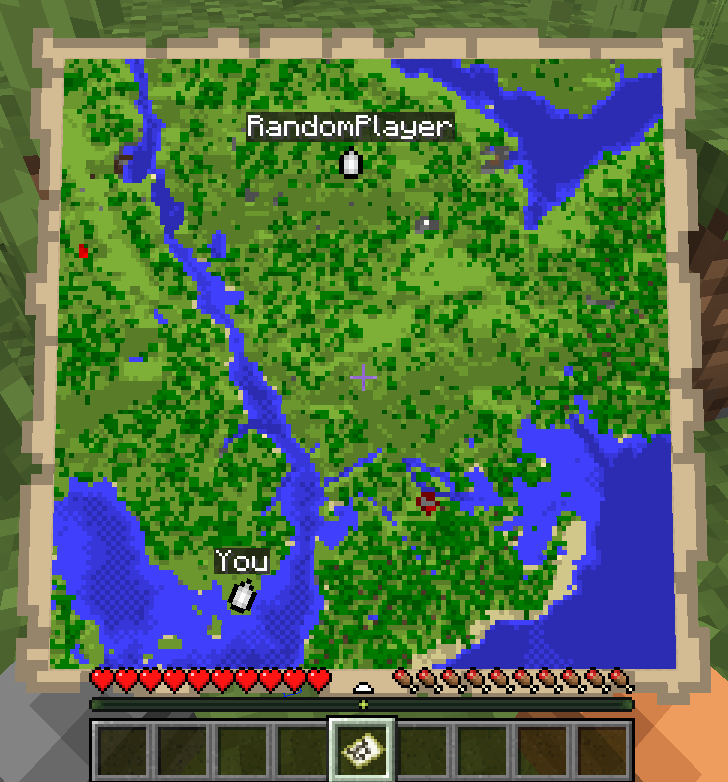
- Run
/locator_pos1- the mod will remember the locator's state, your current position and your view yaw. - Move away as far as possible so the angle to the target becomes as large as possible, then run
/locator_pos2. - Run:
/locator_locate <name>- attempt to compute the coordinates of player<name>, or/locator_locate_all- attempt to compute coordinates of all known targets.
/locator_pos1
/locator_pos2
/locator_locate RandomPlayer

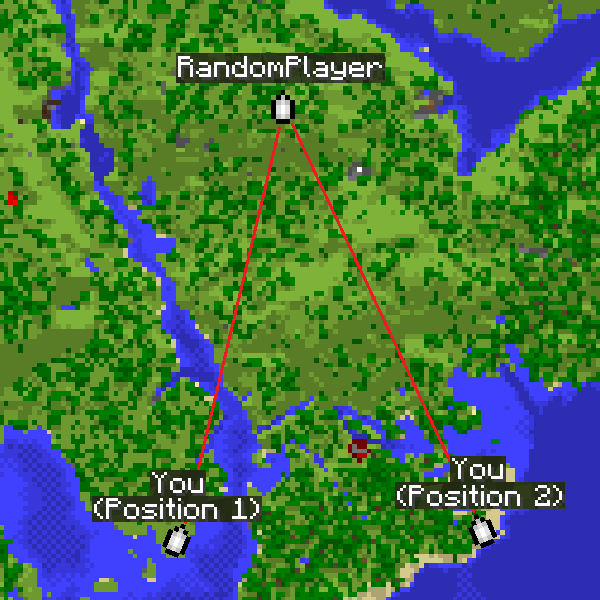
The larger the angle between directions from the two points, the more accurate the coordinates.
For regular triangulation use the same commands but with the triangulation prefix.
Command description
Locator commands
/locator_data- print current locator state/locator_pos1- save the first position (locator state and your coordinates)/locator_pos2- save the second position (locator state and your coordinates)/locator_get_poses- print the saved positions/locator_clear_pos1- clear the first position/locator_clear_pos2- clear the second position/locator_clear_poses- clear both positions/locator_locate <name>- compute coordinates of player<name>(if both positions are saved)/locator_locate_all- compute coordinates for all known targets (if both positions are saved)
Regular triangulation commands
/triangulation_pos1- save the first position (your coordinates + yaw)/triangulation_pos2- save the second position (your coordinates + yaw)/triangulation_get_poses- print the saved positions/triangulation_clear_pos1- clear the first position/triangulation_clear_pos2- clear the second position/triangulation_clear_poses- clear both positions/triangulation_locate— compute the intersection coordinates of the view directions (if both positions are saved)
Keybinds
For convenience, keybinds have been added for locator and triangulation.
The purpose is to simplify the process of setting points and calculating results.
How it works:
- The first press of the selected key will set the first point.
- Pressing the key with Shift will skip setting the second point.
- Pressing the key again will reset the first point.
- Pressing it again will set the second point.
- If both points are already set, pressing the key with Ctrl will return the calculated result for those two points.
Accuracy notes
Triangulation accuracy strongly depends on the angle between view directions from the two positions.
Good results are achieved with an angle between directions from 20° to 150°.
Near-perfect accuracy occurs at about 70-100°.
If the angle is too small (less than 20°) or too large (150° and above), accuracy drops significantly.
For maximum accuracy, take positions so that the target is roughly at a right angle relative to you.
The corner color in the message indicates the calculation quality.
Green means near-perfect accuracy, yellow is acceptable but may include a small error, and red indicates poor accuracy.
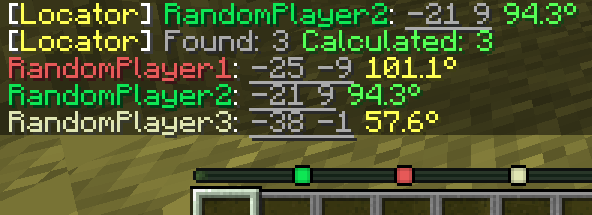
How to hide from the locator
There are several ways to hide from the radar: sneaking (Shift), a mob's or another player's head, a carved pumpkin, or an invisibility potion.
Project description from Modrinth.
Pick your setup
Locator Triangulation by Minecraft version and loader
Choose the version and loader you play, then open the matching release.
Minecraft version
26.2
1 loader buildMinecraft version
26.1.2
1 loader buildMinecraft version
26.1.1
1 loader buildMinecraft version
26.1
1 loader buildMinecraft version
1.21.11
1 loader buildMinecraft version
1.21.10
1 loader buildMinecraft version
1.21.8
1 loader buildCheck the dependencies, then try the file in a copied instance before changing a world you care about.
Recent files
Locator Triangulation versions and loaders
1.5.0+mc26.3-fabric
LocatorTriangulation-1.5.0+mc26.3-fabric.jar
15 Sept 2026
Client Required Server Not supported Dependencies No extras listed Listed on Release listing
Check the 26.3 · Fabric setup 26.3Fabric release
1.4.0+mc26.2-fabric
LocatorTriangulation-1.4.0+mc26.2-fabric.jar
1 Aug 2026
Client Required Server Not supported Dependencies No extras listed Listed on Release listing
Check the 26.2 · Fabric setup 26.2Fabric release
1.3.0+mc26.1-fabric
LocatorTriangulation-1.3.0+mc26.1-fabric.jar
28 Mar 2026
Client Required Server Not supported Dependencies No extras listed Listed on Release listing
Check the 26.1.2 · Fabric setup 26.126.1.126.1.2Fabric release
1.2.0+mc1.21.11-fabric
LocatorTriangulation-1.2.0+mc1.21.11-fabric.jar
25 Mar 2026
Client Required Server Not supported Dependencies No extras listed Listed on Release listing
Check the 1.21.11 · Fabric setup 1.21.11Fabric release
1.1.0+mc1.21.10-fabric
LocatorTriangulation-1.1.0+mc1.21.10-fabric.jar
12 Nov 2025
Client Required Server Not supported Dependencies No extras listed Listed on Release listing
Check the 1.21.10 · Fabric setup 1.21.10Fabric release
1.1.0+mc1.21.8-fabric
LocatorTriangulation-1.1.0+mc1.21.8-fabric.jar
12 Nov 2025
Client Required Server Not supported Dependencies No extras listed Listed on Release listing
Check the 1.21.8 · Fabric setup 1.21.8Fabric release
1.0.0
LocatorTriangulation-fabric-1.21.8-1.0.0.jar
4 Oct 2025
Client Required Server Not supported Dependencies No extras listed Listed on Release listing
Check the 1.21.8 · Fabric setup 1.21.8Fabric release
Looking for an older file? The official Modrinth project page is in Resources.
 mod
Modrinth · Minecraft
iCraft
A fully functional smartphone for your Minecraft world. Chat with players, take photos and selfies, print them, check the weather, make calls and more — all from your in-game phone.
 mod
Modrinth · Minecraft
Society Tweaks
Mixins and Assets for Society: Sunlit Valley
 mod
Modrinth · Minecraft
FWM MOD
A mod by FWM for HugoSMP. It includes a menu with features like a Sell Macro.