Minecraft version
Back to mods 
Modrinth · Minecraft mod
Potato PC
Adds a literal potato pc with a literal potato operating system
Choose a version Pick your version below, then grab the matching file.
Quick answer
Which Potato PC release matches 1.18?
Best match for your filters 1mod
Game version 1.17, 1.17.1, 1.18
Loader Fabric, Forge, Quilt
Potato PC 1mod targets 1.17, 1.17.1, 1.18 with Fabric, Forge, Quilt. Installation on the client is optional. Installation on the dedicated server is optional. No extra mods listed for this file.
Where it goes
Is Potato PC required on the client, server, or both?
Installation on the client is optional. Installation on the dedicated server is optional.
Client Optional
Dedicated server Optional
Loader for this release Fabric, Forge, Quilt
Required install it here Optional supported, not mandatory Not supported do not install here Source doesn’t say do not assume
The source marks this as usable on both the client and server.
What else does Potato PC 1mod need?
1mod on 1.18. Every mod below is checked against that same setup.
This file does not list any required mods. Do not add a library just because a different file uses it.
This file does not list any required or optional mods.
Before you install it
Add Potato PC without breaking your instance.
Built for Potato PC 1mod on 1.18. Pick another file and the loader, install side or required mods may change.
- 01
Stick to this file
Use 1mod. It targets 1.17, 1.17.1, 1.18 with Fabric, Forge, Quilt; another release may have different loader, side or dependency requirements.
- 02
Bring the mods it needs
This file does not list any required mods. Do not add a library just because a different file uses it.
- 03
Put it on the correct side
Installation on the client is optional. Installation on the dedicated server is optional.
- 04
Pick the file you checked
Use the “Get this file” button beside 1mod. It opens that exact file at the source.
About this project
What does Potato PC add?
Potato PC
The Potato PC is a literal computer powered by a literal potato. It has four apps you can use
Description
You can craft the Potato PC like this: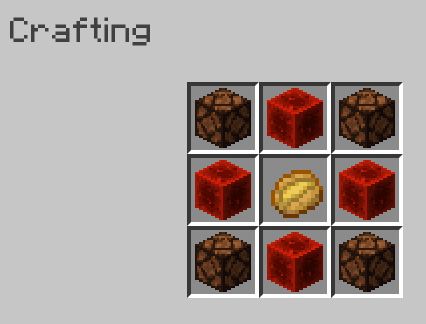
When you place it, right click on it to open the actual computer!
Potato Discord
Potato Discord has two servers you can visit by clicking the, on the sidebar. One is the Bear Cave, and one is the Potato Discord server.
Files
The Files app has 8 files - 3 are images and 5 are text documents. You can click on the files in the app to open them.
Images -
The images app can only be opened by opening an image through the Files app.
Games
The games app has one game, and that game is Worship-a-Potato. When you worship the potato by pressing the button, you have a chance at getting a diamond in return.
Music
The music app lets you play Pigstep when you press the play button.
Project description from Modrinth.
Pick your setup
Potato PC by Minecraft version and loader
Choose the version and loader you play, then open the matching release.
Minecraft version
1.19.2
4 loader buildsMinecraft version
1.19.1
4 loader buildsMinecraft version
1.19
4 loader buildsMinecraft version
1.18.2
4 loader buildsMinecraft version
1.18.1
4 loader buildsMinecraft version
1.18
4 loader buildsMinecraft version
1.17.1
4 loader buildsMinecraft version
1.17
4 loader buildsCheck the dependencies, then try the file in a copied instance before changing a world you care about.
Recent files
Potato PC versions and loaders
1mod
potato-pc-1dp.jar
29 Dec 2022
Client Optional Server Optional Dependencies No extras listed Listed on Release listing
Check the 1.18 · Fabric setup 1.171.17.11.181.18.1 release
1dp
potatopcdata.zip
29 Dec 2022
Client Optional Server Optional Dependencies No extras listed Listed on Release listing
Check the 1.18 · datapack setup 1.171.17.11.181.18.1 release
Looking for an older file? The official Modrinth project page is in Resources.
 mod
CurseForge + Modrinth · Minecraft
Cooking for Blockheads
Adds a multiblock kitchen that shows recipes you can make with what ingredients you have available.
 mod
CurseForge · Minecraft
TONI's Farming Expansion
Watering cans, automatic sprinklers, fertilizer that boosts growth and harvests, grow lamps, crop harvesters, sickles, tillers and more. Farming, upgraded.
 mod
Modrinth · Minecraft
Just Redstone Waterlog
Adds the waterlogged property to redstone components: dust, torches, repeaters, comparators, levers, buttons and pressure plates.