Fabric API Needed by True Fullbright 2.0.2
requiredMatching file found Matched file: 0.160.0+26.2

Modrinth · Minecraft mod
A simple, toggleable, and configurable full brightness mod for Fabric.
Quick answer
True Fullbright 2.0.2 targets 26.2 with Fabric. It must be installed on the client. Do not install it on the dedicated server. All 4 required mods have matching files.
Where it goes
It must be installed on the client. Do not install it on the dedicated server.
This file is marked client-only.
2.0.2. Change the file and its required mods may change too.
Install Fabric API, Mod Menu, YetAnotherConfigLib (YACL), Text Placeholder API first. We found matching files for this game-version and loader setup. 1 comes through another mod in the chain.
1 extra mod was pulled in by another dependency. Indented rows show who needs each one. We only count dependency files that match this setup. A file for another loader does not fill the gap.
Before you install it
Built for True Fullbright 2.0.2. Pick another file and the loader, install side or required mods may change.
Use 2.0.2. It targets 26.2 with Fabric; another release may have different loader, side or dependency requirements.
Install Fabric API, Mod Menu, YetAnotherConfigLib (YACL), Text Placeholder API first. We found matching files for this game-version and loader setup. 1 comes through another mod in the chain.
It must be installed on the client. Do not install it on the dedicated server.
Use the “Get this file” button beside 2.0.2. It opens that exact file at the source.
About this project
A simple, toggleable, and configurable full brightness mod for Fabric.

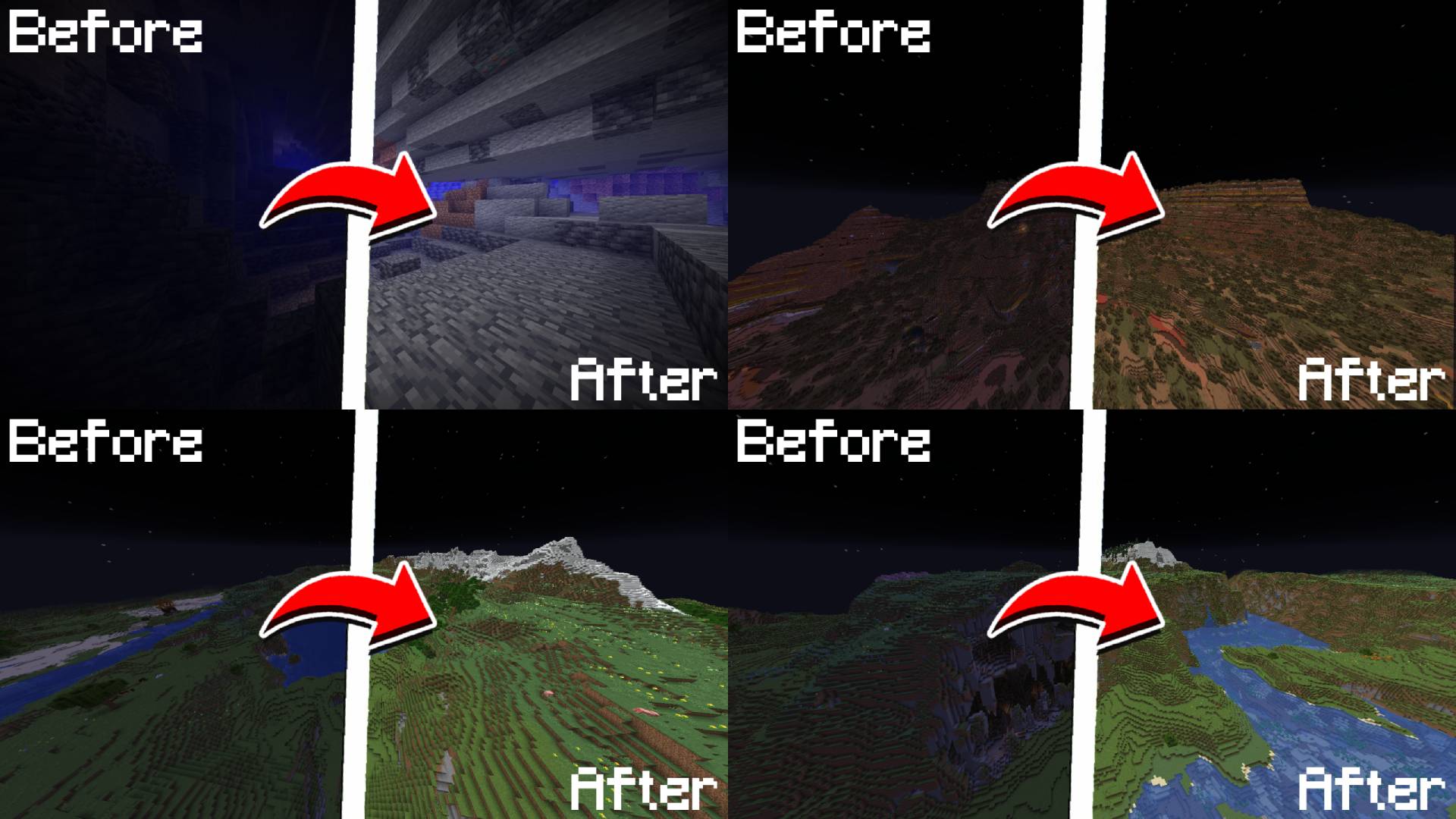
B/fullbright| Command | Description |
|---|---|
/fullbright or /fullbright status |
Check current brightness settings |
/fullbright toggle |
Turn fullbright on/off |
/fullbright mode gamma |
Switch to gamma brightness mode |
/fullbright mode nightvision |
Switch to night vision mode |
/fullbright mode off |
Turn off all brightness modes |
/fullbright set <number> |
Set brightness to exact value |
/fullbright increase |
Make it brighter by one step |
/fullbright decrease |
Make it dimmer by one step |
/fullbright max |
Jump to maximum brightness |
/fullbright min |
Jump to minimum brightness |
/fullbright config |
Open the settings screen |
/fullbright saveconfig |
Save your current settings |
/fullbright resetconfig |
Reset everything to default |
| Action | Default Key |
|---|---|
| Toggle Fullbright On/Off | B |
| Increase Brightness | Arrow Up |
| Decrease Brightness | Arrow Down |
| Maximum Brightness | End |
| Minimum Brightness | Home |
| Open Config Screen | Not set |
Customize all of these under: Options → Controls → Keybinds → True Fullbright
.jar file into your mods/ folderB/fullbright commands to adjust gamma, change modes, or view status/fullbright config or via Mod MenuFound an issue or have feedback?
→ DM me on Discord: rijz.gg
Developed by Rijz & Clyriz4.
Project description from Modrinth.
Pick your setup
Choose the version and loader you play, then open the matching release.
Showing the newest 12 of 23 game versions. Older files are in the list below.
Check the dependencies, then try the file in a copied instance before changing a world you care about.
Recent files
truefullbright-2.0.2.jar
9 Jul 2026
truefullbright-2.0.1.jar
11 Apr 2026
truefullbright-2.0.0.jar
10 Apr 2026
truefullbright-1.0.4.jar
14 Dec 2025
truefullbright-1.0.3.jar
11 Oct 2025
truefullbright-1.0.2.jar
4 Oct 2025
truefullbright-1.0.1.jar
2 Oct 2025
truefullbright-1.0.0.jar
15 Sept 2025
truefullbright-1.0.0-pre1.jar
23 Jul 2025
truefullbright-1.0.0-beta.jar
30 Jun 2025
Looking for an older file? The official Modrinth project page is in Resources.
 mod
modA mod adding many configurable features to EMI!
 mod
modCustomize crystal glow, colors, sounds, and other-player crystal profiles.
 mod
modAdding mega evolutions, z-moves, teralization, dynamax, ultra burst and fusions to the game

