Minecraft version
Back to mods 
Modrinth · Minecraft mod
NPC Studio
Be the director of your best thumbnail yet.
Choose a version Pick your version below, then grab the matching file.
Quick answer
Which NPC Studio release should I use?
Latest stable file 1.3.5
Game version 1.21.11
Loader Fabric
NPC Studio 1.3.5 targets 1.21.11 with Fabric. It must be installed on the client. Do not install it on the dedicated server. No extra mods listed for this file.
Where it goes
Is NPC Studio required on the client, server, or both?
It must be installed on the client. Do not install it on the dedicated server.
Client Required
Dedicated server Not supported
Loader for this release Fabric
Required install it here Optional supported, not mandatory Not supported do not install here Source doesn’t say do not assume
This file is marked client-only.
What else does NPC Studio 1.3.5 need?
1.3.5. Change the file and its required mods may change too.
This file does not list any required mods. Do not add a library just because a different file uses it.
This file does not list any required or optional mods.
Before you install it
Add NPC Studio without breaking your instance.
Built for NPC Studio 1.3.5. Pick another file and the loader, install side or required mods may change.
- 01
Stick to this file
Use 1.3.5. It targets 1.21.11 with Fabric; another release may have different loader, side or dependency requirements.
- 02
Bring the mods it needs
This file does not list any required mods. Do not add a library just because a different file uses it.
- 03
Put it on the correct side
It must be installed on the client. Do not install it on the dedicated server.
- 04
Pick the file you checked
Use the “Get this file” button beside 1.3.5. It opens that exact file at the source.
About this project
What does NPC Studio add?
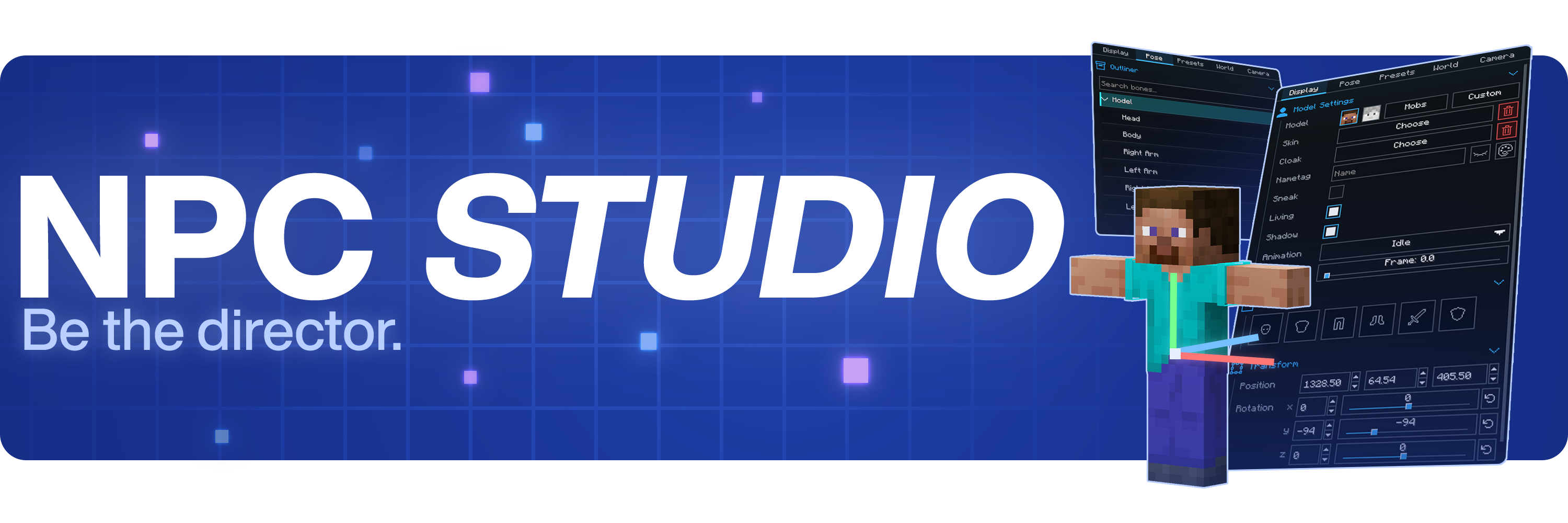


Be the director of your best thumbnail yet.
Stage the shot, pose the characters, control the world, and capture it all inside Minecraft.
Create with control
- Advanced character posing
- Custom mob & item support
- Detailed world and lighting control
- Powerful in-game camera tools
- Pose presets, scene saving, and more
Watch the full showcase
FAQ
Where can I report bugs or suggest features?
Join the Discord at discord.gg/mdh. For bug reports, include your Minecraft version, NPC Studio version, mod loader, what you expected to happen, what actually happened, and any useful logs or screenshots.
How do I import custom models?
Open the model picker, then use the import folder button. NPC Studio supports .bbmodel, .geo.json, and .jar files. For .bbmodel and .geo.json models, place the matching .png texture beside the model file and use the same file name.
How do I share presets?
Open the preset folder from the Presets tab, then share the preset .json file or the folder that contains it. The other person can place it in their config/npcstudio/presets folder and load it from the Presets tab.
How do I make batch screenshots automatically cut out the player?
Install Iris and a WEM cutout-compatible shaderpack, then enable WEM Cutout in the Batch Screenshots screen. If you have more than one compatible shaderpack installed, choose the one you want to use for the cutout pass before running the batch.
Project description from Modrinth.
Pick your setup
NPC Studio by Minecraft version and loader
Choose the version and loader you play, then open the matching release.
Minecraft version
1.20.1
2 loader buildsMinecraft version
1.8.9
1 loader buildCheck the dependencies, then try the file in a copied instance before changing a world you care about.
Recent files
NPC Studio versions and loaders
1.3.5
NPCStudio 1.3.5.jar
26 Jul 2026
Client Required Server Not supported Dependencies No extras listed Listed on Release listing
Check the 1.21.11 · Fabric setup 1.21.11Fabric release
1.3.4
NPCStudio 1.3.4.jar
16 Jul 2026
Client Required Server Not supported Dependencies No extras listed Listed on Release listing
Check the 1.21.11 · Fabric setup 1.21.11Fabric release
1.3.3
NPCStudio 1.3.3.jar
12 Jul 2026
Client Required Server Not supported Dependencies No extras listed Listed on Release listing
Check the 1.21.11 · Fabric setup 1.21.11Fabric release
1.3.2
NPCStudio 1.3.2.jar
29 Jun 2026
Client Required Server Not supported Dependencies No extras listed Listed on Release listing
Check the 1.21.11 · Fabric setup 1.21.11Fabric release
1.3.1
NPCStudio 1.3.1.jar
29 Jun 2026
Client Required Server Not supported Dependencies No extras listed Listed on Release listing
Check the 1.21.11 · Fabric setup 1.21.11Fabric release
1.3.0
NPCStudio 1.3.0.jar
19 Jun 2026
Client Required Server Not supported Dependencies 1 required · 1 unchecked Listed on Release listing
Check the 1.21.11 · Fabric setup 1.21.11Fabric release
1.2.0
NPCStudio 1.2.0.jar
7 Jun 2026
Client Required Server Not supported Dependencies No extras listed Listed on Release listing
Check the 1.21.11 · Fabric setup 1.21.11Fabric release
1.1
NPCStudio 1.1.jar
30 May 2026
Client Required Server Not supported Dependencies 1 required · 1 unchecked Listed on Release listing
Check the 1.21.11 · Fabric setup 1.21.11Fabric release
1.0
NPCStudio 1.0.jar
29 May 2026
Client Required Server Not supported Dependencies 1 required · 1 unchecked Listed on Release listing
Check the 1.21.11 · Fabric setup 1.21.11Fabric release
3.0.0
NewNPC-Mod-fabric-1.20.1-3.0.0.jar
29 Jun 2024
Client Required Server Not supported Dependencies 1 required · 1 unchecked Listed on Release listing
Check the 1.20.1 · Fabric setup 1.20.1Fabric release
3.0.0
NewNPC-Mod-forge-1.20.1-3.0.0.jar
29 Jun 2024
Client Required Server Not supported Dependencies No extras listed Listed on Release listing
Check the 1.20.1 · Forge setup 1.20.1Forge release
2.3
NewNPC mod 2.3 1.20.1.jar
5 Feb 2024
Client Required Server Not supported Dependencies 2 required · 2 unchecked Listed on Release listing
Check the 1.20.1 · Forge setup 1.20.1Forge release
Looking for an older file? The official Modrinth project page is in Resources.
 mod
mod CurseForge + Modrinth · Minecraft
Create: Worldshaper Utilities
An enhanced Create Worldshaper with survival-friendly controls.
 mod
mod CurseForge + Modrinth · Minecraft
Reign of Nether RTS
Minecraft reimagined as a Real Time Strategy game
 mod
mod CurseForge + Modrinth · Minecraft
[TaCZ] Tactical Breaching
TaCZ Tactical Breaching adds realistic breaching, glass damage, bullet shell drop, gun smoke, and much more to tacz!