Mod Menu Needed by Better Potions HUD 1.0+26.3
requiredMatching file found Matched file: 21.0.0

Modrinth · Minecraft mod
Better Potions HUD restores clear, vanilla-style potion effect information on the in-game HUD.
Quick answer
Better Potions HUD 1.0+26.3 targets 26.3 with Fabric. It must be installed on the client. Do not install it on the dedicated server. All 4 required mods have matching files.
Where it goes
It must be installed on the client. Do not install it on the dedicated server.
This file is marked client-only.
1.0+26.3. Change the file and its required mods may change too.
Install Mod Menu, YetAnotherConfigLib (YACL), Fabric API, Text Placeholder API first. We found matching files for this game-version and loader setup. 1 comes through another mod in the chain.
1 extra mod was pulled in by another dependency. Indented rows show who needs each one. We only count dependency files that match this setup. A file for another loader does not fill the gap.
Before you install it
Built for Better Potions HUD 1.0+26.3. Pick another file and the loader, install side or required mods may change.
Use 1.0+26.3. It targets 26.3 with Fabric; another release may have different loader, side or dependency requirements.
Install Mod Menu, YetAnotherConfigLib (YACL), Fabric API, Text Placeholder API first. We found matching files for this game-version and loader setup. 1 comes through another mod in the chain.
It must be installed on the client. Do not install it on the dedicated server.
Use the “Get this file” button beside 1.0+26.3. It opens that exact file at the source.
About this project
Better Potions HUD restores clear, vanilla-style potion effect information on the in-game HUD.
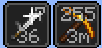
It shows potion timers and amplifier levels directly on the top-right effect icons, while keeping the look and placement close to vanilla Minecraft.
**** amplifier display Ex: /effect give @s minecraft:strength infinite 255 true
Wouldn't show potion hud in top right normally because it has hidden particles set to true
Roman Numbers Enabled

Normal Numbers Enabled
Config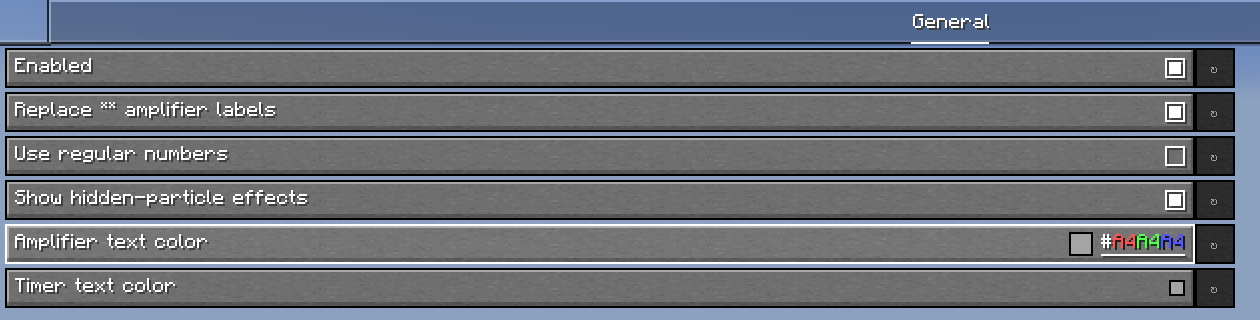
Perfect if you want potion effects to be easier to read without making the HUD feel non-vanilla.
This mod uses FastStats Analytics https://faststats.dev/info
Project description from Modrinth.
Pick your setup
Choose the version and loader you play, then open the matching release.
Check the dependencies, then try the file in a copied instance before changing a world you care about.
Recent files
better-potions-hud-1.0+26.3.jar
20 Sept 2026
better-potions-hud-1.0+26.2.jar
28 Jul 2026
better-potions-hud-1.0+1.21.11.jar
28 Jul 2026
Looking for an older file? The official Modrinth project page is in Resources.
 mod
modScarecrows' Territory keeps spawners activated!
 mod
modIntelligent new animals that make the world livelier
 mod
modServer-side Happy Ghast artillery for Minecraft 26.2 and 26.3, with controls, heat, Cry, and HUDs.