Minecraft version
Back to mods 
Modrinth · Minecraft mod
NeoProtect
NeoProtect is a server-side logging mod that records block changes and player container interactions, allowing server administrators to inspect, look up, and roll back player actions Like CoreProtect. For NeoForge Forge and Fabric.
Choose a version Pick your version below, then grab the matching file.
Quick answer
Which NeoProtect release should I use?
Latest stable file 1.0.5
Game version 1.21.11
Loader NeoForge
NeoProtect 1.0.5 targets 1.21.11 with NeoForge. Do not install it on the client. It must be installed on the dedicated server. No extra mods listed for this file.
Where it goes
Is NeoProtect required on the client, server, or both?
Do not install it on the client. It must be installed on the dedicated server.
Client Not supported
Dedicated server Required
Loader for this release NeoForge
Required install it here Optional supported, not mandatory Not supported do not install here Source doesn’t say do not assume
This file is marked server-only.
What else does NeoProtect 1.0.5 need?
1.0.5. Change the file and its required mods may change too.
This file does not list any required mods. Do not add a library just because a different file uses it.
This file does not list any required or optional mods.
Before you install it
Add NeoProtect without breaking your instance.
Built for NeoProtect 1.0.5. Pick another file and the loader, install side or required mods may change.
- 01
Stick to this file
Use 1.0.5. It targets 1.21.11 with NeoForge; another release may have different loader, side or dependency requirements.
- 02
Bring the mods it needs
This file does not list any required mods. Do not add a library just because a different file uses it.
- 03
Put it on the correct side
Do not install it on the client. It must be installed on the dedicated server.
- 04
Pick the file you checked
Use the “Get this file” button beside 1.0.5. It opens that exact file at the source.
About this project
What does NeoProtect add?
NeoProtect
NeoProtect records what happens on your Minecraft server so you can investigate damage, missing items, and disputes with a clear history. It gives staff in world inspection, searchable logs, and controlled rollback tools. Builds are available for NeoForge, Fabric, and Forge.
What does it record?
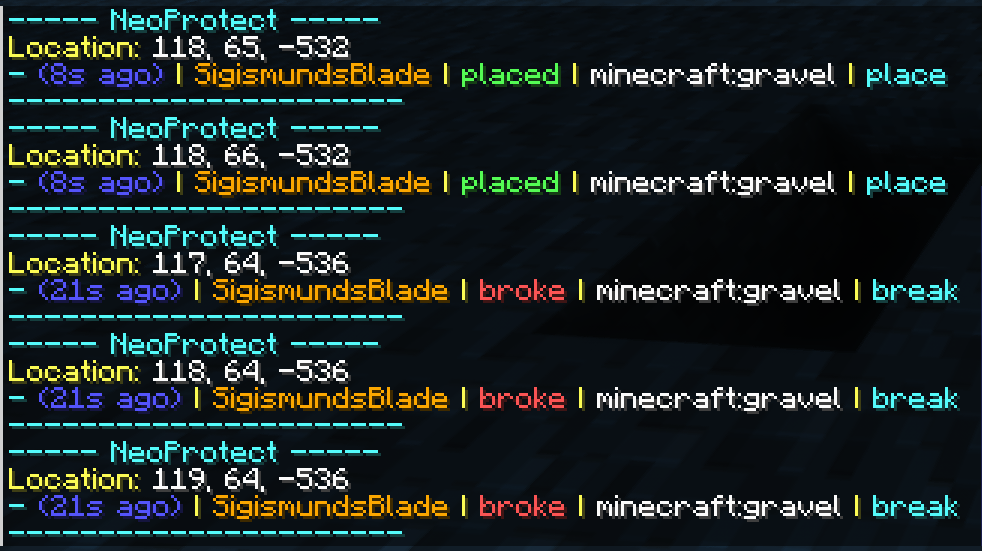
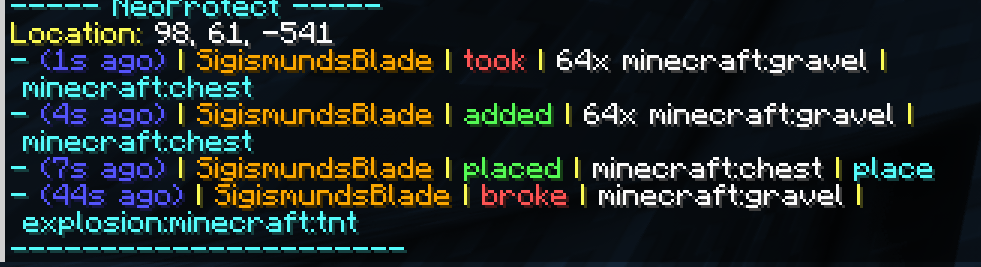
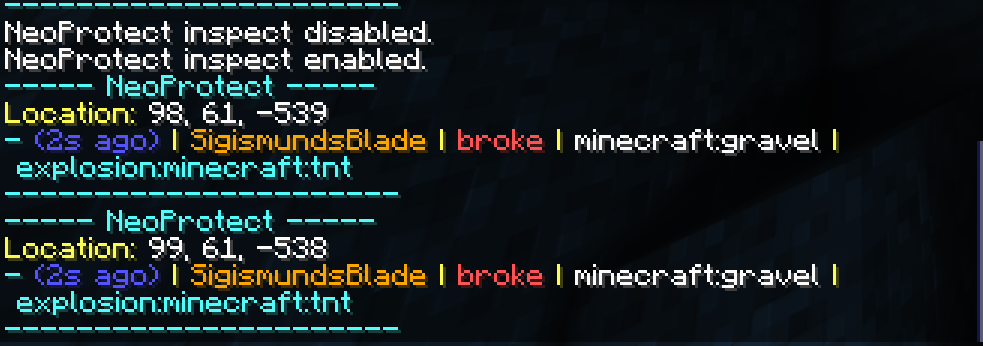
NeoProtect logs block placements, breaks, Items added to or removed from containers, sign edits, explosions, and fire spread. Records include the time and location, with player or cause attribution where the game provides it. History is stored persistently and remains available across restarts until an administrator removes it.
Vanilla containers are supported, along with beta inventory adapters for Sophisticated Storage, Functional Storage, and Tom's Simple Storage. Other mods can integrate through the inventory adapter API.
Find out what happened
Use /np inspect and interact with a block or container to see its history where you are standing. Results have page controls, so older events remain accessible at busy locations.
For a wider investigation, /np search looks through recorded activity across dimensions. /np player shows one player's activity, and /np signs finds sign edits. Search results support time ranges and filters for players, actions, targets, locations, and pages. Click a result's coordinates to teleport to it.
Every /np command also works with /neoprotect, and common command arguments have tab completion.
Repair damage with a preview
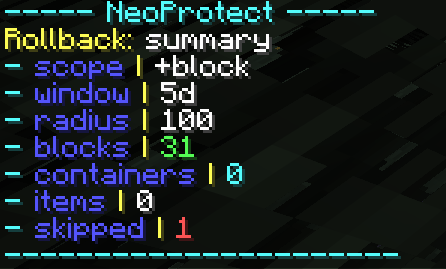
/np rollback shows what would change before anything is applied, including affected blocks and container items. Confirm or cancel the preview in chat. You can choose block or container changes, select the direction of a rollback, and include or exclude particular block or item IDs. For example, blocks,e:water leaves water out of a block rollback. Administrators can undo their own recent rollbacks with /np undo.
Storage and setup
NeoProtect uses an embedded H2 database by default and writes logs asynchronously. Servers that use MariaDB or MySQL can configure a remote database and migrate existing H2 history. CSV export and retention controls are also available to administrators.
Install the jar that matches your Minecraft version and loader on the server. Fabric builds require Fabric API. Players do not need to install NeoProtect on their clients.
Screenshots
Block history
Container history
Rollback records
Explosion history
Need help?
Join the NeoProtect Discord for setup help, questions, and bug reports. If something is not being logged or a server fails to start, include your Minecraft version, loader and loader version, NeoProtect version, and the relevant server log. For inventory issues, include the name and version of the storage mod too.
Project description from Modrinth.
Pick your setup
NeoProtect by Minecraft version and loader
Choose the version and loader you play, then open the matching release.
Minecraft version
1.21.10
3 loader buildsMinecraft version
1.21.9
3 loader buildsMinecraft version
1.21.8
3 loader buildsMinecraft version
1.21.7
3 loader buildsMinecraft version
1.21.6
3 loader buildsMinecraft version
1.21.5
3 loader buildsMinecraft version
1.21.4
3 loader buildsMinecraft version
1.21.3
3 loader buildsMinecraft version
1.21.2
2 loader buildsMinecraft version
1.21.1
3 loader buildsCheck the dependencies, then try the file in a copied instance before changing a world you care about.
Recent files
NeoProtect versions and loaders
1.0.6-beta.2
neoprotect-1.0.6-beta.2-mc1.21.11-forge.jar
25 Oct 2026
Client Not supported Server Required Dependencies No extras listed Listed on Release listing
Check the 1.21.11 · Forge setup 1.21.11Forge beta
1.0.6-beta.2
neoprotect-1.0.6-beta.2-mc1.21.10-forge.jar
25 Oct 2026
Client Not supported Server Required Dependencies No extras listed Listed on Release listing
Check the 1.21.10 · Forge setup 1.21.10Forge beta
1.0.6-beta.2
neoprotect-1.0.6-beta.2-mc1.21.9-forge.jar
25 Oct 2026
Client Not supported Server Required Dependencies No extras listed Listed on Release listing
Check the 1.21.9 · Forge setup 1.21.9Forge beta
1.0.6-beta.2
neoprotect-1.0.6-beta.2-mc1.21.8-forge.jar
25 Oct 2026
Client Not supported Server Required Dependencies No extras listed Listed on Release listing
Check the 1.21.8 · Forge setup 1.21.8Forge beta
1.0.6-beta.2
neoprotect-1.0.6-beta.2-mc1.21.7-forge.jar
25 Oct 2026
Client Not supported Server Required Dependencies No extras listed Listed on Release listing
Check the 1.21.7 · Forge setup 1.21.7Forge beta
1.0.6-beta.2
neoprotect-1.0.6-beta.2-mc1.21.6-forge.jar
25 Oct 2026
Client Not supported Server Required Dependencies No extras listed Listed on Release listing
Check the 1.21.6 · Forge setup 1.21.6Forge beta
1.0.6-beta.2
neoprotect-1.0.6-beta.2-mc1.21.5-forge.jar
25 Oct 2026
Client Not supported Server Required Dependencies No extras listed Listed on Release listing
Check the 1.21.5 · Forge setup 1.21.5Forge beta
1.0.6-beta.2
neoprotect-1.0.6-beta.2-mc1.21.4-forge.jar
25 Oct 2026
Client Not supported Server Required Dependencies No extras listed Listed on Release listing
Check the 1.21.4 · Forge setup 1.21.4Forge beta
1.0.6-beta.2
neoprotect-1.0.6-beta.2-mc1.21.3-forge.jar
25 Oct 2026
Client Not supported Server Required Dependencies No extras listed Listed on Release listing
Check the 1.21.3 · Forge setup 1.21.3Forge beta
1.0.6-beta.2
neoprotect-1.0.6-beta.2-mc1.21.1-forge.jar
25 Oct 2026
Client Not supported Server Required Dependencies No extras listed Listed on Release listing
Check the 1.21.1 · Forge setup 1.21.1Forge beta
1.0.6-beta.2
neoprotect-1.0.6-beta.2-mc1.21.11-neoforge.jar
25 Oct 2026
Client Not supported Server Required Dependencies No extras listed Listed on Release listing
Check the 1.21.11 · NeoForge setup 1.21.11NeoForge beta
1.0.6-beta.2
neoprotect-1.0.6-beta.2-mc1.21.10-neoforge.jar
25 Oct 2026
Client Not supported Server Required Dependencies No extras listed Listed on Release listing
Check the 1.21.10 · NeoForge setup 1.21.10NeoForge beta
Looking for an older file? The official Modrinth project page is in Resources.
 mod
CurseForge + Modrinth · Minecraft
Moving Elevators
Moving Elevators adds real Elevators to Minecraft!
 mod
CurseForge + Modrinth · Minecraft
Book of Familiars
A simple mod to add the Familiar Book, an item that allows players to store and release their tamed creatures.
 mod
Modrinth · Minecraft
KFFA Tabicons
Client-side mod that replaces colored rank stars with custom icons in chat, tab list, and nametags. Createt for MixelPixel