Minecraft version
Back to mods 
Modrinth · Minecraft mod
Hardcore Revive+
A highly configurable data pack that lets you revive your friends in Hardcore mode.
Choose a version Pick your version below, then grab the matching file.
Quick answer
Which Hardcore Revive+ release should I use?
Latest stable file 1.12.0+26.2
Game version 26.2
Loader datapack
Hardcore Revive+ 1.12.0+26.2 targets 26.2 with datapack. Installation on the client is optional. Installation on the dedicated server is optional. No extra mods listed for this file.
Where it goes
Is Hardcore Revive+ required on the client, server, or both?
Installation on the client is optional. Installation on the dedicated server is optional.
Client Optional
Dedicated server Optional
Loader for this release datapack
Required install it here Optional supported, not mandatory Not supported do not install here Source doesn’t say do not assume
The source marks this as usable on both the client and server.
What else does Hardcore Revive+ 1.12.0+26.2 need?
1.12.0+26.2. Change the file and its required mods may change too.
This file does not list any required mods. Do not add a library just because a different file uses it.
This file does not list any required or optional mods.
Before you install it
Add Hardcore Revive+ without breaking your instance.
Built for Hardcore Revive+ 1.12.0+26.2. Pick another file and the loader, install side or required mods may change.
- 01
Stick to this file
Use 1.12.0+26.2. It targets 26.2 with datapack; another release may have different loader, side or dependency requirements.
- 02
Bring the mods it needs
This file does not list any required mods. Do not add a library just because a different file uses it.
- 03
Put it on the correct side
Installation on the client is optional. Installation on the dedicated server is optional.
- 04
Pick the file you checked
Use the “Get this file” button beside 1.12.0+26.2. It opens that exact file at the source.
About this project
What does Hardcore Revive+ add?
This project is the official community-maintained continuation of Hardcore Revive+, developed with permission from the original author (StapleTT).
Hardcore Revive+
Development Status
Hardcore Revive+ is now community maintained.
The latest stable release is v1.11.7 for Minecraft 26.1.2 and v1.12.0 for Minecraft 26.2 and is available as both, a traditional datapack and as a datapack packaged inside a mod.
Development is currently focused on keeping Hardcore Revive+ compatible with future Minecraft versions while also continuing work on the standalone Fabric mod port.
The standalone Fabric mod is a long-term project and is currently intended for development and testing. It should not yet be considered production ready until an official stable release has been announced.
Project Status
Hardcore Revive+ was originally created by StapleTT.
With the author's permission, development continues to keep Hardcore Revive+ compatible with newer Minecraft versions while preserving the original gameplay experience.
The goal of this continuation is not to replace the original project, but to continue maintaining and improving it while remaining as compatible as possible with existing worlds and servers.
Alongside the original datapack, development is also ongoing for an optional standalone Fabric mod. The standalone mod allows features, compatibility improvements and optimizations that cannot easily be implemented inside a datapack while still keeping the original gameplay intact.
The original Discord server remains available for the existing Hardcore Revive+ community.
Need Help?
Join our Discord:
Bug reports, feature requests and development discussions are handled through the GitHub Issues page:
https://github.com/suerion/hardcore-revive-plus/issues
What is Hardcore Revive+?
Are you tired of vanilla Minecraft death mechanics?
Maybe respawning infinitely feels too easy, but Hardcore mode with only one life is too punishing.
Hardcore Revive+ introduces a fully configurable lives system that allows every server or world to choose its own balance between survival, cooperation and difficulty.
Players receive a configurable number of lives.
After losing their final life they become a Ghost instead of immediately leaving the world forever.
Ghosts can still interact with other players in various ways until they are revived.
Depending on the selected settings players can:
- revive each other
- automatically revive after a configurable delay
- regain lives through Life Jam
- steal lives from other players
- spectate and assist living players
Everything is configurable through an in-game menu.
Key Features
- Configurable lives system.
- Ghost gameplay after losing the final life.
- Soul Charm revival system.
- Life Jam item for restoring lives.
- Optional Lifesteal support.
- Optional automatic revival.
- Configurable ghost spawn locations.
- Configurable automatic revive spawn locations.
- Configurable difficulty behaviour.
- Dedicated Hardcore Revive+ server spawn.
- Vanilla respawn compatibility.
- Works both as a datapack and as a datapack packaged inside a mod.
Ghost Gameplay
After a player loses their final life they become a Ghost.
Ghosts are spectators that remain part of the world instead of permanently dying.
Ghosts can:
- freely spectate the world
- keep chunks loaded
- possess living players (optional)
- wait for another player to revive them
- automatically revive if Auto Revive is enabled
This creates a multiplayer experience that encourages teamwork instead of permanently removing players from the server.
Revival System
Players can revive Ghosts by crafting a Soul Charm.
Dropping the Soul Charm allows a Ghost to consume it and return to life.
The amount of lives restored is fully configurable.
Optionally, temporary debuffs can be applied after crafting a Soul Charm and after being revived.
Life Jam
Life Jam allows players to regain lost lives without dying again.
Servers can freely enable or disable Life Jam crafting.
The maximum amount of lives can never exceed the configured limit.
Lifesteal
When enabled, defeating another player grants an additional life.
This feature is completely optional and can be enabled or disabled at any time.
Auto Revive
Ghosts can automatically revive after a configurable amount of time.
The revival timer can be adjusted through the in-game configuration menu.
The location where automatically revived players appear is also fully configurable.
Ghost Spawn
Hardcore Revive+ allows you to configure where players appear after losing their final life.
Available Ghost Spawn Modes
Server Spawn
Ghosts appear at the dedicated Hardcore Revive+ server spawn.
This spawn point is completely independent from Minecraft's vanilla world spawn and can be changed at any time.
Nearest Living Player
Ghosts appear close to the nearest living player.
This option is especially useful on multiplayer servers where players frequently travel together.
Vanilla Spawn
Ghosts respawn at their normal Minecraft spawn location.
This follows vanilla mechanics and respects:
- Beds
- Respawn Anchors
- World Spawn
Death Location
Ghosts appear exactly where they lost their final life.
Auto Revive Spawn
Automatically revived players can appear at a different location than Ghosts.
Available options include:
- Vanilla Spawn
- Hardcore Revive+ Server Spawn
- Death Location
This allows servers to create very different gameplay styles depending on their preferred difficulty.
Vanilla Respawn Compatibility
One of the major goals of Hardcore Revive+ is preserving vanilla Minecraft behaviour whenever possible.
When a player loses their final life, Hardcore Revive+ internally tracks the normal vanilla death and respawn process before transforming the player into a Ghost.
Because of this, vanilla mechanics continue to function correctly, including:
- Beds
- Respawn Anchors
- Spawn Point handling
- Death location tracking
- Vanilla respawn logic
This makes Hardcore Revive+ significantly more compatible with vanilla gameplay than simply replacing Minecraft's death mechanics.
Configuration
All settings can be configured through the in-game menu.
Open it using:
/trigger _hcrplus_settings
New worlds automatically prompt players to configure the datapack during the first startup.
Lives
Max Lives
Choose how many lives every player starts with.
Available values:
- 1
- 3
- 5
Lives on Revival
Choose how many lives are restored after a successful revival.
Options include:
- One Life
- Half of Maximum Lives
- Maximum Lives
Name Colors
Player names can automatically change color depending on their remaining lives.
This allows players to quickly recognize who is close to their final life.
Lives in Tab List
Displays each player's remaining lives inside the player list.
Possession
Ghosts may spectate living players and provide temporary buffs.
This feature can be enabled or disabled independently.
Lifesteal
When enabled, defeating another player grants an additional life.
Auto Revive
Automatically revives Ghosts after a configurable delay.
Auto Revive Timer
Configure how long Ghosts remain dead before automatically reviving.
World
Difficulty Mode
Hardcore Revive+ can either respect Minecraft's current difficulty or override it.
Available options:
- Respect Server Difficulty
- Easy
- Normal
- Hard
Items
Soul Charm
Disables crafting of Soul Charms.
Existing Soul Charms will split back into their crafting ingredients when dropped.
Life Jam
Disables crafting of Life Jam.
Existing Life Jam items split back into their crafting ingredients when consumed.
Soul Charm Debuffs
Applies configurable debuffs after:
- Crafting a Soul Charm
- Being revived
Announce Revives
Broadcasts a global chat message whenever a player is revived.
Debug Menu
The built-in debug menu allows administrators to quickly test Hardcore Revive+ without crafting items.
Available options:
- Give Soul Charm
- Give Life Jam
Recipes
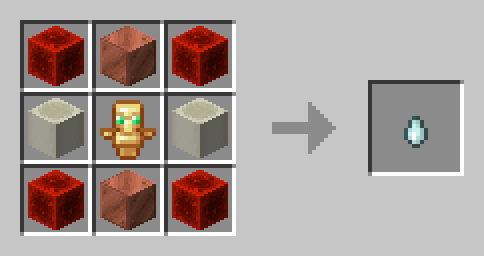
Soul Charm
The Soul Charm is the primary item used to revive Ghosts.
Once crafted, simply drop the Soul Charm on the ground.
A Ghost can collect the Soul Charm to immediately revive.
Soul Charm Recipe
Life Jam
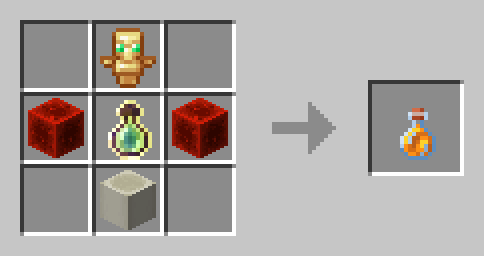
Life Jam restores lost lives without requiring another player to revive you.
This recipe can be disabled through the configuration menu.
Life Jam Recipe
Compatibility
Hardcore Revive+ aims to stay compatible with vanilla Minecraft while providing good compatibility with mods whenever possible.
Because Hardcore Revive+ intentionally processes a normal vanilla player death before converting a player into a Ghost, some mods may react to that death event.
Most mods work without any additional configuration.
Gravestone Mods
Hardcore Revive+ intentionally performs a normal vanilla respawn when a Ghost is revived. This ensures that vanilla mechanics such as beds, respawn anchors, spawn points and other respawn-related systems continue to function correctly.
Some gravestone mods hook into Minecraft's death and respawn events. During Hardcore Revive+'s internal vanilla respawn sequence, they may incorrectly create a gravestone even though the player is simply being revived.
HCRPlus Compatibility
HCRPlus Compatibility is an optional compatibility mod that prevents supported gravestone mods from creating a gravestone during Hardcore Revive+'s internal vanilla respawn sequence.
It does not:
- restore inventories
- transfer inventories
- modify player items
- replace gravestone mods
Its only purpose is to prevent supported gravestone mods from creating an unwanted gravestone during Hardcore Revive+'s internal revival sequence.
Mod Compatibility
The long-term goal is to provide compatibility modules instead of modifying Hardcore Revive+ itself whenever possible.
This keeps the main project lightweight while allowing support for additional mods through optional integrations.
Incompatibilities
The following are currently known to be incompatible:
- Vanilla Hardcore Mode
- Any "Unlock all recipes" datapack
- Essential Mod
- WorldGameRules
If you discover another incompatibility, please report it through the GitHub Issues page.
Removal
To completely uninstall Hardcore Revive+, execute the following command:
/function hcrplus:_uninstall
After running the uninstall function, remove Hardcore Revive+ from either:
- the
datapacksfolder
or
- the
modsfolder
before loading the world again.
Reporting Issues
If you encounter a bug, please include as much information as possible.
Useful information includes:
- Minecraft version
- Loader version
- Hardcore Revive+ version
- Installed mods
- Server or Singleplayer
- Crash report
- Latest log
- Steps required to reproduce the issue
Bug reports can be submitted through GitHub Issues.
Credits
Original Project
StapleTT
Community Maintenance
Suerion
Special thanks to everyone who continues testing new Minecraft versions, reporting bugs and helping improve Hardcore Revive+.
License
This project continues development of the original Hardcore Revive+ with permission from the original author.
Please respect the original project, contributors and license when redistributing or modifying this project.
Project description from Modrinth.
Pick your setup
Hardcore Revive+ by Minecraft version and loader
Choose the version and loader you play, then open the matching release.
Minecraft version
26.1.2
5 loader buildsCheck the dependencies, then try the file in a copied instance before changing a world you care about.
Recent files
Hardcore Revive+ versions and loaders
1.12.0+26.2
Hardcore.Revive+-1.12.0+26.2.zip
4 Aug 2026
Client Optional Server Optional Dependencies No extras listed Listed on Release listing
Check the 26.2 · datapack setup 26.2datapack release
1.11.7+26.1.2
Hardcore.Revive+-1.11.7+26.1.2.zip
4 Aug 2026
Client Optional Server Optional Dependencies No extras listed Listed on Release listing
Check the 26.1.2 · datapack setup 26.1.2datapack release
1.12.0+26.2
hardcore-revive-plus-datapackmod-1.12.0+26.2.jar
4 Aug 2026
Client Optional Server Optional Dependencies No extras listed Listed on Release listing
Check the 26.2 · Fabric setup 26.2FabricForgeNeoForge release
1.11.7+26.1.2
hardcore-revive-plus-datapackmod-1.11.7+26.1.2.jar
3 Aug 2026
Client Optional Server Optional Dependencies No extras listed Listed on Release listing
Check the 26.1.2 · Fabric setup 26.1.2FabricForgeNeoForge release
Looking for an older file? The official Modrinth project page is in Resources.
 mod
mod CurseForge + Modrinth · Minecraft
Safra
Don’t mess with the server Play Minecraft with your friends in 2 clicks
 mod
mod CurseForge + Modrinth · Minecraft
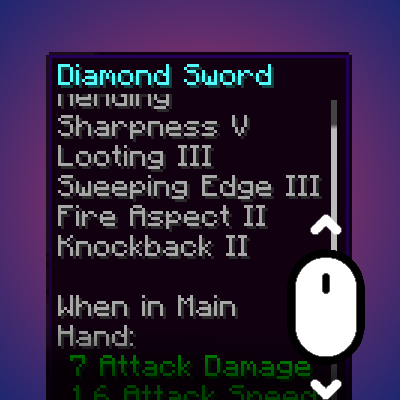
Smart Tooltip Scroll
Dynamically resizes and scrolls oversized tooltips while keeping the item title anchored.
 mod
mod CurseForge + Modrinth · Minecraft
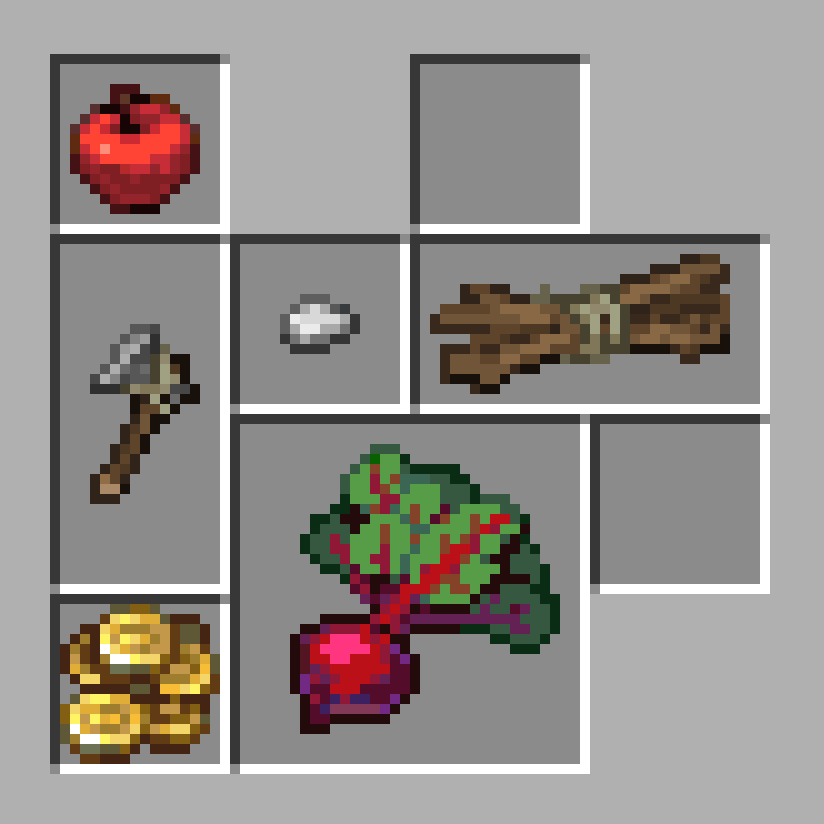
Petite Inventory
Provides a Resident Evil 4 / Diablo–style inventory layout, where a single item can occupy multiple slots, and adjusts the corresponding replacement and transfer operations.