Unified API Needed by Item Tooltips 26.2-r1.0-fabric
requiredMatching file found Matched file: 26.2-r2.5-fabric

Modrinth · Minecraft mod
Provides incredibly configurable tooltips for durability, attributes and item / enchantment descriptions alongside full tooltip wrapping.
Quick answer
Item Tooltips 26.2-r1.0-fabric targets 26.2 with Fabric. Installation on the client is optional. Installation on the dedicated server is optional. All 2 required mods have matching files.
Where it goes
Installation on the client is optional. Installation on the dedicated server is optional.
The source marks this as usable on both the client and server.
26.2-r1.0-fabric. Change the file and its required mods may change too.
Install Unified API, Cloth Config API first. We found matching files for this game-version and loader setup.
We only count dependency files that match this setup. A file for another loader does not fill the gap.
Before you install it
Built for Item Tooltips 26.2-r1.0-fabric. Pick another file and the loader, install side or required mods may change.
Use 26.2-r1.0-fabric. It targets 26.2 with Fabric; another release may have different loader, side or dependency requirements.
Install Unified API, Cloth Config API first. We found matching files for this game-version and loader setup.
Installation on the client is optional. Installation on the dedicated server is optional.
Use the “Get this file” button beside 26.2-r1.0-fabric. It opens that exact file at the source.
About this project
The goal of Item Tooltips is to be the most comprehensive solution to common player, modpack and mod developer needs in regards to tooltips. Therefore, a substantial variety of new tooltip features are contained within this mod - from durability, to attributes, to custom item descriptions, to enchantment descriptions and more. Item Tooltips places a significant emphasis on configurability, allowing you to easily create custom visual styles for each feature to an extent often not provided by other projects, through custom colors, text styles and more which can be changed individually per-feature.
Oh, and we have configurable tooltip wrapping to accomodate the above, too.
Durability Tooltips
Item Tooltips has simply configurable durability tooltips, which show the current and max durability based on the configuration style you've selected. The color for the tooltip can be changed to whatever you desire, and the durability number itself pulls its color straight from the vanilla durability bar for consistency.
Mining Speed
By default, a green attribute tooltip is added for tool mining speed, matching the attack damage and attack speed tooltips present in vanilla. Whilst we are able to filter out most items which shouldn't have the tooltip, there is an additional item tag (#item_tooltips:hidden_mining_speed) which can be used to blacklist provided items from displaying a mining speed.

Adding Item Descriptions
Simply add any blocks / items you'd like to add descriptions to to the #item_tooltips:has_description tag. The translation keys simply add a ".desc" onto the end of the original item name, as with other existing enchantment description mods.
For example, the description translation key for the Totem of Undying, if tagged in #item_tooltips:has_description, would be item.minecraft.totem_of_undying.desc
It is important to note that this feature does nothing on its own without a modpack or mod developer using it themselves - the above GIF is simply an example.
Blacklisting Item Descriptions
Any item added to the item tag #item_tooltips:util/description_blacklist will be excluded from having a description, regardless of other tags. Particularly useful for modpack developers.
Removing Shift Notices
Any item added to the item tag #item_tooltips:util/no_shift_notice will not have a shift notice, regardless of the mod config. This is particularly useful for adding tooltips to items which already have a shift notice added by another mod.
Details on description configuration options can be found further below.
Use in Modpacks
Item Tooltips can serve as a handy utility mod for modpack development. Simply add any items you want to the tag, write a translation, and you're good to go! For this purpose, I'd suggest a mod such as Simple Resource Loader in order to load your custom data/resources.
An example datapack and resourcepack format can be found here.
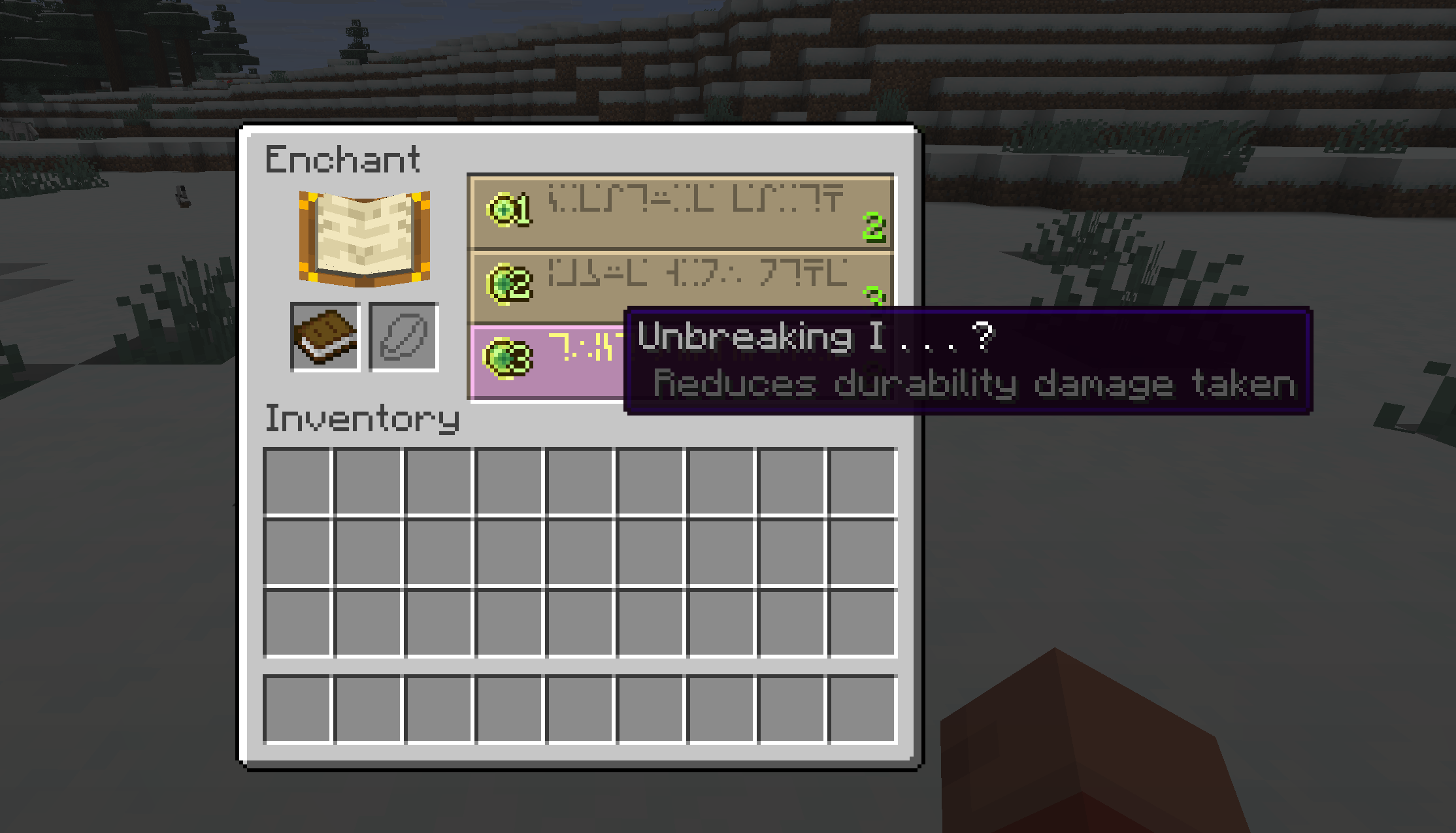
Comes with enchantment descriptions for all vanilla enchantments, and uses the common enchantment.namespace.item_name.desc language key, which means many modded enchantments will work out-of-the-box.
Unlike many other enchantment description mods, Item Tooltips applies its tooltips to both the item and the enchanting table screen.
As with all other modules of this project, enchantment descriptions are fully configurable, including colors, prefixes and more.
Item Tooltips adds text wrapping (ported from Adaptive Tooltips / Better Tooltips), which automatically moves descriptions to the next line should text get too long.
Details on tooltip configuration options can be found further below.
Item Tooltips has a configuration file located at config/item_tooltips.json5
If Mod Menu is installed on Fabric, you can also edit the config file in-game.
Items
enum DurabilityTooltip {
  ALWAYS, // always shows the tooltip
  DAMAGED, // only shows the tooltip when the item is not at full durability
  HOLD_KEY, // only shows the tooltip when the specified key is held
  NONE // disables the feature entirely
}
durability.durability_tooltip - defaults to ALWAYS. How durability should be shown, as according to the DurabilityToolip enum
durability.max_durability_tooltip - defaults to DAMAGED. How max durability should be shown, as according to the DurabilityToolip enum
durability.division_text - defaults to /. What should be put in the interval between current and max durability
durability.color - defaults to 11184810. The color to be used for the durability tooltip - with the sole exception of the current durability number, which uses the durability bar color
mining_speed_tooltip - whether the mining speed tooltip should be shown. This uses the same style as vanilla's attack damage and attack speed tooltips. Defaults to true
Descriptions
add_descriptions - defaults to true. Dictates whether item descriptions are added to tagged blocks / items. This can be disabled should you only want the tooltip wrapping functionality.
require_key_hold - defaults to true. Indicates whether or not the set key must be held for item descriptions to be shown.
key_hold_notice - defaults to true. Indicates whether or not there should be a small tooltip indicating to the player to hold the shift key on items with a description.
color - the decimal colour value of displayed tooltips. The default value is 5592405
prefix.text - empty by default, the contents of this string are added before any description, for example, this could be used to add indentation or a plus symbol before all item descriptions.
prefix.align_wrapped_text - defaults to true. Whether wrapped text lines should line up with the set prefix
prefix.color - the decimal color value of displayed tooltip prefixes. The default value is 13027014
If you'd like help picking colors, a good hexadecimal to decimal converter can be found here.
Enchantments
enchantment_descriptions - defaults to true. Dictates whether enchantment descriptions are added to all enchanted items.
enchanting_table_descriptions - defaults to true. Dictates whether enchantment descriptions are added to enchantments in the enchanting table. These show up regardless of whether the player is holding shift, and are not affected by the auto_disable option.
auto_disable - defaults to true. Dictates whether enchantment descriptions for items should be automatically disabled if another mod which adds enchantment descriptions is detected.
require_key_hold - defaults to true. Indicates whether or not the set key must be held for enchantment descriptions to be shown.
key_hold_notice - defaults to true. Indicates whether or not there should be a small tooltip indicating to the player to hold the shift key on enchanted items.
color - the decimal colour value of displayed enchantment tooltips. The default value is 5592405
prefix.text - by default a simple " ", the contents of this string are added before all enchantment descriptions.
prefix.align_wrapped_text - defaults to true. Whether wrapped text lines should line up with the set prefix
prefix.color - the decimal color value of displayed enchantment tooltip prefixes. The default value is 13027014
If you'd like help picking colors, a good hexadecimal to decimal converter can be found here.
Tooltips
required_key - defaults to SHIFT. Determines what key must be held to show related tooltips. Can be either SHIFT, ALT or CTRL
wrap_text - defaults to true. Whether text should be wrapped. You can disable this if you have another mod which handles text wrapping.
retain_empty_space - whether a fix should be applied to force the vanilla tooltip space to not disappear. Defaults to true
length - a static number value which dictates the maximum length of a tooltip before wrapping. When disabled, wrapping relies solely on the length cap. Defaults to -1
length_cap - the percentage length of the game window a tooltip will cover before wrapping. This also serves to cap the static length config value, should it get too long. Defaults to 50
You may depend on / integrate with Item Tooltips within your own projects. Make sure to change the version number and modloader to the correct ones in your gradle.properties
build.gradle
repositories {
	maven { url = "https://api.modrinth.com/maven" }
}
dependencies {
	modImplementation("maven.modrinth:item-tooltips:$tooltips_version")
}
gradle.properties
tooltips_version=26.1-r2.0-fabric
Project description from Modrinth.
Pick your setup
Choose the version and loader you play, then open the matching release.
Showing the newest 12 of 16 game versions. Older files are in the list below.
Check the dependencies, then try the file in a copied instance before changing a world you care about.
Recent files
item-tooltips-26.2-r1.0-fabric.jar
4 Aug 2026
item-tooltips-26.2-r1.0-neoforge.jar
4 Aug 2026
item-tooltips-26.1-r2.3-fabric.jar
27 Apr 2026
item-tooltips-26.1-r2.3-neoforge.jar
27 Apr 2026
item-tooltips-26.1-r2.2-fabric.jar
25 Apr 2026
item-tooltips-26.1-r2.2-neoforge.jar
25 Apr 2026
item-tooltips-26.1-r2.1-fabric.jar
22 Apr 2026
item-tooltips-26.1-r2.1-neoforge.jar
22 Apr 2026
item-tooltips-26.1-r2.0-fabric.jar
21 Apr 2026
item-tooltips-26.1-r2.0-neoforge.jar
21 Apr 2026
item-tooltips-26.1-r1.2-fabric.jar
5 Apr 2026
item-tooltips-26.1-r1.2-neoforge.jar
5 Apr 2026
Looking for an older file? The official Modrinth project page is in Resources.
 mod
modA mod which adds elements from the Kingdom Hearts games
 mod
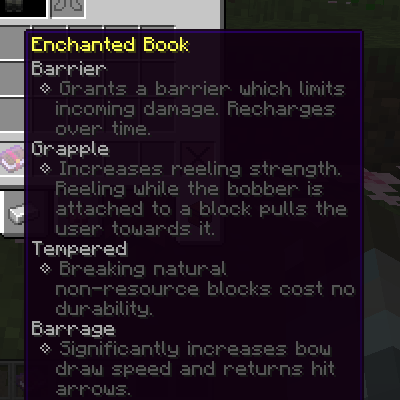
modChanges enchanting and anvil mechanics. Adds new enchantments and reworks some existing ones.
 mod
modAn improved ConsoleFilter mod for Forge, Fabric, and NeoForge that filters log messages by text, regex, log level, thread, source, and mod id. Reduce console noise and focus on what matters — ideal for debugging modpacks and dedicated servers.