Forge Config API Port Needed by Better Compatibility Checker 21.3.1
requiredMatching file found Matched file: v21.4.3-1.21.4-Fabric

Modrinth · Minecraft mod
Changes the default server compatibility check to compare modpack versions
Quick answer
Better Compatibility Checker 21.3.1 targets 1.21.3, 1.21.4, 1.21.5 with Fabric. Installation on the client is optional. Installation on the dedicated server is optional. 1 required mod needs a matching file.
Where it goes
Installation on the client is optional. Installation on the dedicated server is optional.
The source marks this as usable on both the client and server.
21.3.1 on 1.21.4 Fabric. Every mod below is checked against that same setup.
Install Forge Config API Port, Fabric API first, but 1 required mod has no matching file for this setup. Do not mix loader builds to force a match. 1 comes through another mod in the chain.
1 extra mod was pulled in by another dependency. Indented rows show who needs each one. We only count dependency files that match this setup. A file for another loader does not fill the gap.
Before you install it
Built for Better Compatibility Checker 21.3.1 on 1.21.4 Fabric. Pick another file and the loader, install side or required mods may change.
Use 21.3.1. It targets 1.21.3, 1.21.4, 1.21.5 with Fabric; another release may have different loader, side or dependency requirements.
Install Forge Config API Port, Fabric API first, but 1 required mod has no matching file for this setup. Do not mix loader builds to force a match. 1 comes through another mod in the chain.
Installation on the client is optional. Installation on the dedicated server is optional.
Use the “Get this file” button beside 21.3.1. It opens that exact file at the source.
About this project
The forge server compatibility checker is not always accurate and can cause some issues with end-users of a modpack when they add a server, and it shows up as not compatible.
This mod fixes that issue when used by modpacks, as it will compare the modpack project ID and the modpack version ID set in a config file by the modpack author and display a tick if they match or an X if they do not match.
Both server and client are running the same version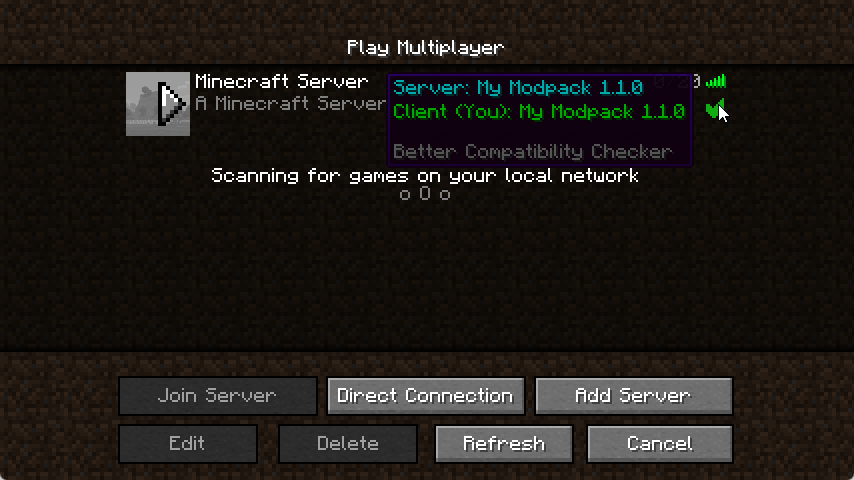
Incompatible server or client version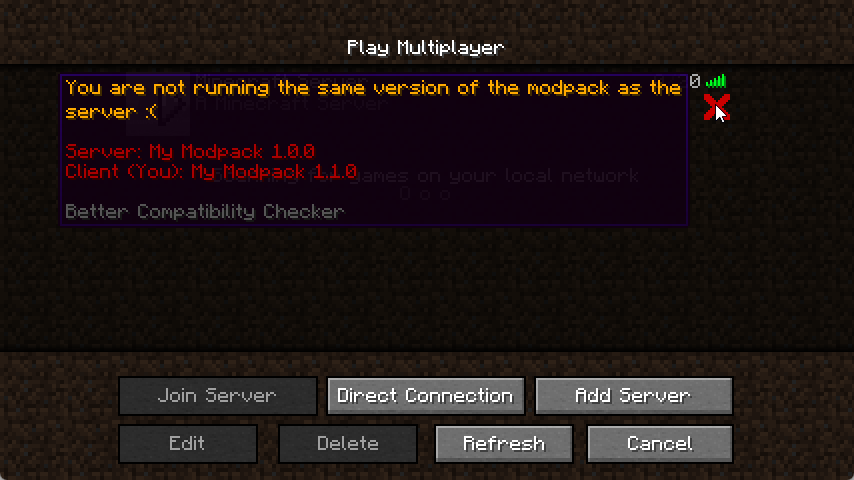
It's simple to configure the mod, first, you will need to open the bcc-common.toml in the config folder, then you will need to set the modpack name and the modpack version, click save, and you're done.
Just remember to update the version when you update the modpack.
Note: Fabric config is named bcc.json
This mod will check if the data needed is set first and if it's not it will fall back to using the default forge implementation
All Rights Reserved unless stated otherwise. Distribution permission is given to FeedTheBeast for use in modpacks
Project description from Modrinth.
Pick your setup
Choose the version and loader you play, then open the matching release.
Showing the newest 12 of 28 game versions. Older files are in the list below.
Check the dependencies, then try the file in a copied instance before changing a world you care about.
Recent files
better-compatability-checker-fabric-21.3.1.jar
1 Jan 2026
Looking for an older file? The official Modrinth project page is in Resources.
 mod
modMinecraft mod to fix long-standing FPS stability issues.
 mod
modReal-time map used for mapping in-game or your browser as you explore.
 mod
modA completely server-side fabric mod that allows you to record replays for replay mod or flashback.