Create Needed by Create: Missions 0.5.2
requiredMatching file found Matched file: 6.0.10+mc1.21.1

Modrinth · Minecraft mod
Economy for servers, by daily weekly missions and physical currency!
Quick answer
Create: Missions 0.5.2 targets 1.21.1 with NeoForge. Installation on the client is optional. Installation on the dedicated server is optional. All 1 required mods have matching files.
Where it goes
Installation on the client is optional. Installation on the dedicated server is optional.
The source marks this as usable on both the client and server.
0.5.2. Change the file and its required mods may change too.
Install Create first. We found matching files for this game-version and loader setup.
We only count dependency files that match this setup. A file for another loader does not fill the gap.
Before you install it
Built for Create: Missions 0.5.2. Pick another file and the loader, install side or required mods may change.
Use 0.5.2. It targets 1.21.1 with NeoForge; another release may have different loader, side or dependency requirements.
Install Create first. We found matching files for this game-version and loader setup.
Installation on the client is optional. Installation on the dedicated server is optional.
Use the “Get this file” button beside 0.5.2. It opens that exact file at the source.
About this project

Create: Missions is a Create addon focused for Create mod servers. It will also work in singleplayers worlds, but it's designed to bring an economy throughout a server's lifetime. We hope to give server owners a better way of giving players a currency, while also encouraging players to build their own shop contraptions/exchange banks/banks.
It works by giving 10 random missions per player per week. These missions can be vanilla missions like "Break X Veridium" or Create mod related like "Drive a train for 4 km with at least 2 passengers". You can also reroll the missions, and claim prices by completing them.
Open the mission GUI pressing H key (by default) or using /missions command
As time goes on, more missions will be added. Some missions can have lots of variation like breaking a block, while others are simpler like walking.
There are in total 16 Mission Types that use Create-related mechanics.
cut, compact, sail, craft, ride, harvester, train-driver-passenger, crush, eat, train-passenger, place, dive, press, mix, train-driver, break, saw, kill, drill, drink, mill, minecart, fly, relocate, fish, walk, swim, feed, belt-walk
Select the currencies and their exchange in config\missions\currency.json
As an example with Create: Numismatics it would look like this:
[
  {"numismatics:spur": "8"},
  {"numismatics:bevel": "2"},
  {"numismatics:sprocket": "4"},
  {"numismatics:cog": "8"},
  {"numismatics:crown": "8"},
  {"numismatics:sun": "1"}
]
{
  "config-version": 2,
  "eat": {
    "weight": 1,
    "missions": [
      {
        "items": {
          "apple": "120-300"
        },
        "titles": [
          "Forced meal"
        ],
        "rewards": [
          {
            "item": "minecraft:diamond",
            "amount": "30-80"
          }
        ]
      },
      {
        "items": {
          "honey_bottle": "1-3"
        },
        "titles": [
          "Drink up"
        ],
        "rewards": [
          {
            "item": "minecraft:diamond",
            "amount": "20-50"
          }
        ]
      }
    ]
  }
}
Don't use tags, they are not supported in the missions.json
Ranges like 1-3 means a number at random from 1 to 3, both included.
Mission example: Eat 2 Honey Bottle(s)
Reward example: 27 Diamond(s)
The "weight" is the chance of this mission to be selected. From 0 to 1.
You can add as many item id's to the "items" bracket, and add as many titles to "titles" bracket, for a mission to be granted one item and one title, both randomly from those inside the bracket.
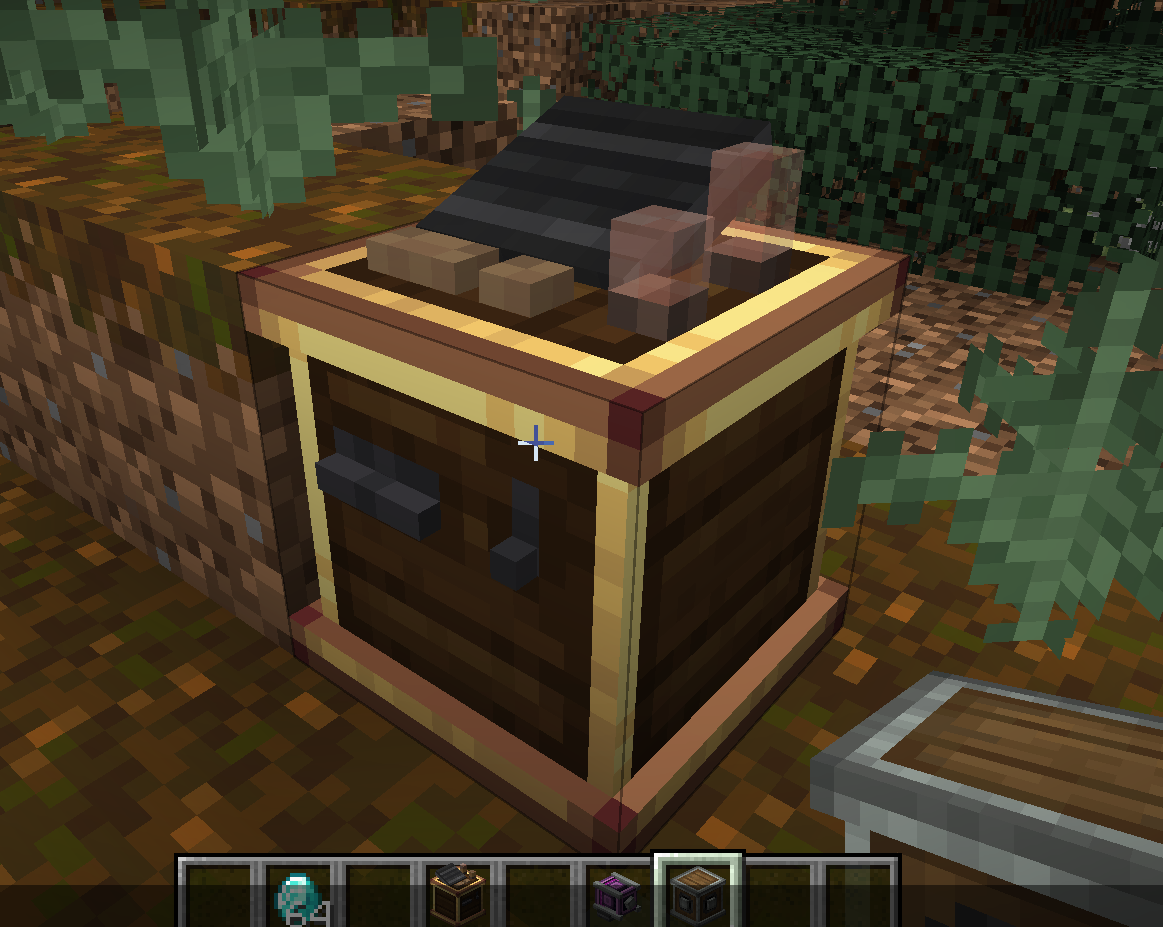
The Mechanical Exchanger doesn't have a crafting recipe, and can only be obtained with a 5% chance (default) after completing a hard mission.
It lets you to exchange currencies from smaller to bigger currency. Depends on which rotation direction the shaft has. It also requires 100 rpm, and consumes much more SU.
It's really possible to add new missions for Create: Missions. You have examples here
Project description from Modrinth.
Pick your setup
Choose the version and loader you play, then open the matching release.
Check the dependencies, then try the file in a copied instance before changing a world you care about.
Recent files
missions-0.5.2.jar
1 Aug 2026
missions-0.5.1.jar
4 Jul 2026
missions-0.5.0.jar
30 Jun 2026
missions-fabric-0.4.9.jar
23 Feb 2026
missions-forge-0.4.8.jar
19 Aug 2025
missions-forge-0.4.7.jar
13 Jun 2025
missions-forge-0.4.6.jar
6 May 2025
missions-forge-0.4.5.jar
29 Apr 2025
missions-forge-0.4.4.jar
28 Apr 2025
missions-forge-0.4.3.jar
18 Feb 2025
missions-fabric-0.4.3.jar
18 Feb 2025
missions-forge-0.4.2.jar
29 Jan 2025
Looking for an older file? The official Modrinth project page is in Resources.
 mod
modLibrary mod for Sophisticated mods
 mod
modStylized tooltips with beautiful effects and smooth animations!
 mod
modAdds an economy system and spawn/event/PvP/minigame dimensions to your server! An alternative for modded Forge servers that want a more Spigot/Bukkit feel.

