Minecraft version
Back to mods 
Modrinth · Minecraft mod
Mine Piece
Japanese anime "ONE PIECE" mod
Choose a version Pick your version below, then grab the matching file.
Quick answer
Which Mine Piece release should I use?
Latest stable file 15
Game version 1.20.1
Loader Forge
Mine Piece 15 targets 1.20.1 with Forge. Installation on the client is optional. Installation on the dedicated server is optional. No extra mods listed for this file.
Where it goes
Is Mine Piece required on the client, server, or both?
Installation on the client is optional. Installation on the dedicated server is optional.
Client Optional
Dedicated server Optional
Loader for this release Forge
Required install it here Optional supported, not mandatory Not supported do not install here Source doesn’t say do not assume
The source marks this as usable on both the client and server.
What else does Mine Piece 15 need?
15. Change the file and its required mods may change too.
This file does not list any required mods. Do not add a library just because a different file uses it.
This file does not list any required or optional mods.
Before you install it
Add Mine Piece without breaking your instance.
Built for Mine Piece 15. Pick another file and the loader, install side or required mods may change.
- 01
Stick to this file
Use 15. It targets 1.20.1 with Forge; another release may have different loader, side or dependency requirements.
- 02
Bring the mods it needs
This file does not list any required mods. Do not add a library just because a different file uses it.
- 03
Put it on the correct side
Installation on the client is optional. Installation on the dedicated server is optional.
- 04
Pick the file you checked
Use the “Get this file” button beside 15. It opens that exact file at the source.
About this project
What does Mine Piece add?
DISCLAIMER
This is a NON-PROFIT, fan-made project created for community enjoyment. It is NOT affiliated with, endorsed by, or associated with Eiichiro Oda, Shueisha, Toei Animation, or the "ONE PIECE" Production Committee. NO COPYRIGHT INFRINGEMENT IS INTENDED. All intellectual property rights belong to their respective owners.
Use of internal data such as textures and models is PROHIBITED.
This mod adds skills, items, weapons, entities, and structures from One Piece to Minecraft.
Survival
When you start the game, you will be given a "Skill Selection Book", "Compasses", and a "Raid Flag".
- Skill Selection Book: Choose a skill to gain that character's traits and unlock their abilities.
- Compasses: A compass that points towards locations such as East Blue and Grand Line.
- Raid Flag: Right-click to start or end a raid.
Bounty
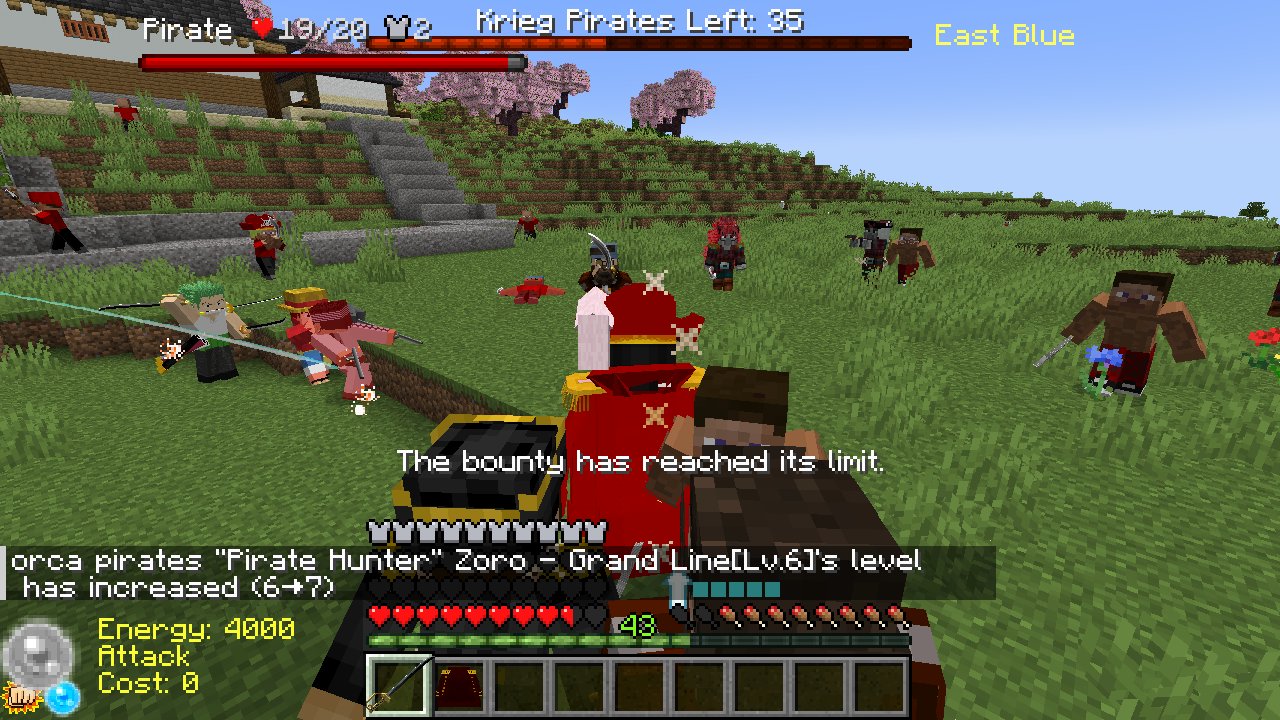
Utilize guards, backsteps, and skills to defeat entities. The more entities you defeat, the higher your bounty will become, strengthening your stats and increasing your techniques (Haki included).
Pirate Crew
By pressing the 'V' key, you can create a team and scout entities to form your own pirate crew.
Raid
Every 20 minutes, a raid by pirates or the Marines will occur. There are approximately 8 types of raids each in East Blue, Grand Line, and New World. Clearing them will grant you advancements. The raids that appear will change based on your advancement progress.
Structures
Pirate ships, Marine bases, villages, and towns will generate in the world. You can find items from treasure chests by exploring.
PvP
You can easily enjoy PvP using the /pvp start command.
Using the PvP command automatically sets a world border, and a battle royale starts with all entities within the world.
PvP rules:
- Player hunger will not decrease.
- Players will not regenerate health.
- All entities other than players will always be hostile.
- Treasure chests containing Devil Fruits can be found in random locations on the map.
- Any bounty gained or Devil Fruits obtained during PvP will be reset after the PvP session ends.
If you wish to play team battles, create a team with the 'V' key before PvP and use the flag to form your team.
When only one player or one team remains, PvP will automatically end, and two rankings will be displayed.
Commands
gamerule Commands
- /gamerule minepiecePVP <true/false>
- /gamerule minepieceBountyMultiplier
- /gamerule minepieceHakiMultiplier
- /gamerule minepieceGainExperience <true/false>
- /gamerule minepiecePlayerBountyLimit
- /gamerule minepieceCrewBountyLimit
- /gamerule minepieceAutoRaidStart <true/false>
- /gamerule minepieceAutoRaidFrequency
minepiece Commands
- /minepiece raid [start/finish] [eastblue/southblue/grandline/newworld]
- /minepiece bounty [add/query/set/limit] [target]
- /minepiece summon [eastblue/grandline/newworld] [marine/pirate] :Summon pirate crew or marine corps
minepiece0 Commands (Not requiring OP)
- /minepiece0 get [compasses/flag] [target]
- /minepiece0 setTeamname
Other Commands
- /pvp start [marine/pirate/random/all]
- /pvp finish
Helps
- Change minecraft difficulty (easy, normal, or hard) if you find the game is too difficult or too easy. The strength of the entities will change greatly.
Wolrd Map
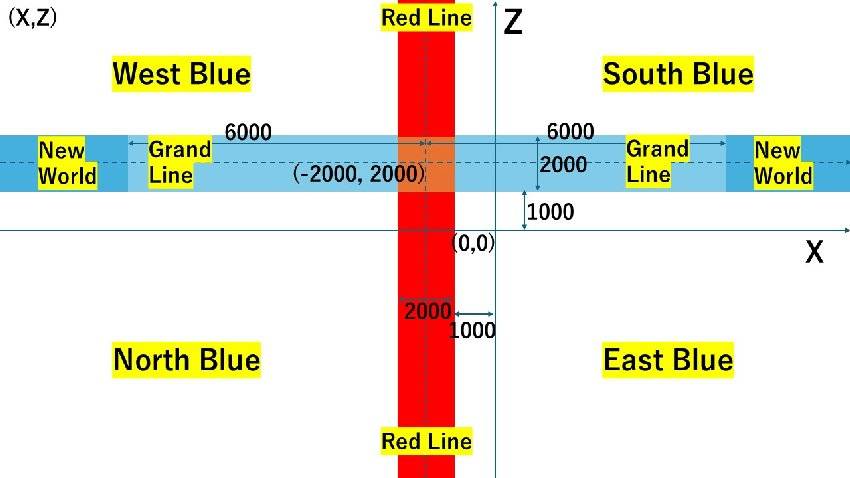
※Go to
East Blue: /tp @s 0 ~ 0
West Blue: /tp @s -5000 ~ 5000
North Blue: /tp @s -5000 ~ -5000
South Blue: /tp @s 5000 ~ 5000
Red Line: /tp @s -2000 ~ 0
Grand Line: /tp @s 0 ~ 2000
New World: /tp @s 6000 ~ 2000
Skypiea (WIP): /execute in minepiece:skypiea_dimension run tp @s 0 150 0
Credits
This is a fan-made recreation based on the original works: "ONE PIECE" by Eiichiro Oda / Shueisha / Toei Animation
This mod developed in MCreator
MCreator→https://mcreator.net/
Project description from Modrinth.
Pick your setup
Mine Piece by Minecraft version and loader
Choose the version and loader you play, then open the matching release.
Check the dependencies, then try the file in a copied instance before changing a world you care about.
Recent files
Mine Piece versions and loaders
15
MinePiece-ver15-forge-1.20.1.jar
12 Oct 2026
Client Optional Server Optional Dependencies No extras listed Listed on Release listing
Check the 1.20.1 · Forge setup 1.20.1Forge release
14
MinePiece-ver14-forge-1.20.1.jar
26 Apr 2026
Client Optional Server Optional Dependencies 4 required · 4 unchecked Listed on Release listing
Check the 1.20.1 · Forge setup 1.20.1Forge release
13
MinePiece-ver13-forge-1.20.1.jar
24 Dec 2025
Client Optional Server Optional Dependencies 4 required · 4 unchecked Listed on Release listing
Check the 1.20.1 · Forge setup 1.20.1Forge release
12
MinePiece-ver12-forge-1.20.1.jar
18 Nov 2025
Client Optional Server Optional Dependencies 4 required · 4 unchecked Listed on Release listing
Check the 1.20.1 · Forge setup 1.20.1Forge release
11
MinePiece-ver11-forge-1.20.1.jar
31 Oct 2025
Client Optional Server Optional Dependencies 4 required · 4 unchecked Listed on Release listing
Check the 1.20.1 · Forge setup 1.20.1Forge release
10.2
MinePiece-ver10.2-forge-1.20.1.jar
28 Aug 2025
Client Optional Server Optional Dependencies 4 required · 4 unchecked Listed on Release listing
Check the 1.20.1 · Forge setup 1.20.1Forge release
10.1
MinePiece-ver10.1-forge-1.20.1.jar
8 Aug 2025
Client Optional Server Optional Dependencies 4 required · 4 unchecked Listed on Release listing
Check the 1.20.1 · Forge setup 1.20.1Forge release
10
MinePiece-ver10-forge-1.20.1.jar
5 Aug 2025
Client Optional Server Optional Dependencies 4 required · 4 unchecked Listed on Release listing
Check the 1.20.1 · Forge setup 1.20.1Forge release
9.2
MinePiece-ver9.2-forge-1.20.1.jar
12 Jul 2025
Client Optional Server Optional Dependencies 4 required · 4 unchecked Listed on Release listing
Check the 1.20.1 · Forge setup 1.20.1Forge release
Looking for an older file? The official Modrinth project page is in Resources.
 mod
mod CurseForge + Modrinth · Minecraft
TACZ Turrets
Simple automated turrets for TACZ guns!
 mod
mod CurseForge · Minecraft
Project Expansion : Arcanum
A Community Edition of Project Expansion,with new items and tools
 mod
mod CurseForge + Modrinth · Minecraft
Music Player
Play music from many sources like youtube, soundcloud or radio livestreams