Quick answer
Which Analog release should I use?
Latest stable file 1.2.2+1.21
Game version 1.21, 1.21.1
Loader Fabric
Analog 1.2.2+1.21 targets 1.21, 1.21.1 with Fabric. Do not install it on the client. It must be installed on the dedicated server. All 2 required mods have matching files.
Where it goes
Is Analog required on the client, server, or both?
Do not install it on the client. It must be installed on the dedicated server.
Client Not supported
Dedicated server Required
Loader for this release Fabric
Required install it here Optional supported, not mandatory Not supported do not install here Source doesn’t say do not assume
This file is marked server-only.
What else does Analog 1.2.2+1.21 need?
1.2.2+1.21. Change the file and its required mods may change too.
Install Simple Voice Chat, Fabric API first. We found matching files for this game-version and loader setup. 10 come through another mod in the chain.
2 listed on this file 10 pulled in by those mods
Matching file found Matched file: fabric-1.21.1-2.6.21
Matching file found Matched file: 0.116.15+1.21.1
Matching file found Matched file: 15.0.140+fabric
Matching file found Matched file: fabric-1.21.1-1.5.1
Matching file found Matched file: v11.0.4 for 1.21
Matching file found Matched file: 0.4.15+78-main
Matching file found Matched file: v5.4.140-fabric
Matching file found Matched file: fabric-1.21.1-1.13.2
Vanish Needed by Simple Voice Chat pulled inMatching file found Matched file: 1.6.15+1.21.1
Matching file found Matched file: placeholder-api-2.4.2+1.21.jar
Matching file found Matched file: [1.21.1] Fabric API 0.116.15+1.21.1
Matching file found Matched file: 2.4.2+1.21
10
extra mods were pulled in by other dependencies.
Indented rows show who needs each one. We only count dependency files that match this setup. A file for another loader does not fill the gap.
Before you install it
Add Analog without breaking your instance.
Built for Analog 1.2.2+1.21. Pick another file and the loader, install side or required mods may change.
- 01
Stick to this file
Use 1.2.2+1.21. It targets 1.21, 1.21.1 with Fabric; another release may have different loader, side or dependency requirements.
- 02
Bring the mods it needs
Install Simple Voice Chat, Fabric API first. We found matching files for this game-version and loader setup. 10 come through another mod in the chain.
- 03
Put it on the correct side
Do not install it on the client. It must be installed on the dedicated server.
- 04
Pick the file you checked
Use the “Get this file” button beside 1.2.2+1.21. It opens that exact file at the source.
About this project
What does Analog add?
Analog
An addon for Simple Voice Chat that adds handheld radios as well as placeable transmitters and receivers.
Features
- Handheld radios
- Block transmitters that broadcast nearby players' voices
- Block receivers that can be tuned into a channel for passive listening
- You can hear another person's radio and their radio can pickup your voice
- Handheld radios can enable receiving and transmitting seperately from eachother
- Radios can tune to 100 channels (Can be changed in config)
- Radios have infinite range but only within the same dimension
- Transmitters can play music from nearby jukeboxes over the radio, including custom discs from AudioPlayer (1.2.0 or later)
- Receivers output a comparator signal when receiving (1.2.0 or later)
Usage

- Right click while in hand to open the radio GUI
- Use the up and down buttons to select a channel
- Press the ON button, by default Receive will be enabled and you will be listening to the channel
- Press the Transmit button to toggle broadcasting your voice and nearby players' voices over the channel
- Press the Receive button to toggle receiving the channel
- Press F (Swap Hands Key) while in hand to quick toggle Transmitting (1.1.0 or later)

- Right click to open transmitter GUI
- Use the up and down buttons to select a channel
- Press the ON button and the transmitter will broadcast nearby players' voices over the channel

- Right click to open receiver GUI
- Use the up and down buttons to select a channel
- Press the ON button and the receiver will tune into the channel and play anything broadcast over the channel
Recipes
Transmitter Recipe
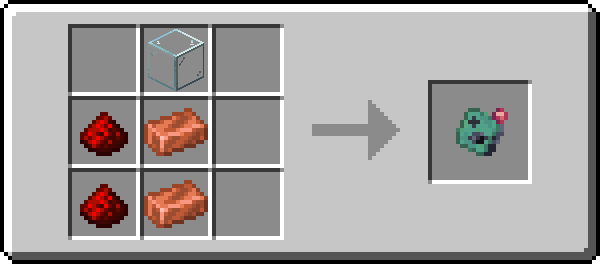
Receiver Recipe
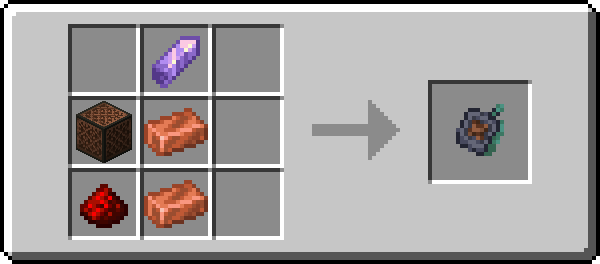
Radio Recipe
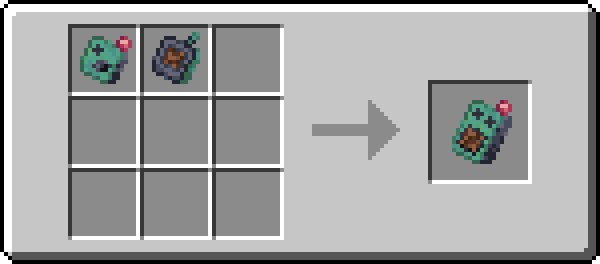
Notes for Servers
Analog requires clients to have the mod on their side or they need to have a resource pack enabled. For a fully server side setup you can use Polymer's Autohost to automatically send the resource pack to clients.
Project description from Modrinth.
Pick your setup
Analog by Minecraft version and loader
Choose the version and loader you play, then open the matching release.
Minecraft version
1.21.1
1
loader build Minecraft version
1.21
1
loader build Minecraft version
1.20.6
1
loader build Minecraft version
1.20.1
1
loader build Check the dependencies, then try the file in a copied instance before changing a world you care about.
Recent files
Analog versions and loaders
analog-1.2.2+1.20.6.jar
22 Aug 2024
Client Not supported Server Required Dependencies 2 required · 2 unchecked Listed on Release listing
Check the 1.20.6 · Fabric setup → analog-1.2.2+1.20.1.jar
22 Aug 2024
Client Not supported Server Required Dependencies 2 required · 2 unchecked Listed on Release listing
Check the 1.20.1 · Fabric setup → analog-1.2.1+1.21.jar
18 Aug 2024
Client Not supported Server Required Dependencies 2 required · 2 unchecked Listed on Release listing
Check the 1.21.1 · Fabric setup → analog-1.2.1+1.20.6.jar
18 Aug 2024
Client Not supported Server Required Dependencies 2 required · 2 unchecked Listed on Release listing
Check the 1.20.6 · Fabric setup → analog-1.2.1+1.20.1.jar
18 Aug 2024
Client Not supported Server Required Dependencies 2 required · 2 unchecked Listed on Release listing
Check the 1.20.1 · Fabric setup → analog-1.2.0+1.21.jar
1 Aug 2024
Client Not supported Server Required Dependencies 2 required · 2 unchecked Listed on Release listing
Check the 1.21.1 · Fabric setup → analog-1.2.0+1.20.6.jar
1 Aug 2024
Client Not supported Server Required Dependencies 2 required · 2 unchecked Listed on Release listing
Check the 1.20.6 · Fabric setup → analog-1.2.0+1.20.1.jar
1 Aug 2024
Client Not supported Server Required Dependencies 2 required · 2 unchecked Listed on Release listing
Check the 1.20.1 · Fabric setup → analog-1.1.2+1.21.jar
29 Jul 2024
Client Not supported Server Required Dependencies 2 required · 2 unchecked Listed on Release listing
Check the 1.21.1 · Fabric setup → analog-1.1.2+1.20.6.jar
29 Jul 2024
Client Not supported Server Required Dependencies 2 required · 2 unchecked Listed on Release listing
Check the 1.20.6 · Fabric setup → analog-1.1.2+1.20.1.jar
29 Jul 2024
Client Not supported Server Required Dependencies 2 required · 2 unchecked Listed on Release listing
Check the 1.20.1 · Fabric setup → 
 mod
mod mod
mod mod
mod