Minecraft version
Back to mods 
Modrinth · Minecraft mod
Custom Skyboxes
Custom Skyboxes is a mod that allows you to change the sky, clouds, sun, moon, rain, snow, and stars in real time with a texture or GIF with Commands!
Choose a version Pick your version below, then grab the matching file.
Quick answer
Which Custom Skyboxes release should I use?
Latest stable file 1.0.2-PLUGIN
Game version 1.20.1, 1.20.4, 1.21.1
Loader bukkit, paper, purpur
Custom Skyboxes 1.0.2-PLUGIN targets 1.20.1, 1.20.4, 1.21.1 with bukkit, paper, purpur. It must be installed on the client. Do not install it on the dedicated server. No extra mods listed for this file.
Where it goes
Is Custom Skyboxes required on the client, server, or both?
It must be installed on the client. Do not install it on the dedicated server.
Client Required
Dedicated server Not supported
Loader for this release bukkit, paper, purpur
Required install it here Optional supported, not mandatory Not supported do not install here Source doesn’t say do not assume
This file is marked client-only.
What else does Custom Skyboxes 1.0.2-PLUGIN need?
1.0.2-PLUGIN. Change the file and its required mods may change too.
This file does not list any required mods. Do not add a library just because a different file uses it.
This file does not list any required or optional mods.
Before you install it
Add Custom Skyboxes without breaking your instance.
Built for Custom Skyboxes 1.0.2-PLUGIN. Pick another file and the loader, install side or required mods may change.
- 01
Stick to this file
Use 1.0.2-PLUGIN. It targets 1.20.1, 1.20.4, 1.21.1 with bukkit, paper, purpur; another release may have different loader, side or dependency requirements.
- 02
Bring the mods it needs
This file does not list any required mods. Do not add a library just because a different file uses it.
- 03
Put it on the correct side
It must be installed on the client. Do not install it on the dedicated server.
- 04
Pick the file you checked
Use the “Get this file” button beside 1.0.2-PLUGIN. It opens that exact file at the source.
About this project
What does Custom Skyboxes add?
CustomSkyboxes
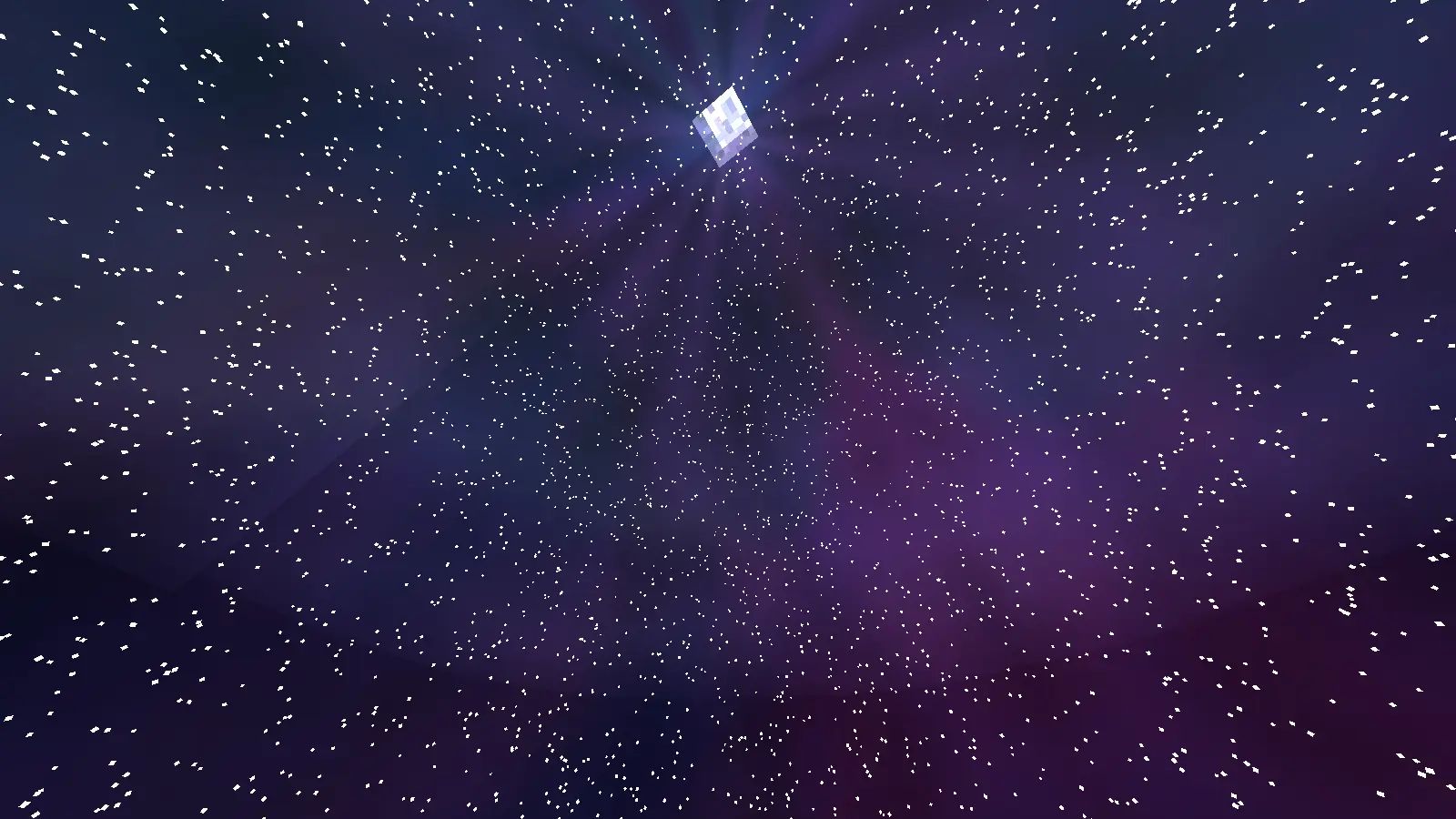
Fully customize the Minecraft sky in real time using textures or animated GIFs from a resource pack.
Replace the sky, sun, moon, stars, clouds, rain and snow individually, globally or per biome, in the Overworld, the Nether and the End.
Client-side mod. No server installation needed.
Supported Versions
| Loader | Minecraft |
|---|---|
| Fabric | 1.20.1 · 1.20.4 · 1.21.1 · 1.21.4 · 1.21.5 · 1.21.8 · 1.21.11 · 26.2 |
| NeoForge | 1.20.1 · 1.20.4 · 1.21.1 · 1.21.4 · 1.21.5 · 1.21.8 · 1.21.11 · 26.2 |
| Forge | 1.20.1 · 1.20.4 |
Fabric versions require Fabric API.
Base Command
/customskyboxes <set/biome/reload/clear>
/customskyboxes set   <type> <texture|color> [args...]
/customskyboxes clear <type|all>
/customskyboxes reload
/customskyboxes biome set   <biome> <type> <texture|color> [args...]
/customskyboxes biome list
/customskyboxes biome clear <biome> <type|all>
Types and arguments
| Type | Arguments after the texture/color |
|---|---|
sky, day_sky, night_sky |
[opacity] [fadein] [fadeout] [speed] [rotation] |
rain, snow |
[opacity] [fadein] [fadeout] [speed] |
sun, moon |
[scale] [opacity] [fadein] [fadeout] [speed] (texture can be vanilla) |
clouds |
[skycolor] [opacity] [fadein] [fadeout] [speed] |
stars |
<color> [scale] [amount] [dayCycle] [opacity] [fadein] [fadeout] |
- opacity: 0 to 1
- fadein / fadeout: transition time in ticks (0 = instant)
- speed: GIF playback speed (
1= normal,2= twice as fast,0.5= half speed) - rotation: turns the sky texture horizontally, in degrees
- skycolor: tints the clouds with the time of day
- dayCycle: stars only show at night
Examples
/customskyboxes set night_sky galaxy.png
/customskyboxes set sky aurora.gif 1 40 20 2
/customskyboxes set day_sky panorama.png 1 0 0 1 90
/customskyboxes set moon eclipse.png 1.5
/customskyboxes set stars CYAN 1.2 3
/customskyboxes biome set minecraft:desert sun big_red_sun.png
/customskyboxes clear all
Your skyboxes are saved automatically and restored when you restart the game.
Sky Domes
skyis always visible,day_skyfades in during the day andnight_skyat night.- Works in the Nether and the End, including during the Ender Dragon fight.
- Textures are mapped as a 360° panorama (2:1 images look best): the top of the image is the zenith and the middle is the horizon.
- The left and right edges of the image blend smoothly where they meet. Use
rotationto move that spot, for example behind mountains.
Resource Pack Folder Structure
assets/customskyboxes

customskyboxes/
├── sun
├── moon
├── night_sky
├── day_sky
├── sky
├── clouds
├── rain
└── snow
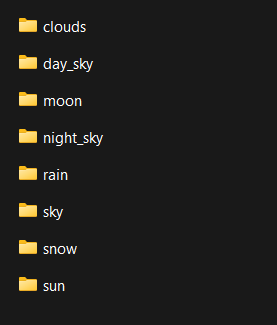
Supports .png and animated .gif files. After adding textures, run /customskyboxes reload or press F3+T.
Multiplayer
To apply CustomSkyboxes effects to other players, use:
Client Execution Mod
Or use the CustomSkyboxesPlugin (Paper/Spigot 1.20.1+) to control the skies of @a or any player from the server:
/customskyboxesplugin set <@a|player> <type> <texture|color> [args...]
/customskyboxesplugin clear <@a|player> <type|all>
/customskyboxesplugin biome set <@a|player> <biome> <type> <texture|color> [args...]
/customskyboxesplugin reload <@a|player>
Players need the mod installed and the textures in their resource pack.
Why Use CustomSkyboxes?
CustomSkyboxes is perfect for Minecraft map makers, server developers, and content creators who want to create immersive environments and cinematic effects.
With real-time sky customization, you can:
- Create dynamic weather and atmosphere
- Add animated skies using GIFs
- Build unique biomes and dimensions
- Improve storytelling and immersion
- Make maps feel more alive and professional
- Instantly change visuals during gameplay
Whether you're making an adventure map, horror experience, RPG server, or cinematic project, CustomSkyboxes gives you full creative control over the Minecraft sky.
What's New in 1.0.2
- NeoForge support: 1.20.1, 1.20.4, 1.21.1, 1.21.4, 1.21.5, 1.21.8, 1.21.11 and 26.2
- Forge support: 1.20.1 and 1.20.4
- New Fabric versions: 1.20.1, 1.20.4, 1.21.8, 1.21.11 and 26.2
- Fixed custom skyboxes not showing in the End on 1.21.5 (also fixed on 1.21.11 and 26.2)
- Fixed sky textures stretching toward the center of the sky; they now map as a proper 360° panorama
- Fixed custom skies disappearing during the Ender Dragon fight
- New
speedargument to control GIF playback speed - New
rotationargument to rotate sky textures horizontally - New smooth blending where the left and right edges of the sky texture meet
- New server plugin to control skyboxes of other players
Project description from Modrinth.
Pick your setup
Custom Skyboxes by Minecraft version and loader
Choose the version and loader you play, then open the matching release.
Minecraft version
1.21.11
3 loader buildsMinecraft version
1.21.8
3 loader buildsMinecraft version
1.21.5
3 loader buildsMinecraft version
1.21.4
3 loader buildsMinecraft version
1.21.1
3 loader buildsMinecraft version
1.20.4
4 loader buildsMinecraft version
1.20.1
4 loader buildsCheck the dependencies, then try the file in a copied instance before changing a world you care about.
Recent files
Custom Skyboxes versions and loaders
1.0.2-PLUGIN
CustomSkyboxesPlugin-1.0.2.jar
14 Sept 2026
Client Required Server Not supported Dependencies No extras listed Listed on Release listing
Check the 26.2 · bukkit setup 1.20.11.20.41.21.11.21.4 release
1.0.2
customskyboxes-neoforge-mc26.2-1.0.2.jar
14 Sept 2026
Client Required Server Not supported Dependencies No extras listed Listed on Release listing
Check the 26.2 · NeoForge setup 26.2NeoForge release
1.0.2
customskyboxes-neoforge-mc1.21.11-1.0.2.jar
14 Sept 2026
Client Required Server Not supported Dependencies No extras listed Listed on Release listing
Check the 1.21.11 · NeoForge setup 1.21.11NeoForge release
1.0.2
customskyboxes-neoforge-mc1.21.8-1.0.2.jar
14 Sept 2026
Client Required Server Not supported Dependencies No extras listed Listed on Release listing
Check the 1.21.8 · NeoForge setup 1.21.8NeoForge release
1.0.2
customskyboxes-neoforge-mc1.21.5-1.0.2.jar
14 Sept 2026
Client Required Server Not supported Dependencies No extras listed Listed on Release listing
Check the 1.21.5 · NeoForge setup 1.21.5NeoForge release
1.0.2
customskyboxes-neoforge-mc1.21.4-1.0.2.jar
14 Sept 2026
Client Required Server Not supported Dependencies No extras listed Listed on Release listing
Check the 1.21.4 · NeoForge setup 1.21.4NeoForge release
1.0.2
customskyboxes-neoforge-mc1.21.1-1.0.2.jar
14 Sept 2026
Client Required Server Not supported Dependencies No extras listed Listed on Release listing
Check the 1.21.1 · NeoForge setup 1.21.1NeoForge release
1.0.2
customskyboxes-neoforge-mc1.20.4-1.0.2.jar
14 Sept 2026
Client Required Server Not supported Dependencies No extras listed Listed on Release listing
Check the 1.20.4 · NeoForge setup 1.20.4NeoForge release
1.0.2
customskyboxes-neoforge-mc1.20.1-1.0.2.jar
14 Sept 2026
Client Required Server Not supported Dependencies No extras listed Listed on Release listing
Check the 1.20.1 · NeoForge setup 1.20.1NeoForge release
1.0.2
customskyboxes-forge-mc1.20.4-1.0.2.jar
14 Sept 2026
Client Required Server Not supported Dependencies No extras listed Listed on Release listing
Check the 1.20.4 · Forge setup 1.20.4Forge release
1.0.2
customskyboxes-forge-mc1.20.1-1.0.2.jar
14 Sept 2026
Client Required Server Not supported Dependencies No extras listed Listed on Release listing
Check the 1.20.1 · Forge setup 1.20.1Forge release
1.0.2
customskyboxes-mc26.2-1.0.2.jar
14 Sept 2026
Client Required Server Not supported Dependencies No extras listed Listed on Release listing
Check the 26.2 · Fabric setup 26.2Fabric release
Looking for an older file? The official Modrinth project page is in Resources.
 mod
mod CurseForge + Modrinth · Minecraft
Warband
Mob AI overhaul that makes Minecraft’s mobs smarter, not spongier. Face regional difficulty, coordinated combat squads, and factional illager wars.
 mod
mod CurseForge + Modrinth · Minecraft
CullTag
Server-side mod that hides player nametags through walls
 mod
mod CurseForge + Modrinth · Minecraft
Cursors Extended
Configurable Minecraft-themed cursors