Minecraft version
Back to mods 
Modrinth · Minecraft mod
Disable Fog
Allows you to selectively disable different types of fog.
Choose a version Pick your version below, then grab the matching file.
Quick answer
Which Disable Fog release should I use?
Latest stable file 2.2.1
Game version 26.3
Loader Forge
Disable Fog 2.2.1 targets 26.3 with Forge. It must be installed on the client. Do not install it on the dedicated server. No extra mods listed for this file.
Where it goes
Is Disable Fog required on the client, server, or both?
It must be installed on the client. Do not install it on the dedicated server.
Client Required
Dedicated server Not supported
Loader for this release Forge
Required install it here Optional supported, not mandatory Not supported do not install here Source doesn’t say do not assume
This file is marked client-only.
What else does Disable Fog 2.2.1 need?
2.2.1. Change the file and its required mods may change too.
This file does not list any required mods. Do not add a library just because a different file uses it.
This file does not list any required or optional mods.
Before you install it
Add Disable Fog without breaking your instance.
Built for Disable Fog 2.2.1. Pick another file and the loader, install side or required mods may change.
- 01
Stick to this file
Use 2.2.1. It targets 26.3 with Forge; another release may have different loader, side or dependency requirements.
- 02
Bring the mods it needs
This file does not list any required mods. Do not add a library just because a different file uses it.
- 03
Put it on the correct side
It must be installed on the client. Do not install it on the dedicated server.
- 04
Pick the file you checked
Use the “Get this file” button beside 2.2.1. It opens that exact file at the source.
About this project
What does Disable Fog add?
Disable Fog
This is a client mod that allows you to selectively disable certain types of fog in minecraft.
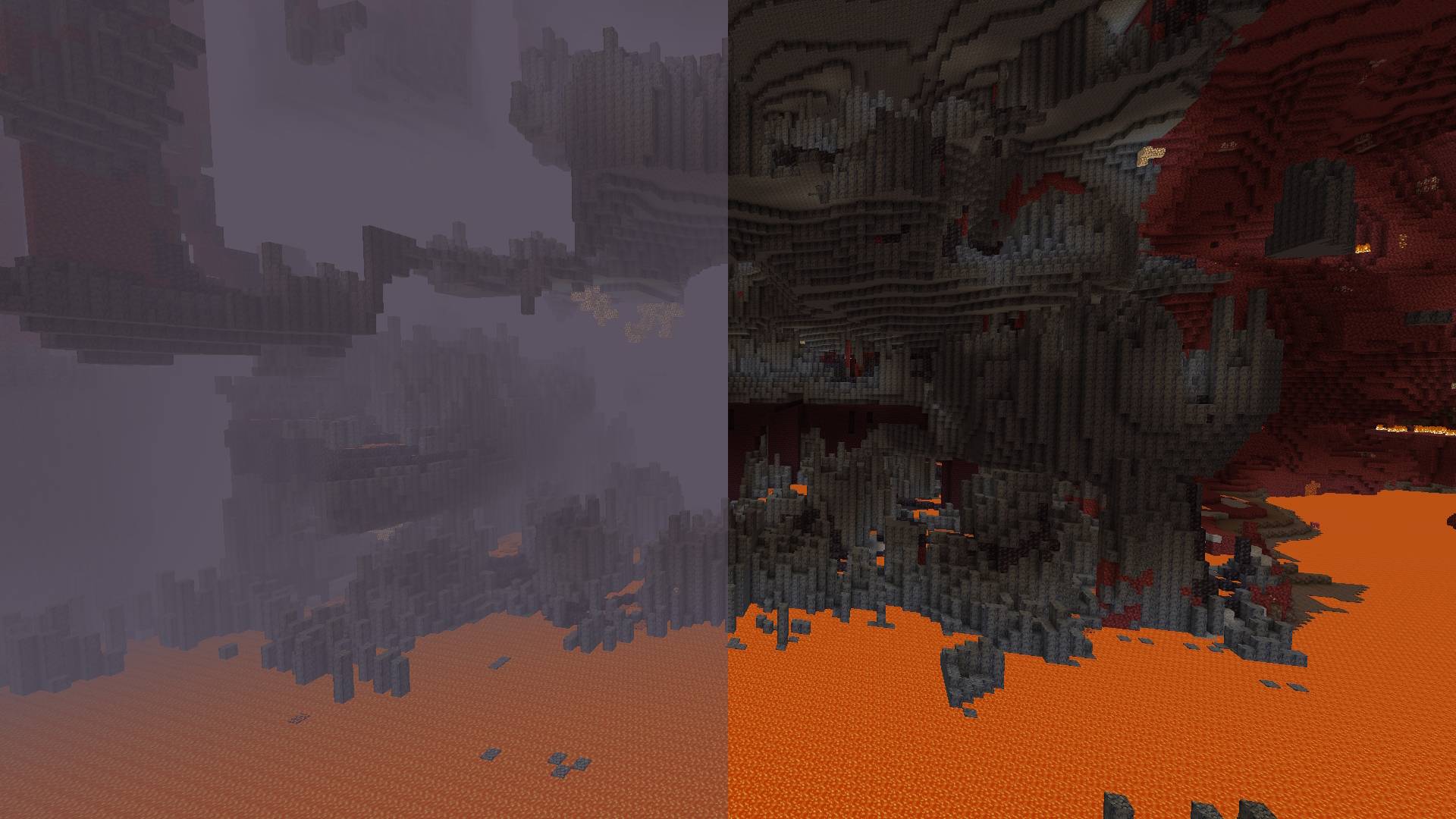


Toggleable Fog Types:
- Terrain Fog: Remove the fog that depends on the drawing distance, which hides the boundaries of the chunks.
- Atmospheric Fog: Remove sky fog in the Overworld and thick fog in the Nether.
- Lava Fog: Remove fog in lava for clearer vision.
- Water Fog: Clear underwater fog for better visibility.
- Powder Snow Fog: Eliminate fog effects in powder snow.
- Blindness Fog: Disable fog caused by the blindness effect.
- Darkness Fog: Remove fog from the darkness effect (e.g., from wardens).
By default, the mod disables terrain fog and atmospheric fog. All other fog types can be configured individually, including per-dimension overrides.
Configuration:
Starting from version 2.0.0, the mod includes a built-in configuration screen available on all mod loaders — no additional mods required.
For Fabric and Quilt:
- Install ModMenu to access the configuration screen in-game.
For Forge and NeoForge:
- No additional mods required. Select the mod from the mod list and click the "Config" button.
Per-Dimension Settings:
Each dimension can independently override the global fog settings. If a dimension setting is set to DEFAULT, it inherits the value from the global configuration. Dimensions added by other mods are supported automatically.
⚠️ Note for versions below 2.0.0:
Built-in configuration is available starting from version 2.0.0. On older versions, install ClothConfig and ModMenu to configure the mod in-game.
Project description from Modrinth.
Pick your setup
Disable Fog by Minecraft version and loader
Choose the version and loader you play, then open the matching release.
Minecraft version
26.3-snapshot-5
2 loader buildsMinecraft version
26.3-snapshot-3
2 loader buildsMinecraft version
26.3-rc-2
2 loader buildsMinecraft version
26.3-pre-2
2 loader buildsMinecraft version
26.3
4 loader buildsMinecraft version
26.2-snapshot-2
2 loader buildsMinecraft version
26.2-snapshot-1
2 loader buildsMinecraft version
26.2
4 loader buildsMinecraft version
26.1.2
4 loader buildsMinecraft version
26.1.1
4 loader buildsMinecraft version
26.1-snapshot-3
1 loader buildShowing the newest 12 of 32 game versions. Older files are in the list below.
Check the dependencies, then try the file in a copied instance before changing a world you care about.
Recent files
Disable Fog versions and loaders
2.2.1
disablefog-forge-26.3-2.2.1.jar
22 Sept 2026
Client Required Server Not supported Dependencies No extras listed Listed on Release listing
Check the 26.3 · Forge setup 26.3Forge release
2.2.1
disablefog-fabric-26.3-2.2.1.jar
18 Sept 2026
Client Required Server Not supported Dependencies No extras listed Listed on Release listing
Check the 26.3 · Fabric setup 26.3FabricQuilt release
2.2.1
disablefog-neoforge-26.3-2.2.1.jar
18 Sept 2026
Client Required Server Not supported Dependencies No extras listed Listed on Release listing
Check the 26.3 · NeoForge setup 26.3NeoForge release
2.2.1
disablefog-fabric-26.3-rc-2-2.2.1.jar
11 Sept 2026
Client Required Server Not supported Dependencies No extras listed Listed on Release listing
Check the 26.3-rc-2 · Fabric setup 26.3-rc-2FabricQuilt beta
2.2.1
disablefog-fabric-26.3-pre-2-2.2.1.jar
6 Sept 2026
Client Required Server Not supported Dependencies No extras listed Listed on Release listing
Check the 26.3-pre-2 · Fabric setup 26.3-pre-2FabricQuilt beta
2.2.1
disablefog-fabric-26.3-snapshot-5-2.2.1.jar
25 Jul 2026
Client Required Server Not supported Dependencies No extras listed Listed on Release listing
Check the 26.3-snapshot-5 · Fabric setup 26.3-snapshot-5FabricQuilt beta
2.2.1
disablefog-fabric-26.3-snapshot-3-2.2.1.jar
8 Jul 2026
Client Required Server Not supported Dependencies No extras listed Listed on Release listing
Check the 26.3-snapshot-3 · Fabric setup 26.3-snapshot-3FabricQuilt beta
2.2.1
disablefog-forge-26.2-2.2.1.jar
18 Jun 2026
Client Required Server Not supported Dependencies No extras listed Listed on Release listing
Check the 26.2 · Forge setup 26.2Forge release
2.2.1
disablefog-fabric-26.2-2.2.1.jar
17 Jun 2026
Client Required Server Not supported Dependencies No extras listed Listed on Release listing
Check the 26.2 · Fabric setup 26.2FabricQuilt release
2.2.1
disablefog-neoforge-26.2-2.2.1.jar
17 Jun 2026
Client Required Server Not supported Dependencies No extras listed Listed on Release listing
Check the 26.2 · NeoForge setup 26.2NeoForge release
2.2.0
disablefog-neoforge-26.2-2.2.0.jar
16 Jun 2026
Client Required Server Not supported Dependencies No extras listed Listed on Release listing
Check the 26.2 · NeoForge setup 26.2NeoForge release
2.2.0
disablefog-fabric-26.2-2.2.0.jar
16 Jun 2026
Client Required Server Not supported Dependencies No extras listed Listed on Release listing
Check the 26.2 · Fabric setup 26.2FabricQuilt release
Looking for an older file? The official Modrinth project page is in Resources.
 mod
GitHub · Minecraft
modpacks-ch-github-test
Disposable public fixture for testing the Modpacks.ch GitHub catalogue flow
 mod
Modrinth · Minecraft
World Portal
Create custom world portal to travel between dimensions.
 mod
Modrinth · Minecraft
JsonPatcher
A tool for patching minecrafts json files, without overrding them, using a custom DSL