Minecraft version
Back to mods 
Modrinth · Minecraft mod
Flashback Extras
Extra tools and quality-of-life improvements for the Flashback replay editor.
Choose a version Pick your version below, then grab the matching file.
Quick answer
Which Flashback Extras release should I use?
Latest stable file 1.3.0
Game version 26.3
Loader Fabric
Flashback Extras 1.3.0 targets 26.3 with Fabric. It must be installed on the client. Do not install it on the dedicated server. No extra mods listed for this file.
Where it goes
Is Flashback Extras required on the client, server, or both?
It must be installed on the client. Do not install it on the dedicated server.
Client Required
Dedicated server Not supported
Loader for this release Fabric
Required install it here Optional supported, not mandatory Not supported do not install here Source doesn’t say do not assume
This file is marked client-only.
What else does Flashback Extras 1.3.0 need?
1.3.0. Change the file and its required mods may change too.
This file does not list any required mods. Do not add a library just because a different file uses it.
This file does not list any required or optional mods.
Before you install it
Add Flashback Extras without breaking your instance.
Built for Flashback Extras 1.3.0. Pick another file and the loader, install side or required mods may change.
- 01
Stick to this file
Use 1.3.0. It targets 26.3 with Fabric; another release may have different loader, side or dependency requirements.
- 02
Bring the mods it needs
This file does not list any required mods. Do not add a library just because a different file uses it.
- 03
Put it on the correct side
It must be installed on the client. Do not install it on the dedicated server.
- 04
Pick the file you checked
Use the “Get this file” button beside 1.3.0. It opens that exact file at the source.
About this project
What does Flashback Extras add?
Flashback Extras
Flashback Extras extends the Flashback replay editor with additional features and fixes.
All features can be toggled on or off.
Features
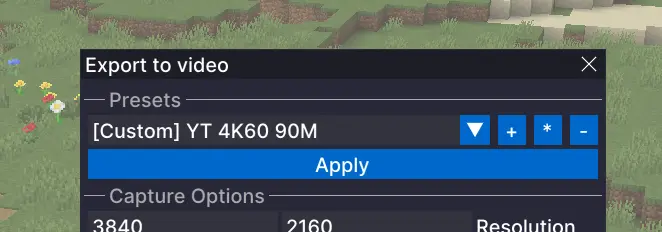
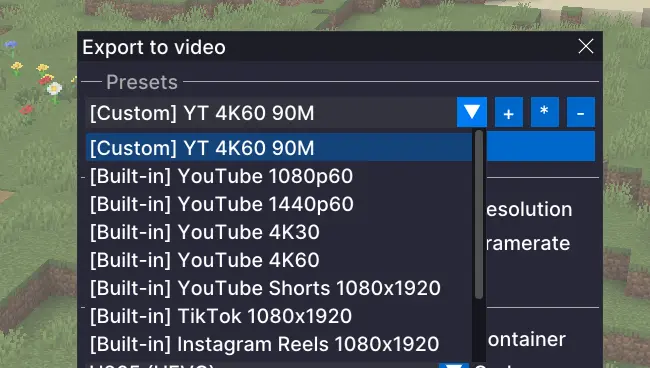
Export Presets
Adds built-in presets for common output targets, such as YouTube 1440p, and lets you create your own presets so you can save the settings you use again and again instead of rebuilding them every time. This is especially useful if you are exporting the same replay in multiple formats.
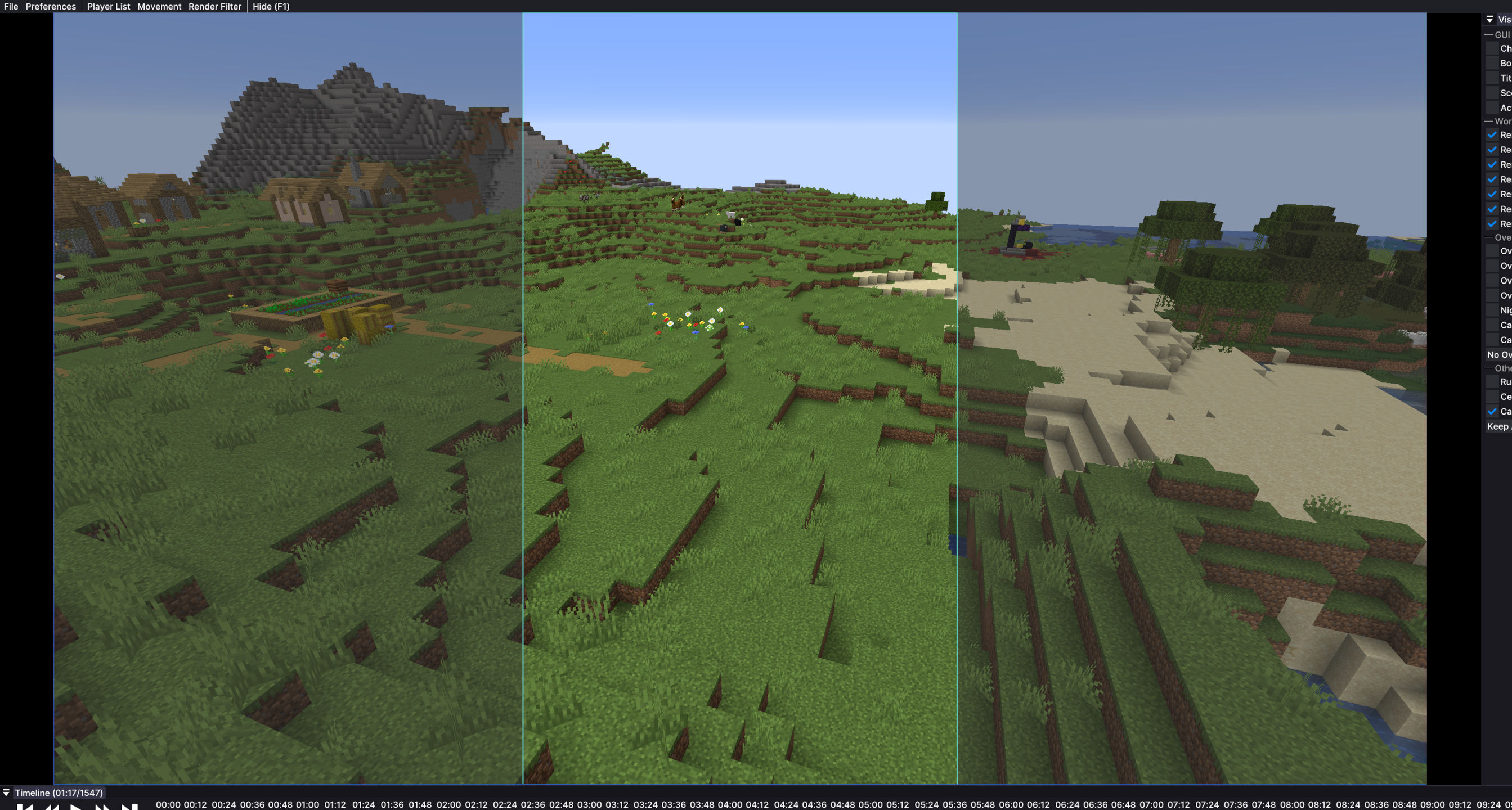
Export Preview Overlay
When you are exporting for formats like TikTok or YouTube Shorts, it is not always clear how the final video will look inside a vertical frame. This adds an overlay that shows that shape on screen, so you can line things up more easily before exporting.
Timeline Horizontal Scroll
Enables horizontal scrolling of the Flashback timeline with a mouse side wheel, horizontal wheel, or trackpad.
Fixes
Faster First Export
Opening the export menu can freeze Flashback for a couple of seconds. This mod prepares export tools in the background shortly after you open a replay, so the export window opens without long waiting times.Audio Track Sync for Timelapses
Timelapses and other speed changes in Flashback can make audio sound wrong and break the waveform display. This mod fixes that, so audio plays normally and the visual audio track scales correctly with timeline speed.
Configure
- You can open the Flashback Extras menu with
Right Alt + Pby default. - The shortcut can be changed in Minecraft Controls.
- You can also open the menu through the Mod Menu mod.
Requirements
- Fabric
- Flashback
Project description from Modrinth.
Pick your setup
Flashback Extras by Minecraft version and loader
Choose the version and loader you play, then open the matching release.
Minecraft version
26.2
1 loader buildMinecraft version
26.1.2
1 loader buildMinecraft version
26.1.1
1 loader buildMinecraft version
26.1
1 loader buildMinecraft version
1.21.11
1 loader buildMinecraft version
1.21.10
1 loader buildMinecraft version
1.21.9
1 loader buildMinecraft version
1.21.8
1 loader buildMinecraft version
1.21.7
1 loader buildMinecraft version
1.21.6
1 loader buildCheck the dependencies, then try the file in a copied instance before changing a world you care about.
Recent files
Flashback Extras versions and loaders
1.3.0
flashback-extras-1.3.0-MC26.3.x.jar
19 Sept 2026
Client Required Server Not supported Dependencies No extras listed Listed on Release listing
Check the 26.3 · Fabric setup 26.3Fabric release
1.2.0
flashback-extras-1.2.0-MC26.2.x.jar
15 Jul 2026
Client Required Server Not supported Dependencies No extras listed Listed on Release listing
Check the 26.2 · Fabric setup 26.2Fabric release
1.1.0
flashback-extras-1.1.0-MC26.1.x.jar
21 Apr 2026
Client Required Server Not supported Dependencies No extras listed Listed on Release listing
Check the 26.1.2 · Fabric setup 26.126.1.126.1.2Fabric release
1.0.0
flashback-extras-1.0.0-MC1.21.6-1.21.10.jar
31 Mar 2026
Client Required Server Not supported Dependencies No extras listed Listed on Release listing
Check the 1.21.10 · Fabric setup 1.21.61.21.71.21.81.21.9 release
1.0.0
flashback-extras-1.0.0.jar
30 Mar 2026
Client Required Server Not supported Dependencies No extras listed Listed on Release listing
Check the 1.21.10 · Fabric setup 1.21.81.21.91.21.10Fabric release
1.0.0
flashback-extras-1.0.0.jar
16 Mar 2026
Client Required Server Not supported Dependencies 2 required · 2 unchecked Listed on Release listing
Check the 1.21.11 · Fabric setup 1.21.11Fabric release
Looking for an older file? The official Modrinth project page is in Resources.