Fabric API Needed by TWISB-Exploration 0.1.4
requiredMatching file found Matched file: [1.21.10] Fabric API 0.138.4+1.21.10

Modrinth · Minecraft mod
Exploration, the way it should be! This mod adds an Atlas item to contain all your maps, and makes compasses more useful.
Quick answer
TWISB-Exploration 0.1.4 targets 1.21.10, 1.21.9 with Fabric. Installation on the client is optional. Installation on the dedicated server is optional. All 1 required mods have matching files.
Where it goes
Installation on the client is optional. Installation on the dedicated server is optional.
The source marks this as usable on both the client and server.
0.1.4. Change the file and its required mods may change too.
Install Fabric API first. We found matching files for this game-version and loader setup.
We only count dependency files that match this setup. A file for another loader does not fill the gap.
Before you install it
Built for TWISB-Exploration 0.1.4. Pick another file and the loader, install side or required mods may change.
Use 0.1.4. It targets 1.21.10, 1.21.9 with Fabric; another release may have different loader, side or dependency requirements.
Install Fabric API first. We found matching files for this game-version and loader setup.
Installation on the client is optional. Installation on the dedicated server is optional.
Use the “Get this file” button beside 0.1.4. It opens that exact file at the source.
About this project
Noticed how many people play with minimap mods, or often use the F3 screen for coordinates even though the vanilla game has maps and compasses? Thats because those items are not that usefull in vanilla. This mod adds an Atlas item to keep your maps tidy and buffs compasses.
I created this mod to improve Minecraft exploration while keeping it as close to Vanilla as possible. The goal is to take what is already in the game and make it actually useful (Mojang, if you read this, I would love if you added these changes to the game).
The Atlas is a new item which can contain filled maps and shows the closest one to your current position. Here is the recipe:
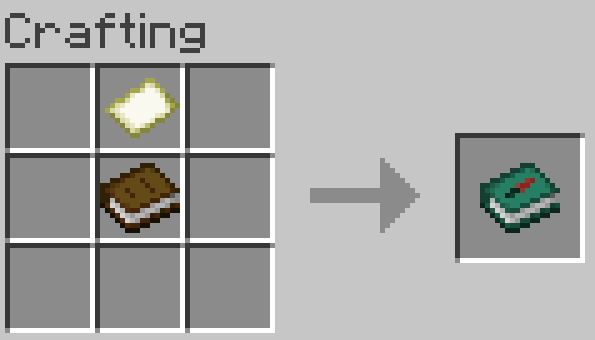
It works like a bundle: select it and click on map items to place them in the Atlas. You can alternatively select the map and click it into the Atlas instead. To extract maps right click the Atlas onto an empty slot or right click the Atlas without any item selected.
Only maps of the same scale and dimension can be placed in an Atlas. For example, if the Atlas contain maps from the overworld it will not take maps from the nether.
If the Atlas contains a map, when you hold it, it will show the one closest to your location.
If you right click while having empty maps in your inventory and the current location does not have a map in the Atlas, a new map will be made and added to the Atlas. If a new map made this way needs to be scaled (because other maps in the Atlas are scaled) paper will be required: one paper is used for each scale-up required.
Having an compass in your inventory will show coordinates and faced direction (N/E/S/W).
The F3 screen does not show coordinates unless you're in creative mode (from mod version 0.1.4) or cheats are enabled (before mod version 0.1.3) giving you an actual reason to have a compass.
For mod versions before 0.1.4 due to a vanilla Minecraft bug (afaik) you are able to place a map from the wrong dimension into an Atlas after reloading the game. Avoid doing that or it gets confusing.
TWISB-Enchanting Allows selecting enchantments in a vanilla-friendly way that promotes exploration. It also buffs anvils.
TWISB-Combat Tweaks health regeneration, potions and tridents to make combat more interesting.
Project description from Modrinth.
Pick your setup
Choose the version and loader you play, then open the matching release.
Check the dependencies, then try the file in a copied instance before changing a world you care about.
Recent files
twisb-exploration-1.0.0.jar
23 Nov 2025
twisb-exploration-1.0.0.jar
5 Sept 2024
twisb-exploration-1.0.0.jar
5 Sept 2024
twisb-exploration-1.0.0.jar
29 Aug 2024
twisb-exploration-1.0.0.jar
26 Aug 2024
twisb-exploration-1.0.0.jar
25 Aug 2024
twisb-exploration-1.0.0.jar
25 Aug 2024
Looking for an older file? The official Modrinth project page is in Resources.
 mod
Simple Tracking Compass is a Minecraft mod that adds a Compass to the top-left corner of your screen which lets you track other players.
 mod
Putting more Magic in your Blood Magic.
 mod
Expands stackable item counts beyond 64 using 64-bit storage, with support for inventories, commands, crafting, and recipe-book interactions.