
Minecraft version
Back to mods 
CurseForge · Minecraft mod
Actually Amazing Config Screen
A settings screen library for Fabric and NeoForge mods: tabs, folding sections, smooth scrolling and a card that explains each setting with a picture.
Choose a version Pick your version below, then grab the matching file.
Quick answer
Which Actually Amazing Config Screen release should I use?
Latest stable file 1.3.0+mc26.3-neoforge
Game version 26.3
Loader NeoForge
Actually Amazing Config Screen 1.3.0+mc26.3-neoforge targets 26.3 with NeoForge. The project page does not say whether this file belongs on the client, dedicated server, or both. No extra mods listed for this file.
Where it goes
Is Actually Amazing Config Screen required on the client, server, or both?
The project page does not say whether this file belongs on the client, dedicated server, or both.
Client Source doesn’t say
Dedicated server Source doesn’t say
Loader for this release NeoForge
Required install it here Optional supported, not mandatory Not supported do not install here Source doesn’t say do not assume
The source does not explicitly classify this release as client-only or server-only.
What else does Actually Amazing Config Screen 1.3.0+mc26.3-neoforge need?
1.3.0+mc26.3-neoforge. Change the file and its required mods may change too.
This file does not list any required mods. Do not add a library just because a different file uses it.
This file does not list any required or optional mods.
Before you install it
Add Actually Amazing Config Screen without breaking your instance.
Built for Actually Amazing Config Screen 1.3.0+mc26.3-neoforge. Pick another file and the loader, install side or required mods may change.
- 01
Stick to this file
Use 1.3.0+mc26.3-neoforge. It targets 26.3 with NeoForge; another release may have different loader, side or dependency requirements.
- 02
Bring the mods it needs
This file does not list any required mods. Do not add a library just because a different file uses it.
- 03
Put it on the correct side
The project page does not say whether this file belongs on the client, dedicated server, or both.
- 04
Pick the file you checked
Use the “Get this file” button beside 1.3.0+mc26.3-neoforge. It opens that exact file at the source.
About this project
What does Actually Amazing Config Screen add?

Actually Amazing Config Screen


A settings screen library for Minecraft mods on Fabric and NeoForge.
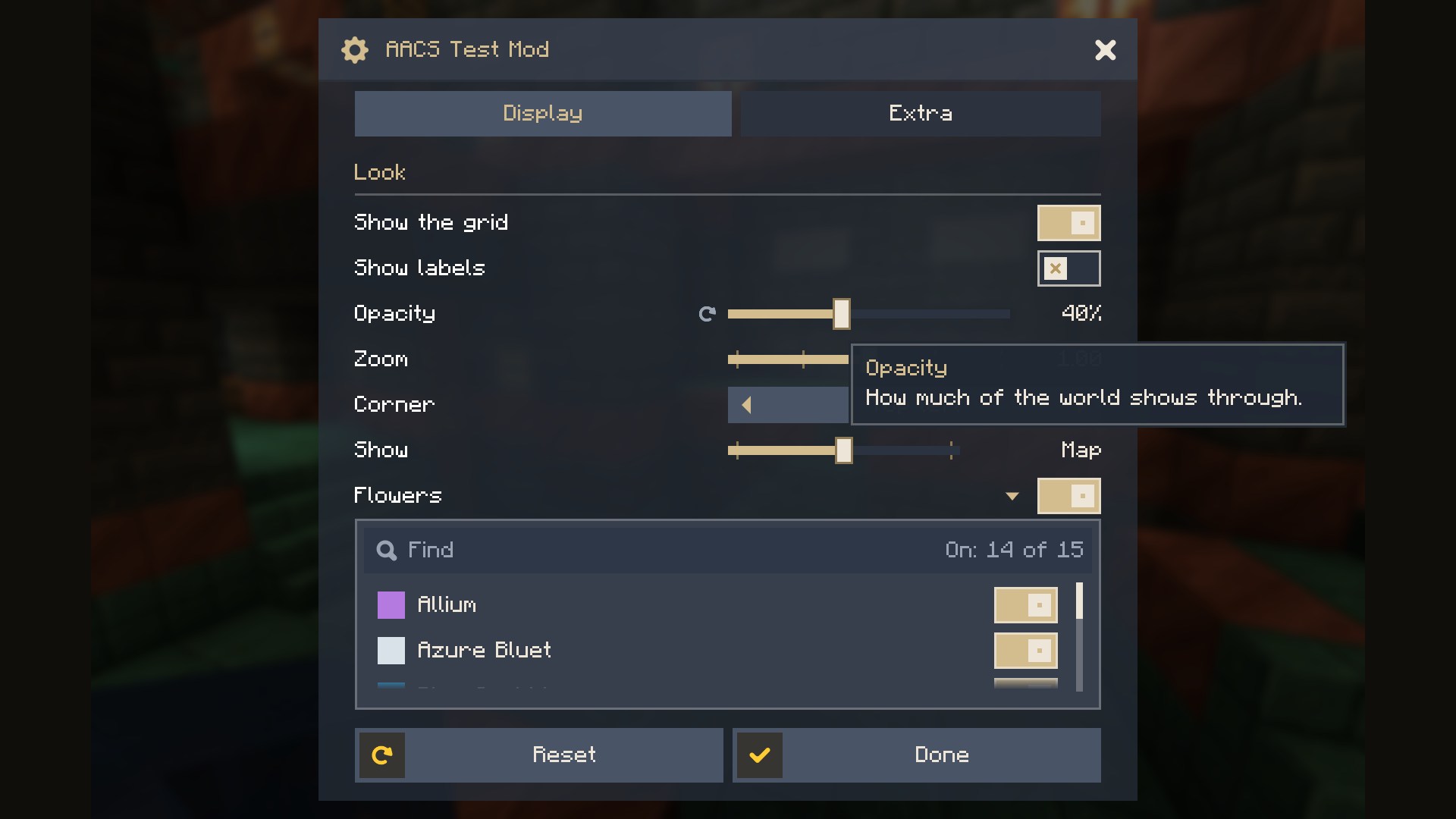
Tabs, sections that fold, smooth scrolling, and a card beside the list that explains the setting under the pointer with a picture of what it does.


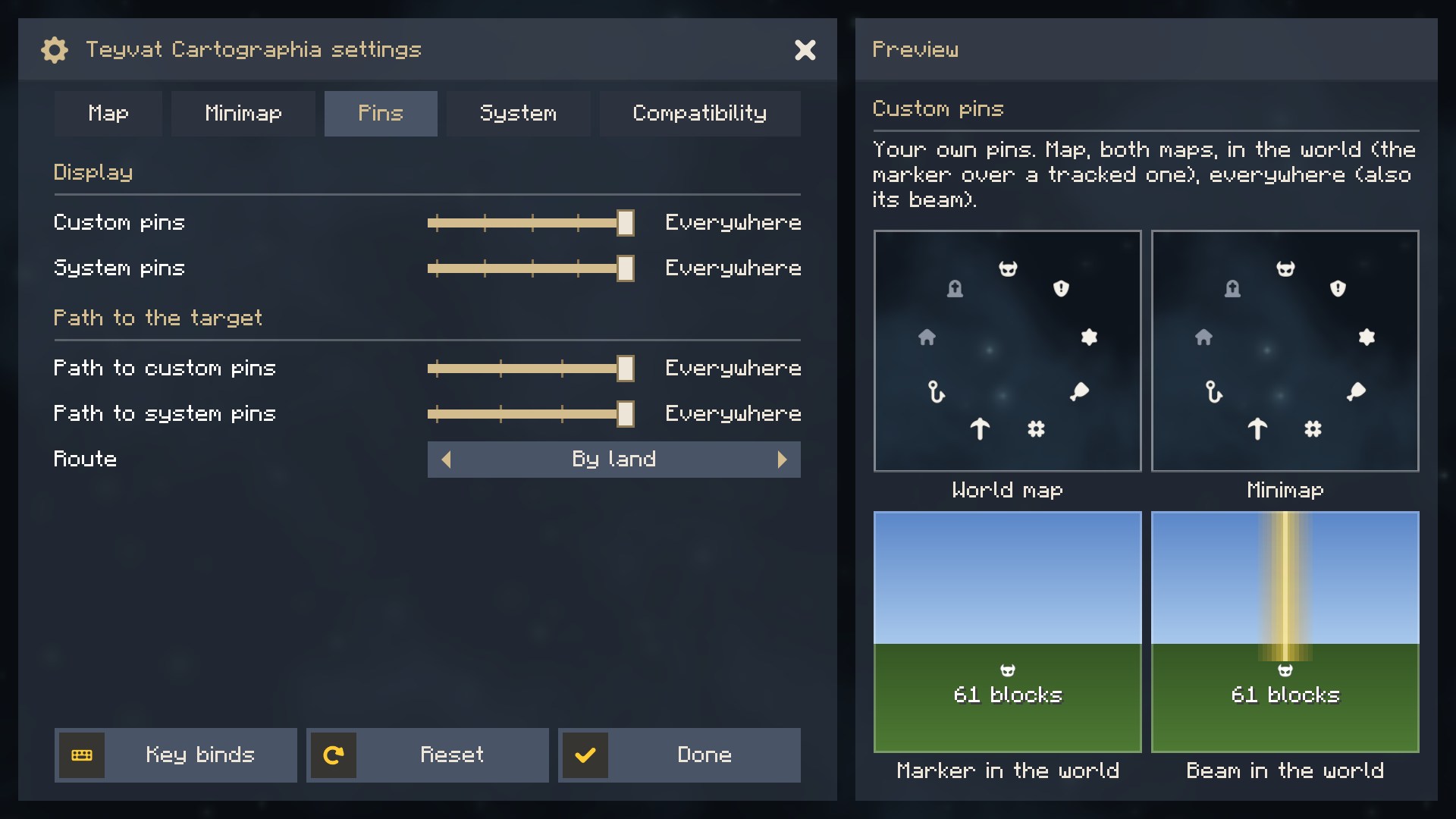
For players
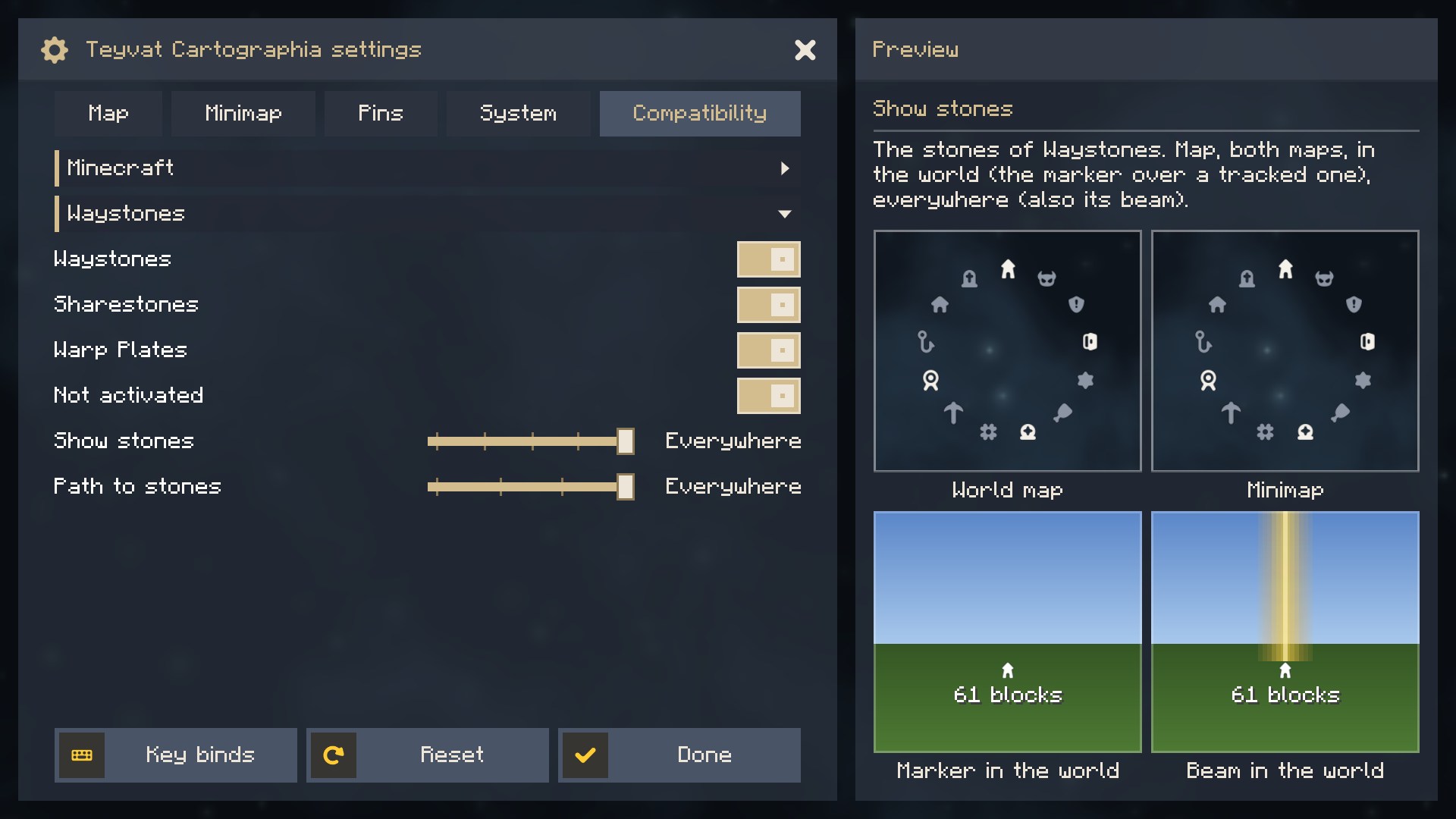
You do not need to install anything. The library comes inside the mods that use it, such as Teyvat Cartographia. It shows in the mod list as a library, and the settings button of each such mod opens its screen.
What the screen does
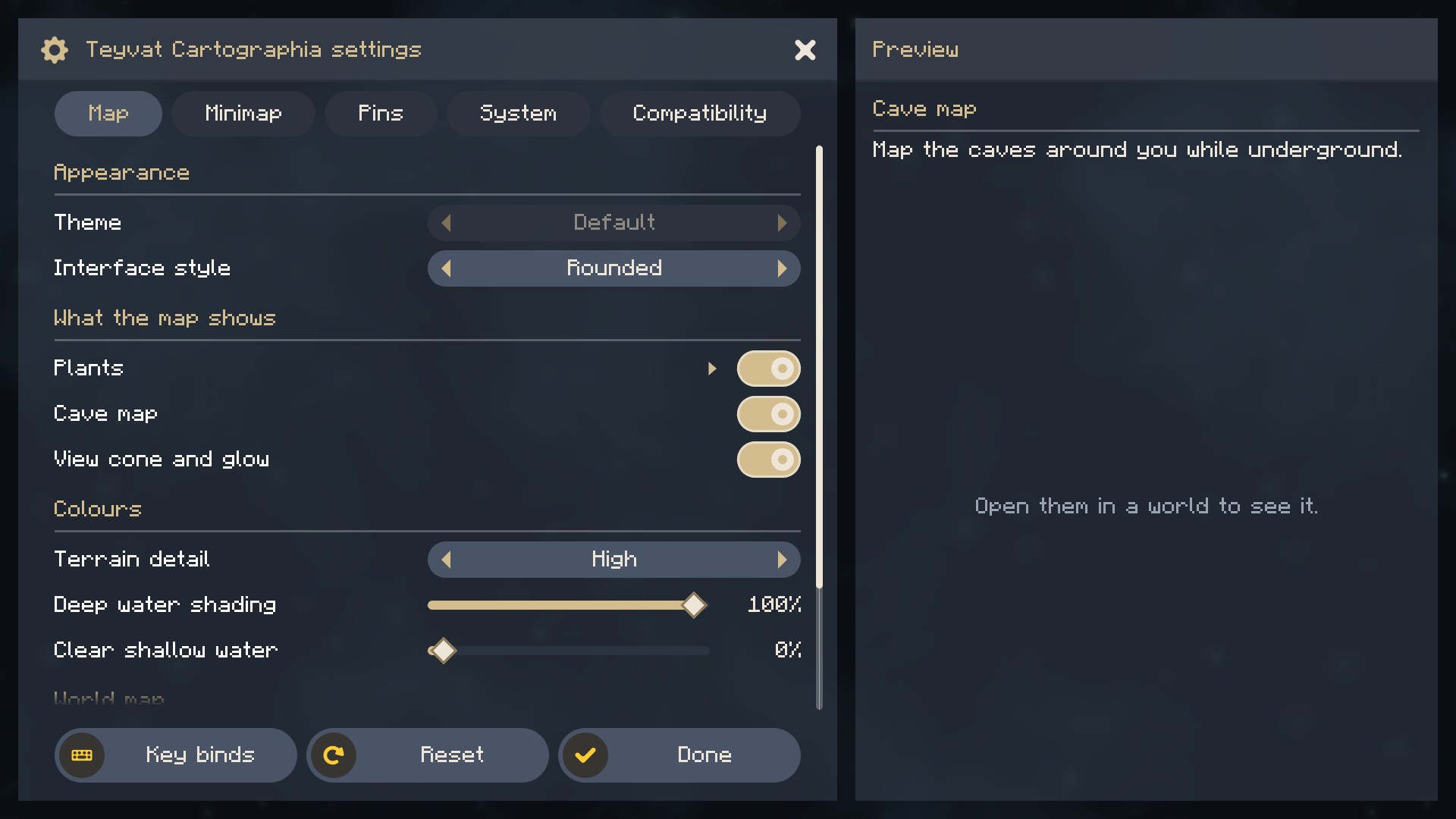
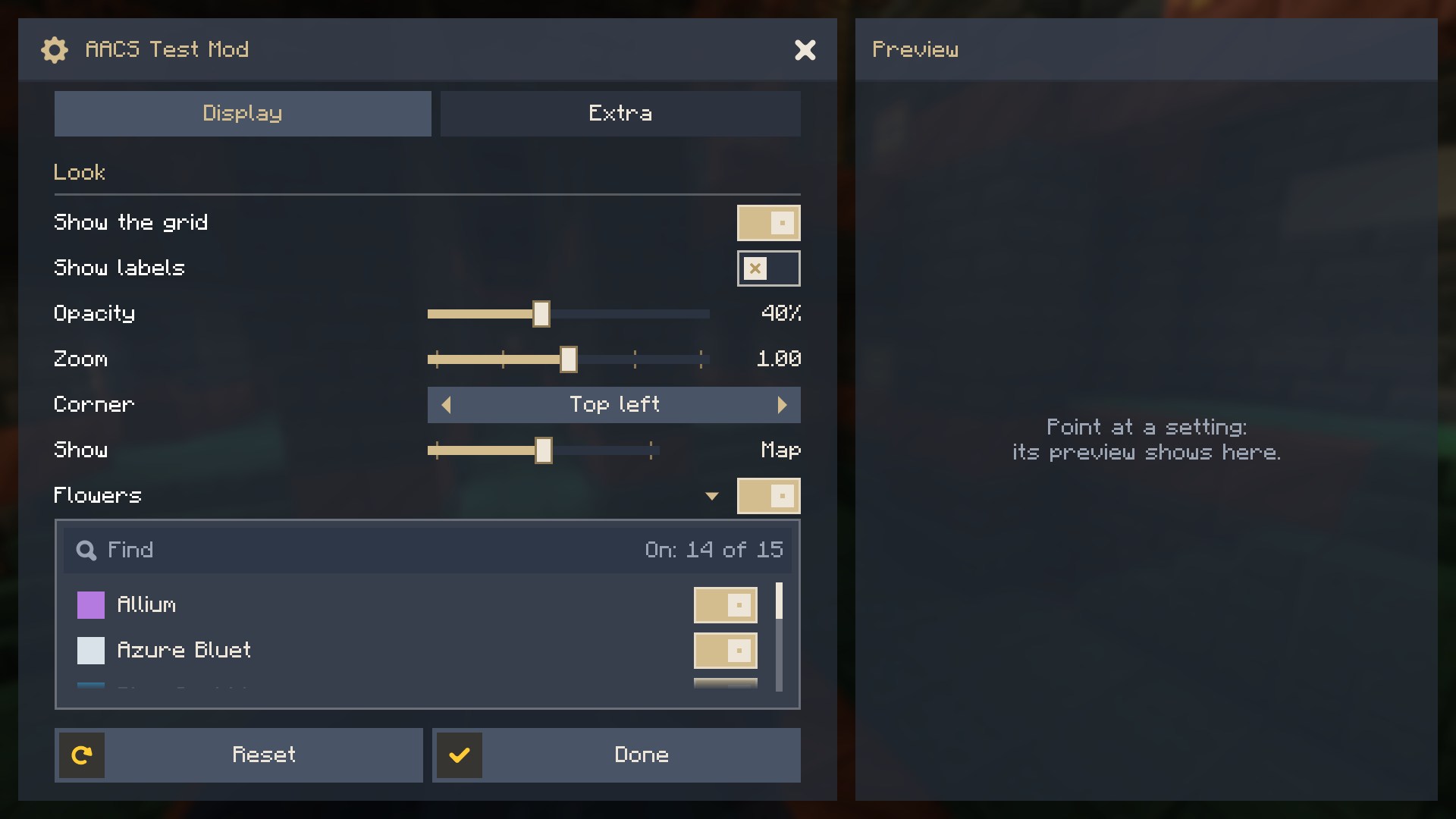
- Tabs as wide as their titles (more than fit scroll between two arrows), sections, and sub-sections that fold.
- Smooth scrolling without steps: the wheel moves a row's distance, the scroll bar can be dragged freely, and rows cut by the edges of the list dissolve.
- The card beside the list: the name and description of the setting under the pointer, and a picture of what it does, drawn by the mod. In a window too narrow for the card, the description shows as a tooltip by the row.
- Rows: switches, sliders of numbers (with a unit, fixed steps or words), choices in steps on a slider, choices with arrows (over one setting, or since 1.3.0 named options the mod keeps its own way), a switch with a searchable list of switches under it, and a link at the right end that hands the screen to the mod, say to open a window of its own.
- A reset icon beside a setting you changed, and Reset and Done at the bottom.
- Rectangular or rounded shapes, the mod's own colours and background, and the GUI scale held at a size that fits the window while the screen is open.
- The settings button in Mod Menu and in the mod list of NeoForge.
- Sub-sections from other mods: a mod can open a tab to others, and they add their own settings there.
For mod authors
Note Since 1.0.0 the API in
net.tapacywka.aacs.apiis stable: it only grows, and older methods are kept working (marked@Deprecated) rather than removed, because the loader keeps only the newest copy of the library among all the mods that embed it.Aacs.API_VERSIONtells which version is running.
Embed the library in your JAR (Fabric include, NeoForge jarJar), so players have nothing to install. The files are on Modrinth Maven:
repositories {
    maven { url = 'https://api.modrinth.com/maven' }
}

dependencies {
    // The game after +mc: 1.21.1, 26.1.2, 26.2 or 26.3 (on 26.x Loom takes implementation, not modImplementation)
    // Fabric (Loom)
    modImplementation 'maven.modrinth:actually-amazing-config-screen:1.3.0+mc1.21.1-fabric'
    include 'maven.modrinth:actually-amazing-config-screen:1.3.0+mc1.21.1-fabric'
    // NeoForge (ModDevGradle)
    jarJar(implementation('maven.modrinth:actually-amazing-config-screen:1.3.0+mc1.21.1-neoforge'))
}
The settings are values in a JSON file of your mod, described by a builder; the screen is laid out over them:
ConfigFile.Builder b = ConfigFile.builder();
b.push("map");                                              // a section of the file: { "map": { ... } }
BoolValue grid = b.bool("grid", true);
IntValue opacity = b.integer("opacity", 80, 0, 100);
b.pop();
ConfigFile file = b.build();
file.load(configDir.resolve("mymod-client.json"));

AacsScreen screen = AacsScreen.builder("mymod", file)
        .tab("mymod.config.tab.display", t -> t
                .section("mymod.config.section.look")
                .toggle(grid)
                .slider(opacity, s -> s.unit("%"))
                .preview((g, row, x, y, w, h, partialTick) -> { /* draw a picture of the setting */ }))
        .build();                                           // also the settings button in the mod lists

boolean showGrid = grid.get();                              // read where you need it; changes count at once
Minecraft.getInstance().setScreen(screen.open(parent));
Texts come from your lang files: a row's name mymod.config.<key> and its description mymod.config.<key>.tooltip.
Another mod can add a sub-section to a tab you opened to others:
.tab("mymod.config.tab.compat", t -> t.openTo("compatibility"))  // in your screen

AacsScreen.extend("mymod", "compatibility", "othermod", otherFile, t -> t.toggle(otherValue))  // in the other mod
        .shownIf(() -> isOtherThingLoaded);
Compatibility
- Minecraft 1.21.1, Fabric (Fabric Loader 0.16 or newer, no Fabric API needed) and NeoForge 21.1.
- The Fabric file also runs on NeoForge through Sinytra Connector.
- Minecraft 26.1.2, 26.2 and 26.3 (Java 25), Fabric and NeoForge.
Building
./gradlew build builds both JARs (fabric/build/libs, neoforge/build/libs) and runs the unit tests; ./gradlew publishToMavenLocal puts net.tapacywka.aacs:aacs-common, aacs-fabric and aacs-neoforge in the local Maven repository. ./gradlew :fabric:runClient and :neoforge:runClient open a game with a small test mod that shows every kind of row.
License
MIT. The icons are from Nieobie's Game Icon Pack (CC0).
Project description from CurseForge.
Pick your setup
Actually Amazing Config Screen by Minecraft version and loader
Choose the version and loader you play, then open the matching release.
Minecraft version
26.2
2 loader buildsMinecraft version
26.1.2
2 loader buildsMinecraft version
1.21.1
2 loader buildsCheck the dependencies, then try the file in a copied instance before changing a world you care about.
Recent files
Actually Amazing Config Screen versions and loaders
1.3.0+mc26.3-neoforge
aacs-v1.3.0-mc26.3-neoforge.jar
9 Nov 2026
Client Source doesn’t say Server Source doesn’t say Dependencies No extras listed Listed on Release listing
Check the 26.3 · NeoForge setup NeoForge26.3 release
1.3.0+mc26.2-neoforge
aacs-v1.3.0-mc26.2-neoforge.jar
9 Nov 2026
Client Source doesn’t say Server Source doesn’t say Dependencies No extras listed Listed on Release listing
Check the 26.2 · NeoForge setup NeoForge26.2 release
1.3.0+mc26.1.2-neoforge
aacs-v1.3.0-mc26.1.2-neoforge.jar
9 Nov 2026
Client Source doesn’t say Server Source doesn’t say Dependencies No extras listed Listed on Release listing
Check the 26.1.2 · NeoForge setup NeoForge26.1.2 release
1.3.0+mc1.21.1-neoforge
aacs-v1.3.0-mc1.21.1-neoforge.jar
9 Nov 2026
Client Source doesn’t say Server Source doesn’t say Dependencies No extras listed Listed on Release listing
Check the 1.21.1 · NeoForge setup 1.21.1NeoForge release
1.3.0+mc26.3-fabric
aacs-v1.3.0-mc26.3-fabric.jar
9 Nov 2026
Client Source doesn’t say Server Source doesn’t say Dependencies No extras listed Listed on Release listing
Check the 26.3 · Fabric setup Fabric26.3 release
1.3.0+mc26.2-fabric
aacs-v1.3.0-mc26.2-fabric.jar
9 Nov 2026
Client Source doesn’t say Server Source doesn’t say Dependencies No extras listed Listed on Release listing
Check the 26.2 · Fabric setup Fabric26.2 release
1.3.0+mc26.1.2-fabric
aacs-v1.3.0-mc26.1.2-fabric.jar
9 Nov 2026
Client Source doesn’t say Server Source doesn’t say Dependencies No extras listed Listed on Release listing
Check the 26.1.2 · Fabric setup Fabric26.1.2 release
1.3.0+mc1.21.1-fabric
aacs-v1.3.0-mc1.21.1-fabric.jar
9 Nov 2026
Client Source doesn’t say Server Source doesn’t say Dependencies No extras listed Listed on Release listing
Check the 1.21.1 · Fabric setup Fabric1.21.1 release
1.2.0+mc26.3-neoforge
aacs-v1.2.0-mc26.3-neoforge.jar
8 Nov 2026
Client Source doesn’t say Server Source doesn’t say Dependencies No extras listed Listed on Release listing
Check the 26.3 · NeoForge setup NeoForge26.3 release
1.2.0+mc26.2-neoforge
aacs-v1.2.0-mc26.2-neoforge.jar
8 Nov 2026
Client Source doesn’t say Server Source doesn’t say Dependencies No extras listed Listed on Release listing
Check the 26.2 · NeoForge setup NeoForge26.2 release
1.2.0+mc26.1.2-neoforge
aacs-v1.2.0-mc26.1.2-neoforge.jar
8 Nov 2026
Client Source doesn’t say Server Source doesn’t say Dependencies No extras listed Listed on Release listing
Check the 26.1.2 · NeoForge setup NeoForge26.1.2 release
1.2.0+mc1.21.1-neoforge
aacs-v1.2.0-mc1.21.1-neoforge.jar
8 Nov 2026
Client Source doesn’t say Server Source doesn’t say Dependencies No extras listed Listed on Release listing
Check the 1.21.1 · NeoForge setup 1.21.1NeoForge release
Looking for an older file? The official CurseForge project page is in Resources.
 mod
CurseForge · Minecraft
Legendary Inventory
Fixes inventory clutter in modpacks forever.
 mod
CurseForge · Minecraft
Legacy Crafting
Craft in the world: lay items on the ground or keep them in a workbench, and craft them over time.
 mod
CurseForge · Minecraft
kenace's Entity Counter
A client-side HUD that counts nearby mobs, dropped items, and hoppers, with customizable layout, compact cycling, colours, and positioning.