oωo (owo-lib) Needed by DeathLog 0.4.1+1.21
requiredMatching file found Matched file: 0.12.15.4+1.21

Modrinth · Minecraft mod
Keeps track of the many embarrassing times you died
Quick answer
DeathLog 0.4.1+1.21 targets 1.21 with Fabric, Quilt. Installation on the client is optional. Installation on the dedicated server is optional. 1 required mod needs a matching file.
Where it goes
Installation on the client is optional. Installation on the dedicated server is optional.
The source marks this as usable on both the client and server.
0.4.1+1.21. Change the file and its required mods may change too.
Install oωo (owo-lib), Fabric API first, but 1 required mod has no matching file for this setup. Do not mix loader builds to force a match. 1 comes through another mod in the chain.
1 extra mod was pulled in by another dependency. Indented rows show who needs each one. We only count dependency files that match this setup. A file for another loader does not fill the gap.
Before you install it
Built for DeathLog 0.4.1+1.21. Pick another file and the loader, install side or required mods may change.
Use 0.4.1+1.21. It targets 1.21 with Fabric, Quilt; another release may have different loader, side or dependency requirements.
Install oωo (owo-lib), Fabric API first, but 1 required mod has no matching file for this setup. Do not mix loader builds to force a match. 1 comes through another mod in the chain.
Installation on the client is optional. Installation on the dedicated server is optional.
Use the “Get this file” button beside 0.4.1+1.21. It opens that exact file at the source.
About this project
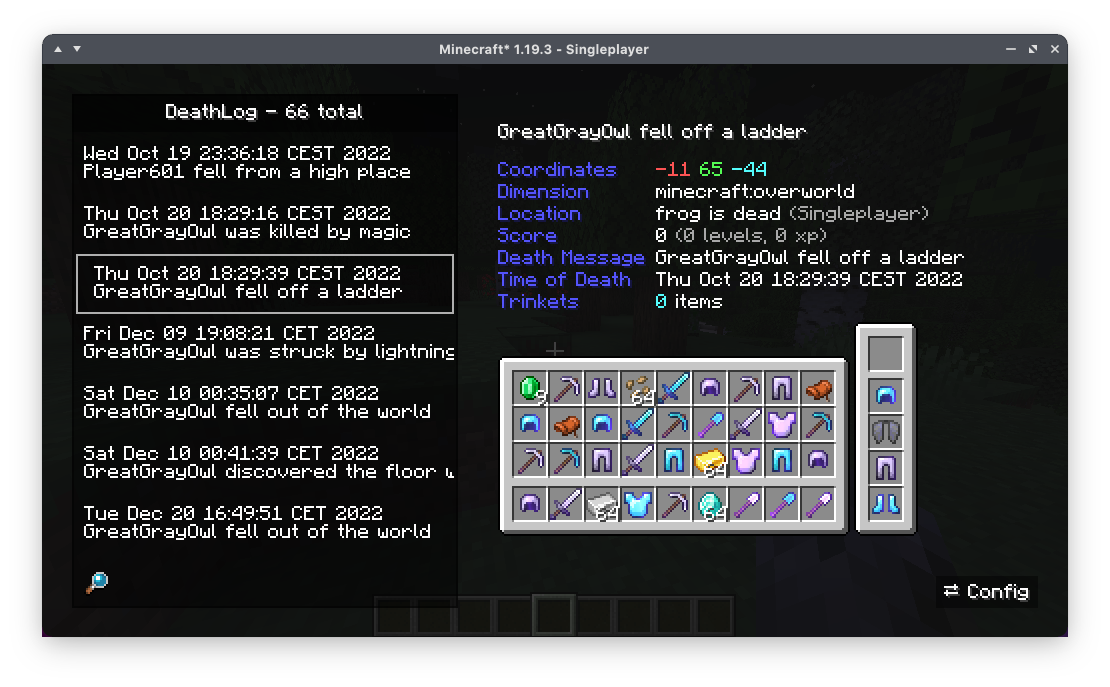
DeathLog tracks your deaths in all worlds and servers. It does this completely client-side and records important metadata like coordinates, dimension and even your entire inventory. Since version 0.2.0 onward, DeathLog can also operate server-side and track all deaths of all players on that server, with native functionality for restoring a death snapshot. DeathLog can be used on both sides without being required on the other, however managing the server's database is significantly easier with a DeathLog-enabled client.
You can access your log from the vanilla Statistics screen. The search bar accounts for
You can get your lost items back while in creative mode by simply clicking on them with your mouse wheel. Should you not have access to creative mode, it will copy an appropriate /give command
Project description from Modrinth.
Pick your setup
Choose the version and loader you play, then open the matching release.
Showing the newest 12 of 24 game versions. Older files are in the list below.
Check the dependencies, then try the file in a copied instance before changing a world you care about.
Recent files
deathlog-0.4.1+1.21.2.jar
8 Nov 2024
deathlog-0.4.1+1.21.jar
24 Aug 2024
deathlog-0.4.0+1.21.jar
30 Jun 2024
deathlog-0.3.2+1.20.3.jar
11 Jan 2024
deathlog-0.3.2+1.20.2.jar
10 Oct 2023
deathlog-0.3.2+1.20.jar
9 Jun 2023
deathlog-0.3.2+1.19.4.jar
23 Mar 2023
deathlog-0.3.2+1.19.3.jar
22 Mar 2023
deathlog-0.3.1+1.19.3.jar
13 Jan 2023
deathlog-0.3.0+1.19.3.jar
12 Jan 2023
deathlog-0.2.11+1.19.jar
20 Oct 2022
deathlog-0.2.10+1.19.jar
16 Jun 2022
Looking for an older file? The official Modrinth project page is in Resources.
 mod
modSmoothly animates GUI screens with extensive customization!
 mod
modA sleek social chat mod for Minecraft that replaces vanilla chat with channels, private messaging, and a modern GUI.
 mod
modLightweight client mod that smooths third-person camera movement.