Minecraft version
Back to mods 
Modrinth · Minecraft mod
DeathLog
Keeps track of the many embarrassing times you died
Choose a version Pick your version below, then grab the matching file.
Quick answer
Which DeathLog release matches 1.18?
Best match for your filters 0.2.6+1.18
Game version 1.18, 1.18.1
Loader Fabric
DeathLog 0.2.6+1.18 targets 1.18, 1.18.1 with Fabric. Installation on the client is optional. Installation on the dedicated server is optional. No extra mods listed for this file.
Where it goes
Is DeathLog required on the client, server, or both?
Installation on the client is optional. Installation on the dedicated server is optional.
Client Optional
Dedicated server Optional
Loader for this release Fabric
Required install it here Optional supported, not mandatory Not supported do not install here Source doesn’t say do not assume
The source marks this as usable on both the client and server.
What else does DeathLog 0.2.6+1.18 need?
0.2.6+1.18 on 1.18. Every mod below is checked against that same setup.
This file does not list any required mods. Do not add a library just because a different file uses it.
This file does not list any required or optional mods.
Before you install it
Add DeathLog without breaking your instance.
Built for DeathLog 0.2.6+1.18 on 1.18. Pick another file and the loader, install side or required mods may change.
- 01
Stick to this file
Use 0.2.6+1.18. It targets 1.18, 1.18.1 with Fabric; another release may have different loader, side or dependency requirements.
- 02
Bring the mods it needs
This file does not list any required mods. Do not add a library just because a different file uses it.
- 03
Put it on the correct side
Installation on the client is optional. Installation on the dedicated server is optional.
- 04
Pick the file you checked
Use the “Get this file” button beside 0.2.6+1.18. It opens that exact file at the source.
About this project
What does DeathLog add?
DeathLog
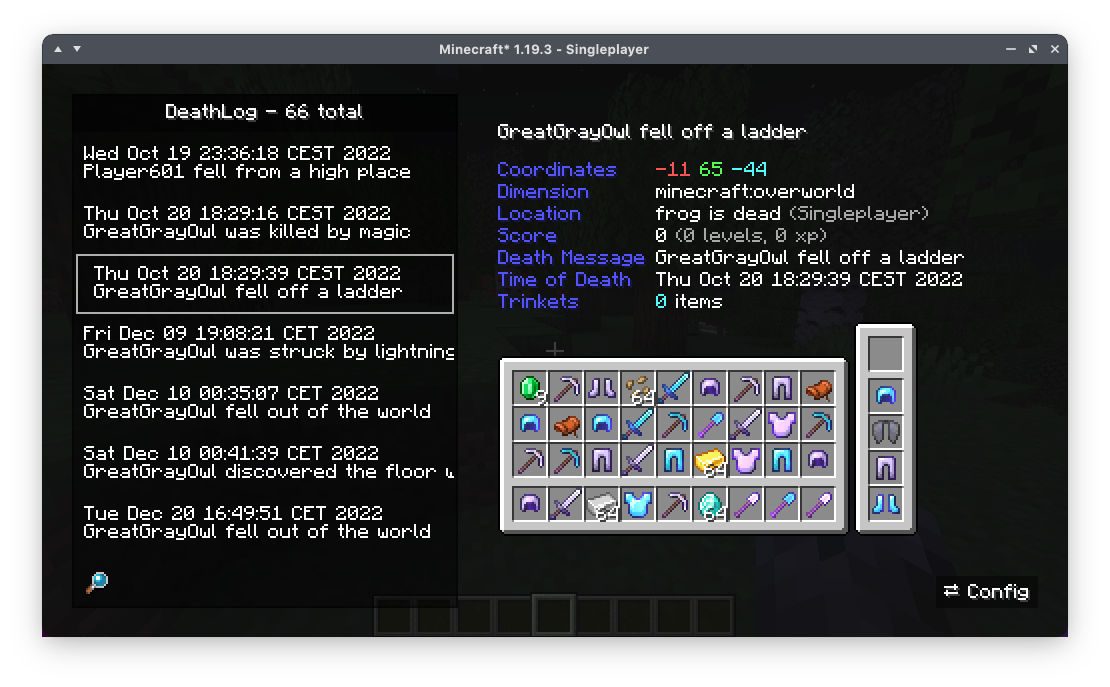
DeathLog tracks your deaths in all worlds and servers. It does this completely client-side and records important metadata like coordinates, dimension and even your entire inventory. Since version 0.2.0 onward, DeathLog can also operate server-side and track all deaths of all players on that server, with native functionality for restoring a death snapshot. DeathLog can be used on both sides without being required on the other, however managing the server's database is significantly easier with a DeathLog-enabled client.
You can access your log from the vanilla Statistics screen. The search bar accounts for
- Item Names
- Coordinates
- World or Server Names
- Death Messages
- ...
You can get your lost items back while in creative mode by simply clicking on them with your mouse wheel. Should you not have access to creative mode, it will copy an appropriate /give command
Project description from Modrinth.
Pick your setup
DeathLog by Minecraft version and loader
Choose the version and loader you play, then open the matching release.
Minecraft version
1.21.2
2 loader buildsMinecraft version
1.21
2 loader buildsMinecraft version
1.20.4
2 loader buildsMinecraft version
1.20.3
2 loader buildsMinecraft version
1.20.2
2 loader buildsMinecraft version
1.20.1
2 loader buildsMinecraft version
1.20
2 loader buildsMinecraft version
1.19.4
2 loader buildsMinecraft version
1.19.3
2 loader buildsMinecraft version
1.19.2
1 loader buildMinecraft version
1.19.1
1 loader buildShowing the newest 12 of 24 game versions. Older files are in the list below.
Check the dependencies, then try the file in a copied instance before changing a world you care about.
Recent files
DeathLog versions and loaders
0.2.6+1.18
deathlog-0.2.6+1.18.jar
12 Jan 2022
Client Optional Server Optional Dependencies No extras listed Listed on Release listing
Check the 1.18 · Fabric setup 1.181.18.1Fabric release
0.2.5+1.18
deathlog-0.2.5+1.18.jar
11 Jan 2022
Client Optional Server Optional Dependencies No extras listed Listed on Release listing
Check the 1.18 · Fabric setup 1.181.18.1Fabric release
0.2.4+1.18
deathlog-0.2.4+1.18.jar
2 Dec 2021
Client Optional Server Optional Dependencies No extras listed Listed on Release listing
Check the 1.18 · Fabric setup 1.18Fabric release
Looking for an older file? The official Modrinth project page is in Resources.
 mod
CurseForge + Modrinth · Minecraft
EasyAuth
Authentication mod for Fabric servers
 mod
CurseForge + Modrinth · Minecraft
Midas Hunger
Adds additional golden food items that give the player status effects.
 mod
Modrinth · Minecraft
ConfigGuard
Automatic snapshots of your config folder with a line-by-line diff and one-click restore. Undo any config change, on the client or on a server.