Minecraft version
Back to mods 
Modrinth · Minecraft mod
JoJo Stands
SVM JoJo is a addition to vanilla Minecraft that adds stands and items from JoJos Bizarre Adventure to the game
Choose a version Pick your version below, then grab the matching file.
Quick answer
Which JoJo Stands release should I use?
Latest stable file 1.92+mod
Game version 1.21, 1.21.1
Loader Fabric, Forge, NeoForge
JoJo Stands 1.92+mod targets 1.21, 1.21.1 with Fabric, Forge, NeoForge. Installation on the client is optional. Installation on the dedicated server is optional. No extra mods listed for this file.
Where it goes
Is JoJo Stands required on the client, server, or both?
Installation on the client is optional. Installation on the dedicated server is optional.
Client Optional
Dedicated server Optional
Loader for this release Fabric, Forge, NeoForge
Required install it here Optional supported, not mandatory Not supported do not install here Source doesn’t say do not assume
The source marks this as usable on both the client and server.
What else does JoJo Stands 1.92+mod need?
1.92+mod. Change the file and its required mods may change too.
This file does not list any required mods. Do not add a library just because a different file uses it.
This file does not list any required or optional mods.
Before you install it
Add JoJo Stands without breaking your instance.
Built for JoJo Stands 1.92+mod. Pick another file and the loader, install side or required mods may change.
- 01
Stick to this file
Use 1.92+mod. It targets 1.21, 1.21.1 with Fabric, Forge, NeoForge; another release may have different loader, side or dependency requirements.
- 02
Bring the mods it needs
This file does not list any required mods. Do not add a library just because a different file uses it.
- 03
Put it on the correct side
Installation on the client is optional. Installation on the dedicated server is optional.
- 04
Pick the file you checked
Use the “Get this file” button beside 1.92+mod. It opens that exact file at the source.
About this project
What does JoJo Stands add?
SVM JoJo is a datapack that aims to bring accurate experience of gameplay with stand abilities as well as fighting against bosses, the datapacks also adds cosmetics, progression and custom advancements!
FAQ
Q - How to get stands? - Craft and use stand arrow or use a disc of a stand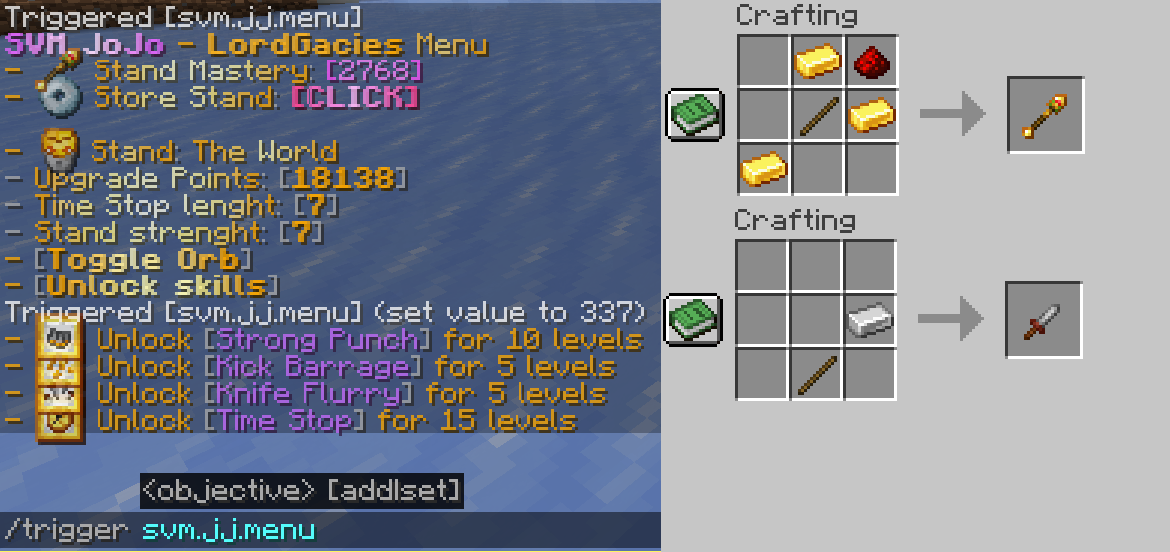
Q - How do I use abilities? - Use /trigger svm.jj.menu command and click "Unlock Moves" then unlock your moves, to check the activation, check out advancements tab of the stand
Q - How do I get Stand Points? - Complete new advancements and kill mobs
Q - How do I get rid of a stand? - Use /trigger svm.jj.menu command and click "Store Stand [CLICK]"
Q - Is this multiplayer friendly? - Yes, you can bash your friends head with Star Platinum :)
Q - What stands are there? - 6 as for now, Star Platinum, The World, King Crimson, Killer Queen and Weather Report and Whitesnake, however Killer Queen can obtain Stray Cat and Bites The Dust
Latest update video
Installation
Datapack
Download newest full version of the datapack
For new world
In "Singleplayer", click "Create New World", then go into ""More" and click "Data Packs", then click "Open Pack Folder" and datapack folder will open, then just drag/copy-paste the downloaded file to the opened folder, then click on the datapack in-game so it's in "Selected" instead of "Available".
For existing world
In "Singleplayer", select your world where you want to install the pack, click "Edit" and then "Open World Folder", then go into "datapacks" folder and drag/copy-paste the downloaded file to the opened folder.
Resourcepack
In "Options", click "Resource Packs..." and click "Open Pack Folder", now just drag-drop the datapack, go back to Minecraft and go to "Options", then "Resource Packs", click the SVM JoJo Pack and click "Done" and that should load your resources
(In short, assets are inside of the Datapack file, so just copy-paste it in the resourcepack folder)
Mod
Mod version doesn't require anything besides putting the downloaded file to .minecraft/mods folder
How to install mods & datapacks with the Modrinth App
Project description from Modrinth.
Pick your setup
JoJo Stands by Minecraft version and loader
Choose the version and loader you play, then open the matching release.
Minecraft version
1.21
5 loader buildsMinecraft version
1.20.2
4 loader buildsMinecraft version
1.20.1
4 loader buildsMinecraft version
1.20
4 loader buildsCheck the dependencies, then try the file in a copied instance before changing a world you care about.
Recent files
JoJo Stands versions and loaders
1.92+mod
svm-jojo-1.92.jar
25 Dec 2024
Client Optional Server Optional Dependencies No extras listed Listed on Release listing
Check the 1.21.1 · Fabric setup 1.211.21.1FabricForge release
1.92+mod
svm-jojo-1.92.jar
25 Dec 2024
Client Optional Server Optional Dependencies No extras listed Listed on Release listing
Check the 1.21.1 · Fabric setup 1.211.21.1FabricForge release
1.92
svm_jojo_1.92.zip
25 Dec 2024
Client Optional Server Optional Dependencies No extras listed Listed on Release listing
Check the 1.21.1 · datapack setup 1.211.21.1datapack release
1.91+mod
svm-jojo-1.91.jar
23 Dec 2024
Client Optional Server Optional Dependencies No extras listed Listed on Release listing
Check the 1.21.1 · Fabric setup 1.211.21.1FabricForge release
1.91
svm_jojo_1.91.zip
23 Dec 2024
Client Optional Server Optional Dependencies No extras listed Listed on Release listing
Check the 1.21.1 · datapack setup 1.211.21.1datapack release
1.9+mod
svm-jojo-1.9.jar
22 Dec 2024
Client Optional Server Optional Dependencies No extras listed Listed on Release listing
Check the 1.21.1 · Fabric setup 1.211.21.1FabricForge release
1.9
svm_jojo_1.9_beta.zip
22 Dec 2024
Client Optional Server Optional Dependencies No extras listed Listed on Release listing
Check the 1.21.1 · datapack setup 1.211.21.1datapack release
4+mod
svm-jojo-4.jar
29 Mar 2024
Client Optional Server Optional Dependencies No extras listed Listed on Release listing
Check the 1.20.2 · Fabric setup 1.201.20.11.20.2Fabric release
4
svm_jojo_1.8_data-resourcepack.zip
29 Mar 2024
Client Optional Server Optional Dependencies No extras listed Listed on Release listing
Check the 1.20.2 · datapack setup 1.201.20.11.20.2datapack release
3+mod
svm-jojo-3.jar
30 Nov 2023
Client Optional Server Optional Dependencies No extras listed Listed on Release listing
Check the 1.20.2 · Fabric setup 1.20.2FabricForgeQuilt release
3+mod
svm-jojo-3.jar
30 Nov 2023
Client Optional Server Optional Dependencies No extras listed Listed on Release listing
Check the 1.20.2 · Fabric setup 1.20.2FabricForgeQuilt release
3+mod
svm-jojo-3.jar
30 Nov 2023
Client Optional Server Optional Dependencies No extras listed Listed on Release listing
Check the 1.20.2 · Fabric setup 1.20.2FabricForgeQuilt release
Looking for an older file? The official Modrinth project page is in Resources.
 mod
CurseForge + Modrinth · Minecraft
Create Simurail
A train mod using Create Aeronautics.
 mod
CurseForge · Minecraft
Gods And Faith
Gods and Faith does exactly as it says, there are a variety of gods upon which I keep expanding and followers of those gods with the followers gaining faith from their god, play as a god, a mortal, or a follower but faith does not break without gods.
 mod
CurseForge · Minecraft
Fantasy DNA
Our mod is based off of the fantasy universe; Naruto, Marvel, God of War and Witcher ETX