Puzzles Lib Needed by Plenty Plates v21.5.0-1.21.5-NeoForge
requiredMatching file found Matched file: [NEOFORGE] [1.21.5] PuzzlesLib-v21.5.13

Modrinth · Minecraft mod
Many new pressure plates for all your redstone needs. Greatly customizable!
Quick answer
Plenty Plates v21.5.0-1.21.5-NeoForge targets 1.21.5 with NeoForge. Installation on the client is optional. Installation on the dedicated server is optional. All 1 required mods have matching files.
Where it goes
Installation on the client is optional. Installation on the dedicated server is optional.
The source marks this as usable on both the client and server.
v21.5.0-1.21.5-NeoForge. Change the file and its required mods may change too.
Install Puzzles Lib first. We found matching files for this game-version and loader setup.
We only count dependency files that match this setup. A file for another loader does not fill the gap.
Before you install it
Built for Plenty Plates v21.5.0-1.21.5-NeoForge. Pick another file and the loader, install side or required mods may change.
Use v21.5.0-1.21.5-NeoForge. It targets 1.21.5 with NeoForge; another release may have different loader, side or dependency requirements.
Install Puzzles Lib first. We found matching files for this game-version and loader setup.
Installation on the client is optional. Installation on the dedicated server is optional.
Use the “Get this file” button beside v21.5.0-1.21.5-NeoForge. It opens that exact file at the source.
About this project





Plenty Plates is a mod all about pressure! Well, pressure plates to be exact. There are multiple new types of pressure plates for detecting all sorts of entities. But that's not all! You can greatly configure each plate after placing it, like making it silent or shrouded.

▶️ All new pressure plates can be placed on all 6 sides of a block, just like buttons!
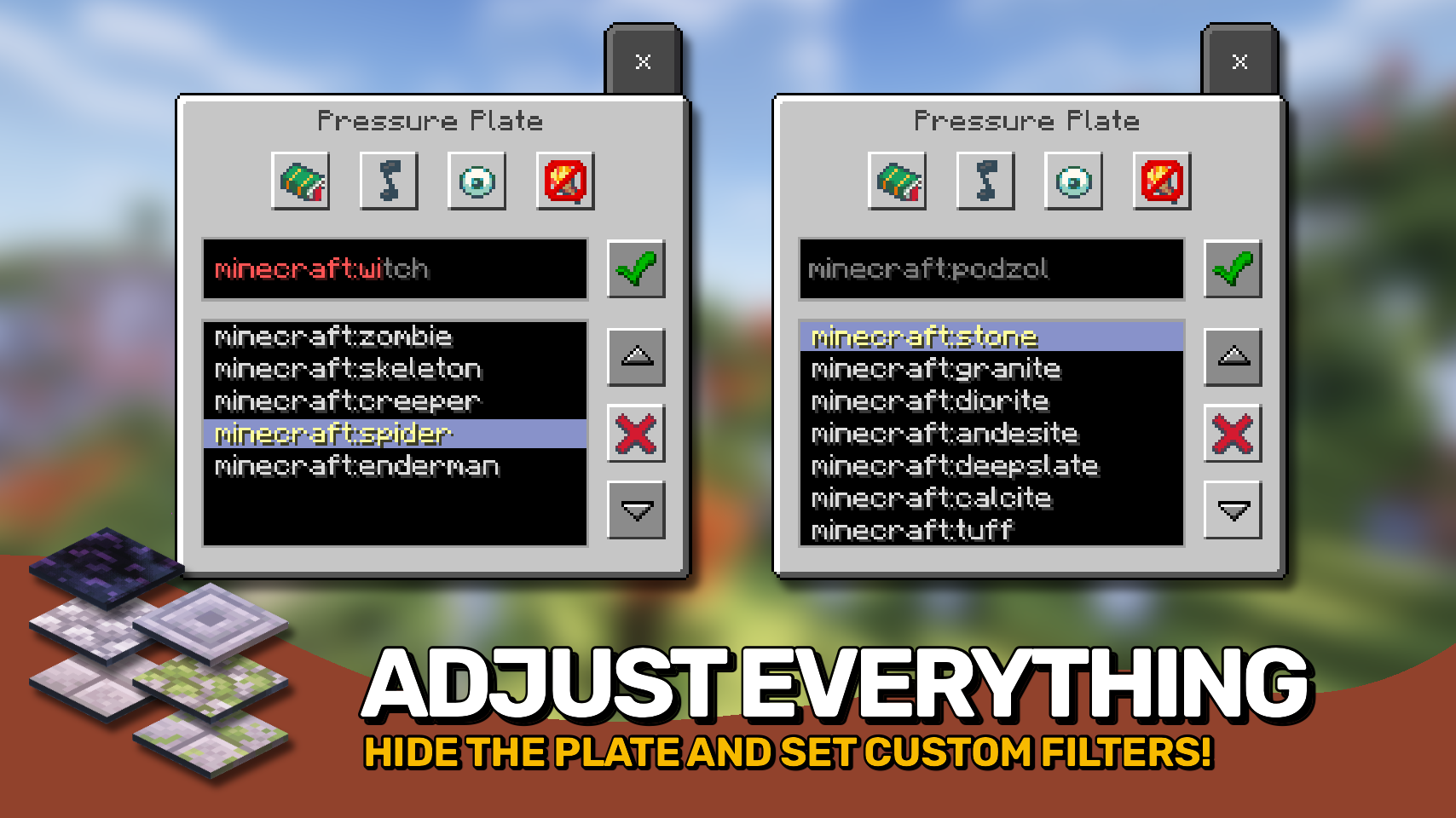
▶️ Pressure plates have a menu accessible by shift + right-clicking, allowing to set whitelist or blacklist filters, and make the plate silent, shrouded, or even make it emit light.
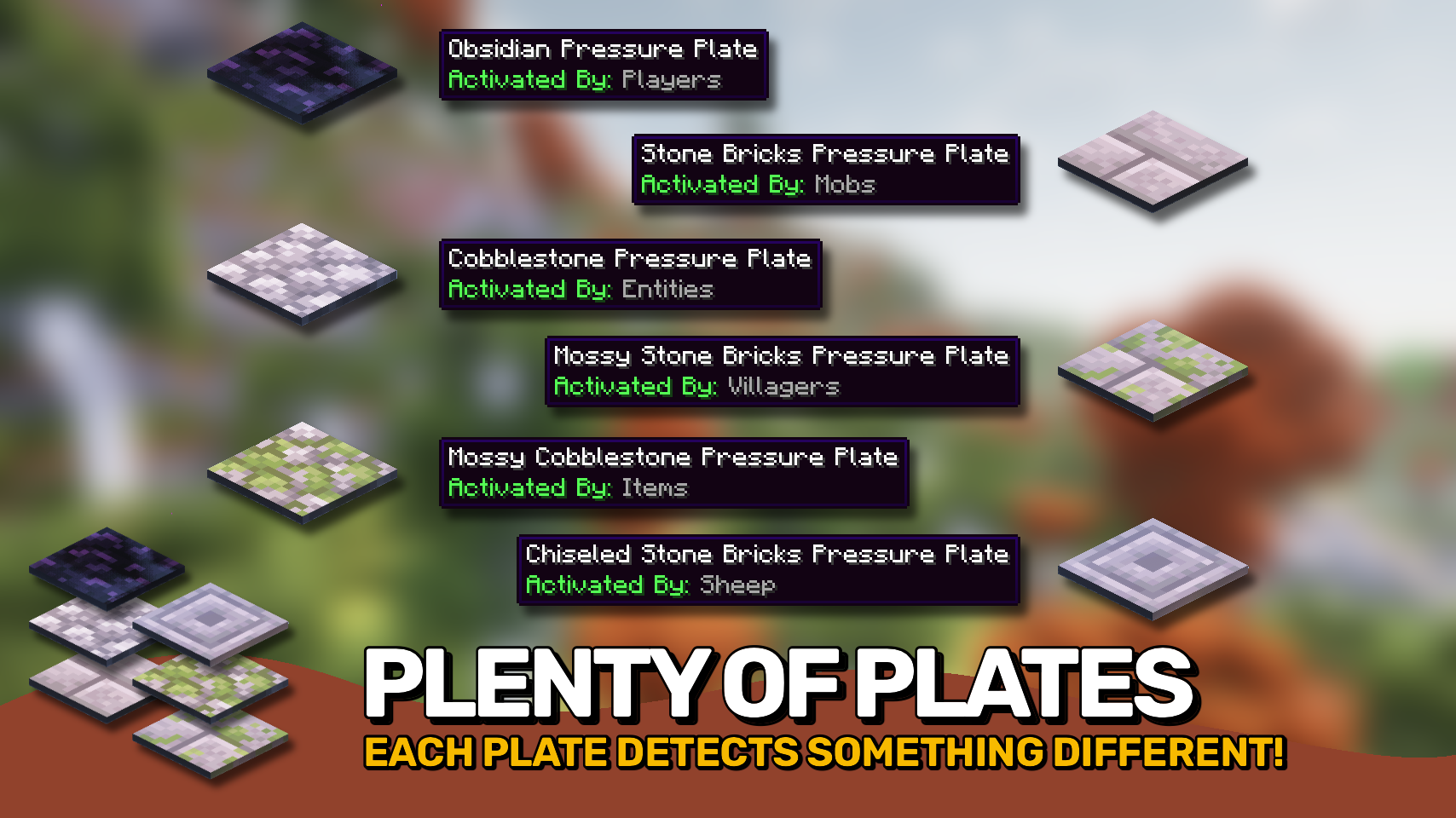
▶️ Obsidian plates for detecting players, allow filtering for specific player names.
▶️ Cobblestone plates for detecting all mobs, can filter for specific mobs.
▶️ Mossy cobblestone plates for detecting items, useful for filtering out specific items.
▶️ Stone bricks plates detect mobs and can even differenciate between adults and babies.
▶️ Mossy stone bricks plates useful for detecting villagers, allows for filtering by profession.
▶️ Chiseled stone bricks plates only trigger for sheep, but can be configured to only respond to specific wool colors.


⏩ INSTALLATION REQUIRED ON CLIENT & REQUIRED ON SERVER
⏩ REQUIRES PUZZLES LIB TO BE INSTALLED (FORGE & FABRIC)
⏩ REQUIRES FABRIC API TO BE INSTALLED (FABRIC)
⏩ REQUIRES FORGE CONFIG API PORT TO BE INSTALLED (FABRIC)

Configuration is easily possible directly from in-game using the mod menu (requires Mod Menu by Prospector to be installed on Fabric) by installing either Configured or Configured (Fabric) by MrCrayfish.
When it comes to manual configuration all files are found at .minecraft/config, named as MOD_ID-client.toml, MOD_ID-common.toml, or MOD_ID-server.toml depending on the type of config. Not all types might exist for this mod if any.
Note that on older mod versions server configuration files are found at .minecraft/saves/WORLD_NAME/serverconfigs, effecticely meaning they must be configured separately for each individual world.

🌟 Thanks a lot to Myrathi and their old ObsidiPlates mod which I loved and which served as main inspiration for this mod.
🌟 Thanks also to Covert_Jaguar and their Railcraft mod, most pressure plate types are based on the detectors from Railcraft.





Project description from Modrinth.
Pick your setup
Choose the version and loader you play, then open the matching release.
Check the dependencies, then try the file in a copied instance before changing a world you care about.
Recent files
PlentyPlates-v21.5.0-1.21.5-NeoForge.jar
13 Apr 2025
PlentyPlates-v21.5.0-1.21.5-Fabric.jar
13 Apr 2025
PlentyPlates-v21.4.0-1.21.4-NeoForge.jar
10 Feb 2025
PlentyPlates-v21.4.0-1.21.4-Fabric.jar
10 Feb 2025
PlentyPlates-v21.3.0-1.21.3-NeoForge.jar
6 Dec 2024
PlentyPlates-v21.3.0-1.21.3-Fabric.jar
6 Dec 2024
PlentyPlates-v21.1.0-1.21.1-NeoForge.jar
12 Sept 2024
PlentyPlates-v21.1.0-1.21.1-Fabric.jar
12 Sept 2024
PlentyPlates-v20.4.1-1.20.4-NeoForge.jar
10 Feb 2024
PlentyPlates-v20.4.1-1.20.4-Forge.jar
10 Feb 2024
PlentyPlates-v20.4.1-1.20.4-Fabric.jar
10 Feb 2024
PlentyPlates-v20.4.0-1.20.4-NeoForge.jar
5 Feb 2024
Looking for an older file? The official Modrinth project page is in Resources.
 mod
Modern warfare military mod: strike drones (Geran, Lancet, FPV), artillery (howitzers, HIMARS, Tornado-S MLRS), air defence (Gepard, Skynex, Strela-10, radars), a command post, realistic ballistics, shrapnel and drivable military vehicles.
 mod
Unofficial NeoForge Port Of Botania(Botania is a mod that adds nature magic to Minecraft).
 mod
Disposable public fixture for testing the Modpacks.ch GitHub catalogue flow
