Cloth Config API Optional for Shifty Hotbar mc1.20-1.1
optionalMatching file found Matched file: 13.0.138+fabric

Modrinth · Minecraft mod
A utility mod that implements the hotbar shifting ability, inspired by Stardew Valley.
Quick answer
Shifty Hotbar mc1.20-1.1 targets 1.20, 1.20.1, 1.20.2 with Fabric. It must be installed on the client. Do not install it on the dedicated server. All 1 required mods have matching files.
Where it goes
It must be installed on the client. Do not install it on the dedicated server.
This file is marked client-only.
mc1.20-1.1. Change the file and its required mods may change too.
Install Fabric API first. We found matching files for this game-version and loader setup. 3 come through another mod in the chain.
3 extra mods were pulled in by other dependencies. Indented rows show who needs each one. We only count dependency files that match this setup. A file for another loader does not fill the gap.
Before you install it
Built for Shifty Hotbar mc1.20-1.1. Pick another file and the loader, install side or required mods may change.
Use mc1.20-1.1. It targets 1.20, 1.20.1, 1.20.2 with Fabric; another release may have different loader, side or dependency requirements.
Install Fabric API first. We found matching files for this game-version and loader setup. 3 come through another mod in the chain.
It must be installed on the client. Do not install it on the dedicated server.
Use the “Get this file” button beside mc1.20-1.1. It opens that exact file at the source.
About this project

A fully client-side utility mod that implements the hotbar shifting ability, inspired by Stardew Valley.
I know that there are mods like this in the wild, but none of them did suit me whatsoever. Therefore, I made the ultimate version that consists of every feature a mod like this can possibly provide:
Up Arrow and Down Arrow by default)Right Arrow and Left Arrow by default)modifier key (Left Alt by default)1...9) while pressing a modifier key (Left Alt by default)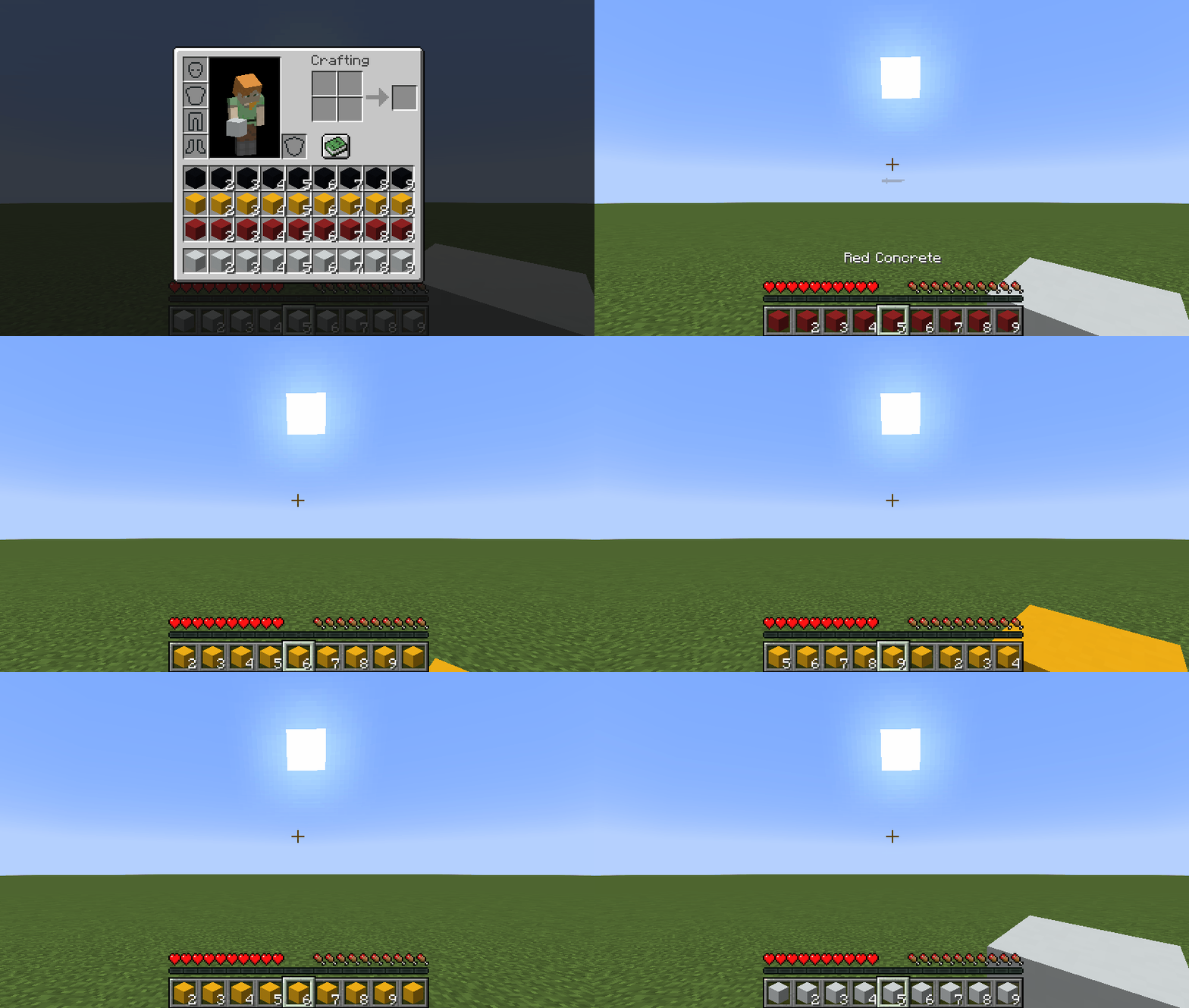
Key binds can be configured just like vanilla ones:
Options...Controls...Key Binds...Shifty Hotbar section| Name | Description | Default |
|---|---|---|
Row modifier |
When pressed, it allows you to shift rows instead of choosing a slot via mouse scroll/hotkeys (1...9) |
Left Alt |
Previous row |
Shifts all rows in your inventory so that the topmost row in your inventory becomes the hotbar | Down Arrow |
Next row |
Shifts all rows in your inventory so that the row above your hotbar becomes the hotbar | Up Arrow |
Row-in-column modifier |
When pressed, it allows you to shift slots in the selected column instead of choosing one via mouse scroll | |
Previous row-in-column |
Shifts all slots in the selected column so that the topmost slot in your inventory becomes the hotbar slot | |
Next row-in-column |
Shifts all slots in the selected column so that the slot above your hotbar slot becomes the hotbar slot | |
Column modifier |
When pressed, it allows you to shift columns instead of choosing a slot via mouse scroll/hotkeys (1...9) |
|
Previous column |
Shifts all columns in your inventory so that the slot before your selected slot becomes the selected slot | Left Arrow |
Next column |
Shifts all columns in your inventory so that the slot after your selected slot becomes the selected slot | Right Arrow |
Column-in-row modifier |
When pressed, it allows you to shift slots in the hotbar instead of choosing one via mouse scroll | |
Previous column-in-row |
Shifts all slots in your hotbar so that the slot before your selected slot becomes the selected slot | |
Next column-in-row |
Shifts all slots in your hotbar so that the slot after your selected slot becomes the selected slot |
If you have Cloth Config installed, you can customize the behavior of the mod. A config is usually located at ./config/shifty_hotbar.json and by default looks like this:
{
  "invertRowScroll": false,
  "invertColumnScroll": false
}
| Name | Description | Default value |
|---|---|---|
invertRowScroll |
Inverts mouse scroll when row or row-in-column modifier is pressed |
false |
invertColumnScroll |
Inverts mouse scroll when column or column-in-row modifier is pressed |
false |
You can edit any of these values directly in the config file or via ModMenu.
Requirements:
>=1.14.x>=0.7.0>=0.25.0You can download the mod from:
Requirements:
17git clone https://github.com/Kir-Antipov/shifty-hotbar.git
cd shifty-hotbar
chmod +x ./gradlew
./gradlew build
cd build/libs
git clone https://github.com/Kir-Antipov/shifty-hotbar.git
cd shifty-hotbar

gradlew build
cd build/libs
Project description from Modrinth.
Pick your setup
Choose the version and loader you play, then open the matching release.
Showing the newest 12 of 29 game versions. Older files are in the list below.
Check the dependencies, then try the file in a copied instance before changing a world you care about.
Recent files
shifty-hotbar-mc1.20-1.1.jar
17 Dec 2023
shifty-hotbar-mc1.19-1.1.jar
18 Jun 2022
shifty-hotbar-mc1.18.2-1.1.jar
18 Jun 2022
shifty-hotbar-mc1.17.1-1.1.jar
18 Jun 2022
shifty-hotbar-mc1.16.5-1.1.jar
18 Jun 2022
shifty-hotbar-mc1.15.2-1.1.jar
18 Jun 2022
shifty-hotbar-mc1.14.4-1.1.jar
18 Jun 2022
shifty-hotbar-mc1.19-1.0.jar
14 Jun 2022
shifty-hotbar-mc1.18.2-1.0.jar
14 Jun 2022
shifty-hotbar-mc1.16.5-1.0.jar
14 Jun 2022
shifty-hotbar-mc1.17.1-1.0.jar
14 Jun 2022
shifty-hotbar-mc1.15.2-1.0.jar
14 Jun 2022
Looking for an older file? The official Modrinth project page is in Resources.
 mod
This mod was designed and planned to improve the experience of creating SMPs servers in Minecraft. Its main function is to ban and control items, blocks, and mods, with the ability to unban those same items, blocks, or mods for specific players.
 mod
A complete overhaul of the minecraft inventory system. Turning every container into a window, where multiple can be open at the same time.
 mod
Minecraft cloud save system using the power of Git!




