Minecraft version
Back to mods 
Modrinth · Minecraft mod
Sloths Display Entity Editor
Create, modify, and delete Block and Item displays, even in survival with this datapack and its command book!
Choose a version Pick your version below, then grab the matching file.
Quick answer
Which Sloths Display Entity Editor release should I use?
Latest stable file 2.1+mod
Game version 26.3
Loader Fabric, Forge, NeoForge
Sloths Display Entity Editor 2.1+mod targets 26.3 with Fabric, Forge, NeoForge. Installation on the client is optional. Installation on the dedicated server is optional. No extra mods listed for this file.
Where it goes
Is Sloths Display Entity Editor required on the client, server, or both?
Installation on the client is optional. Installation on the dedicated server is optional.
Client Optional
Dedicated server Optional
Loader for this release Fabric, Forge, NeoForge
Required install it here Optional supported, not mandatory Not supported do not install here Source doesn’t say do not assume
The source marks this as usable on both the client and server.
What else does Sloths Display Entity Editor 2.1+mod need?
2.1+mod. Change the file and its required mods may change too.
This file does not list any required mods. Do not add a library just because a different file uses it.
This file does not list any required or optional mods.
Before you install it
Add Sloths Display Entity Editor without breaking your instance.
Built for Sloths Display Entity Editor 2.1+mod. Pick another file and the loader, install side or required mods may change.
- 01
Stick to this file
Use 2.1+mod. It targets 26.3 with Fabric, Forge, NeoForge; another release may have different loader, side or dependency requirements.
- 02
Bring the mods it needs
This file does not list any required mods. Do not add a library just because a different file uses it.
- 03
Put it on the correct side
Installation on the client is optional. Installation on the dedicated server is optional.
- 04
Pick the file you checked
Use the “Get this file” button beside 2.1+mod. It opens that exact file at the source.
About this project
What does Sloths Display Entity Editor add?
This Datapack adds a Magical Book Of Commands, that lets you create, modify, and delete both Block and Item displays, even in survival!
Whereas Axiom allows you to edit Display Entities in Creative (with op), this datapack gives you access to Display Entities & editing for Any gamemode and Any permission level.
Book V2.0 is released!
Update your books with the built in button or /trigger slothsdisplayeditor.modify set 999 !

By crafting 3 amethyst shards, a book, and a copper ingot, you gain access to a magical command book that lets you
- Turn whatever item or block is in your offhand into a block or item display entity
- Turn a nametag into a Text Display
- Use a book and quill to Write Text to the Text Display
- Highlight the nearest display entity
- Delete the nearest display entity
- Move the nearest display entity
- Scale the nearest display entity
- Rotate the nearest display entity
- Edit the block properties of the nearest display entity
- Override the sky/block lighting
- Change Billboard (Fixed, vertical, horizontal, center)
- Change wall/regular [for blocks like torches and signs]
- Set view range
- Set shadow strength
- Set text display background
- Set text display opacity
- Many more!
By locking a display, it means that the command book cannot edit/update/move/etc until you unlock it, with the only function available being highlighting. Because a locked display cannot be edited, Highlighting one will give it a yellow highlight, and also highlight the nearest editable display (the displays your book will ACTUALLY edit [except for unlocking])
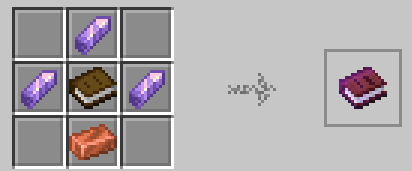
The book has a built in update function, (On page 2, or /trigger slothsdisplayeditor.modify set 999) so should the book change to accomodate future additions and updates, you dont need to craft a new book!
Whilst Axiom and other mods may let you edit display entities in creative, this datapack allows you to create and modify display entities in survival mode, whilst still being balanced.
To create a display entity, you hold an item in your offhand, and it will turn it into a block or item display, whilst removing 1 count of the item in your offhand. When you delete the entity, it summons itself as an item for you to pick back up!
This even works for text displays, however they require specifically a name tag, but will drop it once killed.
There are some secret things, such as Flint & Steel becoming fire when turned into a block display for example.
Piston heads are a special case so they have to be summoned with their own button while holding a piston.
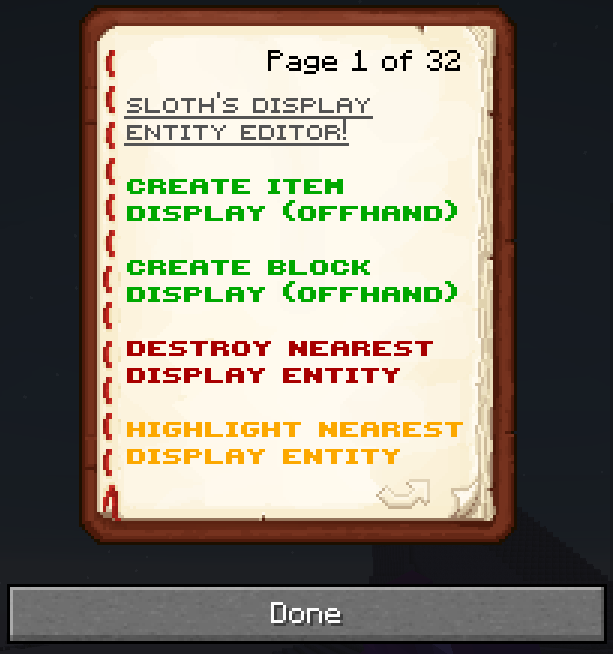
Utilises Quack by Eroxen to rotate the entities
https://modrinth.com/datapack/quaternions
Compatible with Declarative UI by CJDev
Code & Bug reporting --
https://github.com/mrslothkid/Display-Entity-Editor
Project description from Modrinth.
Pick your setup
Sloths Display Entity Editor by Minecraft version and loader
Choose the version and loader you play, then open the matching release.
Minecraft version
26.2
5 loader buildsMinecraft version
26.1.2
5 loader buildsMinecraft version
26.1.1
5 loader buildsMinecraft version
26.1
5 loader buildsMinecraft version
1.21.11
5 loader buildsMinecraft version
1.21.10
5 loader buildsMinecraft version
1.21.9
5 loader buildsMinecraft version
1.21.8
5 loader buildsMinecraft version
1.21.7
5 loader buildsMinecraft version
1.21.6
5 loader buildsCheck the dependencies, then try the file in a copied instance before changing a world you care about.
Recent files
Sloths Display Entity Editor versions and loaders
2.1+mod
sloths-display-entity-editor-2.1.jar
24 Oct 2026
Client Optional Server Optional Dependencies No extras listed Listed on Release listing
Check the 26.3 · Fabric setup 26.3FabricForgeNeoForge release
2.1
slothsDisplayEditorv2.1.zip
24 Oct 2026
Client Optional Server Optional Dependencies No extras listed Listed on Release listing
Check the 26.3 · datapack setup 26.3datapack release
2.0.1+mod
sloths-display-entity-editor-2.0.1.jar
20 Oct 2026
Client Optional Server Optional Dependencies No extras listed Listed on Release listing
Check the 26.3 · Fabric setup 26.3FabricForgeNeoForge beta
2.0.1
slothsDisplayEditorv2.0.1.zip
20 Oct 2026
Client Optional Server Optional Dependencies No extras listed Listed on Release listing
Check the 26.3 · datapack setup 26.3datapack beta
2.0+mod
sloths-display-entity-editor-2.0.jar
20 Oct 2026
Client Optional Server Optional Dependencies No extras listed Listed on Release listing
Check the 26.3 · Fabric setup 26.3FabricForgeNeoForge beta
2.0
slothsDisplayEditorv2.0.zip
20 Oct 2026
Client Optional Server Optional Dependencies No extras listed Listed on Release listing
Check the 26.3 · datapack setup 26.3datapack beta
1.2.1+mod
sloths-display-entity-editor-1.2.1.jar
8 Oct 2026
Client Optional Server Optional Dependencies No extras listed Listed on Release listing
Check the 26.3 · Fabric setup 26.3FabricForgeNeoForge release
1.2.1
slothsDisplayEditorv1.2.1.zip
8 Oct 2026
Client Optional Server Optional Dependencies No extras listed Listed on Release listing
Check the 26.3 · datapack setup 26.3datapack release
1.2+mod
sloths-display-entity-editor-1.2.jar
7 Oct 2026
Client Optional Server Optional Dependencies No extras listed Listed on Release listing
Check the 26.3 · Fabric setup 26.3FabricForgeNeoForge beta
1.2
slothsDisplayEditorv1.2.zip
7 Oct 2026
Client Optional Server Optional Dependencies No extras listed Listed on Release listing
Check the 26.3 · datapack setup 26.3datapack beta
1.1.2+mod
sloths-display-entity-editor-1.1.2.jar
6 Oct 2026
Client Optional Server Optional Dependencies No extras listed Listed on Release listing
Check the 26.3 · Fabric setup 26.3FabricForgeNeoForge release
1.1.2
slothsDisplayEditorv1.1.2.zip
6 Oct 2026
Client Optional Server Optional Dependencies No extras listed Listed on Release listing
Check the 26.3 · datapack setup 26.3datapack release
Looking for an older file? The official Modrinth project page is in Resources.
 mod
mod CurseForge + Modrinth · Minecraft
Latitude
Latitude overhauls world generation so biomes follow realistic latitude bands—from equatorial jungles to polar tundras.
 mod
mod CurseForge + Modrinth · Minecraft
Sensible Stackables
Change and uncap stack sizes for any item, with sensible defaults
 mod
mod Modrinth · Minecraft
devonian - hypixel skyblock
Devonian is a minecraft mod focused on enhancing your gameplay experience while playing Hypixel Skyblock. Adding various QOL features for a better experience while gaming.