Minecraft version
Back to mods 
Modrinth · Minecraft mod
Entity Tracker Hud
Adds a customizable and easy-to-read list of all specific entities near you
Choose a version Pick your version below, then grab the matching file.
Quick answer
Which Entity Tracker Hud release should I use?
Latest stable file 1.0.2+26.3
Game version 26.3
Loader Fabric
Entity Tracker Hud 1.0.2+26.3 targets 26.3 with Fabric. It must be installed on the client. Do not install it on the dedicated server. No extra mods listed for this file.
Where it goes
Is Entity Tracker Hud required on the client, server, or both?
It must be installed on the client. Do not install it on the dedicated server.
Client Required
Dedicated server Not supported
Loader for this release Fabric
Required install it here Optional supported, not mandatory Not supported do not install here Source doesn’t say do not assume
This file is marked client-only.
What else does Entity Tracker Hud 1.0.2+26.3 need?
1.0.2+26.3. Change the file and its required mods may change too.
This file does not list any required mods. Do not add a library just because a different file uses it.
This file does not list any required or optional mods.
Before you install it
Add Entity Tracker Hud without breaking your instance.
Built for Entity Tracker Hud 1.0.2+26.3. Pick another file and the loader, install side or required mods may change.
- 01
Stick to this file
Use 1.0.2+26.3. It targets 26.3 with Fabric; another release may have different loader, side or dependency requirements.
- 02
Bring the mods it needs
This file does not list any required mods. Do not add a library just because a different file uses it.
- 03
Put it on the correct side
It must be installed on the client. Do not install it on the dedicated server.
- 04
Pick the file you checked
Use the “Get this file” button beside 1.0.2+26.3. It opens that exact file at the source.
About this project
What does Entity Tracker Hud add?
Entity Tracker gives you a clean HUD showing which loaded entities are currently around you and how many of each are present.
Features
- Compact in-game HUD with entity icons and live counts
- Tracks currently loaded client-side entities near you
- Shows mobs, animals, and other entity types individually
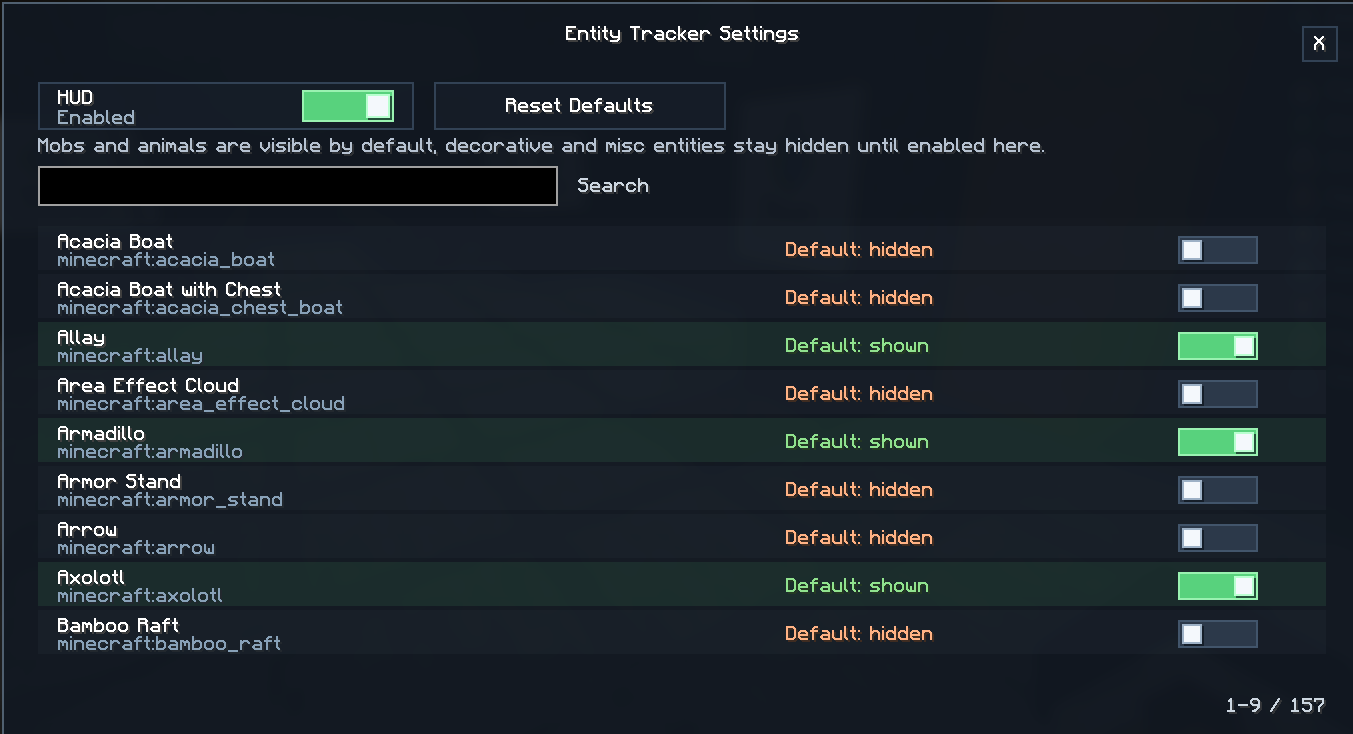
- Per-entity visibility settings
- Searchable settings screen
- Quick HUD toggle keybind
- Optional Mod Menu integration
- Fully client-side
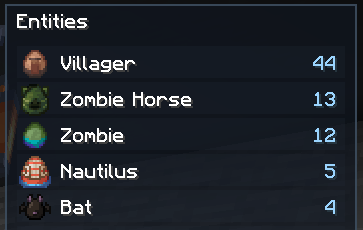
By default, mobs and animals are shown in the HUD.
Decorative, misc, vehicle, projectile, and other non-living entity types stay hidden until you enable them in the settings.
Controls
H- Toggle Entity HUDOpen Entity Tracker Settings- Not bound by default
Check out my other mods


Project description from Modrinth.
Pick your setup
Entity Tracker Hud by Minecraft version and loader
Choose the version and loader you play, then open the matching release.
Minecraft version
26.2
1 loader buildMinecraft version
26.1.2
1 loader buildMinecraft version
1.21.11
1 loader buildCheck the dependencies, then try the file in a copied instance before changing a world you care about.
Recent files
Entity Tracker Hud versions and loaders
1.0.2+26.3
entity-tracker-1.0.2+26.3.jar
22 Sept 2026
Client Required Server Not supported Dependencies No extras listed Listed on Release listing
Check the 26.3 · Fabric setup 26.3Fabric release
1.0.1+1.21.11
entity-tracker-1.0.1+1.21.11.jar
2 Aug 2026
Client Required Server Not supported Dependencies No extras listed Listed on Release listing
Check the 1.21.11 · Fabric setup 1.21.11Fabric release
1.0.1+26.2
entity-tracker-1.0.1+26.2.jar
13 Jul 2026
Client Required Server Not supported Dependencies No extras listed Listed on Release listing
Check the 26.2 · Fabric setup 26.2Fabric release
1.0.1+26.1.2
entity-tracker-1.0.0.jar
30 Jun 2026
Client Required Server Not supported Dependencies No extras listed Listed on Release listing
Check the 26.1.2 · Fabric setup 26.1.2Fabric release
1.0.0+26.1.2
entity-tracker-1.0.0.jar
30 Jun 2026
Client Required Server Not supported Dependencies No extras listed Listed on Release listing
Check the 26.1.2 · Fabric setup 26.1.2Fabric release
Looking for an older file? The official Modrinth project page is in Resources.
 mod
Modrinth · Minecraft
Thematic Superheroes
Team up as Batman or Wonder Woman on Thematic’s official server! Craft gadgets, resize with Pehkui, and roleplay with friends in Minecraft 1.20.1. Featuring Mr Fantastic, Superman, Invincible, Batman, Deadpool
 mod
Modrinth · Minecraft
More Cloud Layers
This mod adds extra layers of clouds above the vanilla cloud layer.
 mod
Modrinth · Minecraft
Supplementaries
Vanilla+ additions: Jars, signposts, faucets, weather vanes spring launchers, sconces, planters, lights, decoration and automation