Minecraft version
Back to mods 
Modrinth · Minecraft mod
MineMath
MineMath - Your Mathematical GUI Calculator Companion in Minecraft
Choose a version Pick your version below, then grab the matching file.
Quick answer
Which MineMath release should I use?
Latest stable file 3.0.0-1.21.8
Game version 1.21.8
Loader NeoForge
MineMath 3.0.0-1.21.8 targets 1.21.8 with NeoForge. It must be installed on the client. Do not install it on the dedicated server. No extra mods listed for this file.
Where it goes
Is MineMath required on the client, server, or both?
It must be installed on the client. Do not install it on the dedicated server.
Client Required
Dedicated server Not supported
Loader for this release NeoForge
Required install it here Optional supported, not mandatory Not supported do not install here Source doesn’t say do not assume
This file is marked client-only.
What else does MineMath 3.0.0-1.21.8 need?
3.0.0-1.21.8. Change the file and its required mods may change too.
This file does not list any required mods. Do not add a library just because a different file uses it.
This file does not list any required or optional mods.
Before you install it
Add MineMath without breaking your instance.
Built for MineMath 3.0.0-1.21.8. Pick another file and the loader, install side or required mods may change.
- 01
Stick to this file
Use 3.0.0-1.21.8. It targets 1.21.8 with NeoForge; another release may have different loader, side or dependency requirements.
- 02
Bring the mods it needs
This file does not list any required mods. Do not add a library just because a different file uses it.
- 03
Put it on the correct side
It must be installed on the client. Do not install it on the dedicated server.
- 04
Pick the file you checked
Use the “Get this file” button beside 3.0.0-1.21.8. It opens that exact file at the source.
About this project
What does MineMath add?
🧮 MineMath
MineMath is a simple and intuitive in-game calculator for Minecraft. MineMath lets you perform calculations directly inside the game — no need to tab out!
Features
- In-Game Calculator: Perform basic math operations right from within Minecraft.
- Keyboard Support: Use your physical keyboard to input numbers and operations quickly.
- Clean Interface: A modern and user-friendly design for a seamless experience.
- Customizable Keybinding: Open the calculator with a key of your choice (default:
N). - Multi-Platform Support: Available for Fabric, Forge, and NeoForge.
Demo
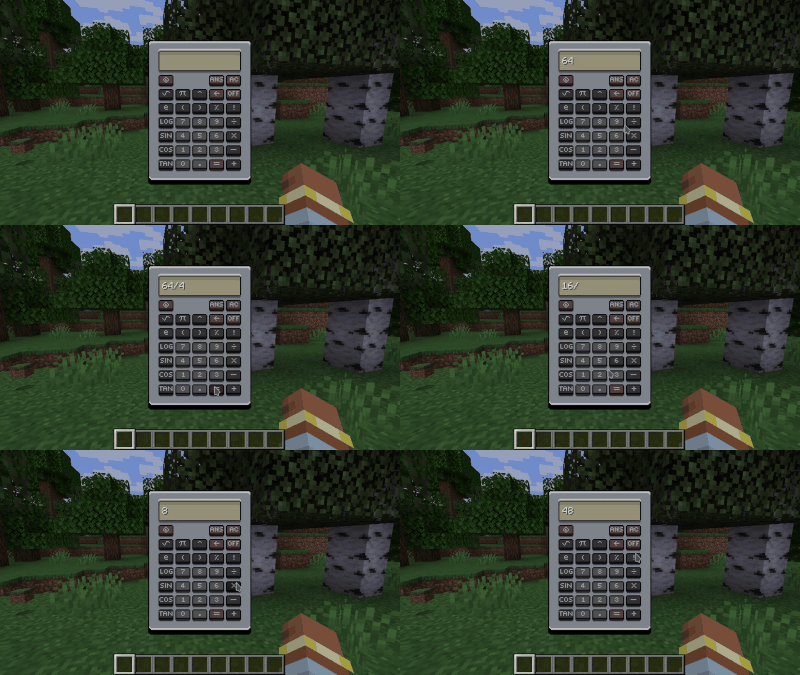
How to Use
Simple... Just press N (or your chosen key) to open the calculator in-game!
Need Help?
Join our community on Discord to get support, share feedback, or suggest new features: Join the Community
Support MineMath
Are you interested in supporting me and the development of MineMath ? If so, I suggest trying out BisectHosting. As a new customer, use the Oiha to receive a 25% discount on your first month of a gaming server. With 24/7 support and rapid response times
Support me
License
MineMath is free to use under the CC BY-NC-SA 4.0 License.
Project description from Modrinth.
Pick your setup
MineMath by Minecraft version and loader
Choose the version and loader you play, then open the matching release.
Minecraft version
1.21.7
2 loader buildsMinecraft version
1.21.6
2 loader buildsMinecraft version
1.21.5
3 loader buildsMinecraft version
1.21.4
1 loader buildMinecraft version
1.21.3
1 loader buildMinecraft version
1.21.2
1 loader buildMinecraft version
1.21.1
3 loader buildsMinecraft version
1.21
1 loader buildMinecraft version
1.20.6
3 loader buildsMinecraft version
1.20.4
2 loader buildsMinecraft version
1.20.3
1 loader buildShowing the newest 12 of 23 game versions. Older files are in the list below.
Check the dependencies, then try the file in a copied instance before changing a world you care about.
Recent files
MineMath versions and loaders
3.0.0-1.21.8
MineMath-neoforge-1.21.8-3.0.0.jar
22 Jul 2025
Client Required Server Not supported Dependencies No extras listed Listed on Release listing
Check the 1.21.8 · NeoForge setup 1.21.8NeoForge release
3.0.0-1.21.8
MineMath-fabric-1.21.8-3.0.0.jar
22 Jul 2025
Client Required Server Not supported Dependencies No extras listed Listed on Release listing
Check the 1.21.8 · Fabric setup 1.21.8Fabric release
3.0.0-1.21.7
MineMath-neoforge-1.21.7-3.0.0.jar
22 Jul 2025
Client Required Server Not supported Dependencies No extras listed Listed on Release listing
Check the 1.21.7 · NeoForge setup 1.21.7NeoForge release
3.0.0-1.21.7
MineMath-fabric-1.21.7-3.0.0.jar
22 Jul 2025
Client Required Server Not supported Dependencies No extras listed Listed on Release listing
Check the 1.21.7 · Fabric setup 1.21.7Fabric release
3.0.0-1.21.6
MineMath-neoforge-1.21.6-3.0.0.jar
22 Jul 2025
Client Required Server Not supported Dependencies No extras listed Listed on Release listing
Check the 1.21.6 · NeoForge setup 1.21.6NeoForge release
3.0.0-1.21.6
MineMath-fabric-1.21.6-3.0.0.jar
22 Jul 2025
Client Required Server Not supported Dependencies No extras listed Listed on Release listing
Check the 1.21.6 · Fabric setup 1.21.6Fabric release
3.0.0-1.21.5
MineMath-forge-1.21.5-3.0.0.jar
1 May 2025
Client Required Server Not supported Dependencies No extras listed Listed on Release listing
Check the 1.21.5 · Forge setup 1.21.5Forge release
3.0.0-1.21.5
MineMath-neoforge-1.21.5-3.0.0.jar
1 May 2025
Client Required Server Not supported Dependencies No extras listed Listed on Release listing
Check the 1.21.5 · NeoForge setup 1.21.5NeoForge release
3.0.0-1.21.5
MineMath-fabric-1.21.5-3.0.0.jar
1 May 2025
Client Required Server Not supported Dependencies 1 required · 1 unchecked Listed on Release listing
Check the 1.21.5 · Fabric setup 1.21.5Fabric release
3.0.0-1.21.1
MineMath-forge-1.21.1-3.0.0.jar
1 May 2025
Client Required Server Not supported Dependencies No extras listed Listed on Release listing
Check the 1.21.1 · Forge setup 1.21.1Forge release
3.0.0-1.21.1
MineMath-neoforge-1.21.1-3.0.0.jar
1 May 2025
Client Required Server Not supported Dependencies No extras listed Listed on Release listing
Check the 1.21.1 · NeoForge setup 1.21.1NeoForge release
3.0.0-1.21.1
MineMath-fabric-1.21.1-3.0.0.jar
1 May 2025
Client Required Server Not supported Dependencies 1 required · 1 unchecked Listed on Release listing
Check the 1.21.1 · Fabric setup 1.21.1Fabric release
Looking for an older file? The official Modrinth project page is in Resources.
 mod
mod CurseForge + Modrinth · Minecraft
Disable Dimensions
A hard-to-break, grief-resistant solution for preventing players from entering The Nether, The End, and any further custom dimensions, with optional per-dimension conditions.
 mod
mod CurseForge + Modrinth · Minecraft
Create: Warnautics
Create Big Cannons add-on with redstone-launched aerial bombs, multi-bomb cassettes, sea bombs, land mines, cinematic blast effects, and optional Sable ship destruction.
 mod
mod CurseForge · Minecraft
Createch 2 Core
Core mod used in the Createch 2 Modpack