
Minecraft version
Back to mods 
Modrinth · Minecraft mod
Resource Pack Overrides
Ensures important resource packs stay always active and helps clean up the pack selection screen.
Choose a version Pick your version below, then grab the matching file.
Quick answer
Which Resource Pack Overrides release should I use?
Latest stable file 26.2.0
Game version 26.2
Loader NeoForge
Resource Pack Overrides 26.2.0 targets 26.2 with NeoForge. It must be installed on the client. Do not install it on the dedicated server. No extra mods listed for this file.
Where it goes
Is Resource Pack Overrides required on the client, server, or both?
It must be installed on the client. Do not install it on the dedicated server.
Client Required
Dedicated server Not supported
Loader for this release NeoForge
Required install it here Optional supported, not mandatory Not supported do not install here Source doesn’t say do not assume
This file is marked client-only.
What else does Resource Pack Overrides 26.2.0 need?
26.2.0. Change the file and its required mods may change too.
This file does not list any required mods. Do not add a library just because a different file uses it.
This file does not list any required or optional mods.
Before you install it
Add Resource Pack Overrides without breaking your instance.
Built for Resource Pack Overrides 26.2.0. Pick another file and the loader, install side or required mods may change.
- 01
Stick to this file
Use 26.2.0. It targets 26.2 with NeoForge; another release may have different loader, side or dependency requirements.
- 02
Bring the mods it needs
This file does not list any required mods. Do not add a library just because a different file uses it.
- 03
Put it on the correct side
It must be installed on the client. Do not install it on the dedicated server.
- 04
Pick the file you checked
Use the “Get this file” button beside 26.2.0. It opens that exact file at the source.
About this project
What does Resource Pack Overrides add?








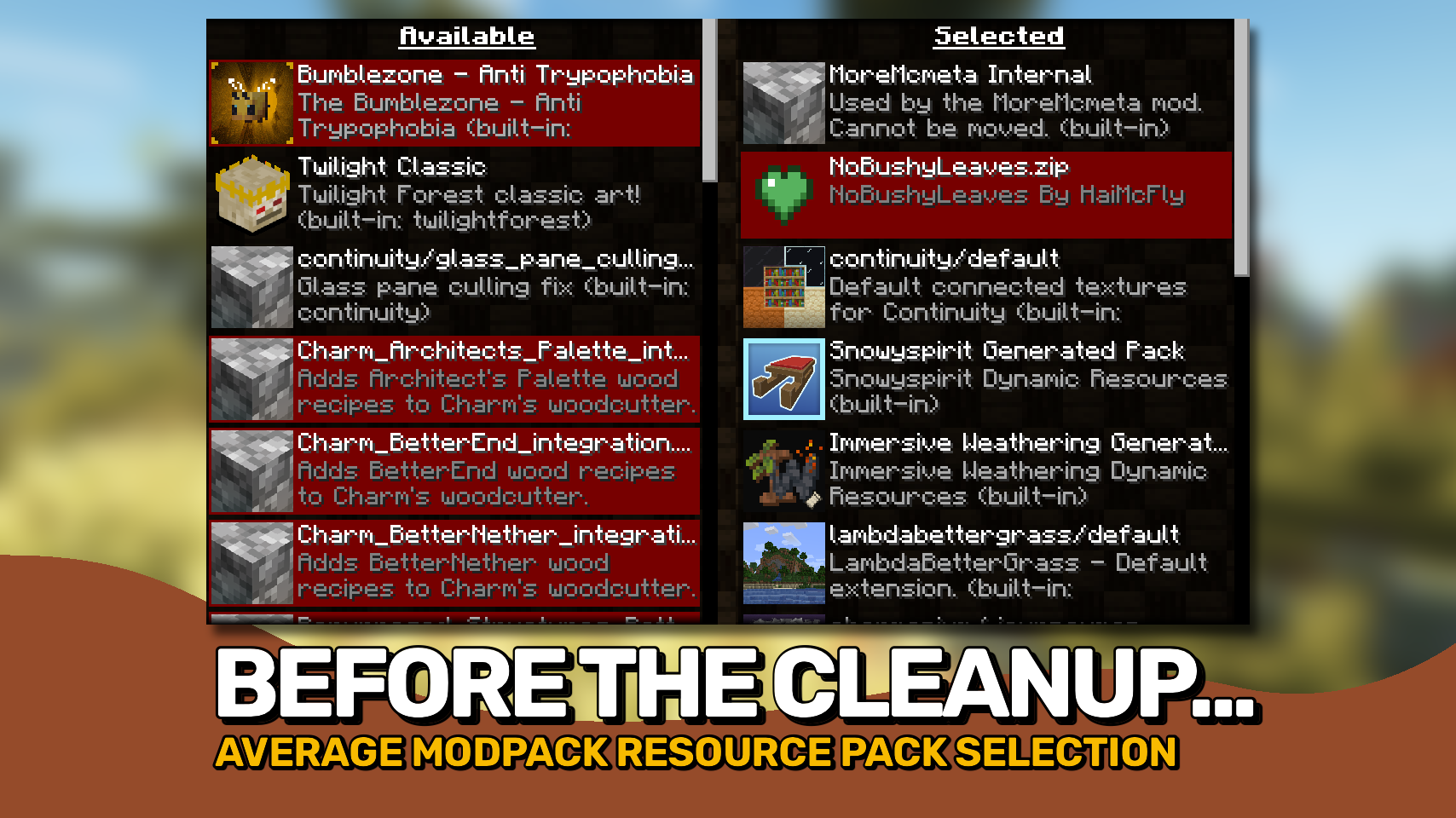
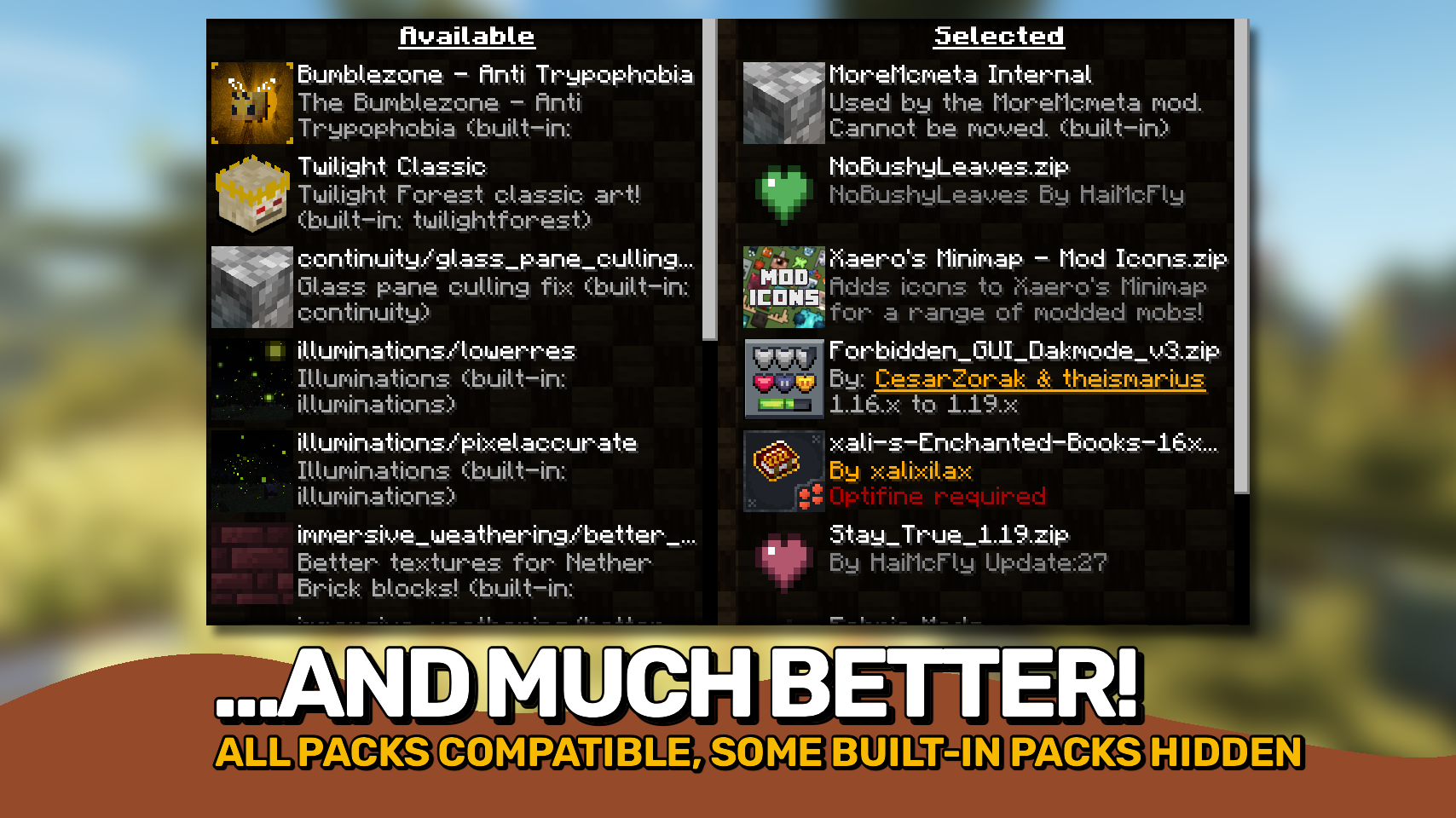
Resource Pack Overrides gives mod pack creators full control over how preinstalled resource packs are presented and managed in Minecraft. It helps ensure important packs stay configured exactly as intended while keeping the resource pack screen clean and easy to use. 🎨
Unlike shipping a predefined resource pack configuration, this mod can automatically restore your preferred pack setup after failed resource reloads, helping maintain a consistent experience for players. 🔄
The mod also allows resource packs to be hidden, locked, reordered, or marked as compatible, making it easy to build polished mod packs where players see only the options they are meant to interact with. 🧰

- 🔄 Persistent Default Pack Setup: Define a default set and order of resource packs that can be restored when resource pack loading resets.
- 🔒 Lock Important Packs: Prevent critical resource packs from being disabled or moved.
- 👁️ Hide Internal Packs: Keep technical or background resource packs out of the selection screen.
- 📋 Customize Pack Presentation: Override names, descriptions, compatibility warnings, and other pack attributes.
- 🎯 Control Pack Ordering: Define where packs appear and how they interact with other enabled resources.
- 🧹 Cleaner Resource Pack Screen: Reduce clutter and help players avoid accidentally changing important pack configurations.
- ⚙️ Built for Mod Packs: Designed specifically for managing curated resource pack setups in modded Minecraft.


⏩ INSTALLATION REQUIRED ON CLIENT
⏩ REQUIRES FABRIC API TO BE INSTALLED (FABRIC)

The whole mod is configured through a single config file located at .minecraft/config/resourcepackoverrides.json. A minimal configuration is generated automatically when the file is missing.
Detailed documentation, configuration examples, and all available options can be found in the README.md on GitHub.



Project description from Modrinth.
Pick your setup
Resource Pack Overrides by Minecraft version and loader
Choose the version and loader you play, then open the matching release.
Minecraft version
26.1.2
2 loader buildsMinecraft version
26.1.1
2 loader buildsMinecraft version
26.1
2 loader buildsMinecraft version
1.21.11
2 loader buildsMinecraft version
1.21.10
2 loader buildsMinecraft version
1.21.8
2 loader buildsMinecraft version
1.21.7
2 loader buildsMinecraft version
1.21.5
2 loader buildsMinecraft version
1.21.4
2 loader buildsMinecraft version
1.21.3
2 loader buildsMinecraft version
1.21.1
2 loader buildsShowing the newest 12 of 16 game versions. Older files are in the list below.
Check the dependencies, then try the file in a copied instance before changing a world you care about.
Recent files
Resource Pack Overrides versions and loaders
26.2.0
ResourcePackOverrides-v26.2.0-mc26.2.x-NeoForge.jar
18 Jun 2026
Client Required Server Not supported Dependencies No extras listed Listed on Release listing
Check the 26.2 · NeoForge setup 26.2NeoForge release
26.2.0
ResourcePackOverrides-v26.2.0-mc26.2.x-Fabric.jar
18 Jun 2026
Client Required Server Not supported Dependencies 1 required · 1 unchecked Listed on Release listing
Check the 26.2 · Fabric setup 26.2Fabric release
26.1.0
ResourcePackOverrides-v26.1.0-mc26.1.x-NeoForge.jar
20 Apr 2026
Client Required Server Not supported Dependencies No extras listed Listed on Release listing
Check the 26.1.2 · NeoForge setup 26.126.1.126.1.2NeoForge release
26.1.0
ResourcePackOverrides-v26.1.0-mc26.1.x-Fabric.jar
20 Apr 2026
Client Required Server Not supported Dependencies 1 required · 1 unchecked Listed on Release listing
Check the 26.1.2 · Fabric setup 26.126.1.126.1.2Fabric release
21.11.1
ResourcePackOverrides-v21.11.1-mc1.21.11-Fabric.jar
26 Dec 2025
Client Required Server Not supported Dependencies 1 required · 1 unchecked Listed on Release listing
Check the 1.21.11 · Fabric setup 1.21.11Fabric release
21.11.1
ResourcePackOverrides-v21.11.1-mc1.21.11-NeoForge.jar
26 Dec 2025
Client Required Server Not supported Dependencies No extras listed Listed on Release listing
Check the 1.21.11 · NeoForge setup 1.21.11NeoForge release
21.10.1
ResourcePackOverrides-v21.10.1-mc1.21.10-Fabric.jar
26 Dec 2025
Client Required Server Not supported Dependencies 1 required · 1 unchecked Listed on Release listing
Check the 1.21.10 · Fabric setup 1.21.10Fabric release
21.10.1
ResourcePackOverrides-v21.10.1-mc1.21.10-NeoForge.jar
26 Dec 2025
Client Required Server Not supported Dependencies No extras listed Listed on Release listing
Check the 1.21.10 · NeoForge setup 1.21.10NeoForge release
21.10.0
ResourcePackOverrides-v21.10.0-mc1.21.10-Fabric.jar
16 Dec 2025
Client Required Server Not supported Dependencies 1 required · 1 unchecked Listed on Release listing
Check the 1.21.10 · Fabric setup 1.21.10Fabric release
21.10.0
ResourcePackOverrides-v21.10.0-mc1.21.10-NeoForge.jar
16 Dec 2025
Client Required Server Not supported Dependencies No extras listed Listed on Release listing
Check the 1.21.10 · NeoForge setup 1.21.10NeoForge release
21.11.0
ResourcePackOverrides-v21.11.0-mc1.21.11-Fabric.jar
16 Dec 2025
Client Required Server Not supported Dependencies 1 required · 1 unchecked Listed on Release listing
Check the 1.21.11 · Fabric setup 1.21.11Fabric release
21.11.0
ResourcePackOverrides-v21.11.0-mc1.21.11-NeoForge.jar
16 Dec 2025
Client Required Server Not supported Dependencies No extras listed Listed on Release listing
Check the 1.21.11 · NeoForge setup 1.21.11NeoForge release
Looking for an older file? The official Modrinth project page is in Resources.
 mod
mod CurseForge + Modrinth · Minecraft
Gouge
Slam your pickaxe into a wall mid-fall to slow your descent or lock yourself in place before you hit the ground.
 mod
mod Modrinth · Minecraft
GriefPrevention3D
A fork of GriefPrevention that adds 3D subdivisions
 mod
mod Modrinth · Minecraft
Joban Client Mod
Railway Facilities addon and Enhancement mod for the Minecraft Transit Railway (MTR) Mod