Minecraft version
Back to mods
Modrinth · Minecraft mod
back-command
Died somewhere dangerous? Use /back to return, with safe handling for void and lava deaths.
Choose a version Pick your version below, then grab the matching file.
Quick answer
Which back-command release should I use?
Latest stable file 1.0.1
Game version 26.2
Loader Fabric
back-command 1.0.1 targets 26.2 with Fabric. Installation on the client is optional. Installation on the dedicated server is optional. No extra mods listed for this file.
Where it goes
Is back-command required on the client, server, or both?
Installation on the client is optional. Installation on the dedicated server is optional.
Client Optional
Dedicated server Optional
Loader for this release Fabric
Required install it here Optional supported, not mandatory Not supported do not install here Source doesn’t say do not assume
The source marks this as usable on both the client and server.
What else does back-command 1.0.1 need?
1.0.1. Change the file and its required mods may change too.
This file does not list any required mods. Do not add a library just because a different file uses it.
This file does not list any required or optional mods.
Before you install it
Add back-command without breaking your instance.
Built for back-command 1.0.1. Pick another file and the loader, install side or required mods may change.
- 01
Stick to this file
Use 1.0.1. It targets 26.2 with Fabric; another release may have different loader, side or dependency requirements.
- 02
Bring the mods it needs
This file does not list any required mods. Do not add a library just because a different file uses it.
- 03
Put it on the correct side
Installation on the client is optional. Installation on the dedicated server is optional.
- 04
Pick the file you checked
Use the “Get this file” button beside 1.0.1. It opens that exact file at the source.
About this project
What does back-command add?
Back Command
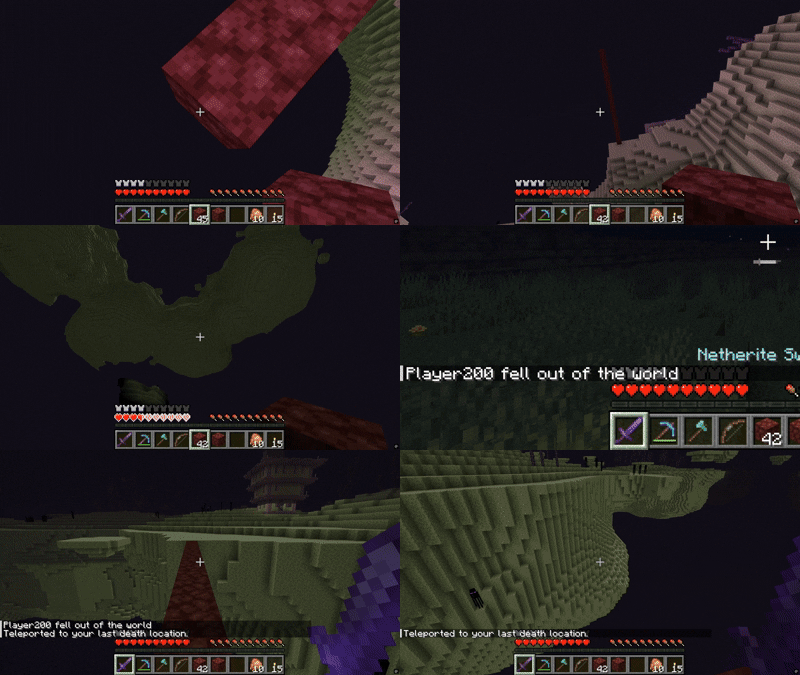
Died far from home, in the void, or inside lava? Back Command gives every player one chance to return after each death.
Simply respawn and use:
/back

The mod will teleport you to your recorded death location and then clear it. You will receive another /back only after dying again.
Features
- Return to your latest death location with
/back - Cross-dimensional teleportation
- Safer recovery from lava deaths
 - Safer recovery from void deaths
 - Instant death command with `/suicide`
- Server-side command and teleportation logic
- Instant death command with `/suicide`
- Server-side command and teleportation logicSafe recovery
Teleporting to the exact location of a void or lava death would usually kill the player again. Version 1.0.1 improves this behaviour by remembering the player's latest safe grounded position.
When a player dies in the void or while still inside lava, /back uses that previously recorded safe position.
For all other deaths, /back uses the actual death coordinates.
Commands
/back
Returns you to the location recorded by your latest death.
The location is consumed after a successful teleport. Using the command again before another death displays:
No death location recorded.
/suicide
Instantly kills your player and creates a new location for /back.
This uses a direct kill operation instead of dealing a large amount of normal damage. Regular Minecraft inventory-drop rules still apply.
Important limitation
Locations are currently stored in memory and do not survive a complete world or server restart.
Required
- Minecraft 26.2
- Fabric Loader
- Fabric API
Project description from Modrinth.
Pick your setup
back-command by Minecraft version and loader
Choose the version and loader you play, then open the matching release.
Minecraft version
1.21.8
1 loader buildMinecraft version
1.21.7
1 loader buildMinecraft version
1.21.6
1 loader buildMinecraft version
1.21.5
1 loader buildMinecraft version
1.21.4
1 loader buildMinecraft version
1.21.3
1 loader buildMinecraft version
1.21.2
1 loader buildMinecraft version
1.21.1
1 loader buildMinecraft version
1.21
1 loader buildCheck the dependencies, then try the file in a copied instance before changing a world you care about.
Recent files
back-command versions and loaders
1.0.1
back-command-1.0.1.jar
20 Aug 2026
Client Optional Server Optional Dependencies No extras listed Listed on Release listing
Check the 26.2 · Fabric setup 26.2Fabric release
0.1
back-command-0.1.jar
23 Aug 2025
Client Optional Server Optional Dependencies No extras listed Listed on Release listing
Check the 1.21.8 · Fabric setup 1.211.21.11.21.21.21.3 release
Looking for an older file? The official Modrinth project page is in Resources.
 mod
mod CurseForge + Modrinth · Minecraft
VO: Better Dogs
Enhances vanilla wolves with unique personalities (Aggressive, Pacifist, Normal), smarter AI, safety behaviors, and combat improvements.
 mod
mod Modrinth · Minecraft
Dungeon Train: A Lore-Rich Roguelite RPG Adventure
Adventure time inspired dungeon crawler on a train. Procedurally generated carriages on a infinite sable physics train. Rich narrative, with custom made mods for a completely unique experience.
 mod
mod Modrinth · Minecraft
Relic Weapons
A content-free visual-effects API for per-item RGB glint, radiance, and particles.