Minecraft version
Back to mods 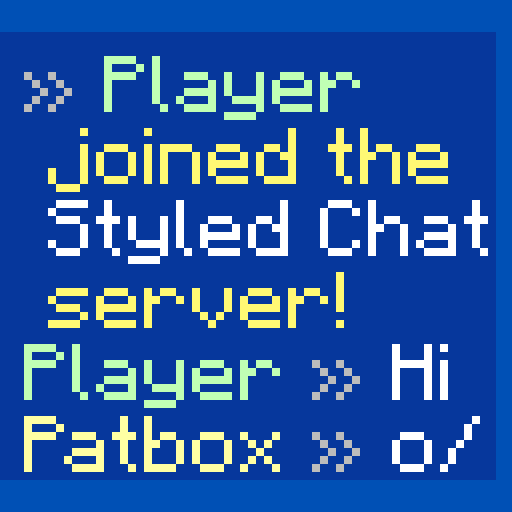
Modrinth · Minecraft mod
Styled Chat
Style your server's chat as you want!
Choose a version Pick your version below, then grab the matching file.
Quick answer
Which Styled Chat release should I use?
Latest stable file 2.14.0+26.3
Game version 26.3-rc-1, 26.3
Loader Fabric
Styled Chat 2.14.0+26.3 targets 26.3-rc-1, 26.3 with Fabric. Do not install it on the client. It must be installed on the dedicated server. No extra mods listed for this file.
Where it goes
Is Styled Chat required on the client, server, or both?
Do not install it on the client. It must be installed on the dedicated server.
Client Not supported
Dedicated server Required
Loader for this release Fabric
Required install it here Optional supported, not mandatory Not supported do not install here Source doesn’t say do not assume
This file is marked server-only.
What else does Styled Chat 2.14.0+26.3 need?
2.14.0+26.3. Change the file and its required mods may change too.
This file does not list any required mods. Do not add a library just because a different file uses it.
This file does not list any required or optional mods.
Before you install it
Add Styled Chat without breaking your instance.
Built for Styled Chat 2.14.0+26.3. Pick another file and the loader, install side or required mods may change.
- 01
Stick to this file
Use 2.14.0+26.3. It targets 26.3-rc-1, 26.3 with Fabric; another release may have different loader, side or dependency requirements.
- 02
Bring the mods it needs
This file does not list any required mods. Do not add a library just because a different file uses it.
- 03
Put it on the correct side
Do not install it on the client. It must be installed on the dedicated server.
- 04
Pick the file you checked
Use the “Get this file” button beside 2.14.0+26.3. It opens that exact file at the source.
About this project
What does Styled Chat add?
Styled Chat
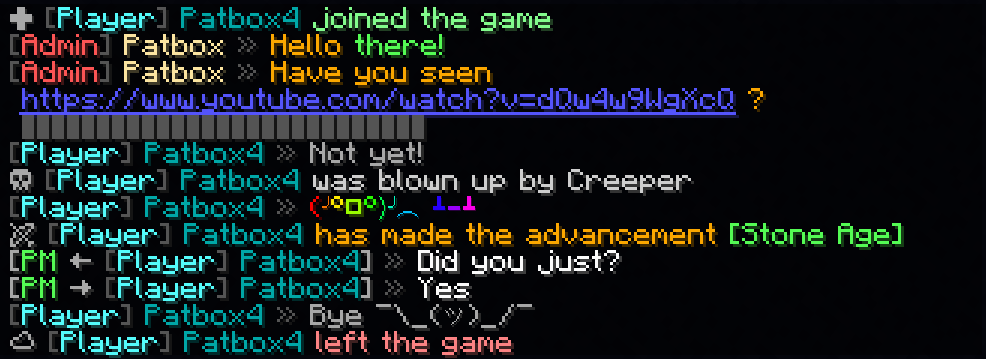
It's a simple mod that allows server owners to change how their chat looks!
It adds support for modern chat formatting supported by Minecraft,
but ignored by many chat mods/plugins.
It's also compatible with any mods using Placeholder API.
It also supports changing style per player with permissions (supports LuckPerms and PlayerRoles)
This mod works only on Fabric Mod Loader and compatible!
If you have any questions, you can ask them on my Discord
Also check out my other mods and project, as you might find them useful!

Commands (and permissions):
/styledchat- Main command (styledchat.main, available by default)/styledchat reload- Reloads configuration and styles (requiresstyledchat.reload)/styledchat set <player> <type> <value>- Changes personal 's style of to (requiresstyledchat.set)/styledchat get <player> <type>- Sends 's style of (requiresstyledchat.get)/styledchat clear <player> <type>- Clears 's style of (requiresstyledchat.clear)
Configuration:
You can find config file in ./config/styled-chat.json.
Formatting uses Simplified Text Format.
It supports usage of placeholders from Placeholder API.
Additionally, every message type has few own local variables.
{
  "CONFIG_VERSION_DONT_TOUCH_THIS": 3,
  "_comment": "Before changing anything, see https://github.com/Patbox/StyledChat#configuration",
  "text_formatting": {
    // Enables parsing of links in chat
    "parse_links": true,
    // Enables markdown
    "markdown": true,
    // Enables support for legacy (&x) codes in chat (only when typed by player)
    "legacy_formatting": false,
    // Enables formatting from other mods (might break StyledChat one, if mod implements it incorrectly)
    "formatting_from_other_mods": false
  },
  "chat_preview": {
    // Sends full message (entire formatting surrounding it) in chat preview
    "send_full_message": false,
    // Require chat preview for formatting, disabling it otherwise
    "require_for_formatting": false
  },
  "auto_completion": {
    // Enables autocompletion for tags (for example <red>, <rainbow>)
    "tags": false,
    // Enables autocompletion for tag aliases (for example <c>, <rb>)
    "tag_aliases": false,
    // Enables autocompletion for emoticons (for example :pos:, :item:)
    "emoticons": false
  },
  // Default style settings
  "default": {
    // Display name (local variables: ${default}, ${name})
    "display_name": "${default}",
    // Style of messages
    "message_formats": {
      // Chat message style (local variables: ${player}, ${message})
      "chat": "<${player}> ${message}",
      // Join message (local variables: ${player})
      "joined_the_game": "<yellow><lang:multiplayer.player.joined:'${player}'></yellow>",
      // Join message after name change (local variables: ${player}, ${old_name})
      "joined_after_name_change": "<yellow><lang:multiplayer.player.joined.renamed:'${player}':'${old_name}'></yellow>",
      // Join message for players joining for first time (local variables: ${player})
      "joined_for_first_time": "<yellow><lang:multiplayer.player.joined:'${player}'></yellow>",
      // Player leaving server (local variables: ${player})
      "left_game": "<yellow><lang:multiplayer.player.left:'${player}'></yellow>",
      // Player death message (local variables: ${player}, ${default_message})
      "base_death": "${default_message}",
      // Finishing advancement task (local variables: ${player}, ${advancement})
      "advancement_task": "<lang:chat.type.advancement.task:'${player}':'${advancement}'>",
      // Finishing advancement challenge (local variables: ${player}, ${advancement})
      "advancement_challenge": "<lang:chat.type.advancement.challenge:'${player}':'${advancement}'>",
      // Finishing advancement goal (local variables: ${player}, ${advancement})
      "advancement_goal": "<lang:chat.type.advancement.goal:'${player}':'${advancement}'>",
      // Team message, visible to player sending it (local variables: ${team}, ${displayName}, ${message})
      "sent_team_chat": "<lang:'chat.type.team.sent':'<hover\\:\\'<lang\\:chat.type.team.hover>\\'><suggest_command\\:\\'/teammsg \\'>${team}':'${displayName}':'${message}'>",
      // Team message, visible to other team members (local variables: ${team}, ${displayName}, ${message})
      "received_team_chat": "<lang:'chat.type.team.text':'<hover\\:\\'<lang\\:chat.type.team.hover>\\'><suggest_command\\:\\'/teammsg \\'>${team}':'${displayName}':'${message}'>",
      // Private message, visible to player sending (local variables: ${receiver}, ${sender}, ${message})
      "sent_private_message": "<gray><italic><lang:commands.message.display.outgoing:'${receiver}':'${message}'>",
      // Private message, visible to others (local variables: ${receiver}, ${sender}, ${message})
      "received_private_message": "<gray><italic><lang:commands.message.display.incoming:'${sender}':'${message}'>",
      // Output of /say command (local variables: ${player}, ${message})
      "say_command": "[${player}] ${message}",
      // Output of /me command (local variables: ${player}, ${message})
      "me_command": "<lang:'chat.type.emote':'${player}':'${message}'>",
      // Death message send when player's pet dies (local variables: ${default_message}, ${pet})
      "pet_death": "${default_message}"
    },
    // Style of link (local variables: ${link}, ${url})
    "link_style": "<underline><c:#7878ff>${link}",
    // Style of spoilers (local variables: ${spoiler})
    "spoiler_style": "<gray>${spoiler}",
    // Spoiler symbol used in spoiler style
    "spoiler_symbol": "▌",
    // Formatting accessible to players
    "formatting": {
      // "formatting tag": true/false
      "dark_red": true,
      "green": true,
      "underline": true,
      "dark_green": true,
      "black": true,
      "yellow": true,
      "bold": true,
      "italic": true,
      "dark_blue": true,
      "dark_purple": true,
      "gold": true,
      "red": true,
      "aqua": true,
      "gray": true,
      "light_purple": true,
      "blue": true,
      "white": true,
      "dark_aqua": true,
      "dark_gray": true,
      "spoiler": true,
      "strikethrough": true
    },
    // List of emoticons accessible to players (:name: in chat). Supports placeholders
    "emoticons": {
      // "name": "value"
      "potion": "🧪",
      "item": "[%player:equipment_slot mainhand%]",
      "trident": "🔱",
      "rod": "🎣",
      "shrug": "¯\\_(ツ)_/¯",
      "bow": "🏹",
      "bell": "🔔",
      "heart": "❤",
      "bucket": "🪣",
      "sword": "🗡",
      "shears": "✂",
      "pos": "%player:pos_x% %player:pos_y% %player:pos_z%",
      "fire": "🔥",
      "table": "(╯°□°)╯︵ ┻━┻",
      // Since 2.2.1+1.20.1 you can also import from files, using this syntax.
      "$emojibase:builtin:joypixels": "${emoji}",
      // value is the same as in others, just ${emoji} is replaced with read emojis (so you can apply fonts for example)
      // Format looks like this $TYPE:SOURCE:PATH
      // TYPE is "emojibase" for Emojibase.dev shorthand, "cldr" for Unicode cldr-json annotation
      //      or "default" for same style as this file (excluding imports)
      // SOURCE points what type of storage it is, where PATH targets the file
      //     "builtin" loads it from json bundled with mod ("joypixels" or "emojibase")
      //     "from_file" loads it from file relative to config dir (for example "emoji.json" points to "[SERVER]/config/emoji.json)

    }
  },
  // List of styles with some requirements, applied from top do bottom
  "styles": [
    {
      // A requirement of style to apply to player
      "require": {
        "type": "...",
        // See information about these here: https://github.com/Patbox/PredicateAPI/blob/master/BUILTIN.md
      },
      /* Rest is the same as in "default" field, except all fields are fully optional */
    }
  ]
}
In chat formatting
If player has a required permissions (styledchat.format.[tag_name], where [tagname] is Text Parser tag), then they can use Simplified Text tags from within their chat.
Additionally, you can enable markdown and legacy (&X) formatting in the config
Example config
{
  "CONFIG_VERSION_DONT_TOUCH_THIS": 3,
  "_comment": "Before changing anything, see https://github.com/Patbox/StyledChat#configuration",
  "text_formatting": {
    "legacy_formatting": true,
    "parse_links": true,
    "markdown": true,
    "formatting_from_other_mods": true
  },
  "chat_preview": {
    "send_full_message": false,
    "require_for_formatting": false
  },
  "auto_completion": {
    "tags": false,
    "tag_aliases": false,
    "emoticons": true
  },
  "default": {
    "display_name": "${vanillaDisplayName}",
    "message_formats": {
      "chat": "${player} <dark_gray>»</dark_gray> ${message}",
      "joined_the_game": "<gray>✚</gray> <color:#85ff8f><lang:multiplayer.player.joined:'${player}'>",
      "joined_after_name_change": "<gray>✚</gray> <color:#85ff8f><lang:multiplayer.player.joined.renamed:'${player}':'${old_name}'>",
      "joined_for_first_time": "<yellow><lang:multiplayer.player.joined:'${player}'></yellow>",
      "left_game": "<gray>☁</gray> <color:#ff8585><lang:multiplayer.player.left:'${player}'>",
      "base_death": "<gray>☠</gray> <color:#d1d1d1>${default_message}",
      "advancement_task": "<lang:chat.type.advancement.task:'${player}':'${advancement}'>",
      "advancement_challenge": "<lang:chat.type.advancement.challenge:'${player}':'${advancement}'>",
      "advancement_goal": "<lang:chat.type.advancement.goal:'${player}':'${advancement}'>",
      "sent_team_chat": "<lang:'chat.type.team.sent':'<hover\\:\\'<lang\\:chat.type.team.hover>\\'><suggest_command\\:\\'/teammsg \\'>${team}':'${displayName}':'${message}'>",
      "received_team_chat": "<lang:'chat.type.team.text':'<hover\\:\\'<lang\\:chat.type.team.hover>\\'><suggest_command\\:\\'/teammsg \\'>${team}':'${displayName}':'${message}'>",
      "sent_private_message": "<gray>[<green>PM</green> → ${receiver}] <dark_gray>»<reset> ${message}",
      "received_private_message": "<gray>[<green>PM</green> ← ${sender}] <dark_gray>»<reset> ${message}",
      "say_command": "<red>[${player}] ${message}",
      "me_command": "<green>* ${player} ${message}",
      "pet_death": "Oh no! ${default_message}"
    },
    "link_style": "<underline><blue>${link}",
    "spoiler_style": "<dark_gray>${spoiler}",
    "spoiler_symbol": "▌",
    "formatting": {
      "dark_red": true,
      "underline": true,
      "yellow": true,
      "italic": true,
      "dark_blue": true,
      "dark_purple": true,
      "gold": true,
      "red": true,
      "aqua": true,
      "gray": true,
      "light_purple": true,
      "white": true,
      "pos": true,
      "dark_gray": true,
      "spoiler": true,
      "strikethrough": true,
      "st": true,
      "b": true,
      "item": true,
      "green": true,
      "dark_green": true,
      "black": true,
      "i": true,
      "bold": true,
      "blue": true,
      "dark_aqua": true
    },
    "emoticons": {
      "potion": "🧪",
      "trident": "🔱",
      "rod": "🎣",
      "shrug": "¯\\_(ツ)_/¯",
      "bow": "🏹",
      "bell": "<yellow>🔔",
      "heart": "<red>❤",
      "bucket": "🪣",
      "sword": "🗡",
      "shears": "✂",
      "fire": "🔥",
      "table": "<rb>(╯°□°)╯︵ ┻━┻"
    }
  },
  "styles": [
    {
      "require": {
        "type": "permission",
        "permission": "group.admin",
        "operator": 4
      },
      "display_name": "<dark_gray>[<red>Admin</red>]</dark_gray> <c:#ffe8a3>${vanillaDisplayName}</c>",
      "message_formats": {
        "chat": "${player} <dark_gray>»</dark_gray> <orange>${message}",
        "base_death": ""
      },
      "formatting": {},
      "emoticons": {}
    },
    {
      "require": {
        "type": "permission",
        "permission": "group.default"
      },
      "display_name": "<dark_gray>[<aqua>Player</aqua>]</dark_gray> <dark_aqua>${vanillaDisplayName}</dark_aqua>",
      "message_formats": {},
      "formatting": {},
      "emoticons": {}
    },
    {
      "require": {
        "type": "permission",
        "permission": "group.vip",
        "operator": 3
      },
      "message_formats": {},
      "formatting": {},
      "emoticons": {
        "potato": "<rb>Potato"
      }
    }
  ]
}
Project description from Modrinth.
Pick your setup
Styled Chat by Minecraft version and loader
Choose the version and loader you play, then open the matching release.
Minecraft version
26.3
1 loader buildMinecraft version
26.2
1 loader buildMinecraft version
26.1.2
1 loader buildMinecraft version
26.1.1
1 loader buildMinecraft version
26.1
1 loader buildMinecraft version
1.21.11-rc3
2 loader buildsMinecraft version
1.21.11-rc2
2 loader buildsMinecraft version
1.21.11
2 loader buildsMinecraft version
1.21.10
2 loader buildsMinecraft version
1.21.9-rc1
2 loader buildsMinecraft version
1.21.9
2 loader buildsShowing the newest 12 of 47 game versions. Older files are in the list below.
Check the dependencies, then try the file in a copied instance before changing a world you care about.
Recent files
Styled Chat versions and loaders
2.14.0+26.3
styled-chat-2.14.0+26.3.jar
11 Sept 2026
Client Not supported Server Required Dependencies No extras listed Listed on Release listing
Check the 26.3-rc-1 · Fabric setup 26.3-rc-126.3Fabric release
2.13.0+26.2
styled-chat-2.13.0+26.2.jar
16 Jun 2026
Client Not supported Server Required Dependencies No extras listed Listed on Release listing
Check the 26.2 · Fabric setup 26.2Fabric release
2.12.0+26.1.2
styled-chat-2.12.0+26.1.2.jar
19 May 2026
Client Not supported Server Required Dependencies No extras listed Listed on Release listing
Check the 26.1.2 · Fabric setup 26.1.2Fabric release
2.12.0-pre.1+26.1
styled-chat-2.12.0-pre.1+26.1.jar
25 Mar 2026
Client Not supported Server Required Dependencies No extras listed Listed on Release listing
Check the 26.1.2 · Fabric setup 26.126.1.126.1.2Fabric release
2.11.0+1.21.11
styled-chat-2.11.0+1.21.11.jar
7 Dec 2025
Client Not supported Server Required Dependencies No extras listed Listed on Release listing
Check the 1.21.11-rc3 · Fabric setup 1.21.11-rc21.21.11-rc31.21.11Fabric release
2.10.0+1.21.9
styled-chat-2.10.0+1.21.9.jar
30 Sept 2025
Client Not supported Server Required Dependencies No extras listed Listed on Release listing
Check the 1.21.10 · Fabric setup 1.21.9-rc11.21.91.21.10Fabric release
2.9.0+1.21.6
styled-chat-2.9.0+1.21.6.jar
18 Jun 2025
Client Not supported Server Required Dependencies No extras listed Listed on Release listing
Check the 1.21.8 · Fabric setup 1.21.61.21.71.21.8Fabric release
2.8.0+1.21.5
styled-chat-2.8.0+1.21.5.jar
24 Mar 2025
Client Not supported Server Required Dependencies No extras listed Listed on Release listing
Check the 1.21.5-rc1 · Fabric setup 1.21.5-rc11.21.5FabricQuilt release
2.1.7+1.19.4
styled-chat-2.1.7+1.19.4.jar
27 Jan 2025
Client Not supported Server Required Dependencies No extras listed Listed on Release listing
Check the 1.19.4 · Fabric setup 1.19.4FabricQuilt release
2.3.1+1.20.2
styled-chat-2.3.1+1.20.2.jar
27 Jan 2025
Client Not supported Server Required Dependencies No extras listed Listed on Release listing
Check the 1.20.2-rc2 · Fabric setup 1.20.2-rc21.20.2FabricQuilt release
2.4.2+1.20.4
styled-chat-2.4.2+1.20.4.jar
27 Jan 2025
Client Not supported Server Required Dependencies No extras listed Listed on Release listing
Check the 1.20.4 · Fabric setup 1.20.31.20.4FabricQuilt release
2.7.2+1.21.3
styled-chat-2.7.2+1.21.3.jar
27 Jan 2025
Client Not supported Server Required Dependencies No extras listed Listed on Release listing
Check the 1.21.4 · Fabric setup 1.21.31.21.4FabricQuilt release
Looking for an older file? The official Modrinth project page is in Resources.
 mod
mod CurseForge + Modrinth · Minecraft
Disc Jockey Plus
(Play Note Block Songs In Minecraft!) NBS SONGS!! Original mod is Disc Jockey. This project just upgraded it and added some features. 原作品为 Disc Jockey,此项目只是对它进行了升级,加装了一些功能。 仅此而已
 mod
mod CurseForge + Modrinth · Minecraft
Advanced Memory Card
Advanced memory card provides powerful automatic configuration capability for Applied Energistics 2 system. It can simplify repetitive configuration tasks and realize efficient batch deployment of equipment settings.
 mod
mod CurseForge + Modrinth · Minecraft
GregTech Calculator Board
An interactive in-game visual flowchart and recipe calculation board for GregTech CEu Modern and EMI!