Minecraft version
Back to mods 
Modrinth · Minecraft mod
STK's Tool Trims
Apply vanilla armor trims to tools and weapons.
Choose a version Pick your version below, then grab the matching file.
Quick answer
Which STK's Tool Trims release should I use?
Latest stable file 1.1.2+1.21.5+mod
Game version 1.21.5, 1.21.6, 1.21.7
Loader Fabric, Forge, NeoForge
STK's Tool Trims 1.1.2+1.21.5+mod targets 1.21.5, 1.21.6, 1.21.7 with Fabric, Forge, NeoForge. Installation on the client is optional. Installation on the dedicated server is optional. No extra mods listed for this file.
Where it goes
Is STK's Tool Trims required on the client, server, or both?
Installation on the client is optional. Installation on the dedicated server is optional.
Client Optional
Dedicated server Optional
Loader for this release Fabric, Forge, NeoForge
Required install it here Optional supported, not mandatory Not supported do not install here Source doesn’t say do not assume
The source marks this as usable on both the client and server.
What else does STK's Tool Trims 1.1.2+1.21.5+mod need?
1.1.2+1.21.5+mod. Change the file and its required mods may change too.
This file does not list any required mods. Do not add a library just because a different file uses it.
This file does not list any required or optional mods.
Before you install it
Add STK's Tool Trims without breaking your instance.
Built for STK's Tool Trims 1.1.2+1.21.5+mod. Pick another file and the loader, install side or required mods may change.
- 01
Stick to this file
Use 1.1.2+1.21.5+mod. It targets 1.21.5, 1.21.6, 1.21.7 with Fabric, Forge, NeoForge; another release may have different loader, side or dependency requirements.
- 02
Bring the mods it needs
This file does not list any required mods. Do not add a library just because a different file uses it.
- 03
Put it on the correct side
Installation on the client is optional. Installation on the dedicated server is optional.
- 04
Pick the file you checked
Use the “Get this file” button beside 1.1.2+1.21.5+mod. It opens that exact file at the source.
About this project
What does STK's Tool Trims add?
STK's Tool Trims
Allows all vanilla trim templates to be applied to tools and weapons in the smithing table: bows and crossbows, all swords, spears, pickaxes, axes, shovels and hoes.
Download Instructions for Vanilla
This page hosts both the datapack and the texturepack. Make sure to download both files:
Download Instructions
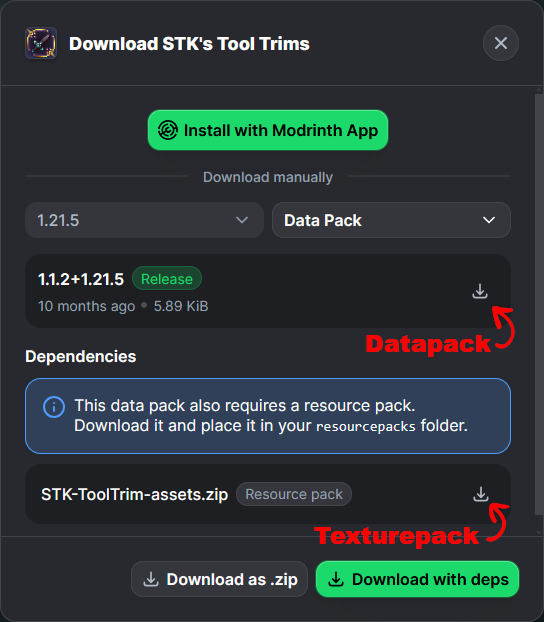
Vanilla versions of the pack are only available for MC 1.21.2 and onward.
The version for MC 1.21.1 requires Variants-CIT on the clientside for the trims to be visible.
Implementation Details
Vanilla Stateless is the only implementation available for MC 1.21.5 and onward. Other implementations are less reliable, and were only required because of the limitations of older Minecraft.
Vanilla Stateless (MC 1.21.5 and onward)
The stateless datapack does not include any recipe, and does not set any custom data on the tools. It simply adds tools to the #trimmable_armor tag, making them valid ingredients for the vanilla armor-trimming recipe, which gives them a trim component.
The texturepack for this version overwrites the vanilla item model definitions for the tools. No missing model should be visible to people who join a stateless server without using the texture pack; they'll just see the regular tools and weapons.
The models are constructed similarly to the trimmed-armor models, and so should be compatible with other texture packs that make minor changes to tools and weapon textures.
Vanilla Stateful (MC 1.21.2 to 1.21.4)
These versions of the datapacks use custom smithing recipes, which also change the tool's item_model component:
- On MC 1.21.3, the item model is changed to "
trimmed_<item_name>/<trim_pattern>_<trim_material>". - On MC 1.21.4, the item model is changed to "
trimmed_<item_name>/<trim_pattern>". Material variance is handled within the model itself.
⚠ Migrating a world from or to any Stateful implementation is likely to cause issues with missing or unset item models.
Prefer using a Stateless implementations instead if possible.
VCIT Stateless (MC 1.21.1 and onward)
The datapack is identical to the Vanilla Stateless implementation.
The texturepack requires Variants-CIT installed on the clientside in order to function.
Project description from Modrinth.
Pick your setup
STK's Tool Trims by Minecraft version and loader
Choose the version and loader you play, then open the matching release.
Minecraft version
26.1.2
5 loader buildsMinecraft version
26.1.1
5 loader buildsMinecraft version
26.1
5 loader buildsMinecraft version
1.21.11
5 loader buildsMinecraft version
1.21.10
5 loader buildsMinecraft version
1.21.9
5 loader buildsMinecraft version
1.21.8
5 loader buildsForge 1.1.2+1.21.5+mod 1
stable file
· 1 total · 11 Aug 2026Fabric 1.1.2+1.21.5+mod 1
stable file
· 1 total · 11 Aug 2026Quilt 1.1.2+1.21.5+mod 1
stable file
· 1 total · 11 Aug 2026NeoForge 1.1.2+1.21.5+mod 1
stable file
· 1 total · 11 Aug 2026Loader not listed 1.1.2+1.21.5 2
stable files
· 2 total · 8 Oct 2025
Minecraft version
1.21.7
5 loader buildsForge 1.1.2+1.21.5+mod 1
stable file
· 1 total · 11 Aug 2026Fabric 1.1.2+1.21.5+mod 1
stable file
· 1 total · 11 Aug 2026Quilt 1.1.2+1.21.5+mod 1
stable file
· 1 total · 11 Aug 2026NeoForge 1.1.2+1.21.5+mod 1
stable file
· 1 total · 11 Aug 2026Loader not listed 1.1.2+1.21.5 2
stable files
· 2 total · 8 Oct 2025
Minecraft version
1.21.6
5 loader buildsForge 1.1.2+1.21.5+mod 1
stable file
· 1 total · 11 Aug 2026Fabric 1.1.2+1.21.5+mod 1
stable file
· 1 total · 11 Aug 2026Quilt 1.1.2+1.21.5+mod 1
stable file
· 1 total · 11 Aug 2026NeoForge 1.1.2+1.21.5+mod 1
stable file
· 1 total · 11 Aug 2026Loader not listed 1.1.2+1.21.5 3
stable files
· 3 total · 8 Oct 2025
Minecraft version
1.21.5
5 loader buildsForge 1.1.2+1.21.5+mod 1
stable file
· 1 total · 11 Aug 2026Fabric 1.1.2+1.21.5+mod 1
stable file
· 2 total · 11 Aug 2026Quilt 1.1.2+1.21.5+mod 1
stable file
· 2 total · 11 Aug 2026NeoForge 1.1.2+1.21.5+mod 1
stable file
· 1 total · 11 Aug 2026Loader not listed 1.1.2+1.21.5 3
stable files
· 5 total · 8 Oct 2025
Minecraft version
1.21.4
5 loader buildsForge 1.1.0+1.21.4+mod 0
stable files
· 1 total · 12 Aug 2026Fabric 1.1.0+1.21.1+mod 0
stable files
· 1 total · 11 Aug 2026Quilt 1.1.0+1.21.1+mod 0
stable files
· 1 total · 11 Aug 2026NeoForge 1.1.0+1.21.4+mod 0
stable files
· 1 total · 12 Aug 2026Loader not listed 1.1.0+1.21.4 0
stable files
· 5 total · 13 Jan 2025
Showing the newest 12 of 16 game versions. Older files are in the list below.
Check the dependencies, then try the file in a copied instance before changing a world you care about.
Recent files
STK's Tool Trims versions and loaders
1.1.0+1.21.4+mod
stks-tool-trims-1.1.0+1.21.4.jar
12 Aug 2026
Client Optional Server Optional Dependencies No extras listed Listed on Release listing
Check the 1.21.4 · Forge setup 1.21.4ForgeNeoForge alpha
1.1.0+1.21.3+mod
stks-tool-trims-1.1.0+1.21.3.jar
12 Aug 2026
Client Optional Server Optional Dependencies No extras listed Listed on Release listing
Check the 1.21.3 · Forge setup 1.21.21.21.3ForgeNeoForge alpha
1.1.2+1.21.5+mod
stks-tool-trims-1.1.2+1.21.5.jar
11 Aug 2026
Client Optional Server Optional Dependencies No extras listed Listed on Release listing
Check the 1.21.8 · Fabric setup 1.21.51.21.61.21.71.21.8 release
1.1.0+1.21.1+mod
stks-tool-trims-1.1.0+1.21.1.jar
11 Aug 2026
Client Optional Server Optional Dependencies 1 required · 1 unchecked Listed on Release listing
Check the 1.21.5 · Fabric setup 1.211.21.11.21.21.21.3 beta
1.2.0+26.2+mod
stks-tool-trims-1.2.0+26.2.jar
8 Aug 2026
Client Optional Server Optional Dependencies No extras listed Listed on Release listing
Check the 26.2 · Fabric setup 1.21.91.21.101.21.1126.1 release
1.2.0+26.2
STK-ToolTrim-data.zip
8 Aug 2026
Client Optional Server Optional Dependencies No extras listed Listed on Release listing
Check the 26.2 · datapack setup 1.21.91.21.101.21.1126.1 release
1.1.2+1.21.9
STK-ToolTrim-data.zip
8 Oct 2025
Client Optional Server Optional Dependencies No extras listed Listed on Release listing
Check the 1.21.10 · datapack setup 1.21.91.21.10datapack release
1.1.2+1.21.5
STK-ToolTrim-data.zip
8 Oct 2025
Client Optional Server Optional Dependencies No extras listed Listed on Release listing
Check the 1.21.8 · datapack setup 1.21.51.21.61.21.71.21.8 release
1.1.1+1.21.5
STK-ToolTrim-data.zip
3 Jul 2025
Client Optional Server Optional Dependencies No extras listed Listed on Release listing
Check the 1.21.8 · datapack setup 1.21.51.21.61.21.71.21.8 release
1.1.0+1.21.5
STK-ToolTrim-data.zip
13 Jun 2025
Client Optional Server Optional Dependencies No extras listed Listed on Release listing
Check the 1.21.6 · datapack setup 1.21.51.21.6datapack release
1.1.0+1.21.4
STK-ToolTrim-data.zip
13 Jan 2025
Client Optional Server Optional Dependencies No extras listed Listed on Release listing
Check the 1.21.4 · datapack setup 1.21.4datapack alpha
1.1.0+1.21.3
STK-ToolTrim-data.zip
13 Jan 2025
Client Optional Server Optional Dependencies No extras listed Listed on Release listing
Check the 1.21.3 · datapack setup 1.21.21.21.3datapack alpha
Looking for an older file? The official Modrinth project page is in Resources.
 mod
mod CurseForge + Modrinth · Minecraft
SeasonHud (Fabric)
Display the current season on the Hud or under the minimap
 mod
mod CurseForge + Modrinth · Minecraft
Umapyoi Delight
Add Umapyoi mod and Farmer's Delight compat features
 mod
mod CurseForge + Modrinth · Minecraft
CC : My Peripheral Extender
Handy ComputerCraft: Tweaked peripherals for Create: Aeronautics on NeoForge