Minecraft version
Back to mods 
Modrinth · Minecraft mod
Firearms
Resident Evil 4 inspired Firearms for Minecraft.
Choose a version Pick your version below, then grab the matching file.
Quick answer
Which Firearms release should I use?
Latest stable file 1.07+mod
Game version 26.2
Loader Fabric, Forge, NeoForge
Firearms 1.07+mod targets 26.2 with Fabric, Forge, NeoForge. Installation on the client is optional. Installation on the dedicated server is optional. No extra mods listed for this file.
Where it goes
Is Firearms required on the client, server, or both?
Installation on the client is optional. Installation on the dedicated server is optional.
Client Optional
Dedicated server Optional
Loader for this release Fabric, Forge, NeoForge
Required install it here Optional supported, not mandatory Not supported do not install here Source doesn’t say do not assume
The source marks this as usable on both the client and server.
What else does Firearms 1.07+mod need?
1.07+mod. Change the file and its required mods may change too.
This file does not list any required mods. Do not add a library just because a different file uses it.
This file does not list any required or optional mods.
Before you install it
Add Firearms without breaking your instance.
Built for Firearms 1.07+mod. Pick another file and the loader, install side or required mods may change.
- 01
Stick to this file
Use 1.07+mod. It targets 26.2 with Fabric, Forge, NeoForge; another release may have different loader, side or dependency requirements.
- 02
Bring the mods it needs
This file does not list any required mods. Do not add a library just because a different file uses it.
- 03
Put it on the correct side
Installation on the client is optional. Installation on the dedicated server is optional.
- 04
Pick the file you checked
Use the “Get this file” button beside 1.07+mod. It opens that exact file at the source.
About this project
What does Firearms add?
Description
Firearms is a Resident Evil 4 inspired datapack. Craft and upgrade guns from the original game, find Mousley and feed her Cheese to unlock bonus content, and delve into a large, procedurally generated castle to acquire pesetas!
 Firearms
There are 7 Firearms in total, and a Rocket Launcher. Hold a Firearm in your mainhand and right click to fire. Below is an explanation of all mechanics relevant to Firearms, as well as a breakdown of each one.
Deadeye Mode
Sneaking while holding a Firearm will activate deadeye mode after some time, allowing bullets fired to deal critical hits.
Ammo Usage
All Firearms use some kind of ammo to fire. You must have the correct ammo type in your inventory to load a clip. The ammo type for each Firearm is detailed in the breakdown table below. Ammo recipes are unlocked automatically when a Firearm enters your inventory.
Reloading
Firearms can be manually reloaded by pressing F while in your mainhand. Reloading happens automatically when ammo reaches 0.
Damage Falloff
Bullets fired experience damage falloff over certain ranges, particular to each Firearm. Some Firearms will require a close range to be effective, whereas others (such as the sniper rifle) can be used over any range without falloff. Deadeye critical hits can make up for some of that falloff.
Maximum Range
There is also a fixed maximum range for each Firearm where, after a certain range, the bullet will no longer be effective at all.
Piercing
Bullets are sometimes able to pierce multiple enemies with one shot, the number specific to each Firearm.
Upgrading & Special Upgrades
Firearms can be upgraded at the Firearms Workshop (more on that below). Each Firearm can have its maximum ammo extended with an Extended Mag. Some Firearms can have damage falloff reduced with a Stabiliser. Every Firearm has a special upgrade that visually and uniquely modifies that Firearm.
Breakdown
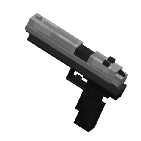
SG-09
- Ammo Type: Copper Bullets

- Damage: Low
- Deadeye Damage: Decent
- Damage Falloff: Low
- Piercing: 1 enemy
- Fire Rate: Very Fast
- Range: Close
- Magazine Capacity: 10/15 (upgraded)
- Special Upgrade: +Deadeye Speed (Reflex Sight)

A trusty pistol with a comfortable fire rate and nice magazine size. Its damage is nothing impressive, but ammo is easy to come by. Simple to craft in the early game and formidable in deadeye mode once fully upgraded.
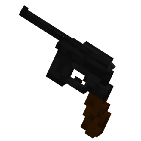
Red9
- Ammo Type: Copper Bullets
- Damage: Decent
- Deadeye Damage: Decent
- Damage Falloff: Low
- Piercing: 1 enemy
- Fire Rate: Fast
- Range: Close
- Magazine Capacity: 8/12 (upgraded)
- Special Upgrade: +Damage (Red9 Stock)

A pistol with respectable damage, but trades off everything else. Less bullets are required to kill most mobs than the SG-09, making the Red9 a very ammo efficient choice. Can pack a punch when fully upgraded.
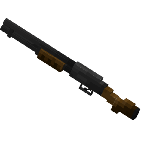
W-870
- Ammo Type: Gold Shells

- Damage: High
- Deadeye Damage: High
- Damage Falloff: High
- Piercing: 3 enemies
- Fire Rate: Slow
- Range: Very Close
- Magazine Capacity: 6/8 (upgraded)
- Special Upgrade: +Fire Speed (Tactical Foregrip)

A highly powerful shotgun with a tight spread. Capable of felling basic hostile mobs in one shell at close range, although it struggles to maintain damage over long distances.
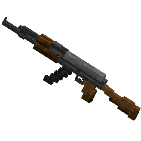
AK-47
- Ammo Type: Iron Bullets

- Damage: Decent
- Deadeye Damage: Decent
- Damage Falloff: Decent
- Piercing: 2 enemies
- Fire Rate: Very Fast
- Range: Far
- Magazine Capacity: 20/40 (upgraded)
- Special Upgrade: +Max Range (Laser Sight)

An assault rifle capable of quickly gunning down mobs. A large magazine size allows for a spray'n'pray approach, although this is very ammo inefficient. Remains effective over long distances when combined with the Laser Sight.
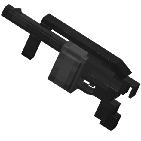
Striker
- Ammo Type: Gold Shells
- Damage: Decent
- Deadeye Damage: High
- Damage Falloff: High
- Piercing: 3 enemies
- Fire Rate: Fast
- Range: Very Close
- Magazine Capacity: 12/20 (upgraded)
- Special Upgrade: +Deadeye Speed (Reflex Sight)
A fast firing shotgun with a big magazine. The wide spread makes it easy to hit multiple enemies with one shell, but overall damage suffers. Deadeye mode is required to one shot basic hostile mobs.
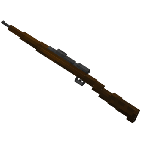
SR M1903
- Ammo Type: Large Iron Bullet

- Damage: High
- Deadeye Damage: Very High
- Damage Falloff: N/A
- Piercing: 10 enemies
- Fire Rate: Very Slow
- Range: Very Far
- Magazine Capacity: 5/7 (upgraded)
- Special Upgrade: +Deadeye Speed (Large Scope)

A sniper rifle with an extremely long range and no damage falloff. When in deadeye mode it can one shot most mobs. However, its very slow to fire and has a small magazine capacity.
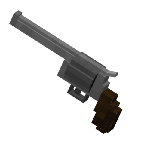
Broken Butterfly
- Ammo Type: Diamond Round

- Damage: Very High
- Deadeye Damage: Very High
- Damage Falloff: High
- Piercing: 3 enemies
- Fire Rate: Slow
- Range: Close
- Magazine Capacity: 6/8 (upgraded)
- Special Upgrade: +Reload Speed (Quick Reloader)

A magnum that's devastating at close range. Suffers from bad damage falloff which can be remedied by firing in deadeye mode. Although it can easily one shot most mobs, its ammo type is difficult to come by.
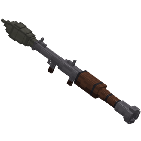
Rocket Launcher
- Ammo Type: Rocket

- Damage: High
- Deadeye Damage: N/A
- Damage Falloff: N/A
- Piercing: 1 enemy
- Fire Rate: Slow
- Range: Very Far
- Magazine Capacity: 1
- Special Upgrade: N/A
A rocket launcher that fires powerful, explosive rockets. Does good damage and has impressive range, but splash damage makes it dangerous to use in close combat.
 Firearms Workshop
The Firearms Workshop is a new block that's used to craft and upgrade Firearms.
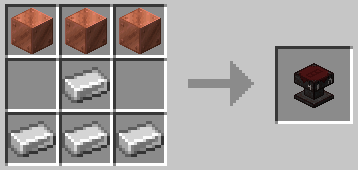
Firearms are crafted in a 3x1 table, with a set ordering of each part. Firearms parts are crafted inside a normal crafting table, with the recipes unlocking automatically after placing a Firearms Workshop.
Firearms can also be upgraded at the Workshop. Place a Firearm in the first slot and an upgrade in the adjacent slot. Buy upgrades from the Firearms Merchant with pesetas (details below).
Here's a list of every Firearm recipe craftable in the Workshop:
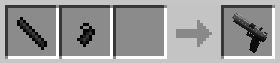
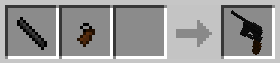
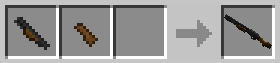
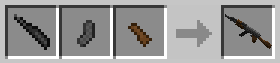
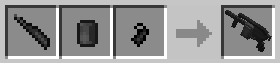
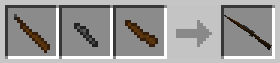
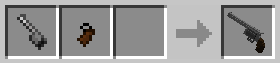
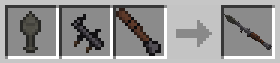
Note: You can type any Firearm's name into the recipe book to bring up the parts used to craft it.
Ammo
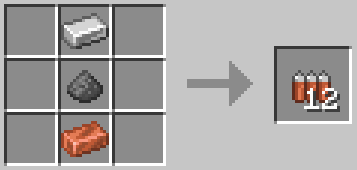
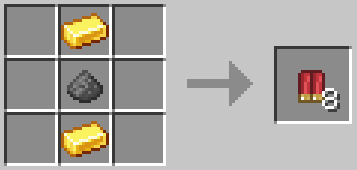
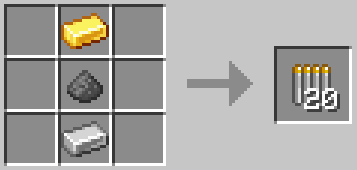
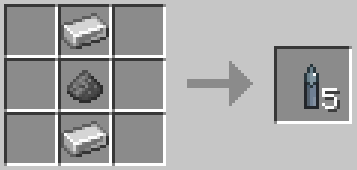
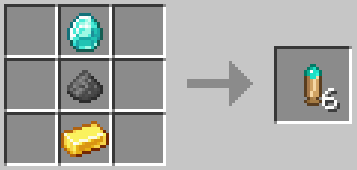
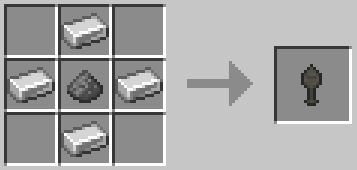
There are 6 ammo types. Ammo recipes are unlocked when a Firearm enters your inventory. All ammo types use gunpowder in their recipes. To account for this, the difficulty of acquiring gunpowder has been reduced. Creepers can rarely drop extra gunpowder, and it can be found in the Castle inside of chests. It can also be bought from the Firearms Merchant for pesetas.
See the crafting recipes below:
 Firearms Merchant
The Firearms Merchant can be summoned by placing a Merchant Brazier. See the recipe below:
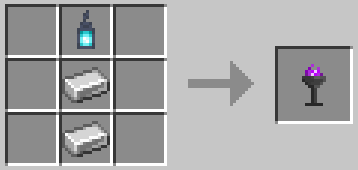
The Merchant sells various upgrades for Firearms, as well as First Aid Spray, gunpowder and a map to the Castle - all for a new currency called pesetas. Pesetas can be found in the new Castle dungeon. (A Castle Map can also be bought for an emerald in case you haven't found a Castle naturally).
 The Castle
The Castle is a large, procedurally generated dungeon that contains difficult challenges as well as a new currency, pesetas. You can also find various hidden treasures that the Merchant will exchange for pesetas. Every Castle also comes equipped with a Firearms Merchant and Workshop located in the Grand Hall.
Valid biomes the Castle can spawn in:
- Meadow
- Grove
- Stony Peaks
- Snowy Slopes
- Wooded Badlands
The Merchant sells an explorer map that leads to a nearby Castle.
 Mousley
Mousley is a little inventory companion who's eager to accompany you on your journey! She'll eat Cheese out of your inventory which will level up her Love Meter. Every 25% of the meter, she'll grant you an extra half heart and a piece of bonus content (a cosmetic). The health bonus stacks to 2 extra hearts at 100%, although you'll lose the bonus if she's not in your inventory.
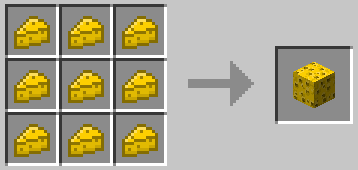
Find Mousley by placing a Cheese Block. She'll eventually start eating it, indicated by a quiet nibbling sound. Break the Cheese Block while in this state to find Mousley! Failing to break it in time will result in Mousley running away and the Cheese Block being consumed.
 Cheese
Cheese is a new food item that's used to level up Mousley, but can also be eaten on its own. Acquire Cheese by curdling milk in a Curdling Pot. See the recipe for a Curdling Pot below:
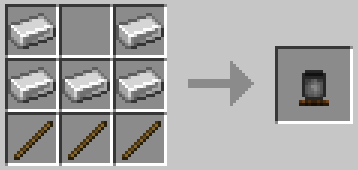
The Curdling Pot is filled by right clicking it with a milk bucket. Right click again with coal once filled to start curdling! The Cheese will then be ready in about 30 seconds.
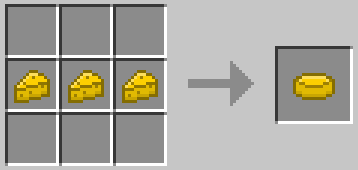
Cheese can also be crafted into a Cheese Wheel or Cheese Block. Cheese Wheels are better for saturation efficiency, whereas Cheese Blocks are good for long-term storage and for finding Mousley.
 Bonus Content
Bonus content is granted by Mousley, and includes four new cosmetics. Each cosmetic has its own special effect when worn. If you ever lose a cosmetic, it can be re-obtained by purchasing the Gift Box from the Firearms Merchant.

Mouse Ears
+Cheese Potency
Causes a regeneration effect upon eating Cheese or Cheese Wheels.

Red Beret
+Combat Knife Speed
Causes the Combat Knife to have no attack cooldown.

Gas Mask
+20% Firearms Damage
Grants +20% damage to all Firearms (excludes Rocket Launcher).

Cat Ears
+Infinite Ammo
No ammo usage when reloading Firearms.
 Miscellaneous
There are a few other items that don't fall under the other categories.
Green Herbs
Green Herbs are a new healing item that drops from basic hostile mobs (zombies, skeletons, creepers, spiders) as well as mobs in the Castle. They can also rarely drop from fully grown crops. Consume Green Herbs to heal 4 hearts.
First Aid Spray
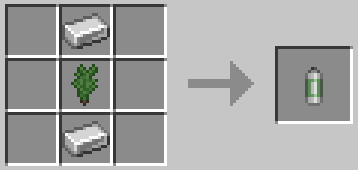
A more powerful version of a Green Herb. Instantly consumed and fully heals. Crafted as follows:
Combat Knife
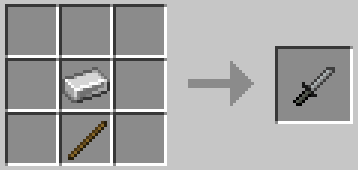
A new combat option for close range. Faster than an iron sword but not very durable. Very effective when combined with the Red Beret.
Creative Mode
Any item in the datapack can be obtained by entering /function firearms:give/x into chat.
Here's a few shortcuts:
- /function firearms:give/all_firearms
- /function firearms:give/all_parts
- /function firearms:give/all_upgrades
- /function firearms:give/all_gifts
- /function firearms:give/all_treasures
Credits
catbreadloaf, M1dnightAsh
M1dnightAsh made:
- The entire Castle
- Ornate Necklace
- Elegant Crown
TechnoGhosty, whose Leon S. Kennedy skin is featured in the thumbnail (see here).
Thanks for playing with this datapack!
Project description from Modrinth.
Pick your setup
Firearms by Minecraft version and loader
Choose the version and loader you play, then open the matching release.
Minecraft version
1.21.11
5 loader buildsCheck the dependencies, then try the file in a copied instance before changing a world you care about.
Recent files
Firearms versions and loaders
1.07+mod
firearms_re4-1.07.jar
12 Sept 2026
Client Optional Server Optional Dependencies No extras listed Listed on Release listing
Check the 26.2 · Fabric setup 26.2FabricForgeNeoForge release
1.07
Firearms.zip
12 Sept 2026
Client Optional Server Optional Dependencies No extras listed Listed on Release listing
Check the 26.2 · datapack setup 26.2datapack release
1.06+mod
firearms_re4-1.06.jar
9 May 2026
Client Optional Server Optional Dependencies No extras listed Listed on Release listing
Check the 1.21.11 · Fabric setup 1.21.11FabricForgeNeoForge release
1.06
Firearms.zip
8 May 2026
Client Optional Server Optional Dependencies No extras listed Listed on Release listing
Check the 1.21.11 · datapack setup 1.21.11datapack release
Looking for an older file? The official Modrinth project page is in Resources.
 mod
mod CurseForge + Modrinth · Minecraft
Let Me Sleep
Monsters are keeping you awake? Customize sleeping, waking, and bed mechanics freely.
 mod
mod CurseForge + Modrinth · Minecraft
Cobblemon Pokédex (Cobbledex)
A sidemod for Cobblemon to quickly see useful information about each Pokémon
 mod
mod CurseForge + Modrinth · Minecraft
Sheep Variety
New sheep models and textures for every climate – a biome-based glow-up awaits!