One Enough Item Needed by One Enough Block OneEnoughBlock-neoforge-26.1.2-1.0.0.jar
requiredMatching file found Matched file: OneEnoughItem-neoforge-26.1.2-1.0.0.jar

CurseForge · Minecraft mod
Easily specify replacing one block with another.
Quick answer
One Enough Block OneEnoughBlock-neoforge-26.1.2-1.0.0.jar targets 26.1.2 with NeoForge. The project page does not say whether this file belongs on the client, dedicated server, or both. All 3 required mods have matching files.
Where it goes
The project page does not say whether this file belongs on the client, dedicated server, or both.
The source does not explicitly classify this release as client-only or server-only.
OneEnoughBlock-neoforge-26.1.2-1.0.0.jar. Change the file and its required mods may change too.
Install One Enough Item, One Enough Lib, One Enough Lib first. We found matching files for this game-version and loader setup. 2 come through another mod in the chain.
2 extra mods were pulled in by other dependencies. Indented rows show who needs each one. We only count dependency files that match this setup. A file for another loader does not fill the gap.
Before you install it
Built for One Enough Block OneEnoughBlock-neoforge-26.1.2-1.0.0.jar. Pick another file and the loader, install side or required mods may change.
Use OneEnoughBlock-neoforge-26.1.2-1.0.0.jar. It targets 26.1.2 with NeoForge; another release may have different loader, side or dependency requirements.
Install One Enough Item, One Enough Lib, One Enough Lib first. We found matching files for this game-version and loader setup. 2 come through another mod in the chain.
The project page does not say whether this file belongs on the client, dedicated server, or both.
Use the “Get this file” button beside OneEnoughBlock-neoforge-26.1.2-1.0.0.jar. It opens that exact file at the source.
About this project
Does your modpack have three kinds of orange trees or four kinds of silver ore? Or do you just want to wipe out useless naturally generated ores like copper?
With One Enough Block, you can conveniently specify which blocks should be replaced with others — easily, flexibly, and powerfully.
Load Method 1: via configuration file. Reload using the /reload command.
Path: config/OEB/example.json
[
  {
    "match": [
      "manametalmod:ManaTreeLog",
      "#minecraft:logs"
    ],
    "result": "minecraft:redstone_block"
  },
  {
    "match": ["#minecraft:logs"],
    "result": "minecraft:redstone_block"
  }
]
Load Method 2: via datapack (available since v1.1.0). Requires OEI as a dependency — note that the structure has changed!
Path: data/oeb/replacements/example.json
[
  {
    "matchBlock": ["#minecraft:logs"],
    "resultBlock": "minecraft:redstone_block"
  }
]
Simply list the block IDs you want to replace in the "match" array, and specify the target block under "result". The replacement will automatically take effect in-game.
Supports tag-based matching, allowing you to replace all blocks under a tag at once. Even fluids can be replaced!
Note: Since version 1.1.0, an in-game replacement rule editor is built in! Press CTRL + R by default to open the UI and enjoy a brain-free, zero-code editing experience.(Switch Function -> Page OEB)
Block replacement occurs when creating worlds or loading new chunks, making it ideal for modifying naturally generated blocks such as ores, plants, or structure blocks.
Replacement also applies to any block placement — when a player places a block, it will be immediately replaced if it matches a rule.
Additionally, existing blocks in the world can be replaced retroactively. This feature is disabled by default, but can be enabled in the config file.
None for now.
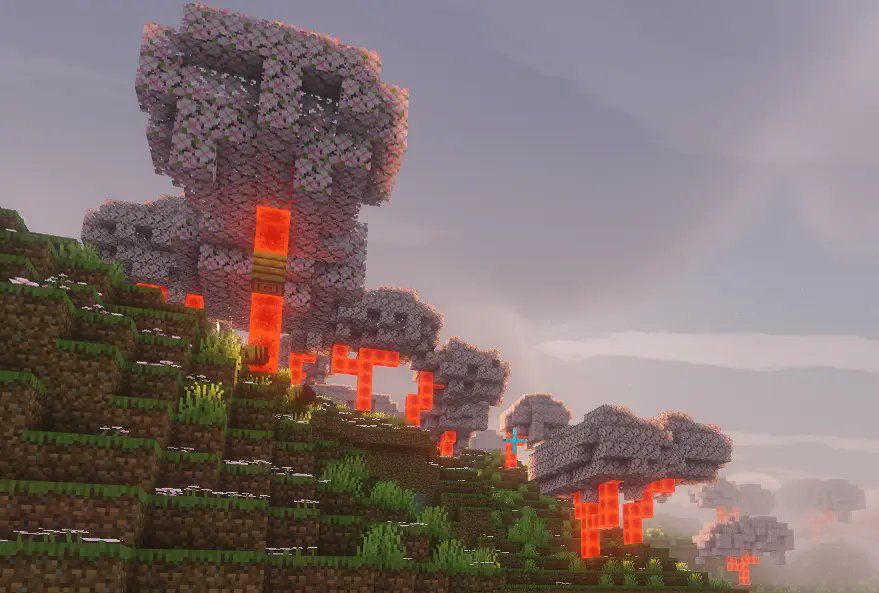 />/>/>
Project description from CurseForge.
Pick your setup
Choose the version and loader you play, then open the matching release.
Check the dependencies, then try the file in a copied instance before changing a world you care about.
Recent files
3 Aug 2026
6 Apr 2026
26 Mar 2026
19 Jan 2026
17 Jan 2026
12 Jan 2026
11 Jan 2026
14 Dec 2025
27 Nov 2025
18 Nov 2025
12 Oct 2025
1 Oct 2025
Looking for an older file? The official CurseForge project page is in Resources.
 mod
modAn AI-powered Carpet extension mod packed with practical utilities, including longer player name support and fake-player area mining.
 mod
modBBL Ability Lock locks all minecraft abilities behind checks. Complete Tasks to unlock new abilities. Can you complete the game?
 mod
modMulti-platform Minecraft web chat with map/standalone UI, DM & groups, secure server relay, moderation/content filters, rich media, notifications, and optional ImageEmojis-Bero/SimpleNicks-Bero integration.