Minecraft version
Back to mods 
Modrinth · Minecraft mod
Colorful Trims
Adds the ability to use dyes in the smithing table
Choose a version Pick your version below, then grab the matching file.
Quick answer
Which Colorful Trims release should I use?
Latest stable file 1.10.1+mod
Game version 1.21.11, 26.1, 26.1.1
Loader Fabric, Forge, NeoForge
Colorful Trims 1.10.1+mod targets 1.21.11, 26.1, 26.1.1 with Fabric, Forge, NeoForge. Installation on the client is optional. Installation on the dedicated server is optional. No extra mods listed for this file.
Where it goes
Is Colorful Trims required on the client, server, or both?
Installation on the client is optional. Installation on the dedicated server is optional.
Client Optional
Dedicated server Optional
Loader for this release Fabric, Forge, NeoForge
Required install it here Optional supported, not mandatory Not supported do not install here Source doesn’t say do not assume
The source marks this as usable on both the client and server.
What else does Colorful Trims 1.10.1+mod need?
1.10.1+mod. Change the file and its required mods may change too.
This file does not list any required mods. Do not add a library just because a different file uses it.
This file does not list any required or optional mods.
Before you install it
Add Colorful Trims without breaking your instance.
Built for Colorful Trims 1.10.1+mod. Pick another file and the loader, install side or required mods may change.
- 01
Stick to this file
Use 1.10.1+mod. It targets 1.21.11, 26.1, 26.1.1 with Fabric, Forge, NeoForge; another release may have different loader, side or dependency requirements.
- 02
Bring the mods it needs
This file does not list any required mods. Do not add a library just because a different file uses it.
- 03
Put it on the correct side
Installation on the client is optional. Installation on the dedicated server is optional.
- 04
Pick the file you checked
Use the “Get this file” button beside 1.10.1+mod. It opens that exact file at the source.
About this project
What does Colorful Trims add?
Information
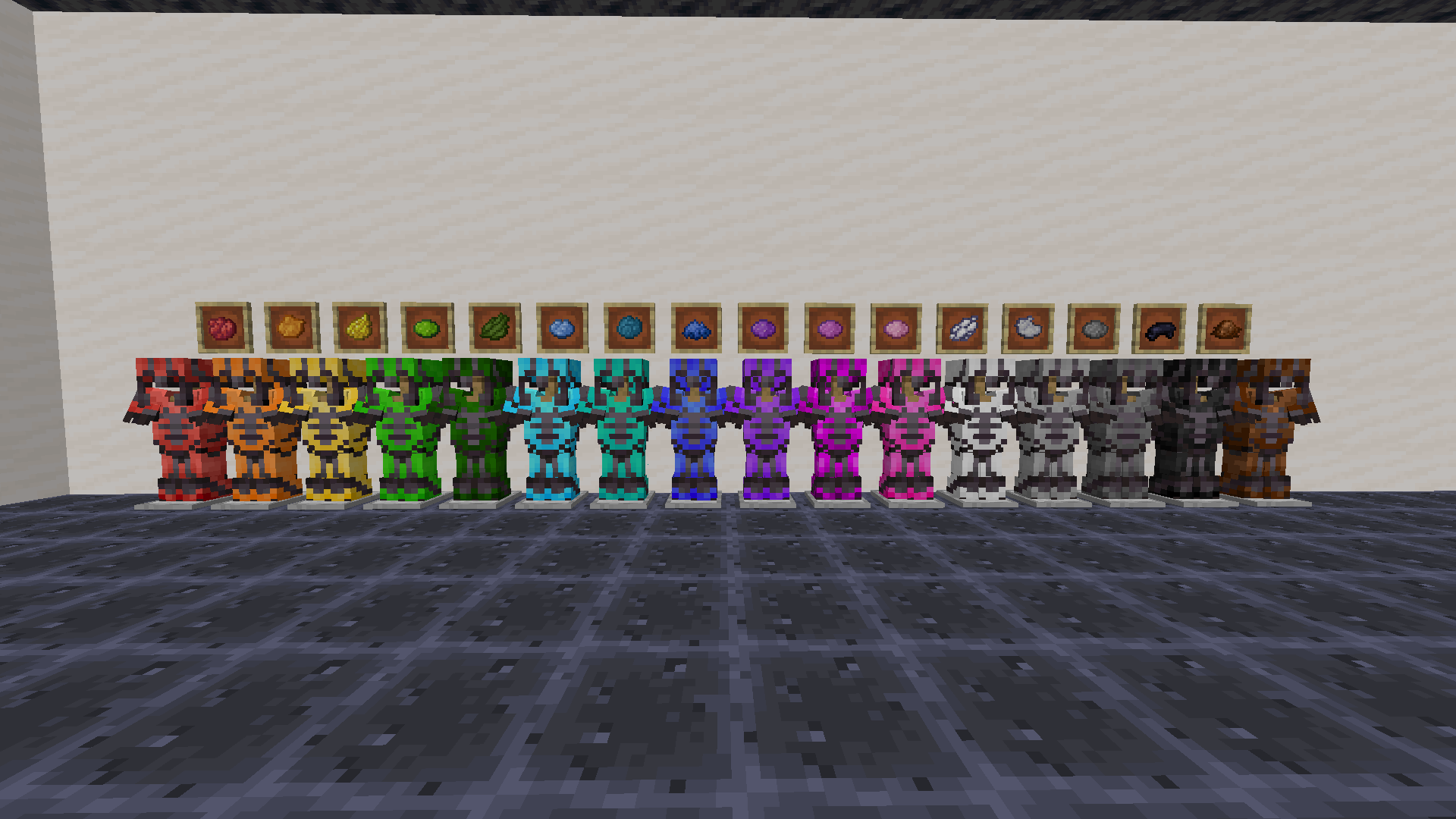
Use any dye along with trims to customize your armor. This works with all trims and armor like how you would do it with any other material.
You need the resource pack in order for you to see the custom armor trims. Without it you would see the missing texture texture. If something doesn't work check the FAQ below. If you find any bugs you can report them to my discord server.
1.21.5+ Note
In order to be able to trim items, you may need to drop them on the ground first.
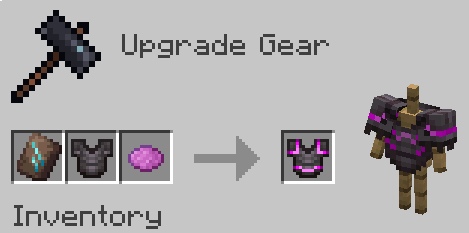
Want the trims to glow? Use my other pack, Emissive Trims!
FAQ
Q: Why does it have a red X over the smithing table when trying to craft it?
A: Drop the dye on the ground, pick it up, and try it again. If that doesnt work restart the server. If neither of those worked report it in the discord
Q: Why can't I put the dye in the smithing table?
A: If it still doesn't work make sure you have installed the datapack correctly. If you are sure you did then report it in the discord
Q: Why do all the dye recipes not work?
A: You have to restart your world/server/realm. It should then work after you do that
Q: I get a missing texture when trying to use this how do I fix it?
A: Make sure to download the resourcepack
Q: Where can I download the resourcepack?
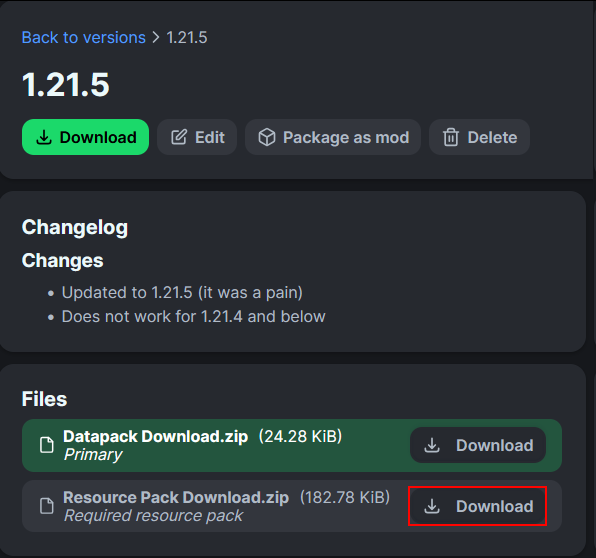
A: Those who click the big download button at the top of the screen are only prompted to download the datapack and not the resourcepack. Modrinth does not show both of them in that menu. You instead have to go to the versions tab.
Where to download the resourcepack
First you have to go to the versions tab

Then you go to the version you want
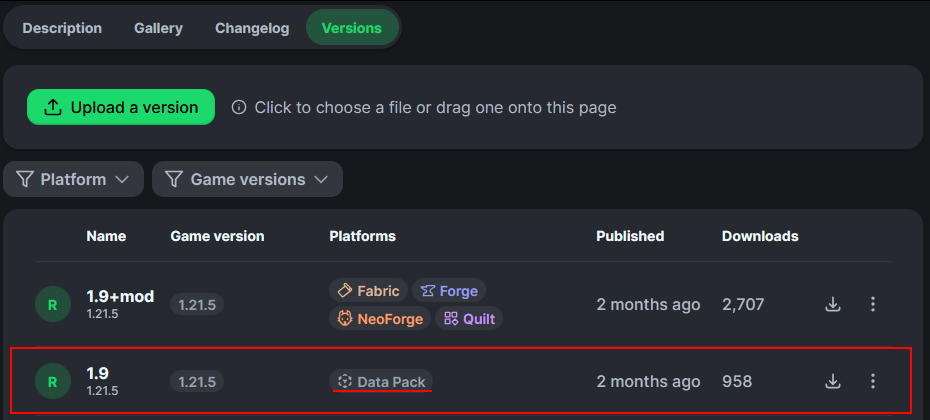
Then underneath the datapack download is the resourcepack download
How to install
On the server / singleplayer install the datapack and enable it. Restart the server afterwards for the smithing table to work.
On the client equip the resource pack in order to see the textures. This is required to do.
You could also just use the mod on both the client and server
Project description from Modrinth.
Pick your setup
Colorful Trims by Minecraft version and loader
Choose the version and loader you play, then open the matching release.
Minecraft version
26.1.2
5 loader buildsMinecraft version
26.1.1
5 loader buildsMinecraft version
26.1
5 loader buildsMinecraft version
1.21.11
5 loader buildsMinecraft version
1.21.10
5 loader buildsMinecraft version
1.21.9
5 loader buildsMinecraft version
1.21.8
5 loader buildsMinecraft version
1.21.7
5 loader buildsMinecraft version
1.21.6
5 loader buildsMinecraft version
1.21.5
5 loader buildsMinecraft version
1.21.4
5 loader buildsShowing the newest 12 of 23 game versions. Older files are in the list below.
Check the dependencies, then try the file in a copied instance before changing a world you care about.
Recent files
Colorful Trims versions and loaders
1.10.1+mod
colorful-trims-1.10.1.jar
10 Dec 2025
Client Optional Server Optional Dependencies No extras listed Listed on Release listing
Check the 26.2 · Fabric setup 1.21.1126.126.1.126.1.2 release
1.10.1
Colorful Trims Datapack v1.10.1.zip
10 Dec 2025
Client Optional Server Optional Dependencies No extras listed Listed on Release listing
Check the 26.2 · datapack setup 1.21.1126.126.1.126.1.2 release
1.10+mod
colorful-trims-1.10.jar
1 Oct 2025
Client Optional Server Optional Dependencies No extras listed Listed on Release listing
Check the 1.21.10 · Fabric setup 1.21.81.21.91.21.10Fabric release
1.10
Colorful Trims Datapack v1.10.zip
1 Oct 2025
Client Optional Server Optional Dependencies No extras listed Listed on Release listing
Check the 1.21.10 · datapack setup 1.21.81.21.91.21.10datapack release
1.9+mod
colorful-trims-1.9.jar
26 Mar 2025
Client Optional Server Optional Dependencies No extras listed Listed on Release listing
Check the 1.21.8 · Fabric setup 1.21.51.21.61.21.71.21.8 release
1.9
Colorful Trims Datapack v1.9.zip
14 Mar 2025
Client Optional Server Optional Dependencies No extras listed Listed on Release listing
Check the 1.21.8 · datapack setup 1.21.51.21.61.21.71.21.8 release
1.8+mod
colorful-trims-1.8.jar
7 Dec 2024
Client Optional Server Optional Dependencies No extras listed Listed on Release listing
Check the 1.21.4 · Fabric setup 1.21.4FabricForgeNeoForge release
1.8
Colorful Trims Datapack v1.8.zip
7 Dec 2024
Client Optional Server Optional Dependencies No extras listed Listed on Release listing
Check the 1.21.4 · datapack setup 1.21.4datapack release
1.7+mod
colorful-trims-1.7.jar
15 Oct 2024
Client Optional Server Optional Dependencies No extras listed Listed on Release listing
Check the 1.21.3 · Fabric setup 1.21.21.21.3FabricForge release
1.7
Colorful Trims Datapack v1.7.zip
15 Oct 2024
Client Optional Server Optional Dependencies No extras listed Listed on Release listing
Check the 1.21.3 · datapack setup 1.21.21.21.3datapack release
1.6+mod
colorful-trims-1.6.jar
13 Jun 2024
Client Optional Server Optional Dependencies No extras listed Listed on Release listing
Check the 1.21.1 · Fabric setup 1.201.20.11.20.21.20.3 release
1.6
Colorful Trims Datapack.zip
13 Jun 2024
Client Optional Server Optional Dependencies No extras listed Listed on Release listing
Check the 1.21.1 · datapack setup 1.201.20.11.20.21.20.3 release
Looking for an older file? The official Modrinth project page is in Resources.
 mod
mod CurseForge + Modrinth · Minecraft
Easy NPC: Core
Provides the core functionallity for the Easy NPC mod.
 mod
mod CurseForge + Modrinth · Minecraft
Easy NPC
Create easily NPCs with dialogs for your world or for your mods.
 mod
mod CurseForge + Modrinth · Minecraft
Bedrock Plus
Adds a new variant of bedrock, which can be combined with netherite armor.