Fabric API Needed by KeybindsPurger-1.4.0-fabric-26.1.2.jar
requiredMatching file found Matched file: [26.1.2] Fabric API 0.155.2+26.1.2
CurseForge · Minecraft mod
Unset all keybinds for a clean slate
Quick answer
KeybindsPurger-1.4.0-fabric-26.1.2.jar targets 26.1.2 with Fabric. The project page does not say whether this file belongs on the client, dedicated server, or both. All 1 required mods have matching files.
Where it goes
The project page does not say whether this file belongs on the client, dedicated server, or both.
The source does not explicitly classify this release as client-only or server-only.
KeybindsPurger-1.4.0-fabric-26.1.2.jar. Change the file and its required mods may change too.
Install Fabric API first. We found matching files for this game-version and loader setup.
We only count dependency files that match this setup. A file for another loader does not fill the gap.
Before you install it
Built for KeybindsPurger-1.4.0-fabric-26.1.2.jar. Pick another file and the loader, install side or required mods may change.
Use KeybindsPurger-1.4.0-fabric-26.1.2.jar. It targets 26.1.2 with Fabric; another release may have different loader, side or dependency requirements.
Install Fabric API first. We found matching files for this game-version and loader setup.
The project page does not say whether this file belongs on the client, dedicated server, or both.
Use the “Get this file” button beside KeybindsPurger-1.4.0-fabric-26.1.2.jar. It opens that exact file at the source.
About this project
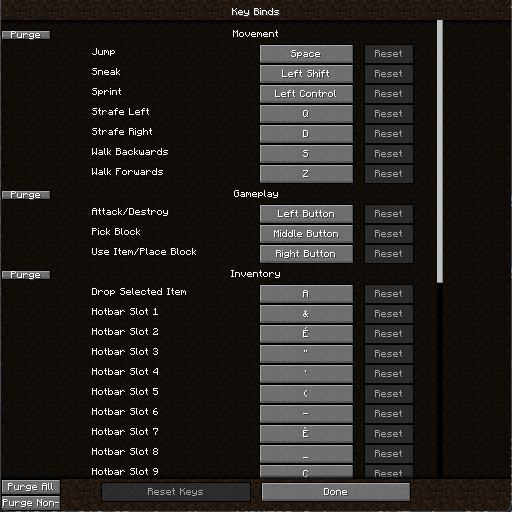
KeybindsPurger is a small utility mod that allows you to unset all keybinds in a category, all categories or non vanilla categories. That's it
The mod will add a few buttons. On the left side of a categorie's name in the keybinds menu, there are two buttons, "x" will purge the category and "r" will reset it. There also are two buttons on the bottom left side of the screen. "A" will unset ALL keybinds while "M" will only target modded keybinds
When starting a new modpack, I tend to unset all keybinds and only configure them when I need them. It is simpler that way for me so I thought that more people could use a mod that makes this task easier
Project description from CurseForge.
Pick your setup
Choose the version and loader you play, then open the matching release.
Showing the newest 12 of 13 game versions. Older files are in the list below.
Check the dependencies, then try the file in a copied instance before changing a world you care about.
Recent files
14 Jul 2026
14 Jul 2026
9 Mar 2026
9 Mar 2026
9 Mar 2026
9 Mar 2026
11 Sept 2025
11 Sept 2025
27 May 2025
27 May 2025
15 Feb 2025
15 Feb 2025
Looking for an older file? The official CurseForge project page is in Resources.
 mod
modEnhances vanilla wolves with unique personalities (Aggressive, Pacifist, Normal), smarter AI, safety behaviors, and combat improvements.
 mod
modA small mod that fixes Memory Leak issues, optimizes Memory Usage, and increases version/loader support for features of other Memory Leak Fix/Memory Optimization mods
 mod
modA lightweight utility for completely removing items via simple JSON configuration.