Minecraft version
Back to mods 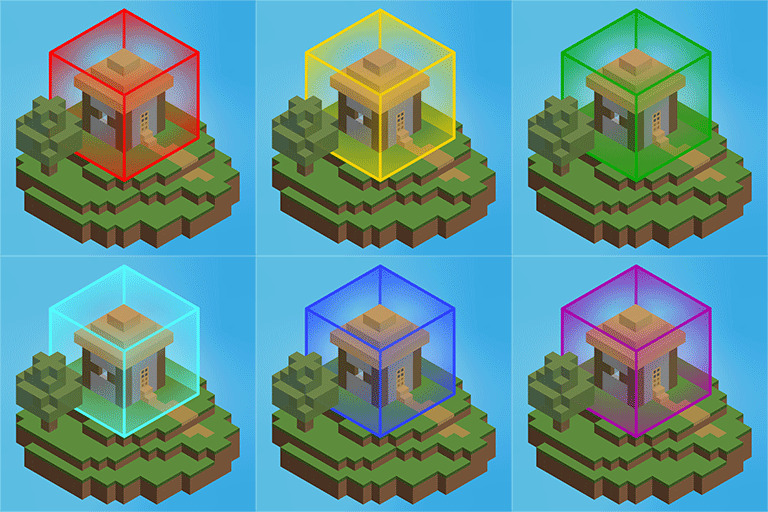
Modrinth · Minecraft mod
Privit
Protect your territory from griefing and other unwanted interactions
Choose a version Pick your version below, then grab the matching file.
Quick answer
Which Privit release should I use?
Latest stable file 1.4.6.2
Game version 26.1.2
Loader Fabric
Privit 1.4.6.2 targets 26.1.2 with Fabric. Installation on the client is optional. Installation on the dedicated server is optional. No extra mods listed for this file.
Where it goes
Is Privit required on the client, server, or both?
Installation on the client is optional. Installation on the dedicated server is optional.
Client Optional
Dedicated server Optional
Loader for this release Fabric
Required install it here Optional supported, not mandatory Not supported do not install here Source doesn’t say do not assume
The source marks this as usable on both the client and server.
What else does Privit 1.4.6.2 need?
1.4.6.2. Change the file and its required mods may change too.
This file does not list any required mods. Do not add a library just because a different file uses it.
This file does not list any required or optional mods.
Before you install it
Add Privit without breaking your instance.
Built for Privit 1.4.6.2. Pick another file and the loader, install side or required mods may change.
- 01
Stick to this file
Use 1.4.6.2. It targets 26.1.2 with Fabric; another release may have different loader, side or dependency requirements.
- 02
Bring the mods it needs
This file does not list any required mods. Do not add a library just because a different file uses it.
- 03
Put it on the correct side
Installation on the client is optional. Installation on the dedicated server is optional.
- 04
Pick the file you checked
Use the “Get this file” button beside 1.4.6.2. It opens that exact file at the source.
About this project
What does Privit add?
About
Tired of someone stealing items from your chest? Trading with villagers on your base without permission? Worried that someone will destroy your buildings? There’s a solution for all these problems:
Privit (short for Private IT) is a territory protection mod. It lets you create regions with per-player rules, so you can limit griefing and other unwanted interactions!
This mod is suitable both for a single‑player world that you will share with your friends or installation on full‑fledged dedicated server.
✨ Key Features
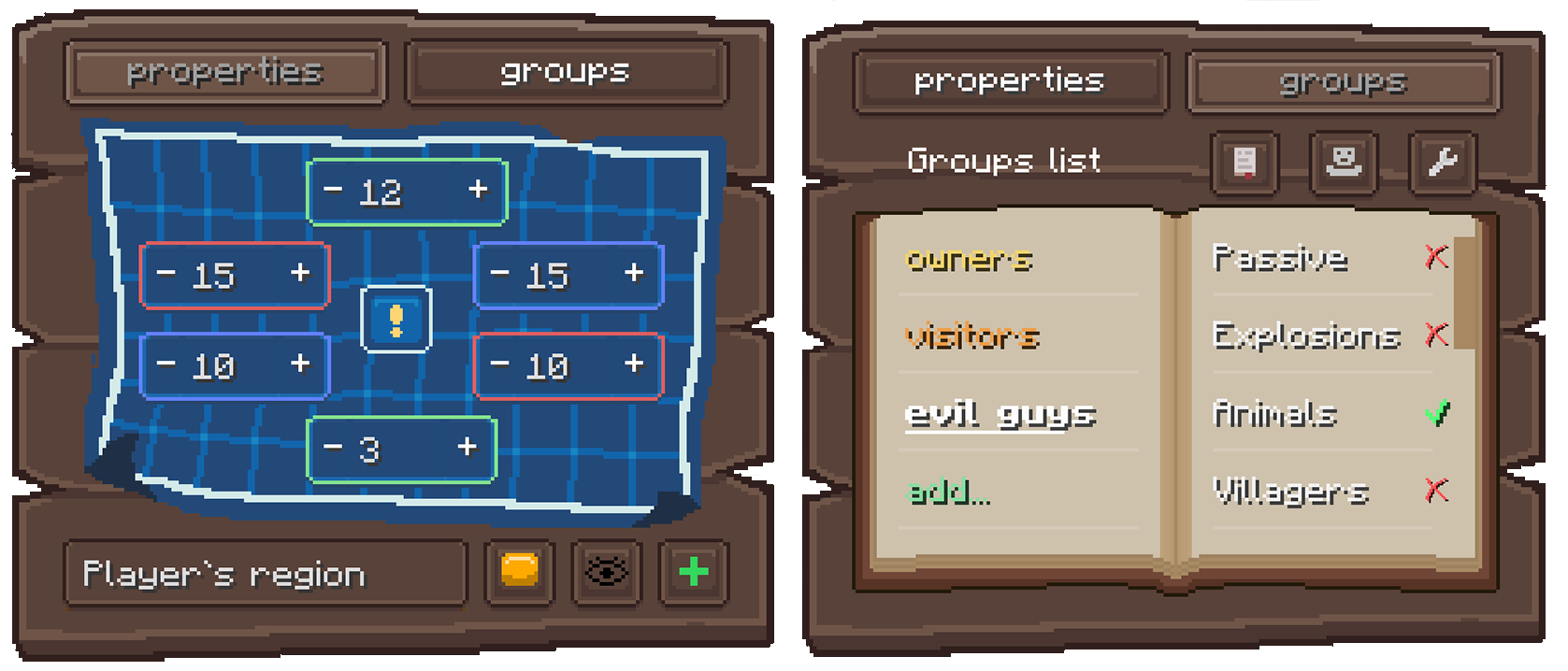
- Convenient Management: Create and edit regions using the Region Table block and a beautiful, intuitive GUI. No need to memorize complex commands to create protected area!
- Deep Customization: Control everything with rules. Decide exactly who can build, fight, open chests and much more.
- Flexible Permission System: Create custom groups for your friends and assign specific permissions to each.
- Visual helpers: See exactly where your region ends with customizable visual grids. The HUD in the corner of the screen will always tell you when you’re in a particular region.
- Admin Controls: Server admins can set global limits, disable unnecessary rules, and manage regions via commands.
How It Works
Instead of typing commands, you simply take a Region Table, place it down, and open the GUI. Here you can:
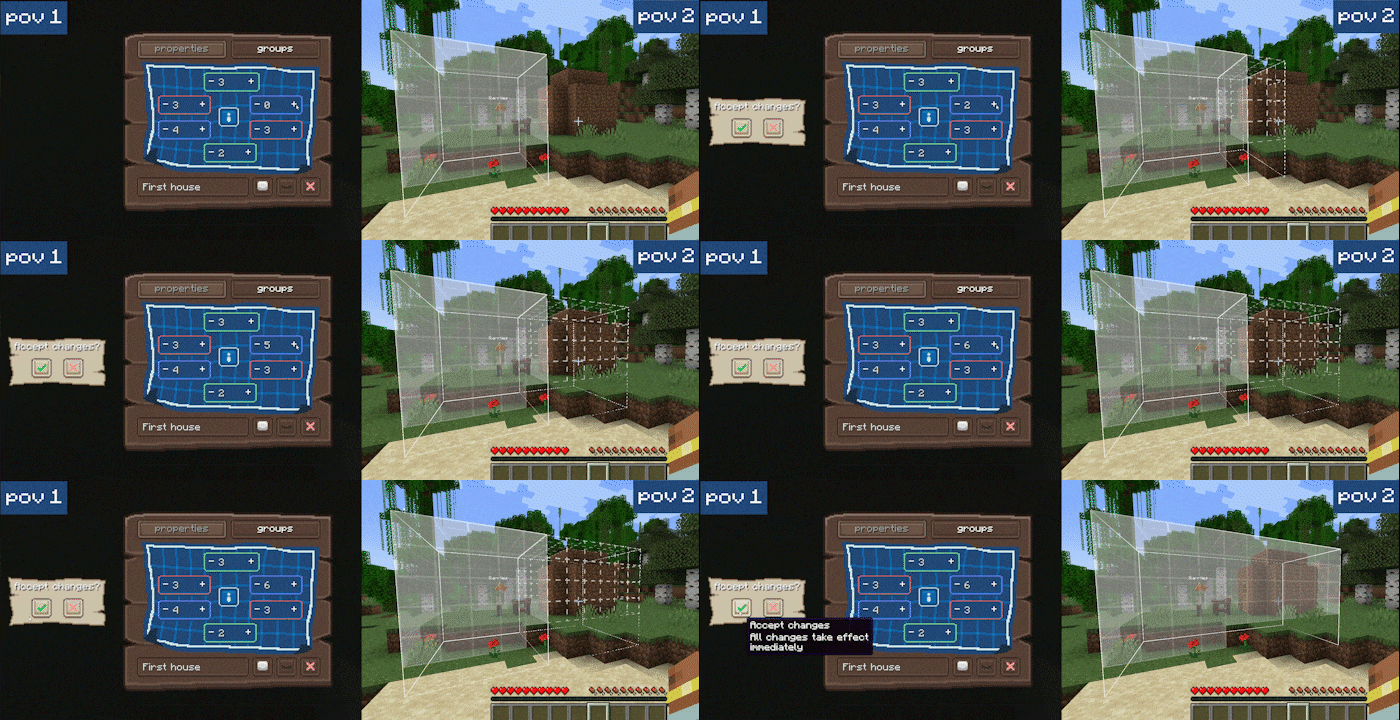
- Set region borders using visual coordinates
- Create player groups with custom permissions
- Enable or disable specific rules (like building, PvP, chest access)
- Visit the auxiliary guide on the wiki to learn how to work with Region Table.
The GUI is fully synced in real-time: if multiple players have it open, they see each other's changes instantly.
Requirements
- Minecraft: 1.20.1, 1.21.1, 26.1.2
- Loader: Fabric
- Dependencies: Fabric API
- (Optional but recommended) Mod Menu & Cloth Config for easy in-game configuration.
Privit is actively developed! Not all planned features are implemented yet, and some bugs may still appear. Bug reports and clear feedback are very welcome on our GitHub Issues page.
❓ Frequently Asked Questions
Q: Can I add this mod to an existing world?
A: Yes. It will not corrupt your world data. Player-action tracking only starts after the mod is installed, so delayed effects that began before that may not be attributed and can be ignored.
Q: Can I remove the mod and keep playing?
A: Absolutely. Mod data is stored in a separate folder inside the world directory and does not touch vanilla saves. If you reinstall the mod later, its features and data come back.
Q: If I break the Region Table inside a region, is the region deleted?
A: No! The table is only an entry point to the GUI. You can place and break as many tables as you want.
Q: I lost my region! How can I find it?
A: Use the /privit regions command to see a list of all regions where you are an owner. The information output line for each region includes the region’s coordinates.
Q: Forge/NeoForge?
A: No. Not in the foreseeable future.
Project description from Modrinth.
Pick your setup
Privit by Minecraft version and loader
Choose the version and loader you play, then open the matching release.
Minecraft version
1.21.1
1 loader buildMinecraft version
1.20.1
1 loader buildCheck the dependencies, then try the file in a copied instance before changing a world you care about.
Recent files
Privit versions and loaders
1.4.6.2
privit-fabric-26.1.2-1.4.6.2.jar
28 Nov 2026
Client Optional Server Optional Dependencies No extras listed Listed on Release listing
Check the 26.1.2 · Fabric setup 26.1.2Fabric release
1.4.6.1-alpha
privit-fabric-26.1.2-1.4.6.1-alpha.jar
28 Oct 2026
Client Optional Server Optional Dependencies No extras listed Listed on Release listing
Check the 26.1.2 · Fabric setup 26.1.2Fabric alpha
1.4.6
privit-fabric-1.20.1-1.4.6.jar
13 Oct 2026
Client Optional Server Optional Dependencies No extras listed Listed on Release listing
Check the 1.20.1 · Fabric setup 1.20.1Fabric release
1.4.5
privit-fabric-1.20.1-1.4.5.jar
11 Oct 2026
Client Optional Server Optional Dependencies No extras listed Listed on Release listing
Check the 1.20.1 · Fabric setup 1.20.1Fabric release
1.4.5
privit-fabric-1.21.1-1.4.5.jar
10 Oct 2026
Client Optional Server Optional Dependencies No extras listed Listed on Release listing
Check the 1.21.1 · Fabric setup 1.21.1Fabric release
1.4.4
privit-fabric-1.20.1-1.4.4.jar
4 Oct 2026
Client Optional Server Optional Dependencies No extras listed Listed on Release listing
Check the 1.20.1 · Fabric setup 1.20.1Fabric release
1.4.4
privit-1.21.1-1.4.4.jar
4 Oct 2026
Client Optional Server Optional Dependencies No extras listed Listed on Release listing
Check the 1.21.1 · Fabric setup 1.21.1Fabric release
1.4.3
privit-fabric-1.20.1-1.4.3.jar
30 Sept 2026
Client Optional Server Optional Dependencies No extras listed Listed on Release listing
Check the 1.20.1 · Fabric setup 1.20.1Fabric release
1.4.3
privit-fabric-1.21.1-1.4.3.jar
30 Sept 2026
Client Optional Server Optional Dependencies No extras listed Listed on Release listing
Check the 1.21.1 · Fabric setup 1.21.1Fabric release
1.4.2
privit-fabric-1.20.1-1.4.2.jar
29 Sept 2026
Client Optional Server Optional Dependencies No extras listed Listed on Release listing
Check the 1.20.1 · Fabric setup 1.20.1Fabric release
1.4.2
privit-fabric-1.21.1-1.4.2.jar
29 Sept 2026
Client Optional Server Optional Dependencies No extras listed Listed on Release listing
Check the 1.21.1 · Fabric setup 1.21.1Fabric release
1.4.1
privit-fabric-1.20.1-1.4.1.jar
28 Sept 2026
Client Optional Server Optional Dependencies No extras listed Listed on Release listing
Check the 1.20.1 · Fabric setup 1.20.1Fabric release
Looking for an older file? The official Modrinth project page is in Resources.
 mod
CurseForge + Modrinth · Minecraft
Tiny Flowers
Add tiny variants of all Vanilla flowers, much like Pink Petals.
 mod
GitHub · Minecraft
modpacks-ch-github-test
Disposable public fixture for testing the Modpacks.ch GitHub catalogue flow
 mod
Modrinth · Minecraft
NightVision
Turn on night vision with a hotkey