Minecraft version
Back to mods 
Modrinth · Minecraft mod
(Old MC) Coordinates
A coordinates mod for Minecraft Alpha and Infdev
Choose a version Pick your version below, then grab the matching file.
Quick answer
Which (Old MC) Coordinates release matches a1.0.16?
Best match for your filters 1.0
Game version a1.0.16
Loader modloader
(Old MC) Coordinates 1.0 targets a1.0.16 with modloader. It must be installed on the client. Do not install it on the dedicated server. No extra mods listed for this file.
Where it goes
Is (Old MC) Coordinates required on the client, server, or both?
It must be installed on the client. Do not install it on the dedicated server.
Client Required
Dedicated server Not supported
Loader for this release modloader
Required install it here Optional supported, not mandatory Not supported do not install here Source doesn’t say do not assume
This file is marked client-only.
What else does (Old MC) Coordinates 1.0 need?
1.0 on a1.0.16. Every mod below is checked against that same setup.
This file does not list any required mods. Do not add a library just because a different file uses it.
This file does not list any required or optional mods.
Before you install it
Add (Old MC) Coordinates without breaking your instance.
Built for (Old MC) Coordinates 1.0 on a1.0.16. Pick another file and the loader, install side or required mods may change.
- 01
Stick to this file
Use 1.0. It targets a1.0.16 with modloader; another release may have different loader, side or dependency requirements.
- 02
Bring the mods it needs
This file does not list any required mods. Do not add a library just because a different file uses it.
- 03
Put it on the correct side
It must be installed on the client. Do not install it on the dedicated server.
- 04
Pick the file you checked
Use the “Get this file” button beside 1.0. It opens that exact file at the source.
About this project
What does (Old MC) Coordinates add?
(Old MC) Coordinates
This is a jarmod that adds coordinates to Minecraft Alpha and Infdev debug menus.
Works for Minecraft versions ranging from inf-20100227 to a1.2.2 (see downloads).
Features
The display is based off of Notch's original implementation of coordinates in Alpha, xyz and f on separate lines.
Since Notch didn't add coordinates until a1.2.3, there are many older versions with infinite world gen where coordinates are a needed addition.
There are two display options:
The "revised" display (left) and the unmodified "nostalgia" display (right).
This was done in case some are looking for the OG display by Notch before the various improvements were made in later versions.
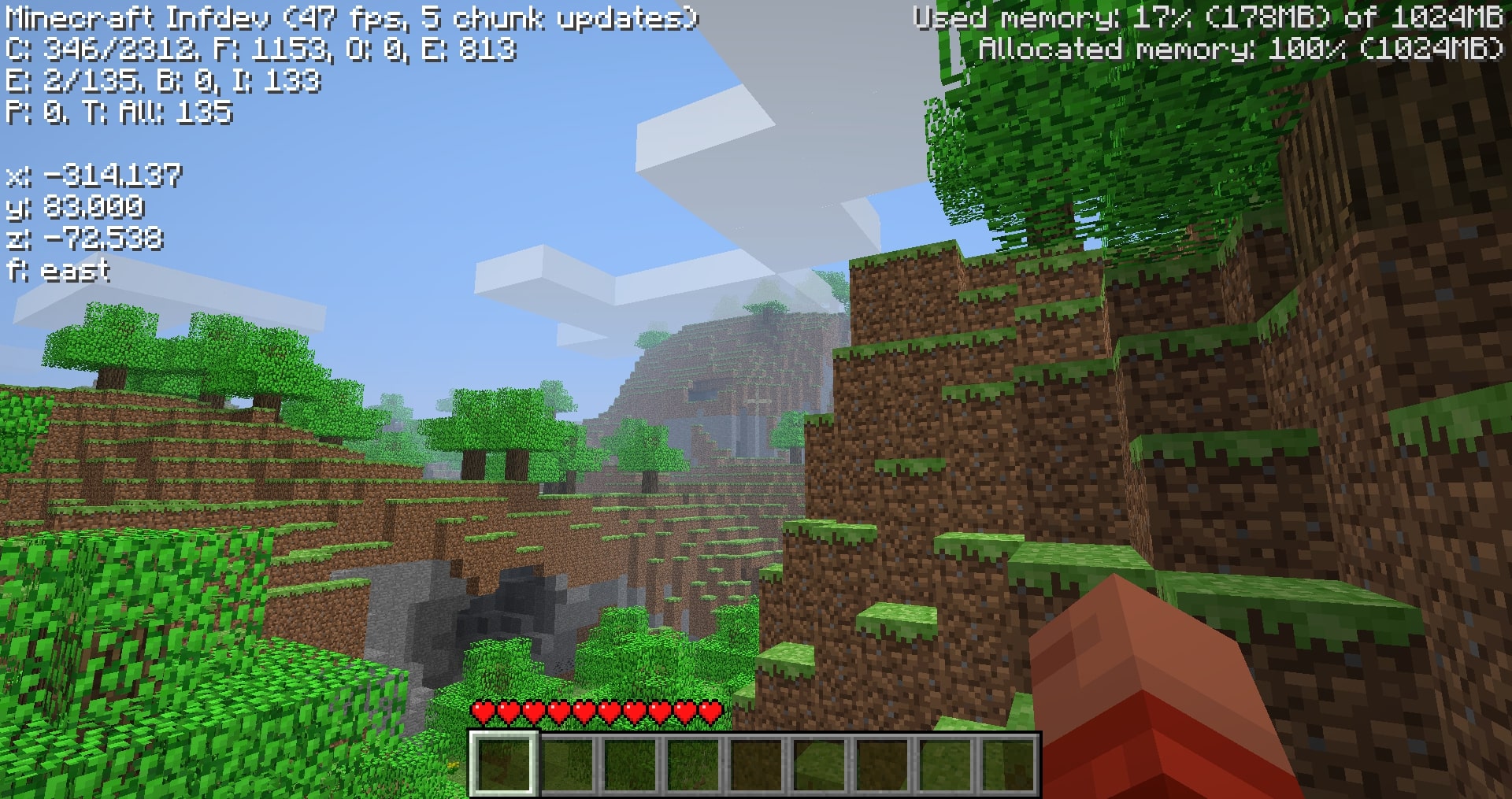
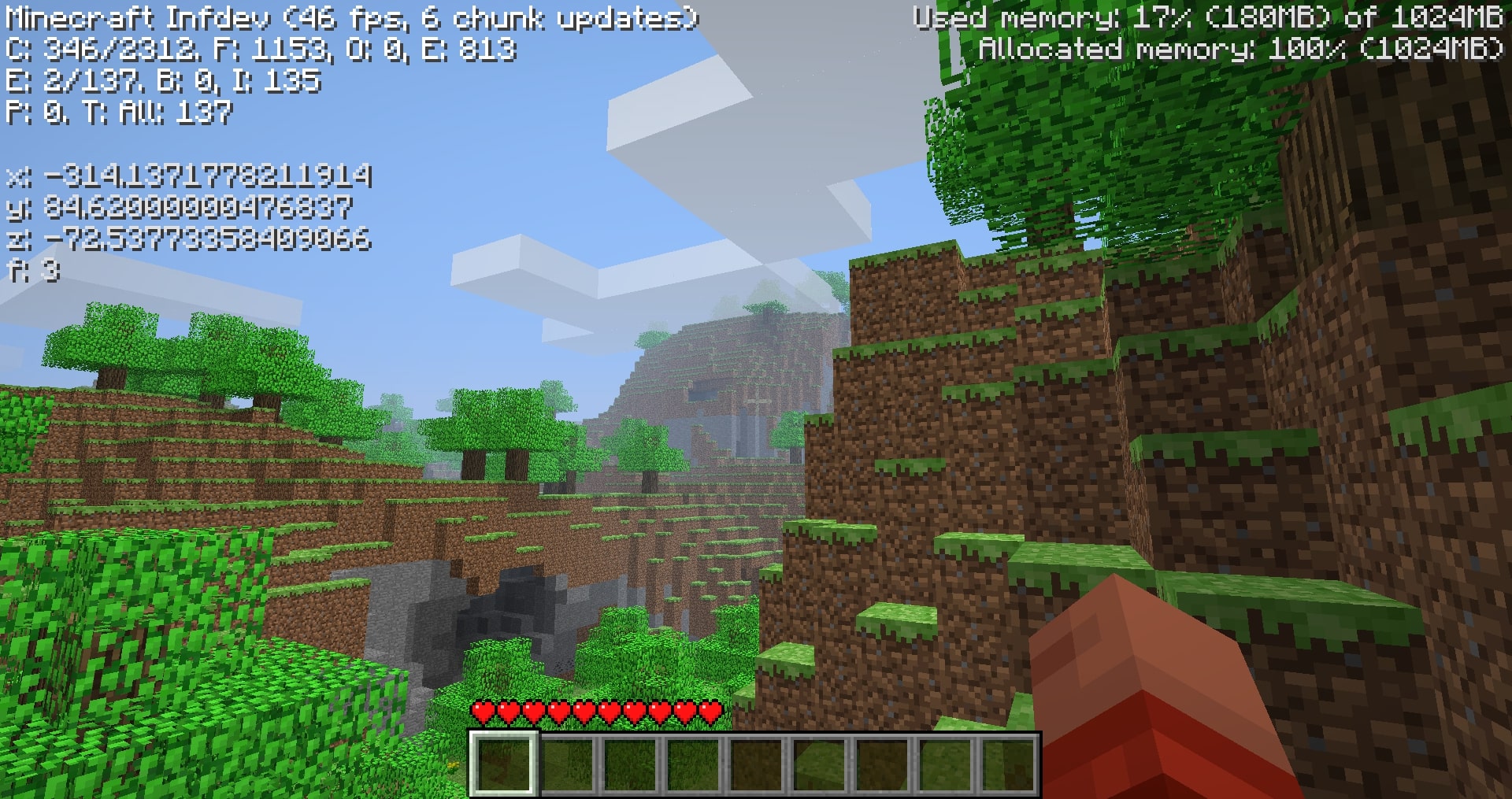
These can be toggled using the N key with the debug screen on. By default, the revised display is shown.
The revised display simply improves the original format:
- rounds 15 leading decimals to 3
- brightens text color
- adds cardinal directions in words
- floors the y-axis to feet level (64.000 and not 65.620 when standing on a full block at y-64).
Compatibility
Overwrites GuiIngame.java, the obfuscated (GuiIngame).class names vary with versions.
In other words, the mod will likely be compatibile with mods that don't change the debug menu.
Downloads
Due to various unforseen circumstances in older versions, I haven't modded every version (yet) from inf-20100227 to a1.2.2. I managed to mod 39 versions in this range, addressing for the more notable releases. Hopefully you can find the version you're looking for.
The downloads are named "Coordinates_v1.0_" followed by "(version name)" ensure that you are downloading the correct version.
Note: ONLY read my zip file names for versions. To upload mods, Modrinth requires default MC launcher versions and mod loader fields to be filled out. (ex: inf-630 is shown to support inf-618 and risugami's modloader, which is false)
How to install
Install Java 8, most mods for older versions use Java 8. So it's always a good idea to have it.
This is a jarmod so I recommend using MultiMC, PrismLauncher, or Betacraft v2.0. These launchers allow for jarmods to be easily setup older versions. They all have similar ways of adding jarmods... Edit your instance in said launcher, locate the add to Minecraft.jar button, and open the downloaded coords.zip.
For Betacraft v1.0, it's more complex as you will need to jarmod the version yourself. You will also need a zip explorer (I like WinRAR for Windows)
- after downloading coords.zip for prefered version, search and open your hidden
%appdata%folder - open the
.betacraftfolder - open the
versionsfolder - highlight and right click on the version.jar you are using (ex:
a1.1.2_01.jar) - after right click, you can choose
Open with WinRAR - with the jar open, also open the downloaded coords.zip
- move the single
.classfile from coords.zip to the opened version.jar. - Press
OK, done! You successfully replaced a game file with my modded game file! - Relaunch Betacraft v1.0 and play.
Extras
Any issues can be addressed on Github
You can also join the Modification Station discord server, a community dedicated to modding old minecraft!
Once you join the server, you can find my mod post by clicking on the mods tab and searching coordinates. This is where you can contact me directly with questions (i.e. doesn't warrant a ticket on Github)
Thanks for downloading my mod!
Project description from Modrinth.
Pick your setup
(Old MC) Coordinates by Minecraft version and loader
Choose the version and loader you play, then open the matching release.
Minecraft version
a1.1.2_01
1 loader buildMinecraft version
a1.1.2
1 loader buildMinecraft version
a1.1.0
1 loader buildMinecraft version
a1.0.17_04
1 loader buildMinecraft version
a1.0.17_02
1 loader buildMinecraft version
a1.0.16
1 loader buildMinecraft version
a1.0.15
1 loader buildMinecraft version
a1.0.14
1 loader buildMinecraft version
a1.0.11
1 loader buildMinecraft version
a1.0.5_01
1 loader buildMinecraft version
a1.0.4
1 loader buildCheck the dependencies, then try the file in a copied instance before changing a world you care about.
Recent files
(Old MC) Coordinates versions and loaders
1.0
Coordinates_v1.0_(a1.0.16_02).zip
3 Aug 2024
Client Required Server Not supported Dependencies No extras listed Listed on Release listing
Check the a1.0.16 · modloader setup a1.0.16modloader release
1.0
Coordinates_v1.0_(a1.0.16_01).zip
3 Aug 2024
Client Required Server Not supported Dependencies No extras listed Listed on Release listing
Check the a1.0.16 · modloader setup a1.0.16modloader release
1.0
Coordinates_v1.0_(a1.0.16).zip
3 Aug 2024
Client Required Server Not supported Dependencies No extras listed Listed on Release listing
Check the a1.0.16 · modloader setup a1.0.16modloader release
Looking for an older file? The official Modrinth project page is in Resources.