Minecraft version
Back to mods 
Modrinth · Minecraft mod
MineTube
Adds music to your Minecraft world using YouTube. Set up location + range and choose whether you want proximity or stable volume based on the chosen setup location.
Choose a version Pick your version below, then grab the matching file.
Quick answer
Which MineTube release should I use?
Latest stable file 1.4.0+1.20.1
Game version 1.20.1
Loader Fabric
MineTube 1.4.0+1.20.1 targets 1.20.1 with Fabric. It must be installed on the client. Do not install it on the dedicated server. No extra mods listed for this file.
Where it goes
Is MineTube required on the client, server, or both?
It must be installed on the client. Do not install it on the dedicated server.
Client Required
Dedicated server Not supported
Loader for this release Fabric
Required install it here Optional supported, not mandatory Not supported do not install here Source doesn’t say do not assume
This file is marked client-only.
What else does MineTube 1.4.0+1.20.1 need?
1.4.0+1.20.1. Change the file and its required mods may change too.
This file does not list any required mods. Do not add a library just because a different file uses it.
This file does not list any required or optional mods.
Before you install it
Add MineTube without breaking your instance.
Built for MineTube 1.4.0+1.20.1. Pick another file and the loader, install side or required mods may change.
- 01
Stick to this file
Use 1.4.0+1.20.1. It targets 1.20.1 with Fabric; another release may have different loader, side or dependency requirements.
- 02
Bring the mods it needs
This file does not list any required mods. Do not add a library just because a different file uses it.
- 03
Put it on the correct side
It must be installed on the client. Do not install it on the dedicated server.
- 04
Pick the file you checked
Use the “Get this file” button beside 1.4.0+1.20.1. It opens that exact file at the source.
About this project
What does MineTube add?

About
MineTube is a lightweight music integration mod that lets you create custom music zones inside your Minecraft world. Place invisible "zones" in any dimension or coordinates, and when you enter the area, music from YouTube will automatically start playing on the MineTube dashboard.
🎵 Features:
- Create unlimited music zones with a custom name, position, radius, and custom song.
- Support for all dimensions, including Nether, End, and modded dimensions.
- Adjustable volume with the ability to set either dynamic volume based on location or stable volume.
- Works with YouTube videos/playlists and livestreams/radio.
- Real-time player position tracking via an integrated web server with no extra setup or dependencies.
- Works on both singleplayer and multiplayer (client-side setup)
- Ability to export/import profiles using the code generation feature or exporting the profile.
- Works with almost all mods and has the ability to work in most vanilla servers using the fabric version.
- Adjustable theme for the MineTube web client to match the mood.
⚠️How to use
MineTube is completely standalone—no external dependencies required. Simply install the mod on a supported mod loader (currently Neoforge or Fabric), launch your game, and enter /minetube in chat. You’ll receive a clickable link that opens the MineTube web dashboard, where you can easily manage and customize all of the mod’s features.
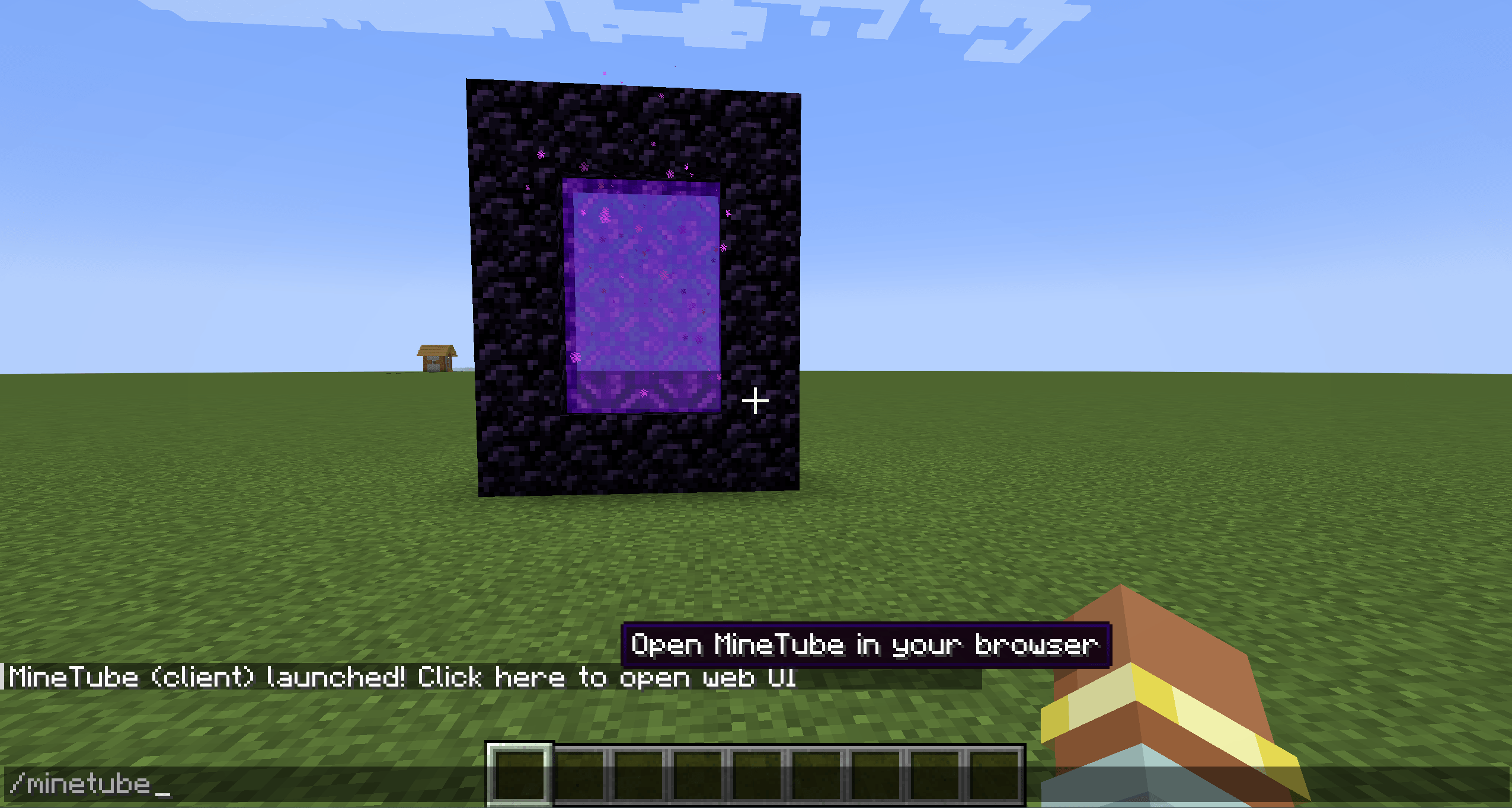
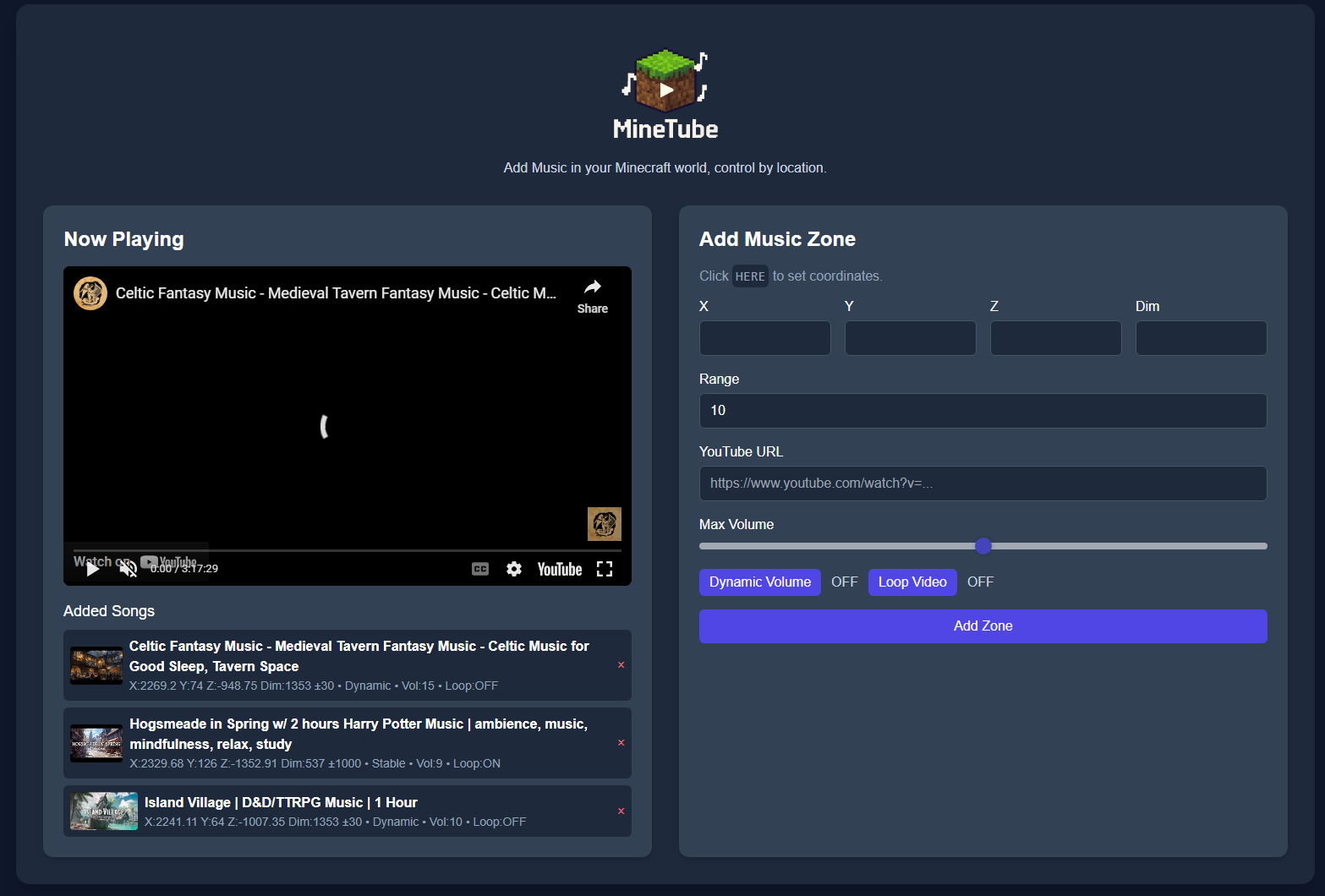
Video Guide:
🛑Permissions
You are welcome to include MineTube in modpacks, public or private, without needing to ask permission.
MineTube is licensed as CC-BY-ND 4.0, with the above granted use for modpack inclusion.
If you wish to redistribute the mod outside of modpacks, rehost it, or integrate it into another project, please contact me first.
Perfect for adventure maps, community servers, or just adding atmosphere to
your own world. Imagine walking into a Nether fortress with custom battle
music, or building a cozy base with your favorite song running in the
background!
Project description from Modrinth.
Pick your setup
MineTube by Minecraft version and loader
Choose the version and loader you play, then open the matching release.
Minecraft version
26.1.1
2 loader buildsMinecraft version
26.1
2 loader buildsMinecraft version
1.21.11
2 loader buildsMinecraft version
1.21.10
2 loader buildsMinecraft version
1.21.9
2 loader buildsMinecraft version
1.21.8
2 loader buildsMinecraft version
1.21.7
2 loader buildsMinecraft version
1.21.6
2 loader buildsMinecraft version
1.21.5
2 loader buildsMinecraft version
1.21.4
2 loader buildsMinecraft version
1.21.3
2 loader buildsShowing the newest 12 of 16 game versions. Older files are in the list below.
Check the dependencies, then try the file in a copied instance before changing a world you care about.
Recent files
MineTube versions and loaders
1.4.0+1.20.1
minetube-fabric-1.4.0+1.20.1.jar
17 Sept 2026
Client Required Server Not supported Dependencies No extras listed Listed on Release listing
Check the 1.20.1 · Fabric setup 1.20.1Fabric release
1.4.0
minetube-1.4.0_1.20.1_forge_neoforge.jar
17 Jun 2026
Client Required Server Not supported Dependencies No extras listed Listed on Release listing
Check the 1.20.1 · Forge setup 1.20.1ForgeNeoForge release
1.4.1
minetube-1.4.1-26.1_Fabric.jar
26 Apr 2026
Client Required Server Not supported Dependencies No extras listed Listed on Release listing
Check the 26.1.2 · Fabric setup 26.126.1.126.1.2Fabric release
1.4.0
minetube-1.4.0_26.1_NeoForge.jar
10 Apr 2026
Client Required Server Not supported Dependencies No extras listed Listed on Release listing
Check the 26.1.2 · NeoForge setup 26.126.1.126.1.2NeoForge release
1.4
minetube-1.4_Fabric_1.21.11.jar
7 Mar 2026
Client Required Server Not supported Dependencies No extras listed Listed on Release listing
Check the 1.21.11 · Fabric setup 1.21.11Fabric release
1.4.0
minetube-1.4.0_1.21.11.jar
7 Mar 2026
Client Required Server Not supported Dependencies No extras listed Listed on Release listing
Check the 1.21.11 · NeoForge setup 1.21.11NeoForge release
1.4
minetube-1.4_Fabric_1.21.10.jar
14 Oct 2025
Client Required Server Not supported Dependencies No extras listed Listed on Release listing
Check the 1.21.10 · Fabric setup 1.21.10Fabric release
1.4.0
minetube-1.4.0_1.21.10.jar
14 Oct 2025
Client Required Server Not supported Dependencies No extras listed Listed on Release listing
Check the 1.21.10 · NeoForge setup 1.21.10NeoForge release
1.4
minetube-1.4_Fabric_1.21.9.jar
30 Sept 2025
Client Required Server Not supported Dependencies No extras listed Listed on Release listing
Check the 1.21.9 · Fabric setup 1.21.9Fabric release
1.4.0
minetube-1.4.0_1.21.9.jar
30 Sept 2025
Client Required Server Not supported Dependencies No extras listed Listed on Release listing
Check the 1.21.9 · NeoForge setup 1.21.9NeoForge release
1.4
minetube-1.4-Fabric_1.21.8.jar
25 Sept 2025
Client Required Server Not supported Dependencies No extras listed Listed on Release listing
Check the 1.21.8 · Fabric setup 1.21.8Fabric release
1.4.0
minetube-1.4.0_1.21.8.jar
25 Sept 2025
Client Required Server Not supported Dependencies No extras listed Listed on Release listing
Check the 1.21.8 · NeoForge setup 1.21.8NeoForge release
Looking for an older file? The official Modrinth project page is in Resources.
 mod
CurseForge + Modrinth · Minecraft
Blocksmith - Voxel Weapons
Create your custom weapons voxel by voxel with dynamic stats!
 mod
CurseForge + Modrinth · Minecraft
Nuclear Radiation
Radioactive hazards into Minecraft
 mod
Modrinth · Minecraft
Customizable Totem Pop
Customize the totem of undying pop animation — offset, scale, opacity, duration, flip, and more.