Minecraft version
Back to mods 
Modrinth · Minecraft mod
Coordinates On-Screen
Adds a coordinate HUD to your interface
Choose a version Pick your version below, then grab the matching file.
Quick answer
Which Coordinates On-Screen release matches 1.21.2?
Best match for your filters 0.1+mod
Game version 1.21, 1.21.1, 1.21.10
Loader Fabric, Forge, NeoForge
Coordinates On-Screen 0.1+mod targets 1.21, 1.21.1, 1.21.10 with Fabric, Forge, NeoForge. Installation on the client is optional. Installation on the dedicated server is optional. No extra mods listed for this file.
Where it goes
Is Coordinates On-Screen required on the client, server, or both?
Installation on the client is optional. Installation on the dedicated server is optional.
Client Optional
Dedicated server Optional
Loader for this release Fabric, Forge, NeoForge
Required install it here Optional supported, not mandatory Not supported do not install here Source doesn’t say do not assume
The source marks this as usable on both the client and server.
What else does Coordinates On-Screen 0.1+mod need?
0.1+mod on 1.21.2. Every mod below is checked against that same setup.
This file does not list any required mods. Do not add a library just because a different file uses it.
This file does not list any required or optional mods.
Before you install it
Add Coordinates On-Screen without breaking your instance.
Built for Coordinates On-Screen 0.1+mod on 1.21.2. Pick another file and the loader, install side or required mods may change.
- 01
Stick to this file
Use 0.1+mod. It targets 1.21, 1.21.1, 1.21.10 with Fabric, Forge, NeoForge; another release may have different loader, side or dependency requirements.
- 02
Bring the mods it needs
This file does not list any required mods. Do not add a library just because a different file uses it.
- 03
Put it on the correct side
Installation on the client is optional. Installation on the dedicated server is optional.
- 04
Pick the file you checked
Use the “Get this file” button beside 0.1+mod. It opens that exact file at the source.
About this project
What does Coordinates On-Screen add?

Compass HUD is a lightweight and highly customizable mod that adds a HUD to constantly display the player's XYZ coordinates on the screen. Perfect for explorers, builders, and adventurers, this mod enhances usability and reduces the need to rely on commands like F3.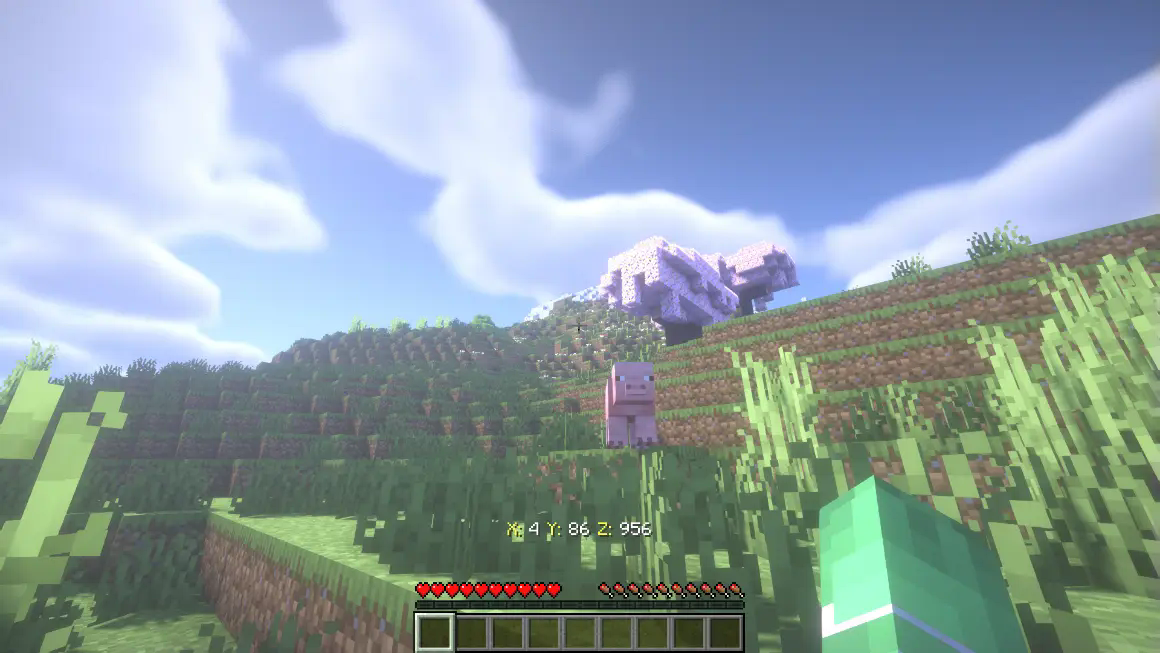

Compatibility
Seamlessly integrates with MiniMap mods like:
- JourneyMap;
- Xaero’s Map.
Performance-friendly:
- Perfect for builders: Keep track of exact coordinates for complex projects.
- Essential for survival players: Easily find spawners, portals, or points of interest with precise coordinates.
- Convenient and intuitive: Forget the heavy F3 debug interface.
Download Player Position HUD+ today and elevate your Minecraft gameplay! Available for all major Minecraft versions.
Success Strategy:
Optimized keywords: Include terms like HUD, coordinates, exploration, and lightweight in the description and tags
Project description from Modrinth.
Pick your setup
Coordinates On-Screen by Minecraft version and loader
Choose the version and loader you play, then open the matching release.
Minecraft version
1.21.9
5 loader buildsMinecraft version
1.21.8
5 loader buildsMinecraft version
1.21.7
5 loader buildsMinecraft version
1.21.6
5 loader buildsMinecraft version
1.21.5
5 loader buildsMinecraft version
1.21.4
5 loader buildsMinecraft version
1.21.3
5 loader buildsMinecraft version
1.21.2
5 loader buildsMinecraft version
1.21.1
5 loader buildsMinecraft version
1.21
5 loader buildsCheck the dependencies, then try the file in a copied instance before changing a world you care about.
Recent files
Coordinates On-Screen versions and loaders
0.1+mod
coordinates-hud-0.1.jar
10 Dec 2024
Client Optional Server Optional Dependencies No extras listed Listed on Release listing
Check the 1.21.2 · Fabric setup 1.211.21.11.21.101.21.2 release
0.1
Compass HUD v0.1.zip
10 Dec 2024
Client Optional Server Optional Dependencies No extras listed Listed on Release listing
Check the 1.21.2 · datapack setup 1.211.21.11.21.101.21.2 release
Looking for an older file? The official Modrinth project page is in Resources.