Minecraft version
Back to mods 
Modrinth · Minecraft mod
Animated Frames
Display GIFs PNGs & JPG in Screen
Choose a version Pick your version below, then grab the matching file.
Quick answer
Which Animated Frames release should I use?
Latest stable file 1.4
Game version 1.20.1, 1.21, 1.21.1
Loader bukkit, paper, purpur
Animated Frames 1.4 targets 1.20.1, 1.21, 1.21.1 with bukkit, paper, purpur. Installation on the client is optional. Installation on the dedicated server is optional. No extra mods listed for this file.
Where it goes
Is Animated Frames required on the client, server, or both?
Installation on the client is optional. Installation on the dedicated server is optional.
Client Optional
Dedicated server Optional
Loader for this release bukkit, paper, purpur
Required install it here Optional supported, not mandatory Not supported do not install here Source doesn’t say do not assume
The source marks this as usable on both the client and server.
What else does Animated Frames 1.4 need?
1.4. Change the file and its required mods may change too.
This file does not list any required mods. Do not add a library just because a different file uses it.
This file does not list any required or optional mods.
Before you install it
Add Animated Frames without breaking your instance.
Built for Animated Frames 1.4. Pick another file and the loader, install side or required mods may change.
- 01
Stick to this file
Use 1.4. It targets 1.20.1, 1.21, 1.21.1 with bukkit, paper, purpur; another release may have different loader, side or dependency requirements.
- 02
Bring the mods it needs
This file does not list any required mods. Do not add a library just because a different file uses it.
- 03
Put it on the correct side
Installation on the client is optional. Installation on the dedicated server is optional.
- 04
Pick the file you checked
Use the “Get this file” button beside 1.4. It opens that exact file at the source.
About this project
What does Animated Frames add?
📺 AnimatedFrames — v1.7
Display GIFs, PNGs, JPGs, JPEGs and MP4 videos on screen!
AnimatedFrames allows you to display GIFs, PNGs, JPGs, JPEGs and MP4 videos within Minecraft using commands.
Requirements
- Loader support: Forge • Fabric • NeoForge • Purpur • Spigot • & forks
- Dependency: WaterMedia
Wiki
📝 Commands
Client-side commands (/mediac) — only you see them
/mediac show <name> [duration] [position] [scale] [volume]Display media locally from your files. Example:/mediac show sunny.gif 10 center 1.0 80/mediac stopStop all active media on your screen./mediac listList files in your local folder./mediac lang <en|es>Change the language (English or Spanish).
Server-side commands (/medias) — requires OP or admin permission
/medias show <player|@a> <name> [duration] [position] [scale] [volume]Send a file from the server to the selected players and play it. Players do not need to have the file beforehand. Example:/medias show @a example.gif 15 topleft 2.0 80/medias showlocal <player|@a> <name> [duration] [position] [scale] [volume]Play a file already stored in each selected player's local media folder. This preserves the previous behavior of/medias show. Example:/medias showlocal @a example.gif 15 topleft 2.0 80/medias stop <player|@a>Stop media for selected players./medias listList files in the server's media folder./medias helpDisplay command help.
Important: Players always need the client mod and WaterMedia. With /medias show, the file comes from the server. With /medias showlocal, the file must already exist in each player's own client folder.
⚠️ File Location
Client folder: .minecraft/config/animatedframes/media/
Server folder with the mod: config/animatedframes/media/
Server folder with the plugin: plugins/AnimatedFramesPL/media/
- Supported files:
.gif,.png,.jpg,.jpeg,.mp4 - Media folders are created automatically during initialization
/mediac showand/medias showlocaluse the player's client folder/medias showuses the server's media folder and transfers the file to the selected players- Received files are stored automatically in a separate client cache
- For launchers with separate instances, use the corresponding instance's folder
🔌 Plugin Support
AnimatedFrames also has a Bukkit/Spigot/Paper/Purpur plugin version for server-side control. With the plugin, server admins can trigger media on players' screens without needing the mod on the server.
Place server files in plugins/AnimatedFramesPL/media/ and use /medias show to send them to players.
The plugin uses the animatedframes.admin permission, granted to OPs by default. Use /medias lang <en|es> to change the plugin's language.
Players still need the client mod and WaterMedia. They only need the media files installed beforehand when using
/medias showlocal.
GIF, PNG, JPG or JPEG displayed locally (client):
.gif)
GIF, PNG, JPG or JPEG sent to players (server):
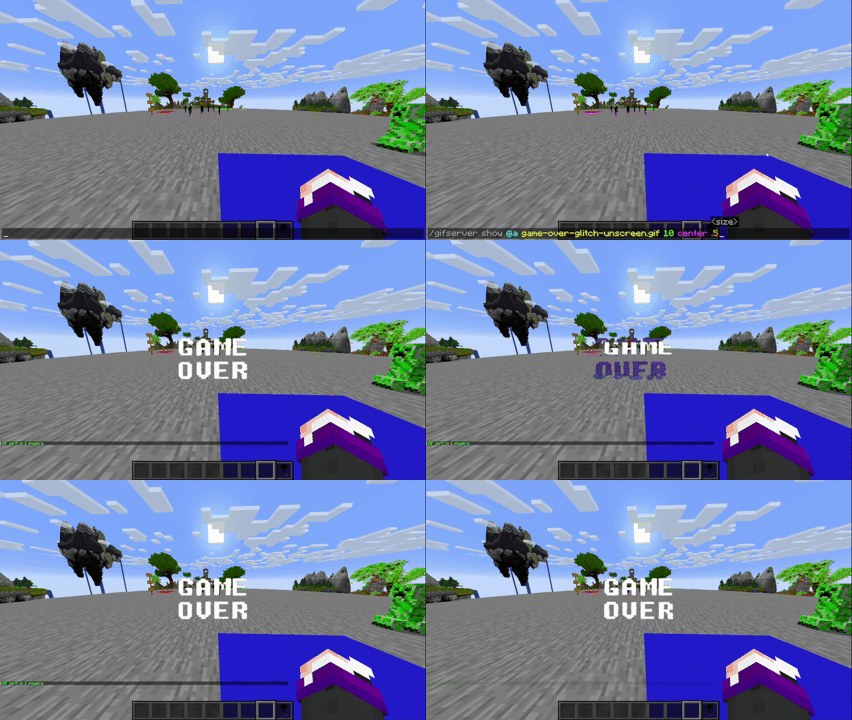
GIF, PNG, JPG or JPEG sent to players (plugin):
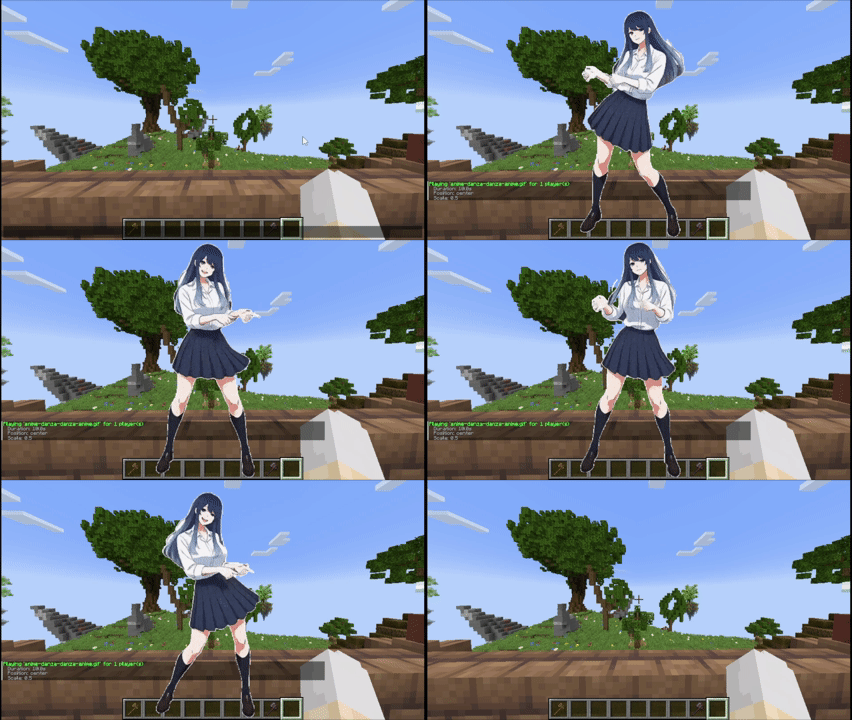
Tutorial
Placing files (Client and server)
Client folder: .minecraft/config/animatedframes/media/
Server folder with the mod: config/animatedframes/media/
Server folder with the plugin: plugins/AnimatedFramesPL/media/
Steps:
- Copy your GIF, PNG, JPG, JPEG or MP4 file into the appropriate media folder:
- Client folder for
/mediac showor/medias showlocal. - Server folder for
/medias show.
- Client folder for
- Make sure the file has the correct extension (
.gif,.png,.jpg,.jpeg,.mp4). - Display it in-game:
- Local (only you):
/mediac show sunny.gif 10 center 1.0 80 - Send a server file to others:
/medias show @a sunny.gif 15 center 1.0 80 - Play files already installed on players' clients:
/medias showlocal @a sunny.gif 15 center 1.0 80
- Local (only you):
Notes:
/mediac show→ only visible to you/medias show→ transfers a server file to selected players — they need the mod and WaterMedia, but not the file beforehand/medias showlocal→ uses each player's local file — they need the mod, WaterMedia and the file in their client folder- Updating from 1.6.2: replace
/medias showwith/medias showlocalif you want to keep using files already installed on players' computers - Filenames with spaces must use double quotes:
/medias show @a "welcome video.mp4" 10 center 1.0 80 - Large files may take some time to transfer before playback begins
- Check chat or logs if a file fails to load
- Use
/mediac listto see your local files and/medias listto see server files - Duration is measured in seconds;
0means no command-imposed time limit. Videos still stop when they reach the end - Scale range:
0.05–10(default:1.0) - Volume range:
0–100(default:80) - Media stops automatically when you disconnect
Available positions (10 options)
center topleft topright bottomleft bottomright topcenter bottomcenter leftcenter rightcenter fullscreen
fullscreen — fills the entire screen for videos while maintaining their aspect ratio, cropping the edges when necessary. Omit the scale and enter the volume directly after
fullscreen. Example:/medias show @a intro.mp4 0 fullscreen 80
Credits
- Created by @SunnyAim_
- 🎬 MP4 integration made possible with the help of @SoyKatto1
- Support: Contact @SunnyAim_ for help or questions.
Project description from Modrinth.
Pick your setup
Animated Frames by Minecraft version and loader
Choose the version and loader you play, then open the matching release.
Minecraft version
1.21.1
3 loader buildsMinecraft version
1.21
3 loader buildsMinecraft version
1.20.1
3 loader buildsCheck the dependencies, then try the file in a copied instance before changing a world you care about.
Recent files
Animated Frames versions and loaders
1.4
AnimatedFramesPL-1.4.jar
6 Sept 2026
Client Optional Server Optional Dependencies No extras listed Listed on Release listing
Check the 1.21.4 · bukkit setup 1.20.11.211.21.11.21.4 release
1.7
[AF]AnimatedFrames-1.7-fabric-1.21.4.jar
6 Sept 2026
Client Optional Server Optional Dependencies 1 required · 1 unchecked Listed on Release listing
Check the 1.21.4 · Fabric setup 1.21.4Fabric release
1.7
[AF]AnimatedFrames-1.7-neoforge-1.21.4.jar
6 Sept 2026
Client Optional Server Optional Dependencies 1 required · 1 unchecked Listed on Release listing
Check the 1.21.4 · NeoForge setup 1.21.4NeoForge release
1.7
[AF]AnimatedFrames-1.7-fabric-1.21-1.21.1.jar
6 Sept 2026
Client Optional Server Optional Dependencies 1 required · 1 unchecked Listed on Release listing
Check the 1.21.1 · Fabric setup 1.211.21.1Fabric release
1.7
[AF]AnimatedFrames-1.7-neoforge-1.21-1.21.1.jar
6 Sept 2026
Client Optional Server Optional Dependencies 1 required · 1 unchecked Listed on Release listing
Check the 1.21.1 · NeoForge setup 1.211.21.1NeoForge release
1.7
[AF]AnimatedFrames-1.7-fabric-1.20.1.jar
6 Sept 2026
Client Optional Server Optional Dependencies 1 required · 1 unchecked Listed on Release listing
Check the 1.20.1 · Fabric setup 1.20.1Fabric release
1.7
[AF]AnimatedFrames-1.7-forge-1.20.1.jar
6 Sept 2026
Client Optional Server Optional Dependencies 1 required · 1 unchecked Listed on Release listing
Check the 1.20.1 · Forge setup 1.20.1Forge release
1.6.2
[AF]AnimatedFrames-1.6.2-fabric-1.21.4.jar
22 Mar 2026
Client Optional Server Optional Dependencies 1 required · 1 unchecked Listed on Release listing
Check the 1.21.4 · Fabric setup 1.21.4Fabric release
1.6.2
[AF]AnimatedFrames-1.6.2-neoforge-1.21.4.jar
22 Mar 2026
Client Optional Server Optional Dependencies 1 required · 1 unchecked Listed on Release listing
Check the 1.21.4 · NeoForge setup 1.21.4NeoForge release
1.6.2
[AF]AnimatedFrames-1.6.2-fabric-1.21-1.21.1.jar
22 Mar 2026
Client Optional Server Optional Dependencies 1 required · 1 unchecked Listed on Release listing
Check the 1.21.1 · Fabric setup 1.211.21.1Fabric release
1.6.2
[AF]AnimatedFrames-1.6.2-neoforge-1.21-1.21.1.jar
22 Mar 2026
Client Optional Server Optional Dependencies No extras listed Listed on Release listing
Check the 1.21.1 · NeoForge setup 1.211.21.1NeoForge release
1.6.2
[AF]AnimatedFrames-1.6.2-forge-1.20.1.jar
22 Mar 2026
Client Optional Server Optional Dependencies 1 required · 1 unchecked Listed on Release listing
Check the 1.20.1 · Forge setup 1.20.1Forge release
Looking for an older file? The official Modrinth project page is in Resources.