Minecraft version
Back to mods 
Modrinth · Minecraft mod
Animated Frames
Display images, GIFs, videos, audio and YouTube links on screen or on Screen blocks inside the world.
Choose a version Pick your version below, then grab the matching file.
Quick answer
Which Animated Frames release matches 1.21.1?
Best match for your filters 1.6
Game version 1.20.1, 1.21, 1.21.1
Loader bukkit, paper, purpur
Animated Frames 1.6 targets 1.20.1, 1.21, 1.21.1 with bukkit, paper, purpur. Installation on the client is optional. Installation on the dedicated server is optional. No extra mods listed for this file.
Where it goes
Is Animated Frames required on the client, server, or both?
Installation on the client is optional. Installation on the dedicated server is optional.
Client Optional
Dedicated server Optional
Loader for this release bukkit, paper, purpur
Required install it here Optional supported, not mandatory Not supported do not install here Source doesn’t say do not assume
The source marks this as usable on both the client and server.
What else does Animated Frames 1.6 need?
1.6 on 1.21.1. Every mod below is checked against that same setup.
This file does not list any required mods. Do not add a library just because a different file uses it.
This file does not list any required or optional mods.
Before you install it
Add Animated Frames without breaking your instance.
Built for Animated Frames 1.6 on 1.21.1. Pick another file and the loader, install side or required mods may change.
- 01
Stick to this file
Use 1.6. It targets 1.20.1, 1.21, 1.21.1 with bukkit, paper, purpur; another release may have different loader, side or dependency requirements.
- 02
Bring the mods it needs
This file does not list any required mods. Do not add a library just because a different file uses it.
- 03
Put it on the correct side
Installation on the client is optional. Installation on the dedicated server is optional.
- 04
Pick the file you checked
Use the “Get this file” button beside 1.6. It opens that exact file at the source.
About this project
What does Animated Frames add?
📺 AnimatedFrames — v1.8
Display images, GIFs, videos, audio and YouTube links on players' screens — or on Screen blocks inside the world!
AnimatedFrames lets you show PNG, JPG, GIF, MP4, WEBM, audio files and YouTube videos within Minecraft using simple commands.
Requirements
- Loader support: Fabric • Forge • NeoForge • Paper • Spigot • Purpur • & forks
- Minecraft: 1.20.1 • 1.21 – 1.21.1 • 1.21.4 • 1.21.11 • 26.1.2 • 26.2 • 26.3
- No dependencies. WaterMedia is no longer needed.
- Optional: AnimatedFrames Stream Add-on — makes YouTube links load in about 1 second.
Wiki --- Discord Support
✨ What's new in 1.8
- No WaterMedia — AnimatedFrames has its own video engine.
- New versions: 1.21.11, 26.1.2, 26.2 and 26.3.
- YouTube: videos, Shorts, live streams and YouTube Music, up to 1080p.
- Screen block: play videos inside the world.
- Options:
loop, fades, free positionx/yand sizew/h. - Queue: play media one after another with
/medias queueand/medias skip. - New formats: WEBM (also with transparency) and MP3, OGG, WAV, FLAC, M4A, AAC and OPUS audio.
- Much faster and optimized.
- Singleplayer and LAN:
/mediasand Screen blocks also work in your own world.
📝 Commands
Server-side commands (/medias) — OP, console, command blocks and functions
/medias show <players> <file|"link"> [time] [position] [scale] [volume] [options]Send a server file or a link to the players and play it. Example:/medias show @a intro.mp4 0 fullscreen 80/medias showlocal <players> <file> [time] [position] [scale] [volume] [options]Play a file each player already has in their own folder./medias queue <players> <file|"link"> ...Same asshow, but plays after the current media ends./medias skip <players>Skip to the next item in the queue./medias stop <players>Stop everything and clear the queue./medias preload <players> <file|all|"link">Send files or prepare a link ahead of time, so the nextshowis instant./medias test "link"Test a link on every player with the mod and see who can play it./medias screen <x y z> show|stop|pause|resume|lock|unlockControl a Screen block./medias list·/medias lang <auto|es|en>·/medias help
Client-side commands (/mediac) — only you see them
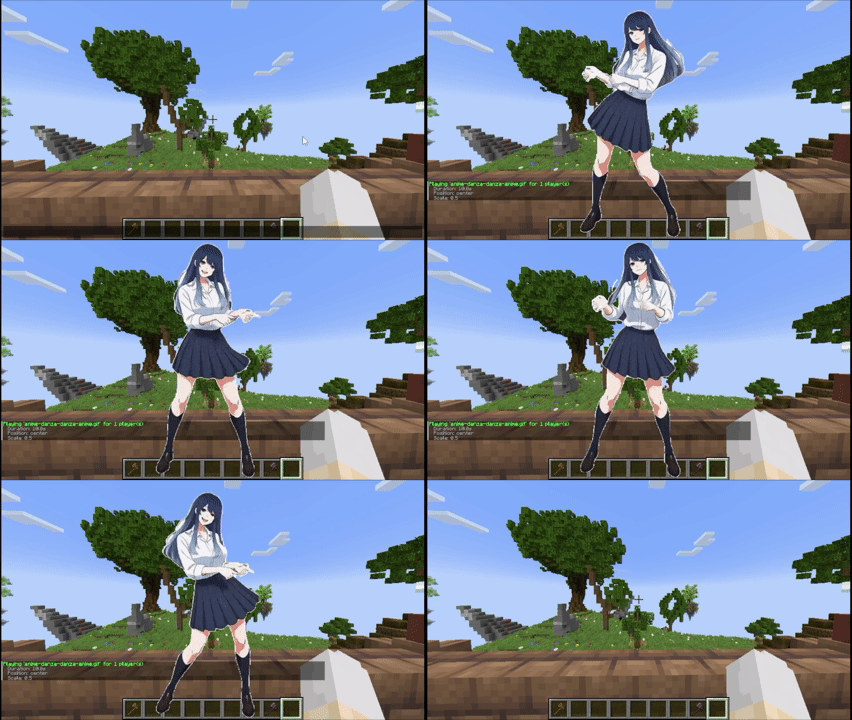
/mediac show <file|"link"> [time] [position] [scale] [volume] [options]Example:/mediac show sunny.gif 10 center 1.0 80/mediac stop·/mediac list·/mediac lang <en|es>
⚙️ Options
Add them at the end of show, showlocal, queue or /mediac show:
| Option | What it does |
|---|---|
loop |
Repeats the video or audio until the time runs out or stop. |
fade:0 |
Turns the fade off. Images fade in and out by default; videos appear instantly and fade out. |
fade:2, fadein:1, fadeout:3 |
Custom fades, in seconds. |
x:0 y:0 |
Position from the center, -100 to 100. |
w:40 h:30 |
Width and height in % of the screen. |
Positions: center topleft topright bottomleft bottomright topcenter bottomcenter leftcenter rightcenter fullscreen
fullscreen fills the whole screen and blocks every menu except the chat. Omit the scale and enter the volume right after
fullscreen.
🖥️ Screen block
- Place several next to each other and they join into one big screen (up to 32×32).
- Right-click to choose a file or link, volume and loop, and to play, stop, pause or resume.
- 3D audio, synced for every player. YouTube starts at second 0 for everyone.
- Any player can use it unless an OP locks it.
- Break a block and the video resizes to fit what's left.
- Crafting: iron ingots, glass panes and black dye (gives 4). Own Animated Frames creative tab.
- Off by default on servers: set
pantallas: trueinconfig/animatedframes/config.yml.

📺 YouTube
- Links go in quotes:
/medias show @a "https://youtu.be/XXXX" 0 fullscreen 80 - Videos, Shorts, live streams, YouTube Music and mobile links. Up to 1080p.
- Install the Stream Add-on on the client to load links in about 1 second.
⚠️ File Location
Client folder: .minecraft/config/animatedframes/media/
Server folder with the mod: config/animatedframes/media/
Server folder with the plugin: plugins/AnimatedFramesPL/media/
- Supported files:
.png,.jpg,.jpeg,.gif,.mp4,.webm,.mp3,.ogg,.wav,.flac,.m4a,.aac,.opus - Files sent by the server start playing while they are still downloading.
🔌 Plugin Support
AnimatedFrames also has a Paper/Spigot/Purpur plugin (1.20.1 to 26.3) with the same commands, YouTube and options. Players need the mod 1.8. The plugin uses the animatedframes.admin permission (OP by default). The Screen block is only in the mod.
🎬 Showcase
Screen block

YouTube

Free position and size

Queue

Image sent to players (server)
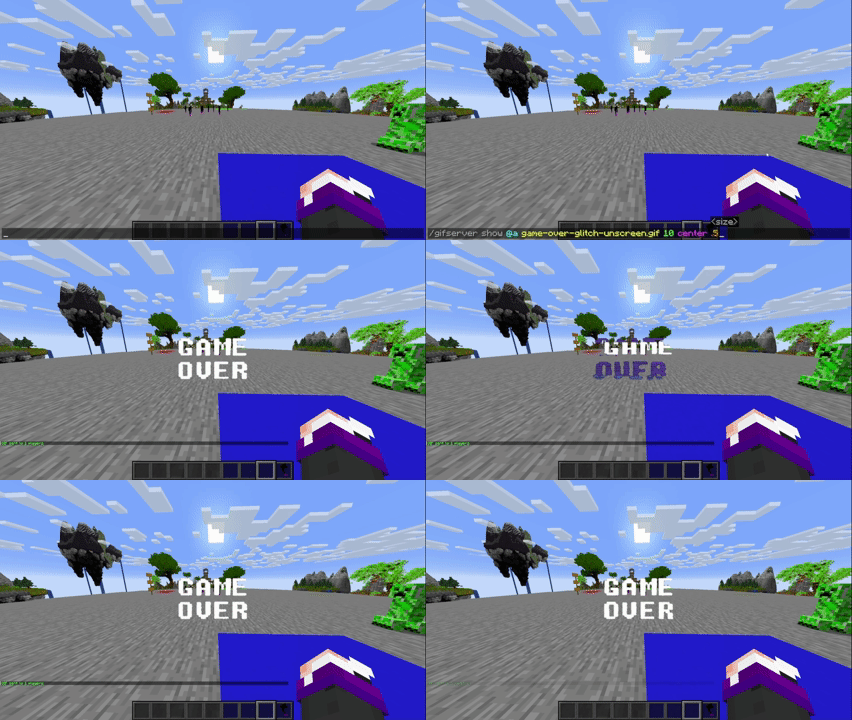
Image displayed locally (client)

Image sent to players (plugin)
Credits
- Created by @SunnyAim_
- 🎬 MP4 integration made possible with the help of @SoyKatto1
- Support: Contact @SunnyAim_ for help or questions.
Project description from Modrinth.
Pick your setup
Animated Frames by Minecraft version and loader
Choose the version and loader you play, then open the matching release.
Minecraft version
26.2
3 loader buildsMinecraft version
26.1.2
3 loader buildsMinecraft version
1.21.11
2 loader buildsMinecraft version
1.21.4
3 loader buildsMinecraft version
1.21.1
3 loader buildsMinecraft version
1.21
3 loader buildsMinecraft version
1.20.1
3 loader buildsCheck the dependencies, then try the file in a copied instance before changing a world you care about.
Recent files
Animated Frames versions and loaders
1.6
AnimatedFramesPL-1.6.jar
11 Nov 2026
Client Optional Server Optional Dependencies No extras listed Listed on Release listing
Check the 1.21.1 · bukkit setup 1.20.11.211.21.11.21.4 release
1.8
[AF]AnimatedFrames-1.8-neoforge-1.21-1.21.1.jar
11 Nov 2026
Client Optional Server Optional Dependencies No extras listed Listed on Release listing
Check the 1.21.1 · NeoForge setup 1.211.21.1NeoForge release
1.8
[AF]AnimatedFrames-1.8-fabric-1.21-1.21.1.jar
11 Nov 2026
Client Optional Server Optional Dependencies No extras listed Listed on Release listing
Check the 1.21.1 · Fabric setup 1.211.21.1Fabric release
1.4
AnimatedFramesPL-1.4.jar
7 Sept 2026
Client Optional Server Optional Dependencies No extras listed Listed on Release listing
Check the 1.21.1 · bukkit setup 1.20.11.211.21.11.21.4 release
1.7
[AF]AnimatedFrames-1.7-fabric-1.21-1.21.1.jar
6 Sept 2026
Client Optional Server Optional Dependencies 1 required · 1 unchecked Listed on Release listing
Check the 1.21.1 · Fabric setup 1.211.21.1Fabric release
1.7
[AF]AnimatedFrames-1.7-neoforge-1.21-1.21.1.jar
6 Sept 2026
Client Optional Server Optional Dependencies 1 required · 1 unchecked Listed on Release listing
Check the 1.21.1 · NeoForge setup 1.211.21.1NeoForge release
1.6.2
[AF]AnimatedFrames-1.6.2-fabric-1.21-1.21.1.jar
22 Mar 2026
Client Optional Server Optional Dependencies 1 required · 1 unchecked Listed on Release listing
Check the 1.21.1 · Fabric setup 1.211.21.1Fabric release
1.6.2
[AF]AnimatedFrames-1.6.2-neoforge-1.21-1.21.1.jar
22 Mar 2026
Client Optional Server Optional Dependencies No extras listed Listed on Release listing
Check the 1.21.1 · NeoForge setup 1.211.21.1NeoForge release
1.6.1
[AF]AnimatedFrames-1.6.1-fabric-1.21-1.21.1.jar
2 Mar 2026
Client Optional Server Optional Dependencies 1 required · 1 unchecked Listed on Release listing
Check the 1.21.1 · Fabric setup 1.211.21.1Fabric release
1.6.1
[AF]AnimatedFrames-1.6.1-neoforge-1.21-1.21.1.jar
2 Mar 2026
Client Optional Server Optional Dependencies 1 required · 1 unchecked Listed on Release listing
Check the 1.21.1 · NeoForge setup 1.211.21.1NeoForge release
1.6
[AF]AnimatedFrames-1.6-neoforge-1.21-1.21.1.jar
1 Mar 2026
Client Optional Server Optional Dependencies 1 required · 1 unchecked Listed on Release listing
Check the 1.21.1 · NeoForge setup 1.211.21.1NeoForge release
1.6
[AF]AnimatedFrames-1.6-fabric-1.21-1.21.1.jar
1 Mar 2026
Client Optional Server Optional Dependencies 1 required · 1 unchecked Listed on Release listing
Check the 1.21.1 · Fabric setup 1.211.21.1Fabric release
Looking for an older file? The official Modrinth project page is in Resources.
 mod
CurseForge · Minecraft
Create: Mob Grinding
Creating powerful mob spawners using CREATE!
 mod
CurseForge · Minecraft
TFC x YUNG's Better Series
Add world generation YUNG's better series structures, in TFC-style
 mod
CurseForge · Minecraft
Spirit Form
Allows players to enter an astral Spirit Form featuring flight, noclip, and damage immunity